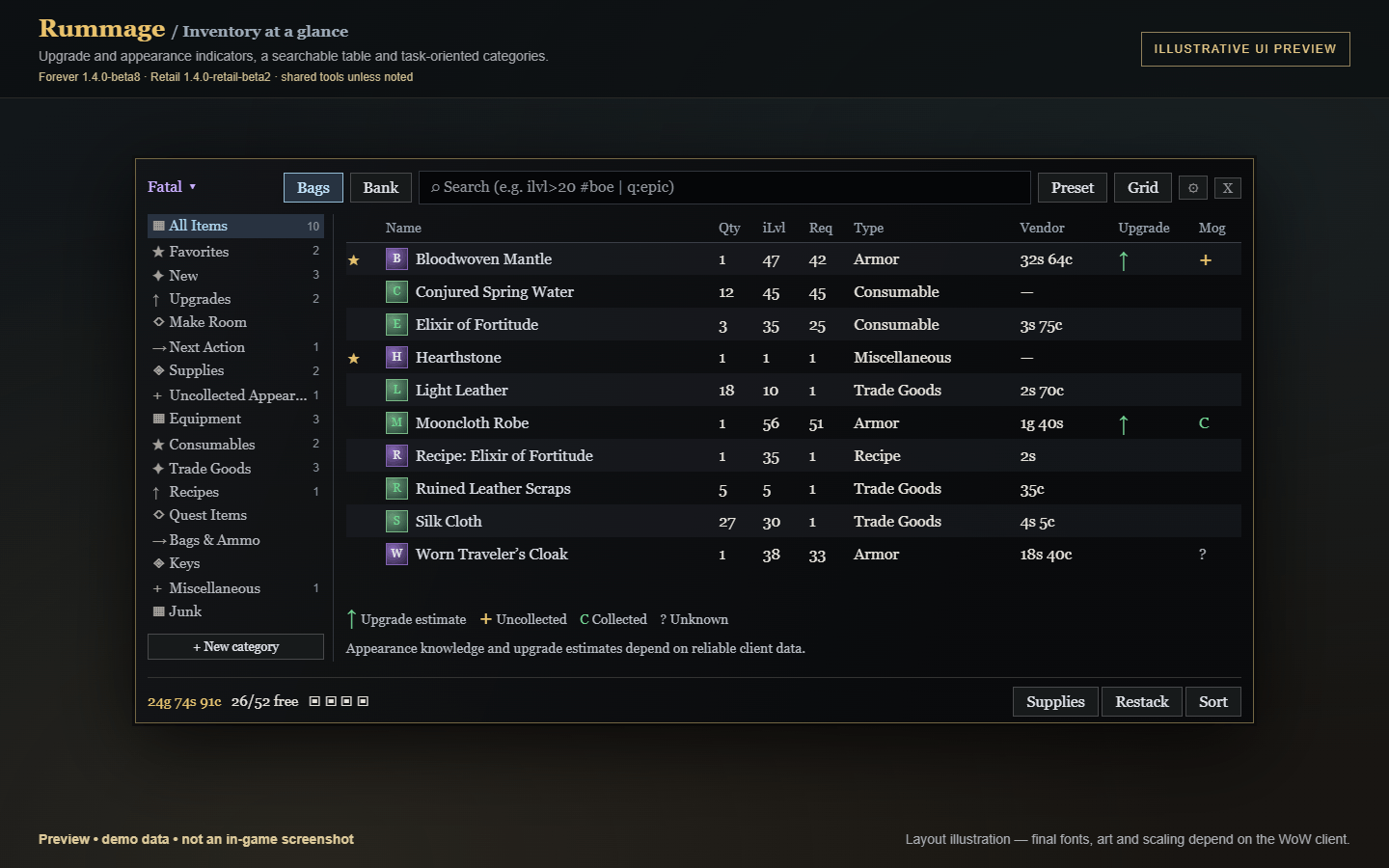
03-preview-inventory.png
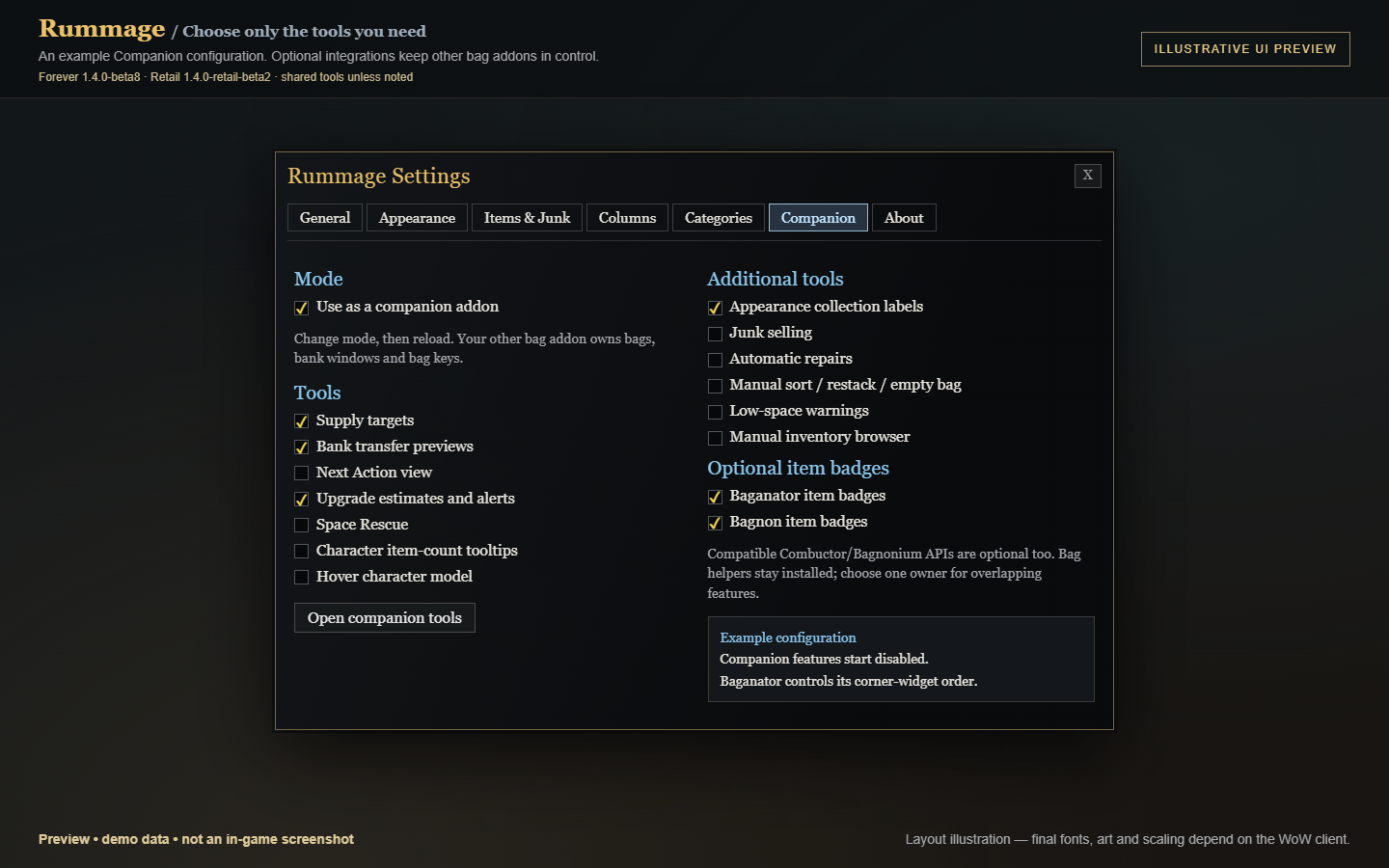
04-preview-companion.png
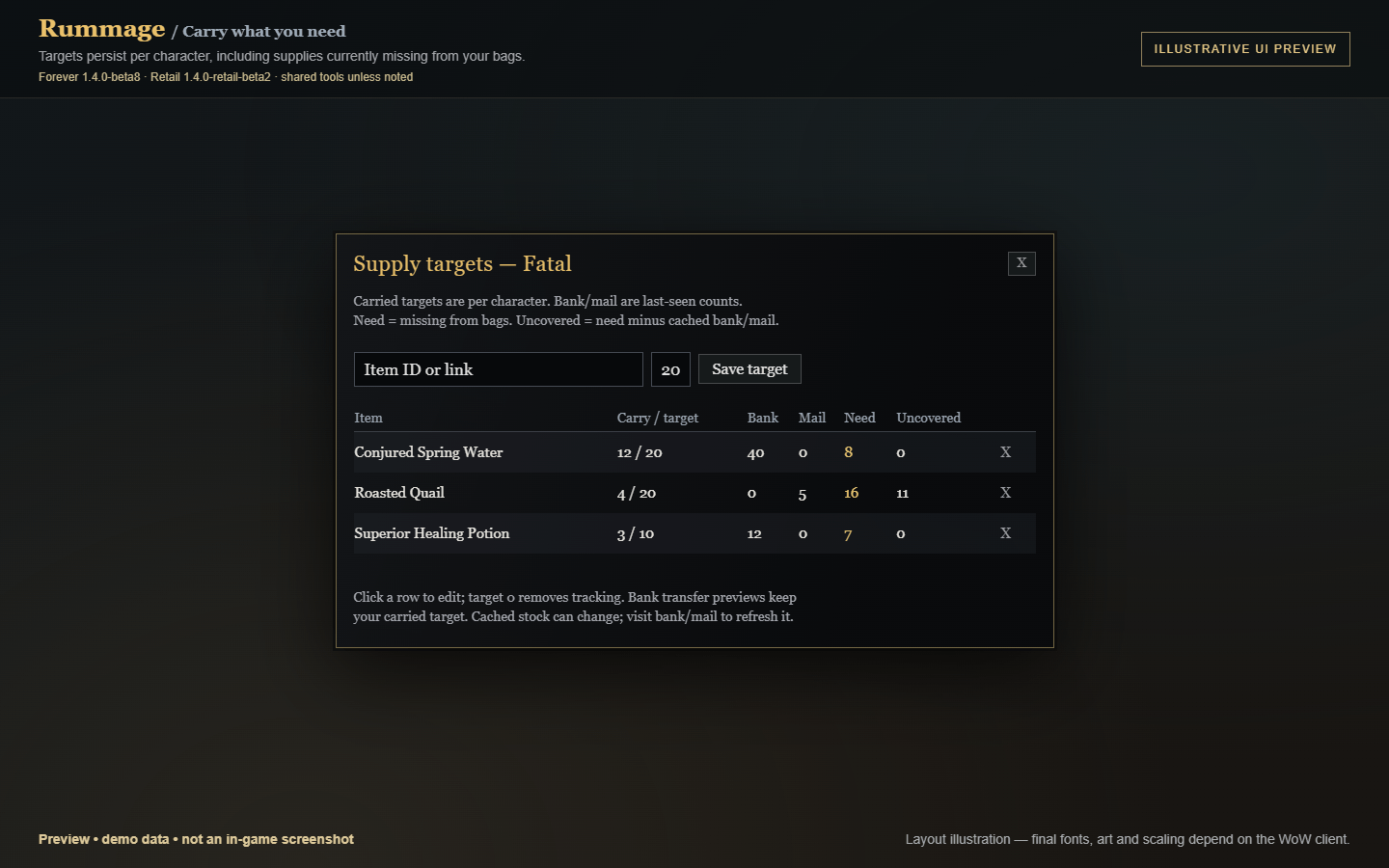
05-preview-supplies.png
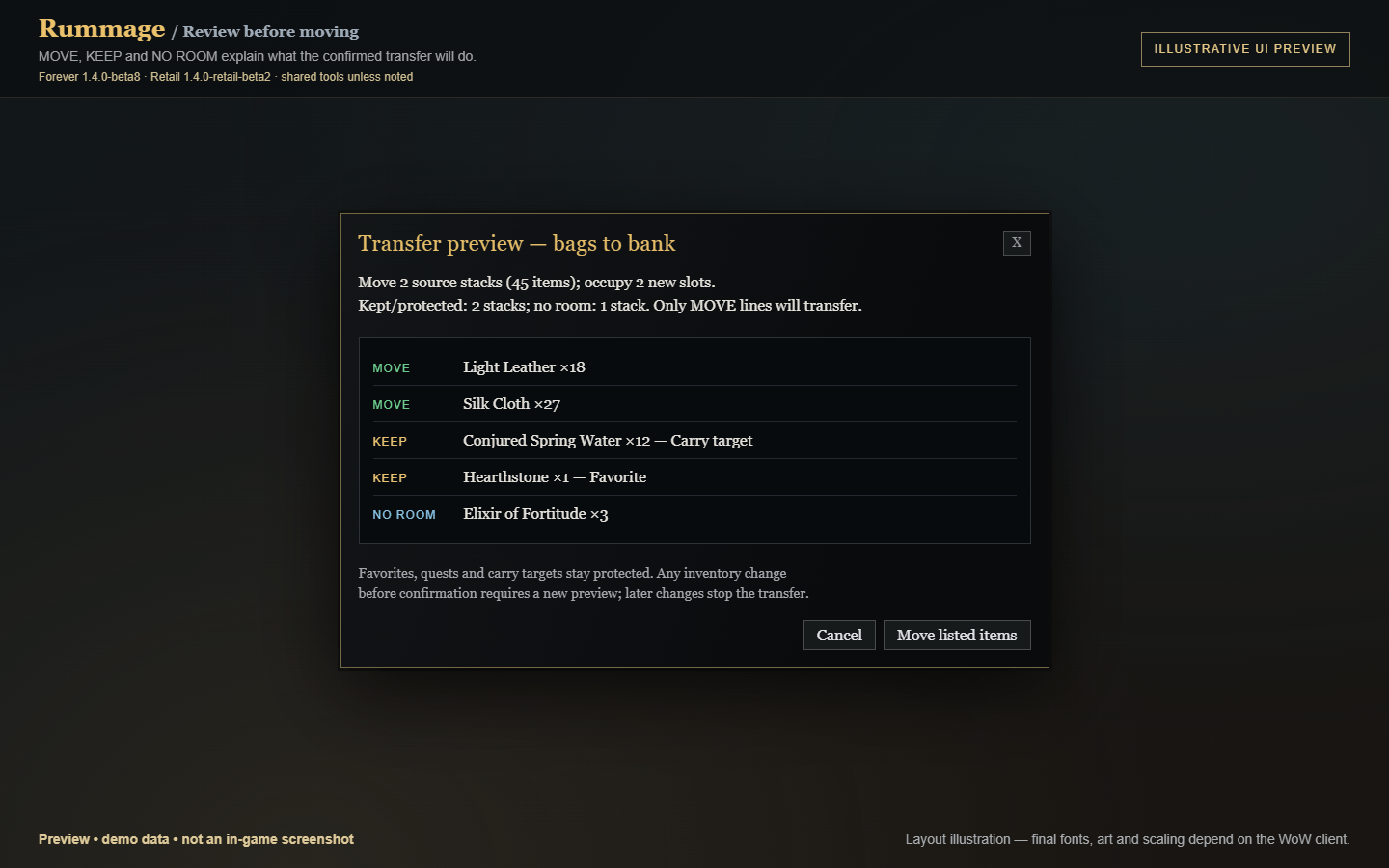
06-preview-transfer.png
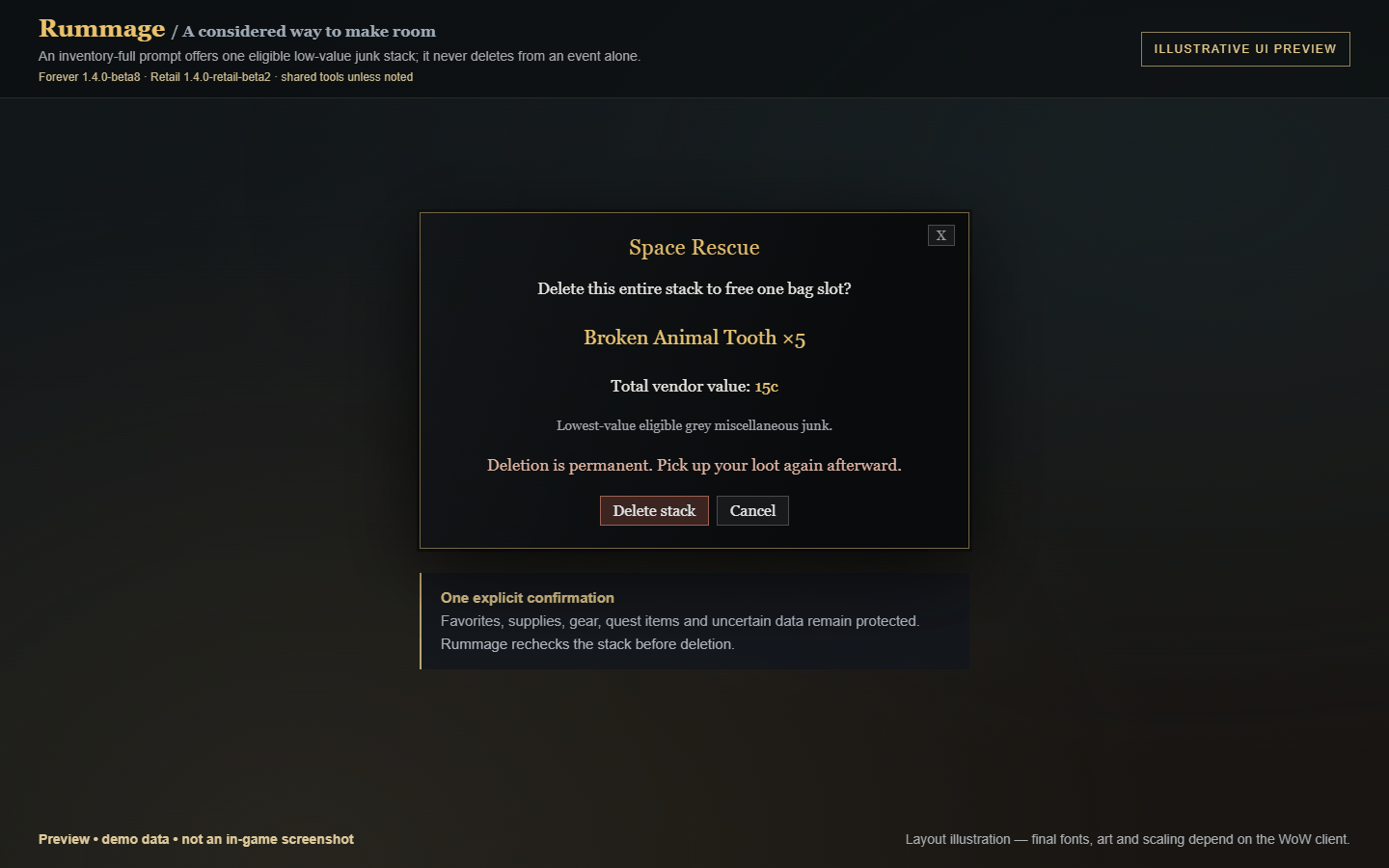
07-preview-space-rescue.png
Description
Rummage
Know what you have, what you need, and what deserves a closer look.
Rummage combines a searchable bag interface with supply planning, upgrade estimates, transmog knowledge, character previews, careful cleanup and optional tools for your preferred bag addon.
Completely standalone. No other addons are required. Use Rummage as your bag replacement or enable only the tools you need in Companion mode.
Downloads and testing status
- Forever: 1.4.0-beta8 — targets WoW Forever 1.60.1, Interface 16001.
- Retail: 1.4.0-retail-beta2 — targets WoW Retail 12.1.5, Interface 120105.
Both builds have been tested in game and reported working by the addon author (2026-10-22). The existing beta version names are retained. Optional helper compatibility depends on the installed client, helper version and enabled features; testing every combination is not implied.
Install the correct download for your client. Other Classic clients and future game patches are not automatically supported.
At a glance: version differences
| Forever beta8 | Retail beta2 | |
|---|---|---|
| Target client | Forever 1.60.1; Interface 16001 | Retail 12.1.5 (70448); Interface 120105 |
| Main bags | Replacement or Companion mode | Replacement or Companion mode; includes reagent-bag storage |
| Character bank | Replacement interface using supported Forever storage APIs | Character-bank browser and reviewed transfer tools using modern bank tabs |
| Native bank | Configurable replacement | Retained for Warband storage, shared money, tab settings and native confirmations |
| Warband/account storage | Outside Rummage's supported presentation/transfer scope | Native Blizzard interface; excluded from Rummage per-character counts and transfer plans |
| Physical keyring | Included where the client supports it | Excluded |
| Combat | Protected actions obey client restrictions; combat ending never automatically equips | Inventory interactions and upgrade scans explicitly pause; accessible inventory/bank data refreshes afterward |
| Upgrade slot mapping | Client-specific equipment mapping | Ranged weapons compare main hand rather than obsolete slot 18 |
| Latest audit | Existing beta8 safeguards | Additional job error recovery, restricted-data handling, stale-row interaction checks and adapter performance fixes |
Install one flavor per client. Both use the folder name Rummage in their respective client's Interface/AddOns directory. Their saved data lives in the respective client's WTF directory.
1. Bag interface and layout — shared
| Feature | What it does |
|---|---|
| List view | Sortable table with full item names and configurable information columns. |
| Grid view | Item icons with counts, item levels and supported status badges. |
| Customizable columns | Show, hide, resize and reorder columns. |
| Grouping | Group by category, type, quality or bag; collapse groups. |
| Combined stacks | Display identical stacks together while preserving real locations for actions. |
| Sorting | Sort by columns, optionally keeping favorites or new items first. |
| Sort presets | Save named combinations of sorting, grouping and view settings. |
| Window controls | Move, resize, scale or lock the window; adjust background opacity. |
| Bag filters | Click a bag icon to show only that bag. |
| View totals | See the vendor value of the current view, including its junk portion. |
2. Finding items — shared
- Category sidebar: equipment, consumables, trade goods, recipes, quests, bags/ammunition, supported keys, miscellaneous items and junk.
- Task categories: Upgrades, Supplies, Next Action, Make Room and Uncollected Appearances.
- Favorites and New categories: find marked or recently acquired items.
- Category counts and subfilters: narrow categories further where supported.
- Custom categories: build categories using search queries.
- Search history: recall the last 10 searches.
- Cross-character search: inspect saved bags and character banks across characters; results are view-only.
- Sidebar preferences: hide empty categories, use compact icons or hide the sidebar.
- Remembered category: optionally restore your last selection.
| Search example | Meaning |
|---|---|
linen |
Matching names, types, subtypes or slots. |
ilvl>40, ilvl:10-20, lvl<=30 |
Item-level or required-level conditions. |
q>=rare |
Rare quality or better. |
type:armor sub:cloth slot:head |
Cloth head armor. |
count>5, bag:2 |
Stack size or bag number. |
#fav #new |
New favorites. |
#upgrade |
Current upgrade candidates. |
#collected, #uncollected, #mogunknown |
Known, missing or unknown appearances. |
#supply, #short |
Tracked carried supplies or those below target. |
#action, #learn, #open, #queststart, #read |
Supported item recommendations. |
#discardable |
Eligible Space Rescue candidates. |
#boe, #bop, #bound, #gear, #usable |
Binding/equipment/usability filters. |
#consumable, #quest, #trade, #recipe, #key, #junk |
Item-purpose filters. |
value>1g |
Stack vendor value above one gold. |
ah>50s, tsm>2g, pawn>5 |
Values supplied by the corresponding optional integration. |
Spaces or & combine conditions; | means OR; ! excludes a condition. Results depend on loaded item metadata and enabled features.
3. Item information and favorites — shared
- Eight favorite markers using raid-marker symbols.
- New-item highlighting with configurable clearing behavior.
- Item-age column showing time since acquisition.
- Required-level tinting for items you cannot yet use.
- Quest-starter badges, cooldown indicators and locked-item dimming.
- Optional grid item-level labels.
- Standard item interactions, including supported modified clicks and dragging.
Shortcuts: Alt-click cycles favorite markers; Alt-right-click toggles a junk mark. Click the favorite/coin columns where provided for their corresponding controls.
Retail beta2: clicks and both drag paths verify that the displayed full item link still matches the live slot and reject locked or unreadable slots before invoking native actions.
4. Upgrade assistance — shared, client-dependent
| Feature | What it does |
|---|---|
| Upgrade indicators | Arrows, a column, category and tooltip information identify candidates. |
| Standalone comparison | Uses item level, equipment slots and available usability information. |
| Optional Pawn support | Uses compatible Pawn upgrade results when available. |
| Upgrade alerts | Movable popup can notify you when candidate gear arrives. |
| Player-click Equip | Rechecks the live item before attempting to equip it. |
| Alert preferences | Optional sound, configurable duration, hover pause and item-specific dismissal. |
Paired slots such as rings/trinkets are evaluated against the weaker slot where supported. Item-level comparisons are estimates, not a stat simulation or a guarantee for every specialization, unique restriction, set bonus or effect. Inspect the tooltip before equipping.
Combat ending never automatically equips an item. Retail only: item interactions and upgrade scans pause in combat; ranged weapons compare against main hand.
5. Transmog collection tracking — shared, client-dependent
| Marker | Meaning |
|---|---|
| C — Collected | Reliable client information says the appearance is known. |
| + — Not collected | Reliable information says the appearance is missing. |
| ? — Unknown | Collection information is unavailable, incomplete or ambiguous. |
Status can appear in a column, tooltips, icon badges and the model preview. The Uncollected Appearances category shows confirmed missing looks; Unknown stays separate. Collection updates refresh displayed knowledge, and full links preserve item variants.
Missing and unknown appearances are protected from Rummage bulk sales and Space Rescue, even when appearance display is disabled or an item is marked junk. Incomplete weapon/armor metadata also prevents unsafe disposal. Protection uses fresh checks rather than trusting a display cache.
No Can I Mog It? dependency is required. If the client provides neither reliable collection APIs nor supported tooltip markers, status remains Unknown. Prior item ownership does not prove the appearance was learned. Other addons do not inherit Rummage's protections.
6. Character-model previews — shared, client-dependent
Hover supported visible equipment to see your currently logged-in character wearing it in a private popup.
- Resets to your current outfit before each preview.
- Supports eligible cached item links; does not reconstruct offline characters.
- Uses a rear-facing view for cloaks and unsheathed weapons where supported.
- Reuses one model and stops its timer while hidden.
- Clears when the hover/owner changes or the relevant window closes.
- Steps aside when another visible tooltip model is detected.
- Can be disabled independently.
The popup never equips, binds, learns or applies transmog. A preview does not guarantee that your character can collect or use the appearance; client rejection is reported as unavailable.
7. Supply targets — shared
Track desired carried quantities for up to 64 items per character, including items you currently own none of.
| Display | Meaning |
|---|---|
| Carry / target | Current carried quantity versus desired minimum. |
| Bank / mail | Last-seen stock for that character. |
| Need | Quantity missing from your bags. |
| Uncovered | Shortage remaining after cached bank/mail stock is considered. |
Add targets using item IDs or links, edit rows, or remove them with X/target zero. Supply status is available through a window, category, searches, tooltips and optional column. The separate window includes absent items; the inventory category shows tracked items already carried.
Bank deposits preserve your carried target, splitting excess where necessary. Active targets protect supplies from Rummage junk selling and Space Rescue. Targets remain separate from layout profiles and settings exports. Nothing is automatically bought, mailed or restocked. Cached stock can be stale. Retail only: Warband stock is excluded.
8. Bank transfer previews — shared, character-bank only
| Result | Meaning |
|---|---|
| MOVE | The listed quantity can transfer. |
| KEEP | Protected, reserved, locked or insufficiently understood. |
| NO ROOM | The selected amount does not fit. |
- Works with the current filtered selection and previews deposits/withdrawals.
- Accounts for compatible partial stacks and specialty bags.
- Preserves carried supply targets and protects favorites, quests/starters and keys.
- Shows quantities, source stacks and new slots required.
- Requires confirmation; only MOVE lines execute.
- Rechecks state during execution and waits for acknowledgements.
- Stops for combat, bank closure, occupied cursors or changed inventory.
- Inventory/protection changes before confirmation require a new preview.
Completed moves are not rolled back. Cached/global character results cannot be transferred. Retail only: Warband transfers remain in Blizzard's native bank; /rum nativebank opens it at a banker outside combat.
9. Next Action recommendations — shared, client-dependent
Highlights supported opportunities to learn a recipe, open a loot container, start a quest, or read an item. Available in a category, optional column, tooltip hints and dedicated searches. Skill, spell, level and quest changes refresh hints.
Unknown data produces no unsupported recommendation. Rummage does not automatically use items. Normal right-click behavior is context-sensitive: a merchant, bank, mail or trade window may sell/transfer an item instead of using it.
10. Space Rescue — shared
When ordinary bags are full and the client reports an inventory-full error, offer the eligible stack with the lowest total vendor value.
- Shows the exact stack and value; requires explicit confirmation.
- Considers only known-price grey miscellaneous junk in ordinary bags.
- Excludes equipment, favorites, active supplies, quests/starters, keys, explicit keep marks, locked items and uncertain data.
- Does not empty specialty bags to make ordinary loot space.
- Rechecks stack identity, quantity, value, protections, cursor, combat and newly available space.
Deletion is permanent. No event or timer alone deletes an item, and no deletion is deferred until combat ends. Attempt to pick up the loot again afterward. /rum cleanup requests the same review manually.
11. Junk selling and repairs — shared
| Feature | What it does |
|---|---|
| Default junk detection | Grey items count as junk by default. |
| Manual marks | Explicitly mark or keep items. |
| Custom junk rules | Define up to eight search-based rules. |
| Optional Scrap classification | Use compatible Scrap junk information. |
| Sell Junk | Start a guarded queue at a merchant. |
| Automatic selling | Separately enabled merchant convenience. |
| Favorite protection | Enabled by default, with its own setting. |
| Buyback-safe budget | Limits Rummage sales to 12 stacks per merchant visit. |
| Automatic repairs | Optional repairs using affordable funds. |
| Guild repair preference | Checks allowance and balance before using guild funds; otherwise tries affordable personal repairs. |
Bulk sales exclude quests/starters, keys, missing quest metadata, protected appearances and active supplies. Protection and live item identity are checked before each sale. The buyback budget spans repeated Rummage clicks during that visit; another seller can still displace buyback entries.
Retail beta2: failed sale jobs cancel their ticker; restricted slots cannot count as confirmed removals or advance the queue. Failed move jobs release their busy state without clearing an unidentified cursor payload.
12. Sorting and moving — shared, client-dependent
- Restack: combine compatible partial stacks.
- Native sort: use Blizzard sorting where supported.
- Empty a bag: right-click its icon; crossing the bank boundary uses a preview.
- Drop into free space: place a cursor item through supported empty-list space.
- Low-space warnings: configure the free-slot threshold.
- Supported bag-slot controls allow normal bag management where available.
Actions respect combat, cursor state and other Rummage jobs. Retail beta2: restricted slots are not reported as free space; destination planning skips locked empty slots. A failed move may leave the item on the cursor for the player to place.
13. Character tracking — shared
Keep last-seen local records of bags, character banks, equipped items, mailbox contents and gold. Browse saved characters, search their inventories, inspect gold totals or forget old character records.
Item-count tooltips show bags/bank/equipped/mail breakdowns. Preferences include realm-only counts and whether to show Rummage counts alongside Syndicator. Snapshots may be stale until you revisit the relevant character or storage. Retail only: shared Warband stock is excluded from per-character totals.
14. Companion mode — shared
Keep Blizzard bags or another full replacement and select only the Rummage tools you want.
- The selected bag addon retains its windows and bag keys.
- Tools have independent switches and start disabled.
- Automatic selling needs an additional opt-in.
- An optional manual Rummage inventory browser remains available.
- Changing the window-ownership mode requires a reload.
- Disabling a tool cancels its associated supported jobs.
Selectable tools include supplies, transfers, Next Action, upgrades, appearance labels/previews, count tooltips, cleanup, merchant tools, sorting, low-space warnings and the manual browser. Appearance disposal protection remains independent of display switches.
15. Optional icon adapters and integrations
| Optional addon/library | Benefit when a compatible API is available |
|---|---|
| Baganator | Upgrade and appearance corner widgets on supported item icons. |
| Bagnon | Upgrade and appearance indicators on supported buttons. |
| Compatible Combuctor/Bagnonium APIs | Shared Bagnon-family adapter support. |
| Auctionator | Auction and disenchant value columns. |
| TradeSkillMaster | Configurable pricing-source column. |
| Pawn | Upgrade decisions and percentage information. |
| Scrap | Junk classification. |
| Can I Mog It? | Optional appearance-information column. |
| Syndicator | Complementary count tracking; Rummage can yield its count tooltips. |
| Shared-media/broker libraries | Additional fonts and launcher/minimap support with built-in fallbacks. |
Adapters can be disabled separately; recognized existing indicators take precedence. Unsupported APIs are skipped, new connections defer during combat, and Baganator controls its widget placement/order. Cached alts never receive current-player upgrade recommendations. Completely custom tooltip/icon systems may need an explicit adapter; a public registration contract supports additional integrations.
Retail beta2: full refreshes avoid redundant indicator paints; disabled adapters do not discover/hook new host buttons through layout observers. Slot-query allocations are reduced, and malformed optional pricing APIs are declined. These are implementation improvements, not measured frame-rate promises.
No integration is mandatory. Use helper versions that support the actual client; compatibility with every release, skin or combination is not guaranteed.
16. Conflict detection — shared
- Warn about known competing full bag replacements.
- Distinguish verified competing features from possible overlaps.
- Yield automatic selling/repairing when supported probes confirm another active owner.
- Yield a hover model to an observed tooltip model.
- Stop inventory queues when unexpected changes occur.
- Report adapter status and known conflicts.
- Offer a player-confirmed disable/reload action for detected replacement conflicts.
No helper is automatically disabled and third-party settings are not edited. Helpers/libraries are not classified as full replacements merely through broad name matching. Diagnostics cannot identify every unknown conflict or determine the source of every bag event. Choose one owner for overlapping automation.
17. Appearance and accessibility settings — shared
- Native Blizzard-style theme.
- Themes designed to fit alongside ElvUI, EllesmereUI, GW2 UI, Tukui and NDui.
- Minimal Dark, Parchment and Classic Tooltip styles.
- Automatic theme selection and optional class-colored accents.
- Built-in or available shared-media fonts.
- Adjustable font size, scale, opacity, row height and grid size.
- Scrollable settings, mouse-wheel slider adjustment and native disabled-button behavior.
- Narrow-window layouts preserve search space and restore extra controls/columns when widened.
A theme does not automatically disable another UI suite's bag module or transfer window ownership.
18. Profiles, launchers and diagnostics — shared, client-dependent
- Named settings profiles, optionally selected per character.
- Settings export/import for supported layout settings, columns, custom categories and junk rules; not character inventory, favorites or supply targets.
- Configurable auto-opening at merchants, mailboxes, auctions, trade and banks.
- Optional routing of existing bag keys through temporary override bindings; saved bindings are not rewritten.
- Dedicated toggle-bags, toggle-bank and focus-search bindings.
- Minimap button, optional broker launcher and supported addon-compartment entry.
- Diagnostics for memory, frame timing, event rates and instrumented operations.
- Window-position reset without erasing inventory data.
Quick command reference
| Command | Purpose |
|---|---|
/rum or /rummage |
Toggle bags, or the Companion tool panel. |
/rum config |
Settings. |
/rum companion or /rum tools |
Companion tool panel. |
/rum bank |
Character-bank view. |
/rum nativebank |
Retail only: native bank at a banker outside combat. |
/rum search <text> |
Search inventory. |
/rum supplies |
Supply targets. |
/rum actions |
Next Action view. |
/rum cleanup |
Space Rescue review. |
/rum sell |
Sell eligible junk at an open merchant. |
/rum restack |
Combine supported partial stacks. |
/rum upgrade |
Positioning preview of upgrade popup; actual Equip still checks eligibility. |
/rum conflicts |
Known conflict report. |
/rum adapters |
Icon-adapter status. |
/rum keys |
Refresh configured key routing. |
/rum reset |
Reset main window position. |
/rum export / /rum import <string> |
Share supported settings. |
/rum debug [report|reset] |
Toggle/report/reset diagnostics. |
Installation
- Download the Forever or Retail ZIP that matches your client.
- Extract the single
Rummagefolder into that client’sInterface/AddOnsfolder. For Retail this is normally under_retail_/Interface/AddOns. - Check that the file is at
Interface/AddOns/Rummage/Rummage.toc, without an extra nested Rummage folder. - Enable the addon and open
/rum config. - Choose Rummage’s bag interface, or enable Companion mode, reload and select the individual tools you want. Companion features start disabled.
Install only one flavor in each client. Back up WTF before updating; existing settings remain in that client’s saved-variable files. Do not delete your WTF folder as part of installation. Settings exports do not include cached character inventory, favorites or supply targets.
Gallery images
The gallery includes two original in-game screenshots from an earlier build and seven clearly labeled illustrative UI previews / diagrams. Previews use demonstration data and are not in-game captures of these releases. Shared tools are illustrated alongside a version comparison and a Retail-only character-bank/Warband scope diagram. Keep the visible preview labels when sharing them.
Support and boundaries
Rummage does not provide guild-bank management, automatic buying/restocking, offline-character model reconstruction, combat rotations or movement automation. All actions remain subject to the client’s native restrictions. Rummage’s protection rules apply to its own operations; other sellers and manual item actions use their own rules.
For a bug report, include the client and Rummage versions, full-replacement or Companion mode, enabled tools, relevant helper versions, reproduction steps and the complete Lua error. /rum conflicts and /rum adapters can help diagnose a setup. No credentials or full WTF upload is needed.
Author: Malikor. License: GNU GPL v3 or later. Third-party addon implementations are not bundled. No external account or network service is required.
Rummage Bags & Bank Team