


Rucksack Forever
rucksack-home.jpg
rucksack-cleanup.jpg
rucksack-faire.jpg
rucksack-settings.jpg
rucksack-pocket.jpg
Description
Tired of full bags and digging for food? Rucksack takes care of the chores every adventurer repeats all day.
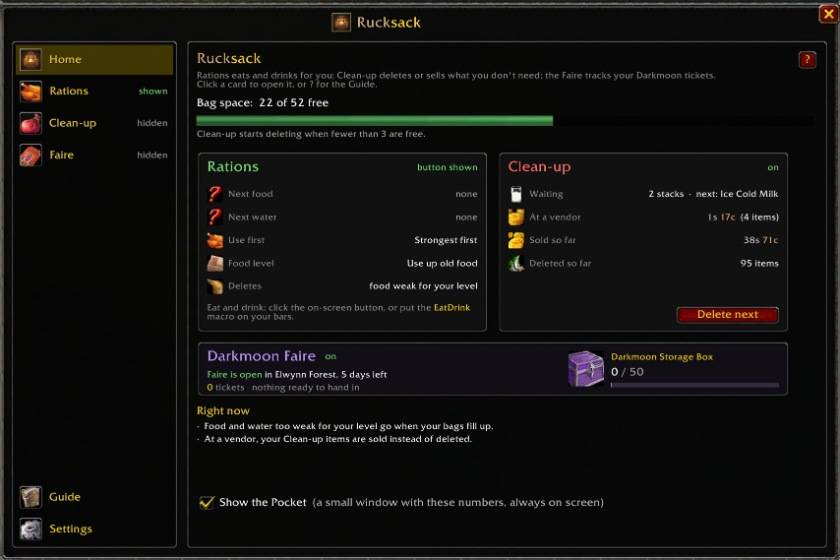
Rations picks the right food and water for you and eats and drinks with one click. No more searching your bags after every fight or eating the wrong stack.
Clean-up keeps a few bag slots free for you, always. When space runs low, the cheapest junk goes first (or gets sold at the next vendor), and quest items stay.
Bags puts everything in one bag window: items in groups (your own too), junk at a glance, a Hidden bag for things you never need to see, and your bank and other characters a click away.
Darkmoon Faire tracks your tickets, shows where to get every turn-in item (one click pins it on your map) and the prize you're saving for. Scrolls lets mages decipher their scrolls with one click.
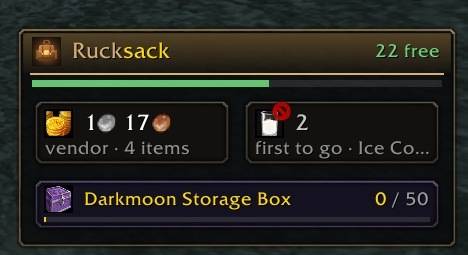
Everything is in one window (/ruck), with a small on-screen Pocket that shows bag space, your next meal and what a vendor would pay. Made for WoW Forever.
Modules: only load what you use
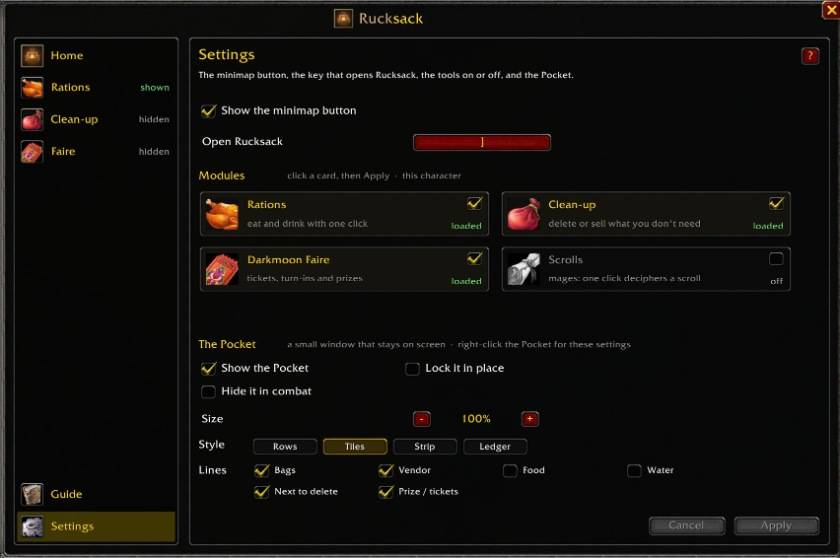
Rucksack comes with all its parts, but only loads the ones you turn on in Settings > Modules: Rations, Clean-up (or Clean-up + Bags), Darkmoon Faire and Scrolls. Each is a card: click the ones you want, then Apply. New ones load right away; ones you turned off stop after a reload, and then they use no memory and do nothing. Each character has its own choice, and Scrolls turns itself on for mages only. The "Show button" box on each tool's page only hides or shows that tool's button on screen.
Rations: eat and drink with one click
- One button eats your food and drinks your water. It greys out in combat, when you can't eat or drink.
- Eat button: pick Food and water (one click does both), Food only, Water only, or Separate (a food button and a water button side by side).
- Use first: Strongest first, Conjured first, Save conjured, or Random.
- Food level: Any level, Only my level, or Use up old food.
- Delete below level: Off, Auto, or a level (5 to 55): old food you've outgrown goes when your bags fill up.
- Warriors and rogues: delete all water as soon as you get it (set per character).
- Buff food: tick "Eat buff food when the buff is missing" and it's eaten first whenever you're not Well Fed. A big "don't move" alert counts down while you eat, and tells you when you're Well Fed and can move (you can drag it anywhere).
- Buff food in one click: a small "Buff" strip on top of the eat button (green when on, red when off), and a tick on the Pocket's food, switch it on or off. Remind me when I'm not Well Fed: a big alert (untick under it to turn buff food off), or off.
- Set any food to "Use this first" or "Never use this".
- Three macros shared by all your characters, kept up to date: EatDrink, Eat and Drink. Drag them onto your bars straight from the Rations page; Create macros makes any that are missing.
- Right-click the eat button: the Rations page.
Clean-up: delete or sell what you don't need
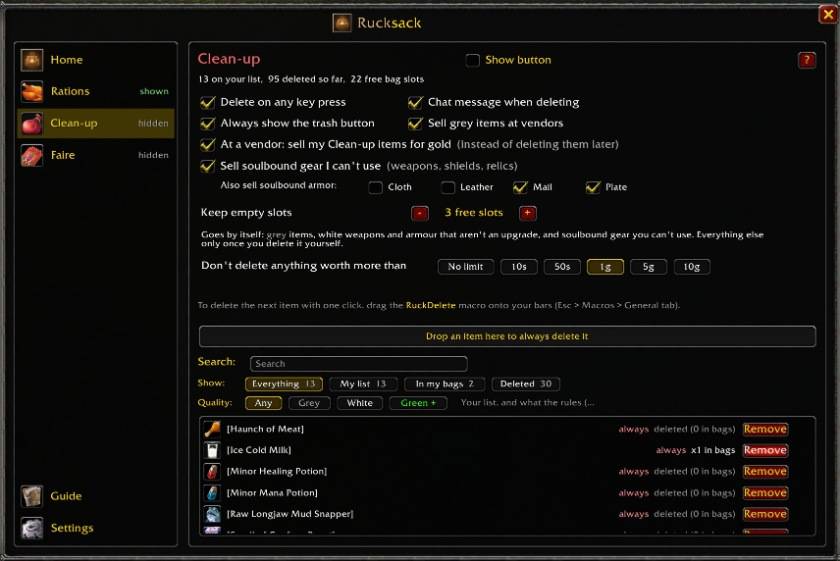
Clean-up is like a little bag helper. You pick how many free slots you always want to keep, say 4. As soon as you drop below that, it throws out your cheapest junk first, the stuff worth the least, until you're back to 4 free slots. No more "Inventory is full" in the middle of a dungeon.
What goes by itself: grey items, white weapons and armour your class can't wear or that are worse than what you wear in that slot, and soulbound gear of any quality your class can't use. Better gear, gear for an empty slot and profession tools (Skinning Knife, Mining Pick, fishing poles, enchanting rods...) always stay. Anything else only goes if you told it to: click Always when you delete something once. Passing a vendor? It sells the junk for gold instead. And it never touches what your quests still need: if a quest wants 8 wolf pelts, it keeps 8.
- Keep empty slots: deletes only when you drop below the free slots you want to keep, the cheapest first.
- Delete limit: never deletes anything worth more than your limit (1g to start). It stops, tells you, and lets you choose: Delete it, Keep it or Not now.
- The trash button: shows your free slots against your setting, the first item to go and what it's worth; red when it really deletes on your next key press. Hover it for everything that can go. The RuckDelete macro does the same and shows the same item.
- Deleting by hand: the game's delete box gets an Always button. If the item is used for something (a quest, a Darkmoon turn-in, an unread scroll, your next food or water, a profession tool, or it's rare or better) it tells you what for and asks once more.
- Keeps exactly what your current quests still need, never more. Quest starters are kept.
- At a vendor: sells your Clean-up items and junk for gold instead of deleting them (hold Shift to skip).
- Search your list, see what's in your bags, and a history of the last 100 items deleted.
Bags: one bag window (with Clean-up)
Turn it on in Settings > Modules: on the Clean-up card, pick Clean-up + Bags. B, the bag buttons, vendors, mail and trades then open Rucksack's bag. Items work as always: click, drag, split, use.
- Groups: Weapons, Armour, Food and water, Potions, Trade goods, Quest, Everything else, Junk and your own groups, each on its own row (or Packed side by side). Drag a group by its name to move it; the others slide out of the way.
- Put an item in a group: pick it up and every group gets a green + (Junk a red one). Drop it there and all its stacks go there from now on. Drop it on its own group again to undo.
- Your own groups: make one with the green + in the bags row (or drop an item on it); right-click a group's name to rename it, change its colour or delete it.
- One bag: no groups, everything sorted by kind, quality or name; Junk stays at the bottom.
- The bags row: hover Rucksack in the corner and click the arrow. Your four bags and the reagent bag with their free slots (drop a bag on a bag to swap), Hidden, New group, Delete group and a padlock that locks the layout.
- Hidden: a small bag for things you never need to look at (Skinning Knife, Mining Pick, Hearthstone...). Pull them in and the bag stops showing them; they stay usable from there.
- Your bank and other characters: in their own window, as they were when last seen; at a banker your bank is live. Item tooltips say where else you have an item.
- New items, every empty slot, BoE and "open" tags, Tidy, merged or separate stacks, search, columns and size.
Darkmoon Faire: tickets, turn-ins and prizes
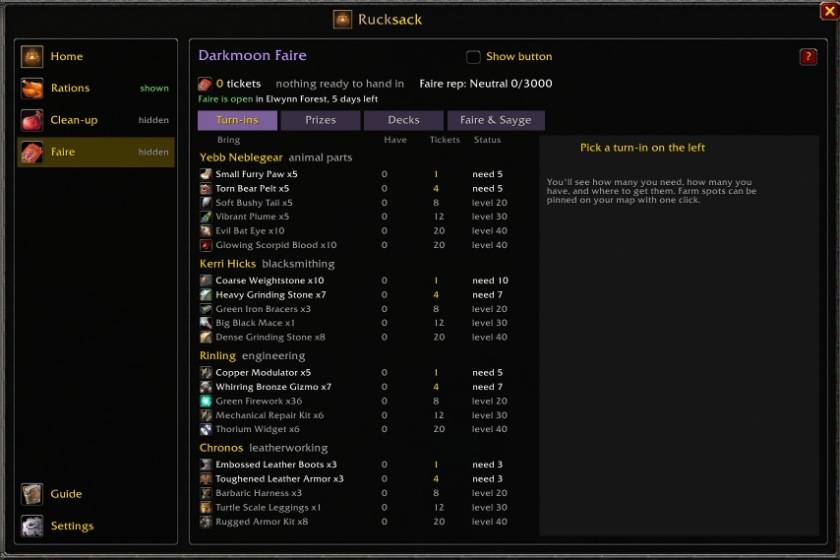
- Every ticket turn-in: what it wants, how many you have (bank too) and the tickets it gives. Ready, need more, too low level, or closed by your Faire reputation.
- Where to get it: good farm spots for each animal part, closest to your level first. Click one to pin it on your world map (TomTom too); shift-click pins them all. Crafted items show their profession and materials.
- Prizes: click a prize to track it. The Pocket and Home show it as 37 / 50; turn on the on-screen ticket button for a card that fills up and glows gold when you have enough.
- Darkmoon deck checklist, the Faire's dates and places, Sayge's answers.
- Item tooltips, and quick turn-ins at Yebb, Kerri, Rinling and Chronos (hold Shift to do it yourself). Clean-up keeps the turn-in items.
Scrolls: one-click decipher (mages)
- One click on the scroll button (or the Decipher macro) casts Comprehend Scroll on your next scroll: the hardest one your Comprehension skill allows, so you never get turned into a sheep.
- A page with your Comprehension skill and every scroll in your bags. Clean-up keeps undeciphered scrolls; other classes keep them to send to their mage.
Home, Pocket and Guide
- Home: bag space, your next food and water, what's waiting to go, and what a vendor would pay right now.
- Pocket: a small window that stays on screen with the same numbers and your Darkmoon prize. Four styles: Rows, Tiles, Strip (just icons and numbers, across or down) and Ledger (text only). Right-click it for its settings.
- Guide: every feature explained in the game. Hover any option for a short tip.
Commands
- /ruck or /rucksack: open the window. Everything else is in there.
Works alongside bag addons like Bagnon and Baganator (with Clean-up only; Clean-up + Bags is its own bag).
Enjoying Rucksack Forever? You can buy me a coffee ☕
Rucksack Forever Team
