Rotamatic
- By
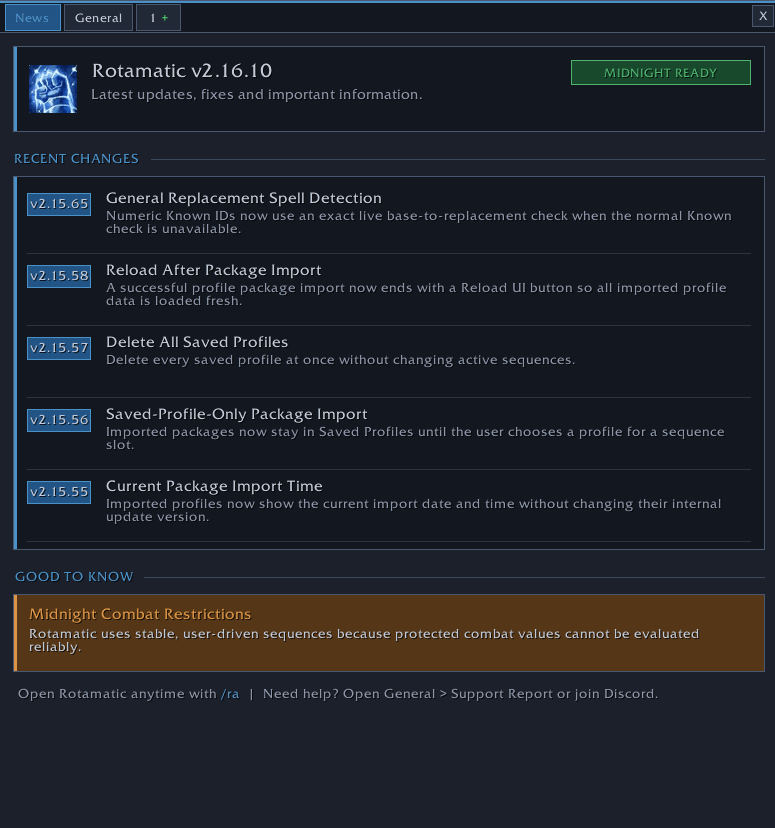
Build user-driven spell, item, and macro sequences for WoW: Midnight, with modifiers, targeting, profiles, overlays, diagnostics, and no automated input.
Screenshot 2026-08-08 005000.png
Screenshot 2026-08-08 005024.png
Screenshot 2026-08-08 005038.png
Screenshot 2026-08-08 005232.png
Description
Rotamatic
Rotamatic is a lightweight, user-driven sequence builder for World of Warcraft: Midnight. Build ordered sequences from spells, items, and native WoW macros, assign them to a key, and advance them one physical key or mouse-button press at a time.
You decide which actions are included, how they are ordered, which target they use, and under which conditions they are available. Rotamatic does not press keys, repeat inputs, broadcast commands, or cast anything without player input. Every sequence step requires a new input; World of Warcraft's protected-action, macro, cooldown, resource, range, and global-cooldown rules remain in control.
Main features
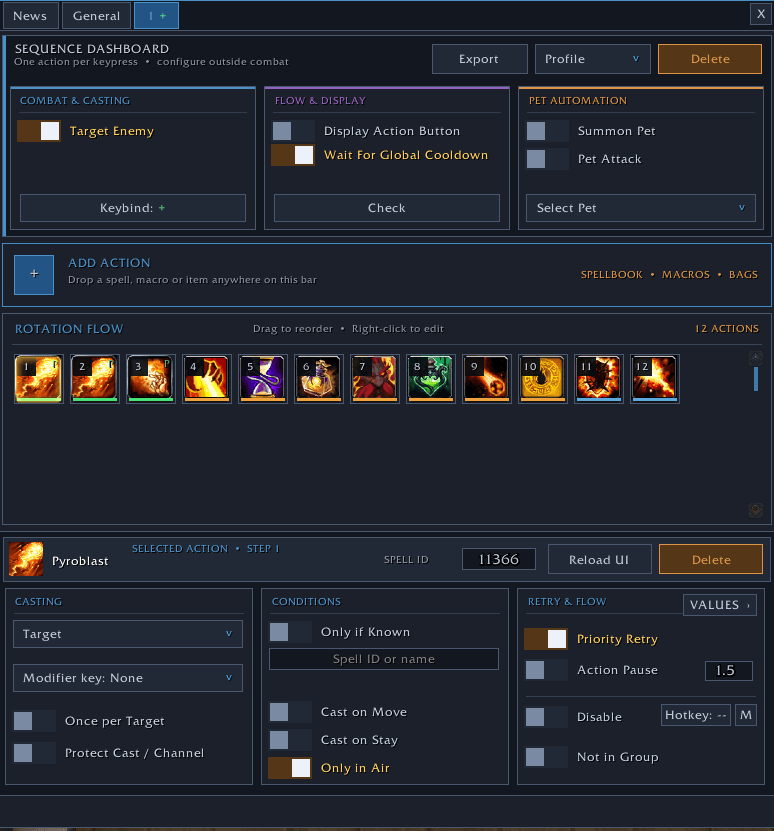
- Visual sequence dashboard with drag-and-drop action ordering
- Spell, item, trinket, and native macro actions, including
/castsequence - Active sequence slots and reusable saved profiles
- Language-independent sequence and profile import/export
- Full-profile packages with validation and import previews
- Direct updates for saved profiles linked to an active sequence
- English and German interface text
- No required external libraries or companion addons
Targets, modifiers, and conditions
- Per-action targets:
@target,@focus,@pet,@player,@cursor,@mouseover, and@party1 - Direct Shift, Ctrl, and Alt action lanes
- Multiple actions can share the same modifier and advance one press at a time
@playertargeting for native/castsequencemacro actions selected through Rotamatic's Target field- Tank-taunt protection for Warrior, Paladin, Death Knight, Druid, Monk, and Demon Hunter
- Direct tank taunts are kept on
@targetinstead of being sent to@player - A
/castsequencecontaining a tank taunt does not receive an automatic@playertarget - Known-spell and replacement-spell conditions
- Once-per-target actions for marks, debuffs, and similar effects
- Per-action Cast on Move, Cast on Stay, and Only in Air conditions
- Per-action disable switch and optional character-local action-toggle hotkey or macro
Important target limitation: WoW applies one target condition to a complete native /castsequence. A mixed sequence containing both a self-targeted spell and a hostile taunt should therefore be split into two Rotamatic actions: keep the self-targeted sequence on @player and place the taunt in its own action on @target.
Combat flow
- Stable ordered sequence flow
- Definitely unavailable actions can be skipped when WoW exposes safe readiness information
- Reset after confirmed successful casts
- Optional wait for the real global cooldown and Spell Queue Window
- Per-action Priority Retry with fair scheduling
- Optional per-action Action Pause
- Optional protection for casts, channels, and empower spells
- Optional enemy targeting and pet actions
- Optional action overlay
- Automatic safe reset after combat
- Protected or unavailable combat values fall back safely to WoW's normal secure cast attempt
Priority Retry and readiness checks only decide which configured action is prepared for the current player input. They never generate another input or cast automatically.
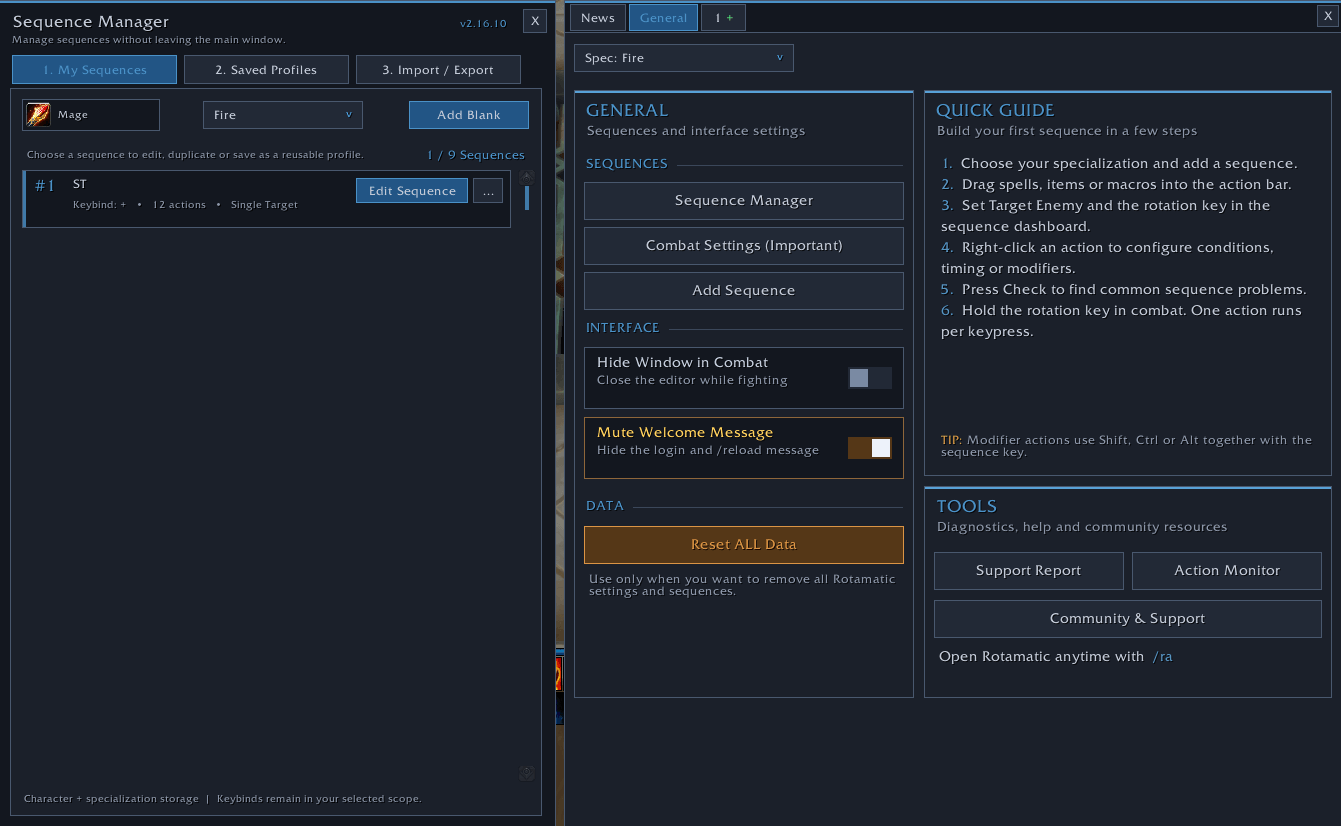
Sequence Manager
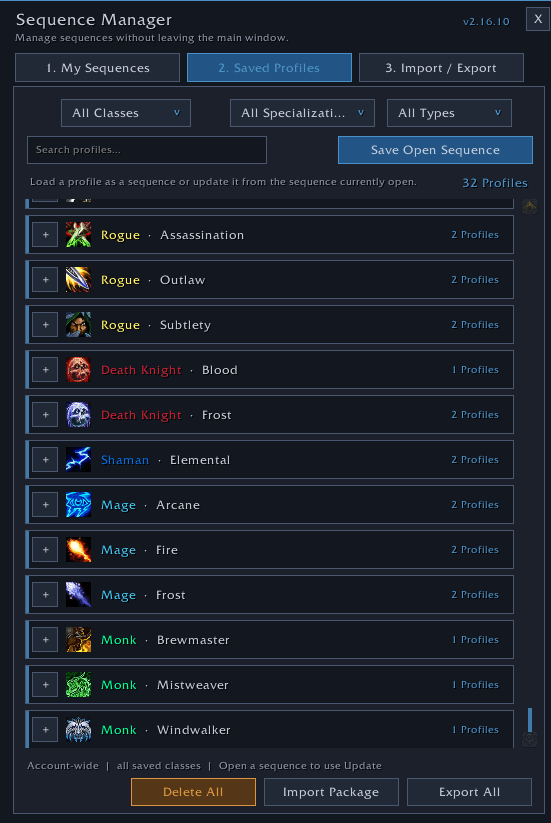
The built-in Sequence Manager keeps active sequences, saved profiles, and import/export tools in one place. You can:
- Create, rename, duplicate, reorder, and delete sequences
- Save an active sequence as a reusable profile
- Load saved profiles into specialization slots
- Update linked profiles directly from the open sequence
- Export or import one sequence
- Export or import all saved profiles as a portable package
- Preview new, changed, unchanged, and locally newer profiles before import
- Validate active sequences and saved profiles
Imported profile packages are stored in Saved Profiles first and do not silently replace active sequences.
Action Monitor and diagnostics
Rotamatic includes an optional Action Monitor for prepared actions, successful casts, channels, and empower events. Successful casts can be copied as language-independent Spell IDs or as a Rotamatic sequence import.
For support cases, the opt-in diagnostic mode records a limited local event log:
- Run
/ra diag start. - Reproduce the issue.
- Run
/ra diag stop. - Run
/ra diag copyand copy the selected text.
The diagnostic buffer:
- Exists only in memory
- Is limited to the latest 400 entries
- Does not contain character or realm names
- Does not contain sequence names
- Does not contain internal action UUIDs
- Does not contain macro bodies
Always review diagnostic text before sharing it.
Quick start
- Open Rotamatic with
/raor the minimap button. - Open General > Sequence Manager.
- Create, import, or open a sequence.
- Add spells, items, or macros and drag them into the desired order.
- Right-click an action to configure its target, modifier, conditions, retry behavior, or channel protection.
- Configure the sequence under Combat & Casting, Flow & Display, and Pet Automation.
- Bind the sequence to a key.
- Press the assigned key once for each sequence step.
Sequence and protected-button editing is intentionally disabled during combat because World of Warcraft locks protected action state while fighting.
Recommended WoW settings
- Enable Cast action keybinds on key down for responsive input, then reload the UI.
- Leave Press and Hold Casting disabled. Blizzard does not apply it consistently to all macros and items.
- Do not configure mouse or keyboard software to repeat, mirror, or broadcast inputs. Rotamatic is intended for manual input only.
Slash commands
/raor/rotamatic— Show or hide Rotamatic/ra manager— Open the Sequence Manager/ra import— Open sequence import/ra monitor— Open the Action Monitor/ra diag start— Start diagnostic capture/ra diag stop— Stop and freeze diagnostic capture/ra diag copy— Open diagnostics as selected text for copying/ra toggle <sequence> <action>— Command used by Rotamatic action-toggle macros/ra debug— Toggle developer debug logging/ra commands— Show the command list
Installation
CurseForge app
Install Rotamatic from the CurseForge app and make sure the selected game flavor is WoW Retail.
Manual installation
- Close World of Warcraft.
- Extract the
Rotamaticfolder intoWorld of Warcraft/_retail_/Interface/AddOns. - Confirm that this file exists:
Interface/AddOns/Rotamatic/Rotamatic_Mainline.toc. - Start World of Warcraft and enable Rotamatic in the AddOns list.
- Open it with
/ra.
When updating from an older manually installed Rotamatic build, delete only the old Interface/AddOns/Rotamatic folder before extracting the new version. Do not delete the WTF folder; sequences, profiles, settings, and keybind data are stored there.
Compatibility
- Game: World of Warcraft Retail
- Expansion: Midnight
- Interface: 12.0.7 (
120007) - Languages: English and German
- Dependencies: None
- Classic support: Not included in this build
Privacy and data handling
Rotamatic has no telemetry and does not connect to an external web service. It does not upload sequences, settings, diagnostics, or character data. Account-wide and character-specific settings are stored locally through WoW SavedVariables. Import, export, support reports, and diagnostics are shared only when the player manually copies their text.
Support
For help, bug reports, and shared sequences, join the community Discord:
When reporting a problem, please include:
- Rotamatic version
- WoW version and locale
- A short description of what happened
- The built-in support report
- Diagnostic text from
/ra diag, when relevant - A BugSack error or screenshot if a Lua error appeared
Add-on policy and technical transparency
Rotamatic is built entirely as an in-client Lua UI addon. It uses WoW's secure action-button system for protected actions and respects combat lockdown. It does not include an executable program, input driver, key repeater, input broadcaster, web client, or Battle.net web-API integration.
Rotamatic is distributed free of charge. Its Lua source is readable in the addon package and is not obfuscated. The in-game addon contains no paid or premium features, advertisements, or donation requests. Protected action configuration is performed outside combat, while combat execution remains subject to Blizzard's secure UI restrictions.
The main WoW UI API surfaces used by this build are:
- Secure UI and input:
CreateFrame,SecureActionButtonTemplate,SecureHandlerAttributeTemplate,SecureHandlerBaseTemplate,SecureHandlerMouseUpDownTemplate, secure frame attributes,SetOverrideBindingClick,ClearOverrideBindings, andInCombatLockdown
- Spells:
C_Spell.GetSpellInfo,GetSpellName,GetSpellTexture,GetSpellCooldown,GetSpellCharges,GetSpellIDForSpellIdentifier,GetBaseSpell,GetOverrideSpell,IsSpellPassive, andIsSpellUsable
- Spellbook:
C_SpellBook.GetNumSpellBookSkillLines,GetSpellBookSkillLineInfo,GetSpellBookItemInfo,GetSpellBookItemName, andGetOverrideSpell
- Items and action bars:
C_Item.GetItemInfo,GetItemNameByID,GetItemIconByID,GetItemSpell,IsUsableItem,RequestLoadItemDataByID,C_Container.GetItemCooldown, andC_ActionBar.GetActionInfo
- Specializations:
C_SpecializationInfo.GetSpecialization,GetSpecializationInfo,GetSpecializationInfoByID, andGetSpecializationInfoForClassID - Addon, configuration, and timing:
C_AddOns.GetAddOnMetadata,C_CVar.SetCVar, andC_Timer.After
- Native macros and bindings: WoW's macro information/creation functions, binding functions, and the native macro parser for
/cast,/use, and/castsequence - Player state and events: unit cast/channel state, combat lockdown and regeneration events, spellcast events, specialization and spellbook updates, movement/airborne state, macro updates, item-data events, and binding updates
- Local persistence:
SavedVariablesandSavedVariablesPerCharacter
These are client-provided UI APIs. Rotamatic does not bypass protected functions; if Blizzard marks a value or action as protected, unavailable, or restricted in combat, that restriction remains effective.
Policy, API, submission, and license sources
- Blizzard — World of Warcraft User Interface Add-On Development Policy: https://us.forums.blizzard.com/en/wow/t/ui-add-on-development-policy/24534
- Blizzard — Policy Update for Input Broadcasting Software: https://worldofwarcraft.blizzard.com/en-us/news/23558957/policy-update-for-input-broadcasting-software
- Blizzard — End User License Agreement: https://www.blizzard.com/legal/fba4d00f-c7e4-4883-b8b9-1b4500a402ea/blizzard-end-user-license-agreement
- WoW in-game API documentation: use
/apiin the World of Warcraft client - Warcraft Wiki — World of Warcraft API reference and Blizzard API-documentation index: https://warcraft.wiki.gg/wiki/World_of_Warcraft_API
- Warcraft Wiki — SecureActionButtonTemplate reference: https://warcraft.wiki.gg/wiki/SecureActionButtonTemplate
- CurseForge — Creating and Submitting a Project: https://support.curseforge.com/support/solutions/articles/9000197241-creating-and-submitting-a-project
- Third-party library — rxi/json.lua v0.1.2, MIT License: https://github.com/rxi/json.lua and https://github.com/rxi/json.lua/blob/master/LICENSE
The bundled json.lua file retains its copyright and MIT permission notice. The remaining Rotamatic project is published under the license selected on its CurseForge project page.
Important: Blizzard does not individually pre-approve or certify third-party addons. The sources above document the public rules and client API used when Rotamatic was built. Blizzard may change, restrict, or disable addon functionality at any time, and its current policies and EULA always take precedence.
Rotamatic is an independent community addon and is not affiliated with, endorsed by, sponsored by, or approved by Blizzard Entertainment. World of Warcraft, Warcraft, and Blizzard Entertainment are trademarks or registered trademarks of Blizzard Entertainment, Inc.
The Rotamatic Team