Rootwalking Marker
- By
Displays Rootwalking spell buttons for Harronir characters in Harandar as either Game Menu buttons or a floating window, with one-click waypoint setting.
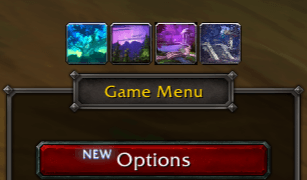
Rootwalking Marker menu buttons
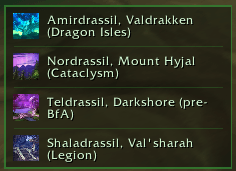
Rootwalking Marker window
Description
Rootwalking Marker
A lightweight addon for Harronir characters in World of Warcraft: Midnight.
Overview
The Harronir racial ability Rootwalking allows you to teleport to the roots of the four World Trees in Harandar — but each variant only activates when you are physically standing near the corresponding roots. Finding those roots without a guide can be frustrating.
Rootwalking Marker displays the four Rootwalking destinations and lets you set a waypoint with a single click. On first install, a popup asks which display mode you prefer. Your choice is saved and can be changed at any time with /rwm mode.
Display Modes
Game Menu Buttons — Four quickslot-style spell icon buttons appear above or below the Game Menu (Escape key) while in Harandar. Click a button to set a waypoint and close the menu.
Floating Window — A compact movable window lists all four destinations with spell icons. It appears automatically when you enter Harandar and can be dragged anywhere on screen, locked in place, or hidden.
Both modes are only visible on Harronir characters in Harandar.
Features
- First-run popup to choose your preferred display mode
- Switch modes at any time with
/rwm mode buttonsor/rwm mode window - Game Menu buttons can be positioned above or below the menu
- Floating window is draggable, lockable, and remembers its position
- One click sets a waypoint to that root location
- TomTom support — uses TomTom if installed, otherwise uses the built-in WoW waypoint system
- Hover tooltips show the spell name, destination, and coordinates
- All settings persist across sessions
Root Locations
| Spell | Destination | Coords |
|---|---|---|
| Rootwalking: Amirdrassil | Amirdrassil, Valdrakken (Dragon Isles) | 71.77, 51.39 |
| Rootwalking: Nordrassil | Nordrassil, Mount Hyjal (Cataclysm) | 64.62, 23.23 |
| Rootwalking: Teldrassil | Teldrassil, Darkshore (pre-BfA) | 32.41, 23.44 |
| Rootwalking: Shaladrassil | Shaladrassil, Val'sharah (Legion) | 31.23, 73.95 |
Commands
| Command | Description |
|---|---|
/rwm |
Show all commands |
/rwm mode buttons |
Switch to Game Menu button mode |
/rwm mode window |
Switch to floating window mode |
/rwm position top |
Show buttons above the Game Menu (default) |
/rwm position bottom |
Show buttons below the Game Menu |
/rwm show |
Show the floating window |
/rwm hide |
Hide the floating window |
/rwm lock |
Lock the floating window position |
/rwm unlock |
Unlock the floating window position |
/rwm reset |
Reset the floating window to default position |
/rwm waypoint tomtom |
Use TomTom for waypoints (if installed) |
/rwm waypoint builtin |
Use the built-in WoW waypoint system |
/rwm waypoint |
Show current waypoint system |
/rwm debug |
Print debug info |
Optional Dependency
TomTom — if installed, clicking a button sets a TomTom waypoint. Otherwise the built-in WoW waypoint system is used automatically.
The Rootwalking Marker Team