Roam Talents
A talent viewer and build planner for every class, in its own window, with leveling builds and your class's spells built in.
Description
Roam Talents is a talent viewer and build planner for World of Warcraft: Forever. It opens in its own window and leaves the game's talent window as it is. It needs Roam (Core), which the CurseForge app installs with it.
Every talent name, icon, rank, position and rule is read from the game client itself, so when Forever changes a tree, Roam Talents shows the new tree on your next login. The Spells panel's list of class spells comes from ForeverDB.net; what your own game shows always wins.
It spends talent points only when you switch that on. Out of the box you spend points yourself, in the game's own talent window.
A short tutorial shows you around the first time you open it, and each update shows only the steps for what is new.
What it does
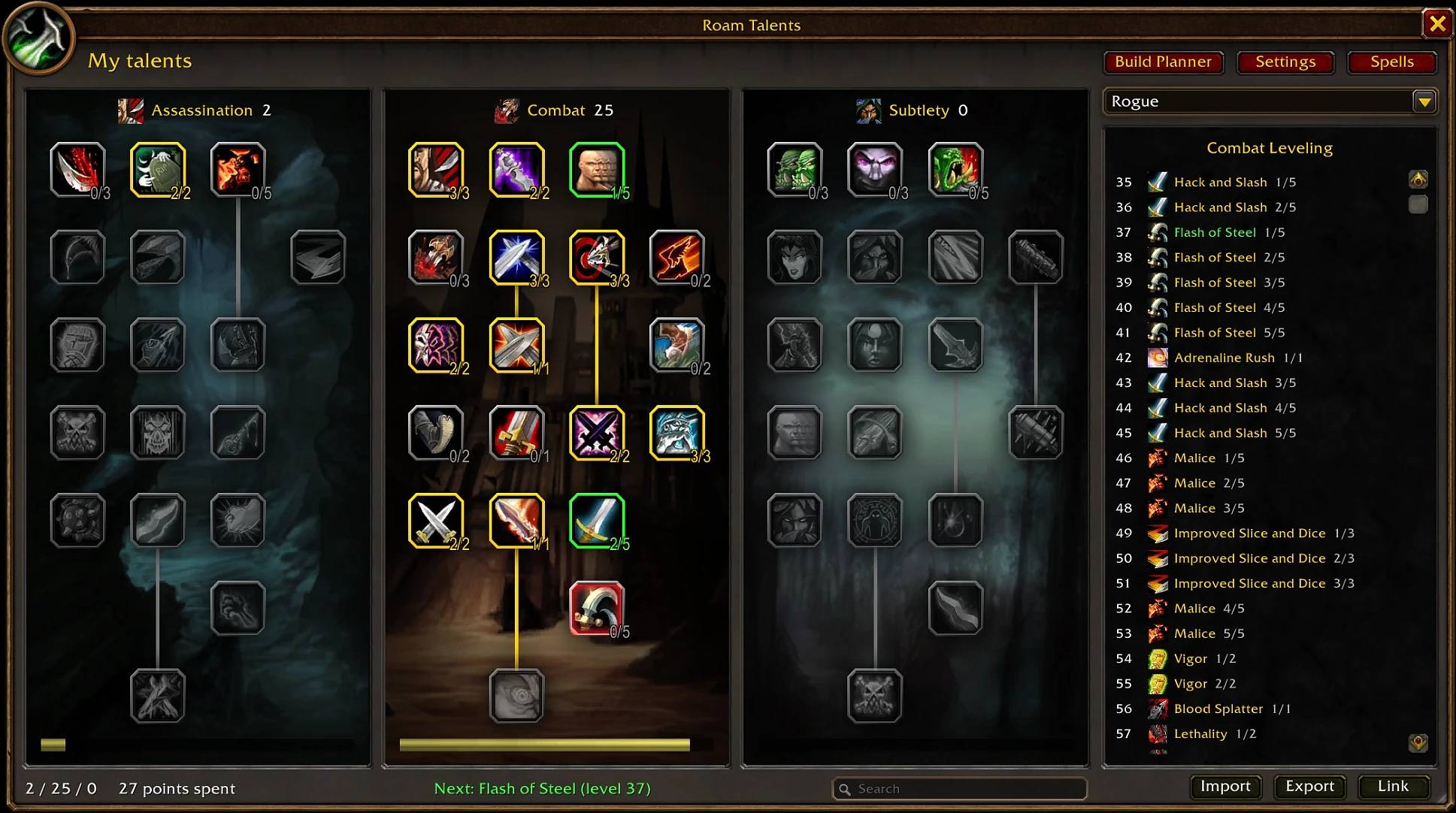
- My talents: your own talents as the game has them, with your active build's pick order beside them and its next talent at the foot.
- Build Planner: any class's three trees, with the painted scenes and round tree headers of the game's own talent window. Left-click adds a point, right-click takes one back, under the game's own rules (points per row, prerequisites, the most points). The pick order panel lists each point with its level.
- Plan at a level: an "At level" slider shows a build at any level from 10 to 60, with the next talent glowing red in the trees.
- Roam default builds: 29 builds from the Roam website, built in. A leveling build for every damage and tank spec of every class (druid Balance and Feral; all three hunter, mage, rogue and warlock specs; paladin Protection and Retribution; priest Shadow; shaman Elemental and Enhancement; warrior Arms, Fury and Protection), and dungeon healing builds for druid and shaman Restoration, paladin Holy (one build each, from 20 to 60) and priest Discipline and Holy (a 20-40 build and a 60 build each). Each is checked against the game's own trees. They can't be changed, but Save keeps a copy of your own, and any of them can be your active build.
- Saved builds for any class: save, load, rename and delete. The Builds menu shows each build's main tree and points per tree. Pick one of your own class's builds as your active build, and Roam Talents tells you the next talent to take.
- View talents in Roam: right-click another player (target, party, raid, or anyone nearby) and choose View talents in Roam, or type
/roam talents inspect, to open their build in the planner, ready to save. - Spending, if you want it (Settings, off to start with): Learn next and Learn all in My talents follow your active build; Learn all shows the points glowing green first and asks before spending. Optionally, each new point is spent for you when you level. It asks before starting a new tree, stops if your talents differ from the build, and never acts in combat.
- Your plan on the game's talent window (off to start with): turn on "Show my plan", in Settings or with the tick box beside the "Roam: active build" button, and the game's own talent window shows your active build's points on each talent and a glow on the next one.
- Secondary Talents: Primary and Secondary tabs in My talents, an Activate button to swap, and an active build for each talent set. (Not yet tested on a character with Forever's Secondary Talents.)
- Spells panel (the Spells button, or
/roam talents spells): every rank of your class's spells from level 1, in Available to learn, Coming up and Known. The tooltip marks ranks taught by a book or a class quest, or not by your trainer. Pick another class to see its spells by level; My class spells switches back. - Build links in chat: the Link button puts a build in your chat box, or straight into Say, Yell, Party, Raid or Guild. Other Roam Talents players click it to open the build, or Shift-click it to put it in their Import box.
- Undo: take back the last change to a plan, several steps deep.
- Import and export builds as short text strings, to keep or share. Import also takes a build link from the Roam website, a build string with words around it, or a link that holds one.
- Search: marks the talents whose name or description holds the words you type.
- On the game's talent window: a small "Roam: active build" button, the "Show my plan" tick box and a green "Next" line, in the empty strip under the trees.
- Minimap button: opens the window; its tooltip names your active build and its next talent.
- Level-up reminder: from level 10, when you level, a notice names the next talent in your active build, with an Open Roam button. It can be turned off in Settings.
- Builds that survive tree changes: if Forever changes a tree, each saved build is replayed point by point against the new tree. A talent that only moved is followed by itself. A point that no longer fits is shown in red, and you pick a new talent for it or skip it; the saved copy stays untouched until you finish.
/roam talents checkbuildssays whether the Roam default builds still fit. - Settings, in Roam Talents' own window (a page that scrolls): the minimap button, Roam on the game's talent window, plan marks, the level-up reminder, spending, Roam notices, sounds, the tutorial, and Center window. The Roam website and Discord invite are at the foot, ready to copy.
- Any size you like: drag the window's corner, or use the Window size slider (60% to 120%); size and place are kept.
- A key to open and close the window: set it in Settings ("Set Roam key binding") or in the game's Keybindings, where every Roam key sits in one Roam section. No key is set to start with.
How to open it
- The minimap button,
/roam talents, or your key. /roam talents spellsopens the Spells panel,/roam talents introreplays the tutorial,/roam talents optionsopens Settings, and/roam talents centerputs the window back in the middle of the screen.
Good to know
- Built in: the Roam default builds, from the Roam website, and every class's spell list (ranks and levels) from ForeverDB. Talents are always read from your game, and your own spellbook wins over the built-in list.
- No trainer prices are shown yet; they come in an update once every class's prices are gathered.
- Your builds are saved for your whole account; your active build is saved per character. No character, realm, guild or account name is stored.
- Only the game's own art is used.
- Made for World of Warcraft: Forever only (game version 1.60.1).
- Free and open: the code is under the MIT license. The minimap button uses LibDBIcon, LibDataBroker, CallbackHandler and LibStub, credited in the README.
Coming next
- Popular builds and pick rates, gathered from Roam players who share their play.
Bugs and ideas
Please leave a comment on this page, or come and talk in the Roam Discord: discord.gg/Q6d89GqaD
The Roam website: roamforever.gg. Plan builds in its Talent planner, which opens the Roam default builds and shares them by link, or plan a whole character, gear included, in the Build planner.
Class spell lists: Data from ForeverDB.net (https://foreverdb.net)
Roam Talents Team