Roam Ready
A buff tracker you can click, with your class's buffs, poisons, weapon imbues and party buffs built in, plus a back-to-town checklist.
Description
Roam Ready is a buff tracker for World of Warcraft: Forever. Every class's buffs are built in, so from your first login it shows, at the top of your screen, each buff that is missing or running out: click the icon to cast it. It also keeps a back-to-town checklist. It needs Roam (Core), which the CurseForge app installs with it.
The buff tracker
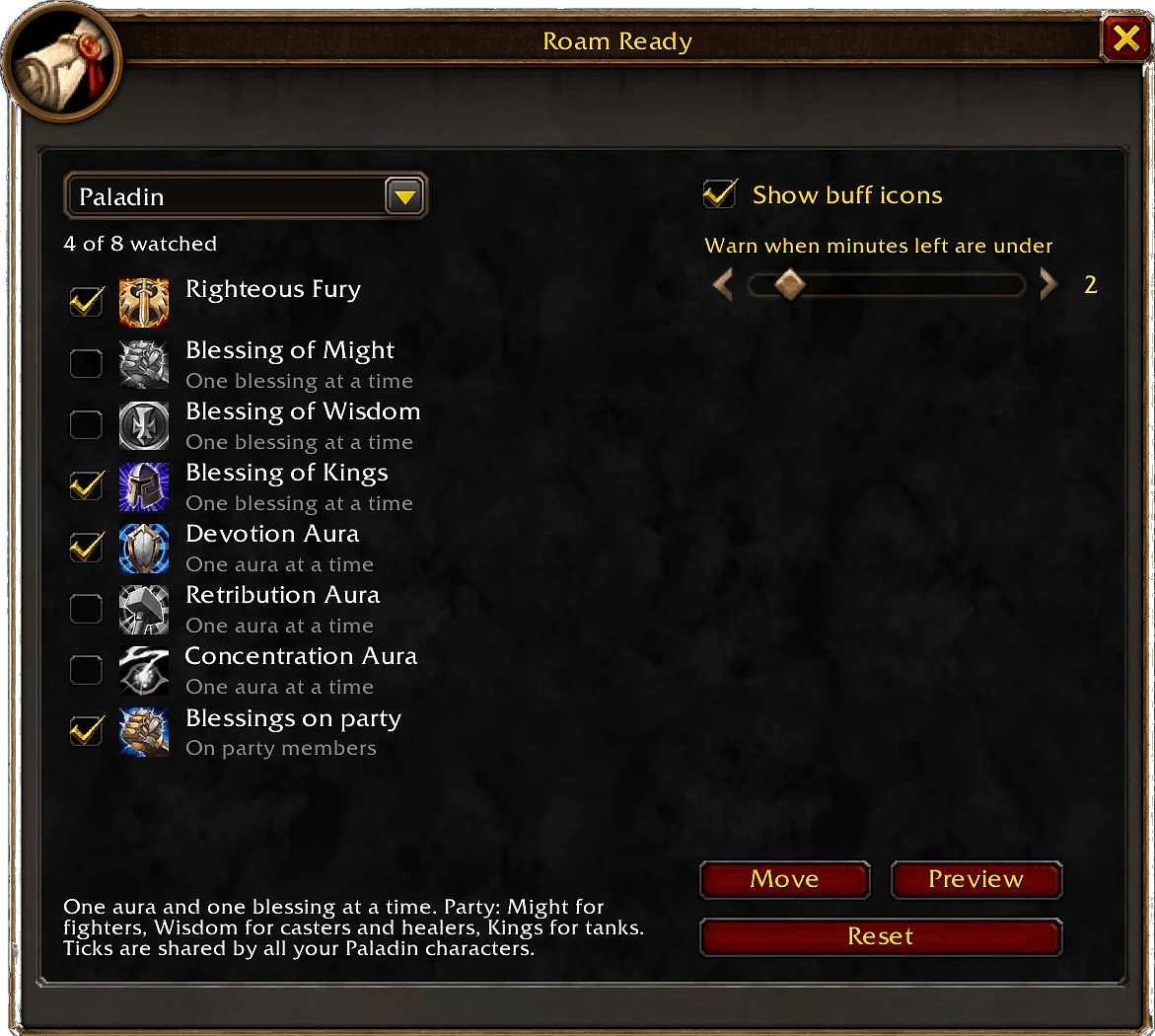
- Built in for every class: every class's buffs are built in, with the usual ones already ticked; tick or untick any on the Buffs tab (one aura, blessing, armor or aspect at a time).
- Rogue poisons per weapon: missing, low on charges or time, and a warning when the wrong one is on (once you choose a poison for that weapon).
- Shaman weapon imbue (main hand), with a warning when a different one is on.
- Party buffs: party members missing a buff you can give them: paladin blessings by class and role, Arcane Intellect, Fortitude, Divine Spirit, Shadow Protection, Mark of the Wild, and Thorns on tanks. Members out of range, offline or dead are left out. No party icons in raids.
- Well Fed (in a new General section, off to start with): an icon when you're not Well Fed or it's running out; click to eat a food you picked or one known to give Well Fed.
- Click to cast. Each icon has a square frame like the game's talent window: red when a buff is missing, yellow when it is running out. The icons can be moved, previewed and reset, and hide while you are dead.
- The Buffs tab picks what is watched.
The checklist
- Checklist: a back-to-town list that ticks itself off.
- Train skills: from your first login, a line when your class trainer has spells for you that you don't know yet. Hover it for the list (name and rank). When your trainer's window is open, its own list wins. Right-click the line to skip spells you don't want yet; a skipped spell comes back at its next rank. Kept for each character.
- Repairs, with a level you set (75% to start with).
- New mail or auction sales waiting.
- Bag space, with a level you set.
- Bind on Equip items in your bags.
- Food and water, each with its own switch (212 foods and 40 drinks recognized, from the game client and what Roam players have met in game).
- Buff food: carry at least 5 Well Fed foods (you set the amount); right-click to pick your own foods from your bags.
- Ammo, when a ranged weapon is equipped, with a level you set.
- Rogue poisons in your bags.
- Class reagents and tools (
/roam ready reagents). - Recipe materials: the materials of the recipes you track, listed under each recipe's name, with any you are short of counted in your things to do. Shift-click one into chat or the auction house search.
- Your own reminders: type one, press Enter, tick it off, and it fades away. Drag to reorder.
- Resting reminder: when you start resting with things still on the list, a notice with an "Open checklist" button. Never at login or in a fight, at most once every two minutes, and it can be turned off.
- Minimap tooltip: how many things are left on your list, and up to five of them.
- Settings: the minimap button, notices, sounds, window size, and a key to open and close the window (set in Settings or in the game's Keybindings, Roam section). The Roam website and Discord invite are there too, in boxes you can copy from.
How to open it
- The minimap button,
/roam ready, or your key. /roam ready buffsopens the Buffs tab,/roam ready optionsthe settings, and/roam ready centerputs the window back in the middle of the screen.
Good to know
- Built in: every class's spell list (ranks and levels) from ForeverDB, for the Train skills line. What your own game shows (your trainer, your spellbook) always wins. No trainer prices are shown.
- The buff icons recognize buffs by their English names, so they work on English game clients only for now; the checklist works in every language.
- Only the game's own art is used.
- Made for World of Warcraft: Forever only (game version 1.60.1).
- Free and open: the code is under the MIT license. The minimap button uses LibDBIcon, LibDataBroker, CallbackHandler and LibStub, credited in the README.
Coming next
- Train skills built from Roam players' own trainer records, once every class is covered.
- Trainer prices, once every class's prices are gathered.
Bugs and ideas
Please leave a comment on this page, or come and talk in the Roam Discord: discord.gg/Q6d89GqaD
The Roam website: roamforever.gg (also on the Settings tab)
Train skills: Data from ForeverDB.net (https://foreverdb.net)
Roam Ready Team