rModelOrbTemplate
- By
Provides a model orb XML template, camera mixins and a ton of preset models to pick from.
Description
rModelOrbTemplate
The inspiration for this addon was to bring Diablo like player unitframe orbs for health and power back into the game. I did something similar years prior.
The idea was to create an XML template that houses all frame types needed so you can spawn as many of them as you like.
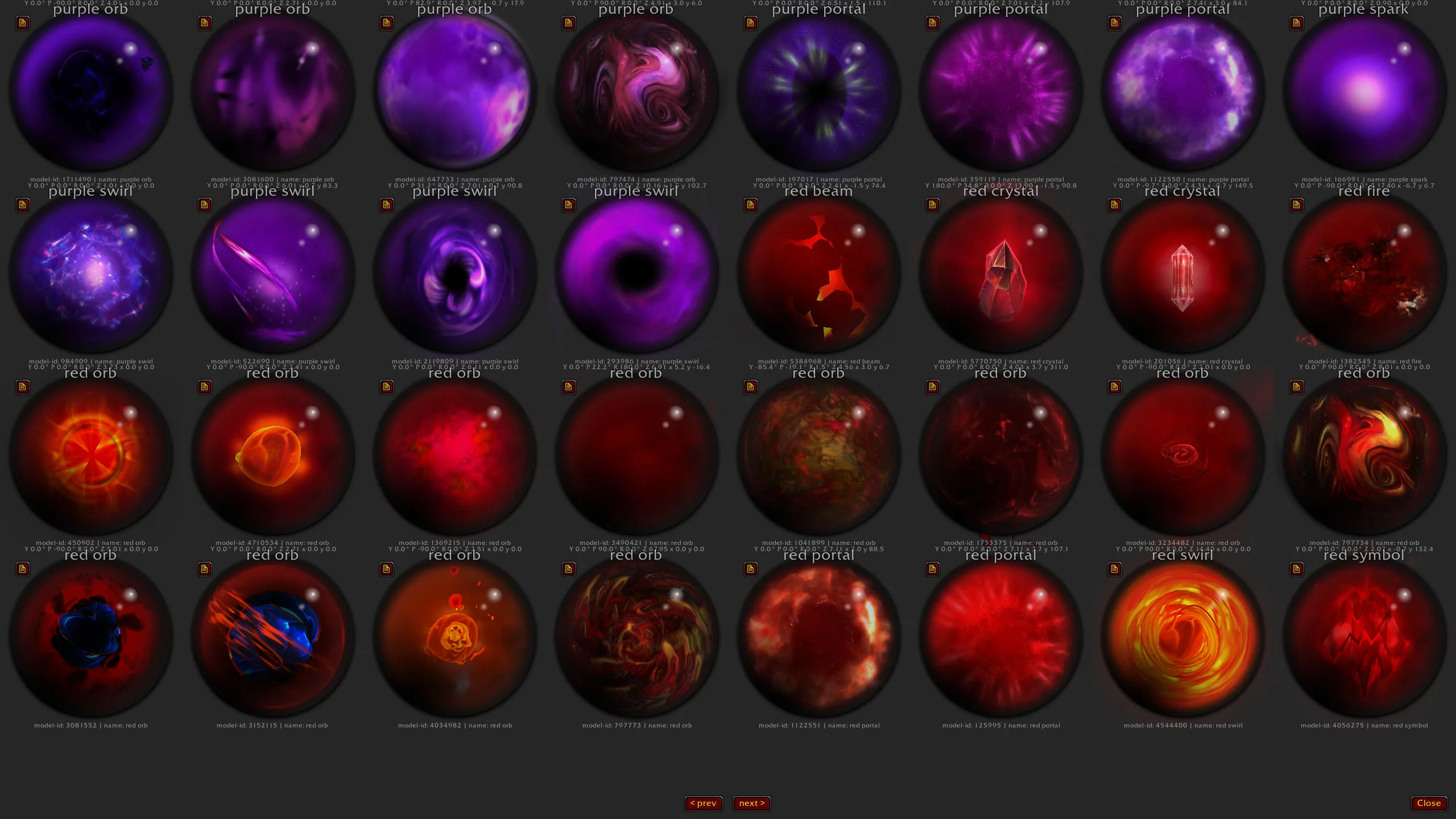
To make the template visually appealing a ModelScene is used which houses a WoW model that fits into the orb environment. The addon comes with over 200 preconfigured models that can be picked from.
The orb art consists of different layers.
XML structure/layers
- OrbFrame [Frame, 256x256]
  - BackgroundTexture [Texture, TOPLEFT+BOTTOMRIGHT]
  - FillingStatusBar [StatusBar, 256x256, BOTTOMLEFT, Vertical Filling]
  - ClipFrame [Frame, 256x256, BOTTOMLEFT]
    - ModelFrame [ModelScene, 256x256, BOTTOMLEFT]
  - OverlayFrame [Frame, 256x256, TOPLEFT+BOTTOMRIGHT]
    - SparkTexture [Texture, TOP]
    - GlowTexture [Texture, 256x256, TOPLEFT+BOTTOMRIGHT]
    - LowHealthTexture [Texture, 256x256, TOPLEFT+BOTTOMRIGHT]
    - GlossTexture [Texture, 256x256, TOPLEFT+BOTTOMRIGHT]
OrbFrame
The base frame to house all children.
OrbFrame.BackgroundTexture
A 256x256 background texture that lives behind all the other art.
OrbFrame.FillingStatusBar
A vertically filled statusbar with a circular/orb filling texture.
OrbFrame.ClipFrame
A helper frame which is anchored to the BOTTOMLEFT. The height of the frame is dependent on the FillingStatusBar:GetStatusBarTexture():GetPoint() and adapts dynamically when the filling statusbar changes value. It clips the Model Scene.
OrbFrame.ClipFrame.ModelFrame
A ModelScene which the model get loaded into. It consists of an actor and a camera. Over 200 preconfigured models are provided. More on that later in the camera section.
OrbFrame.OverlayFrame
Just a frame on top of the clip frame to house some more textures on another layer.
OrbFrame.OverlayFrame.SparkTexture
To give the orb value a bit more dimension a spark texture is used. This is a horizontal divider texture which is bound by a circular mask texture. Same as the ClipFrame its point is reliant on the FillingStatusBar:GetStatusBarTexture():GetPoint() and adapts dynamically when the filling statusbar changes value. The circular mask texture is needed to clip the spark texture to stay believable inside the orb.
OrbFrame.OverlayFrame.GlowTexture
A glow texture that can be used for debuff highlighting.
OrbFrame.OverlayFrame.LowHealthTexture
A secondary glow texture that can be used for low health highlighting.
OrbFrame.OverlayFrame.GlossTexture
This of this as a final gloss layer ontop of everything. Sort of like the crystal top on a pocket watch.
ZorkCamera
To position a model correctly inside a ModelScene an actor and a camera is needed. The actor will always be at vector [0,0,0]. The picked model is the actor we are trying to look at in 3D space.
Blizzard provides the OrbitCameraMixin which I adapted into ZorkCameraMixin. The camera can fly around a target at a set distance in an orbit. Like a satelite around earth. I changed the camera type to react to mouse buttons. That change allows users to configure models on the fly using full mouse controls. Our target never moves. It is the actor at [0,0,0]. That is why the camera target can stay at [0,0,0] aswell.
The base camera functions are as follows:
--left
self:SetLeftMouseButtonXMode(ZORK_CAMERA_MOUSE_MODE_YAW_ROTATION, true)
self:SetLeftMouseButtonYMode(ZORK_CAMERA_MOUSE_MODE_PITCH_ROTATION, true)
--right
self:SetRightMouseButtonXMode(ZORK_CAMERA_MOUSE_PAN_HORIZONTAL, true)
self:SetRightMouseButtonYMode(ZORK_CAMERA_MOUSE_PAN_VERTICAL, true)
--NEW: m4
self:SetMouse4ButtonXMode(ZORK_CAMERA_MOUSE_MODE_NOTHING, true)
self:SetMouse4ButtonYMode(ZORK_CAMERA_MOUSE_MODE_ROLL_ROTATION, true)
--NEW: m5
self:SetMouse5ButtonXMode(ZORK_CAMERA_MOUSE_MODE_NOTHING, true)
self:SetMouse5ButtonYMode(ZORK_CAMERA_MOUSE_MODE_ROLL_ROTATION, true)
--wheel
self:SetMouseWheelMode(ZORK_CAMERA_MOUSE_MODE_ZOOM, true)- Camera Yaw/Pitch on left mouse.
- Camera position x/y offset on a 2D plane right mouse.
- Camera roll on m4 or m5.
- Camera zoom on mouse wheel.
Shift and Alt modifiers are added to only move the camera on x/y or to increase/decrease zoom speed.
How to spawn the orb
local orb = CreateFrame("Frame", nil, UIParent, "rModelOrbTemplate")

--get all model data, a list of all 200+ preconfigured models. The index-key is the modelFileID.
local allModelData = orb:GetAllModelData()

--LoadModelDataByID(modelFileID, enableMouse)
--modelFileID (has to be part of allModelData), enableMouse true/false
--if enableMouse is true you can dynamically adjust the model configuration using the mouse. Changes are saved on the fly for the selected model.
orb:LoadModelDataByID(2030216, true)

orb:SetPoint("CENTER")
orb.FillingStatusBar:SetValue(0.5) --50%
--orb.FillingStatusBar:SetStatusBarColor(1,0,0)
The rModelOrbTemplate Team