RestedRadar
- By
A small on-screen list of your alts' rested XP, with a bar and time-to-full for each, so you know who to play before it caps.
01-tooltip-full.png
02-tooltip-totals.png
03-settings-general.png
04-settings-characters.png
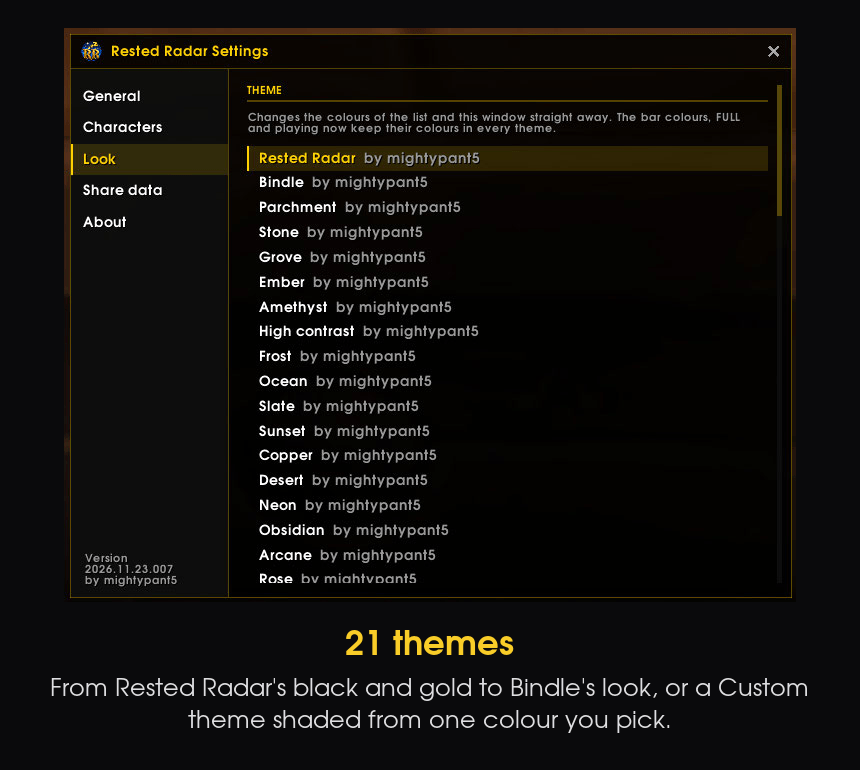
05-settings-look.png
Description
Rested Radar
A small on-screen list for WoW: Forever that tells you which alt to play next, and which alts are about to stop saving rested XP.
It supports Forever's Legacy system: each character's Well Rested talent rank is read from the game and counted in its rested XP rate and cap.
How rested XP works
- Rested XP is bonus XP. While a character is logged out, it saves up bonus XP. When you play it again, your kills give extra XP until the bonus is used up.
- How fast it builds: about 10% a day logged out in an inn or city, about 2.5% a day anywhere else. Well Rested makes it a little faster.
- When it stops building:
- After a week away. A character saves for 7 days after you log out, then stops. Log in to start a new week.
- If it was already full when you logged out. At 100% or more when you leave, it saves nothing until you play some of it off.
- Reaching 100% while you're away doesn't stop it: a character that logged out below 100% keeps saving for the whole week, even past 100%.
The simple version: log into every character at least once a week, and don't log out with a full bar.
Rested Radar explains this in-game too: How it works on the list opens it any time.
Features
The list
- One row per character below level 60, by first name and surname.
- Seven day squares count down the days left before that character stops saving, green through yellow and orange to red, with the count beside them: "5 days left", "last day".
- % rested XP: how much bonus it has saved up.
- gaining or NOT GAINING, with the reason when it isn't: full (logged out at 100% or more) or week up.
- Play next: the alt with the most rested XP saved up, the best one to play.
- Quick log in: an alt below 100% whose week is ending. Logging in and out restarts its week; you don't need to play it.
- Urgent alts (stopped, or in their last day) come first, then everyone else, most rested first. The character you're playing sits at the top as playing now.
- Move it, resize it from the bottom-right corner, or lock it in place. It scrolls, so any number of alts fits.
- Only when needed: keep the list hidden until an alt needs you. It appears with that row pulsing, and hides again once you've dealt with it.
Warnings
- An alt's day squares pulse slowly in its last day, and once it has stopped saving. Turn it off with Pulse when an alt needs playing.
- It stops when you play that character. Right-click its row to dismiss the warning until you log out or reload, or Shift + right-click to dismiss them all. To silence one alt for good, switch it off on the Characters tab.
How Rested Radar works
- A one-page explanation, in plain words, of how rested XP builds, when it stops, and what the list shows. It opens at login, with Don't show this again, and the How it works button on the list opens it any time.
Tooltips
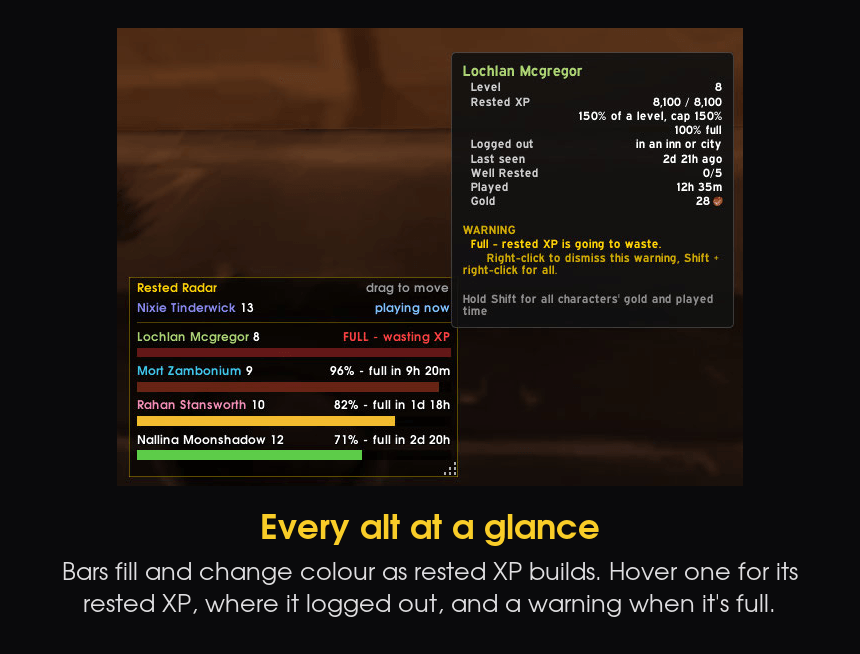
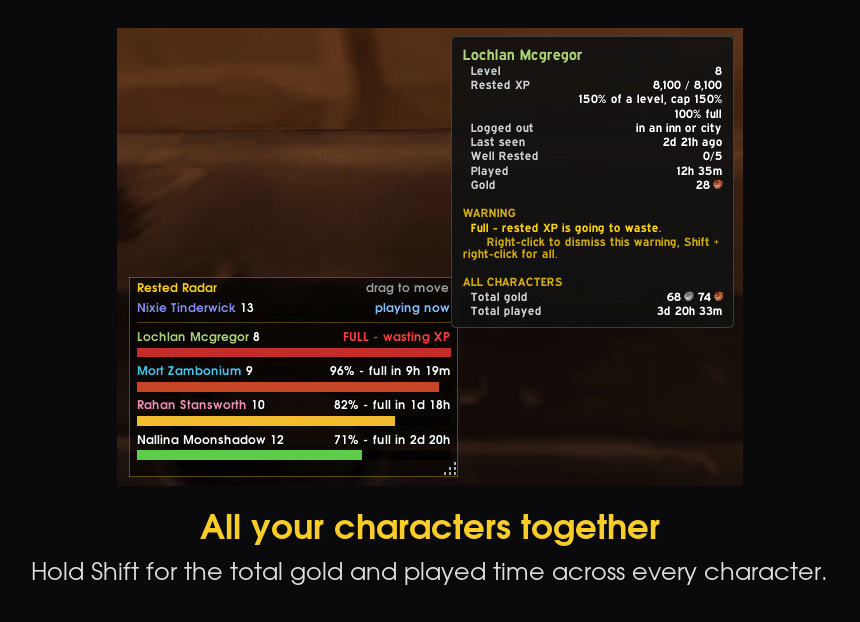
- Hover a row for why it is or isn't gaining, its rested XP and cap (also as a share of a level), how long until it stops gaining, where it logged out, when it was last seen, its Well Rested rank, its
/playedtime and its gold. - Hold Shift to add the total gold and played time across all your characters, level 60s included.
Themes
- 22 themes, from Rested Radar's own black and gold to Parchment, Frost, Ember and High contrast, plus Alliance and Horde to match Bindle if you use both. The list and the settings window change straight away.
- Custom: pick one colour on a colour wheel, or type a hex code, and the rest is shaded from it.
- Two transparency sliders: one for the list, one for the settings window and pop-ups.
- The day-square colours, NOT GAINING and playing now keep their colours in every theme.
Welcome
- The first time you log in, a welcome walks you through picking a theme (every theme shown with your own characters), a couple of setup choices, and the About page. Open it again any time with
/rradar welcomeor from the Look tab.
New version notice
- A pop-up tells you when a newer Rested Radar is out. Not for this version stops it until an even newer one comes out.
Settings window
- Rested Radar's own window. Open it by right-clicking the minimap button, with
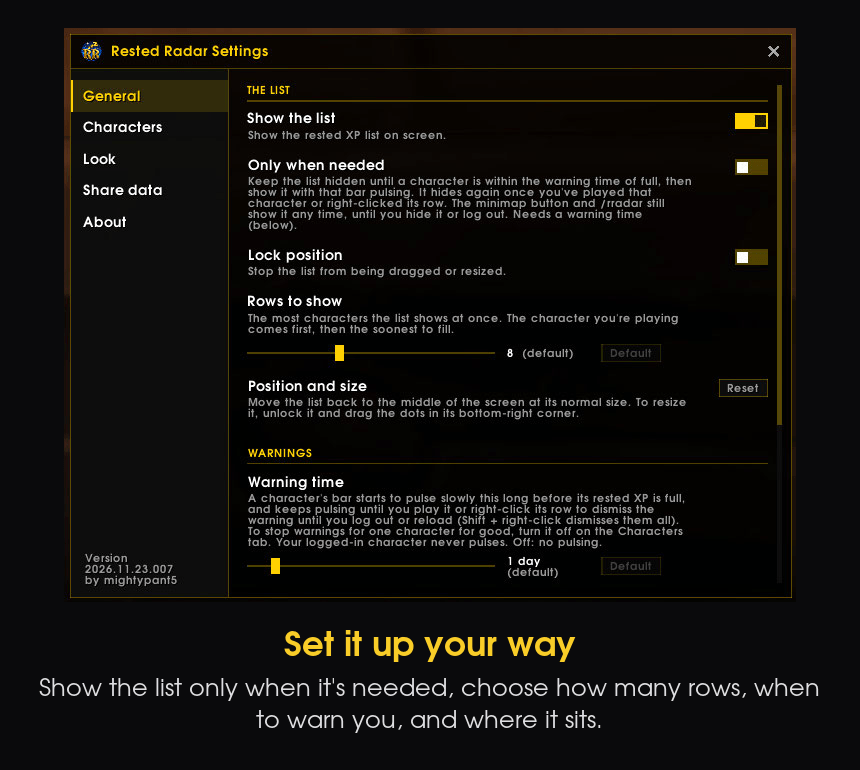
/rradar config, or from Options > AddOns > Rested Radar. Drag the dots in its bottom-right corner to make it taller or shorter. - General: the list, warnings and minimap button. A Preview button fills the list with example characters for 30 seconds, so you can see every state, colour and the pulse.
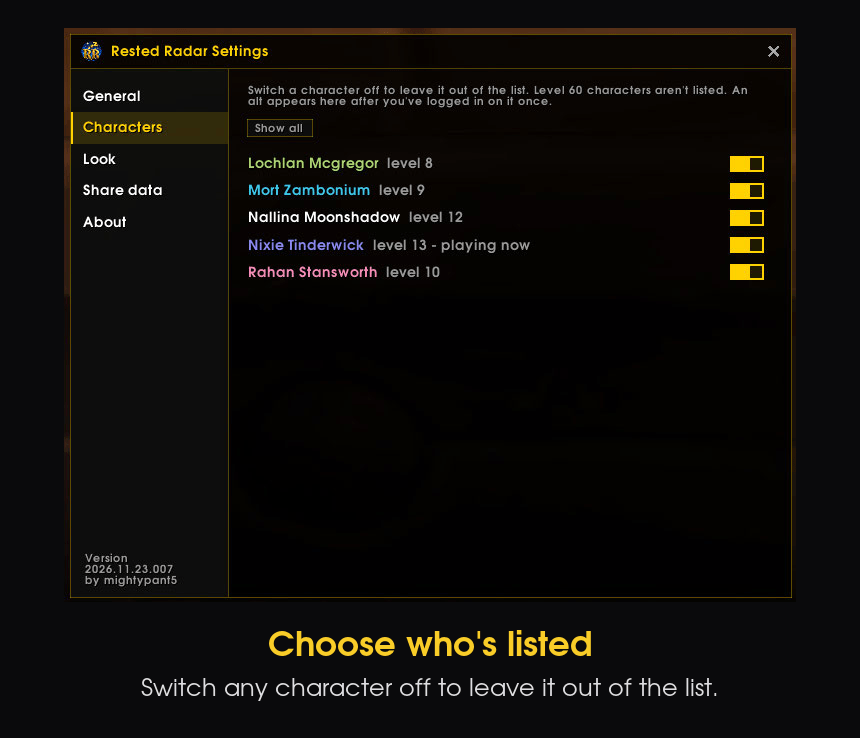
- Characters: a switch per alt, to leave any of them out of the list.
- Look: the theme, transparency, font and outline. The default font is TeX Gyre Adventor Bold, which comes with Rested Radar along with four monospaced fonts, the game's own fonts and any your other addons share through LibSharedMedia. Each is shown in its own lettering.
- Share data: what Rested Radar shares, each with its own switch (see Help build Rested Radar, below).
- About: the version, the website, and mightypant5's other addons.
Minimap button
- Left-click to show or hide the list, right-click for settings, drag to move it around the edge. It's also in the minimap's addon menu, and button-collector addons pick it up like any other.
Help build Rested Radar
Rested Radar aims to give the most accurate rested XP estimates in WoW: Forever, in an app that stays fast and error-free. The Share data tab has five switches, each on its own:
- Version check: shares your version number and tells you when a newer Rested Radar is out.
- Share rested XP readings: when one of your characters comes back from time away, how much rested XP it gained, so Rested Radar's estimates can be checked against the game, Well Rested ranks included.
- Send error reports: when something in Rested Radar breaks, it sends where in Rested Radar's code it happened and the error message, so it can be fixed.
- Share how you use Rested Radar: a short summary of which features you use and which settings you changed, so updates focus on what you actually use.
- Share discoveries: facts about the game world you come across (vendors and prices, drops, places and services), to help build the shared database of WoW: Forever that Bindle ships. Rested Radar keeps nothing it hears; with Bindle installed, Bindle shares these instead.
Shared with other Rested Radar players on your realm, the same way addons do version checks: from your character on a hidden addon channel. Rested Radar doesn't log your character's name. Your gold and your chat messages are never sent.
Commands
Everything is in the settings window; the commands are optional. /restedradar works too.
| Command | Does |
|---|---|
/rradar |
show or hide the list |
/rradar config |
open the settings window |
/rradar lock / unlock |
stop or allow moving the list |
/rradar rows <n> |
the most characters shown (default 8) |
/rradar reset |
move the list back to the middle at its normal size |
/rradar minimap |
show or hide the minimap button |
/rradar preview |
example rows for 30 seconds |
/rradar welcome |
the welcome: theme, setup and About |
/rradar hide <name> / unhide <name> |
leave a character out of the list, or put it back |
/rradar list |
print the list in chat |
/rradar debug |
the Well Rested reading, and predicted against actual rested XP |
/rradar errors / errors clear |
Rested Radar's own Lua errors, for bug reports, or clear them |
How the estimate works
Logged out in an inn or city, a character gains 5% of a level every 8 hours; anywhere else, a quarter of that. Well Rested raises the rate and the cap by 4% per rank. The cap (100% in the list) is 150% of a level, but it only stops a character that logs out already at it. A week of saving is about 105% of a level in an inn or city. These rules come from thousands of rested XP readings shared by Rested Radar players.
While you play, rested XP only builds in an inn or city and is spent as you earn XP, so the character you're on shows no estimate. Each login compares the prediction with the real figure (/rradar debug).
Good to know
- An alt appears once you've logged in on it with Rested Radar installed. The game doesn't let addons see other characters.
- Estimates don't count camp tents or sleeping bags.
- An alt's gold, played time and Well Rested rank are as of its last session. To read played time, Rested Radar asks the game once per login and hides the "Total time played" lines that would print; a
/playedyou type yourself prints as normal. - Warnings only show in the list: with it hidden (and Only when needed off), nothing pulses.
- The game may block the hidden channel inside instances. MightyNet shows in
/chatlist.
Fonts
The fonts in RestedRadar/Media/Fonts aren't covered by Rested Radar's licence. Each is its authors' work, included unmodified with its licence: JetBrains Mono, IBM Plex Mono, Inconsolata and Courier Prime under the SIL Open Font License 1.1, and TeX Gyre Adventor (Bold and Regular, from CTAN) under the GUST Font License. Game clients in non-Latin alphabets default to the game's own font, since TeX Gyre Adventor has Latin letters only.
Versions
Versions are dated year.month.day.build: 2026.11.22.008 is the eighth build of November 22, 2026.
RestedRadar Team