ResourceBarsForever
- By
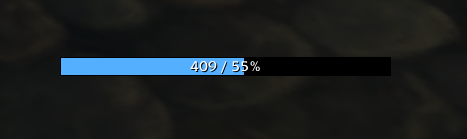
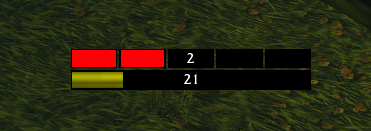
Create your own mana, rage, energy and combo point bars for each character, copy them to your alts, and see the 5-second rule on your mana bar.
manabar.png

rage.png
rogue.png
Description
ResourceBarsForever lets you build your own resource bars exactly the way you want them. Each character has its own bars, so your mage can show a big mana bar while your rogue on the same account shows energy and combo points.
It's small and simple, and you set everything up in the game's own options window.
Features
As many bars as you like, per character
- Add, copy and delete bars from the options panel.
- Each character saves its own bars. Nothing is shared by accident.
- The first time you log in on a character, you get a bar for its main resource automatically.
Copy bars between characters
- Happy with your setup? Copy it to any other character on your account in one click.
- Choose Replace to swap out your current bars, or Add to keep them and add the copied ones.
- Characters are listed in their class colors, with the number of bars they have.
Track the resource you need
- Mana, Rage, Energy or Combo Points.
- Automatic mode follows your current main resource. Druids switch between mana, rage and energy as they change form.
Full control over the look
- Width (20–800 px) and height (2–100 px)
- Any fill color with opacity, or the game's default color for the resource
- Background color with opacity
- Border size (0–5 px)
- Bar textures: Blizzard, Flat, Raid
- Separate boxes: show combo points (or any resource with up to 10 points) as single boxes, with adjustable spacing between them. When you pick Combo Points, the boxes are turned on for you.
Text on the bar
- No text
- Current (
4250) - Current / Max (
4250 / 5000) - Percent (
85%) - Current / Percent (
4250 / 85%) - Adjustable font size
Show bars only when you need them
- Always, in combat only, or out of combat only
- Separate opacity for in combat and out of combat
- Turn single bars on or off without deleting them
5-second rule for mana users
- A spark moves across your mana bar for 5 seconds after every spell that costs mana.
- When the spark reaches the end, your normal Spirit-based mana regeneration is back on.
- Spells that don't cost mana don't start the spark.
Easy positioning
- Unlock the bars and drag them wherever you want.
- One click puts a bar back in its default position.
- Moving is blocked in combat, so you can't move a bar by accident mid-fight.
Works with the new combat restrictions
- The game hides some combat values from addons now. ResourceBarsForever is built for these new rules: your bars and text stay correct in combat without any Lua errors.
Slash commands
| Command | What it does |
|---|---|
/rbf |
Opens the options panel |
/rbf unlock |
Unlocks all bars so you can drag them |
/rbf lock |
Locks all bars |
/rbf reset |
Resets all bars of the current character (reloads the UI) |
You can also find the options under Options → AddOns → ResourceBarsForever.
Known limitations
- If a spell is free for a moment because of a proc like Clearcasting, the 5-second rule spark still starts, even though the rule doesn't actually kick in.
- The bar list in the options panel doesn't scroll yet. About 15 bars per character fit.
- A character appears in the copy list only after you have logged in with it once while ResourceBarsForever was installed.
Planned
- Color changes based on how full the bar is
- Threshold lines, e.g. a marker at 30% mana
ResourceBarsForever Team