Profession Cooldown Tracker Forever
- By
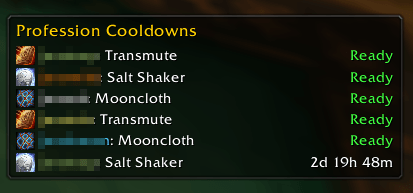
Never forget a transmute again. Profession Cooldown Tracker Forever remembers the long profession cooldowns of all your characters on all realms and shows them in one small window, so you can see at a glance which alt is ready to craft.
options.png
Description
Profession Cooldown Tracker Forever
Never forget a transmute again. Profession Cooldown Tracker Forever remembers the long profession cooldowns of all your characters on all realms and shows them in one small window, so you can see at a glance which alt is ready to craft.
Features
- Account-wide overview: every character's cooldowns in one list, with character names in class colours.
- Sorted by remaining time: cooldowns that are ready are listed first and shown in green as Ready.
- Exact ready time: hover over a row to see the date and time when the cooldown will be ready.
- Works offline for alts: timers are saved with server time, so they stay correct after logging out, restarting the game or switching characters.
- Safe and reliable: values the game reports as unreliable (for example during combat) are never saved. The addon doesn't scan during combat and catches up when combat ends.
- Fully configurable: add your own spells or items, group several spells into one shared cooldown, or temporarily disable entries.
- Lightweight: no libraries and no dependencies.
Tracked by default
| Cooldown | Profession |
|---|---|
| Transmute (Arcanite, Iron to Gold, Mithril to Truesilver, all elemental transmutes; one shared cooldown) | Alchemy |
| Mooncloth | Tailoring |
| Salt Shaker (item) | Leatherworking |
Spells your character doesn't know are simply ignored. You can add more cooldowns in the options menu.
The cooldown window
- Drag with the left mouse button to move it (unless locked). The position is saved.
- Hover over a row to see when the cooldown will be ready.
- Ctrl + right-click a row to hide it. A plain right-click does nothing, so you can't hide a row by accident. Use
/pctf unhideto show all hidden rows again. - Realm names are added automatically as soon as you have characters on more than one realm. You can also switch them on permanently with
/pctf realm.
Options menu
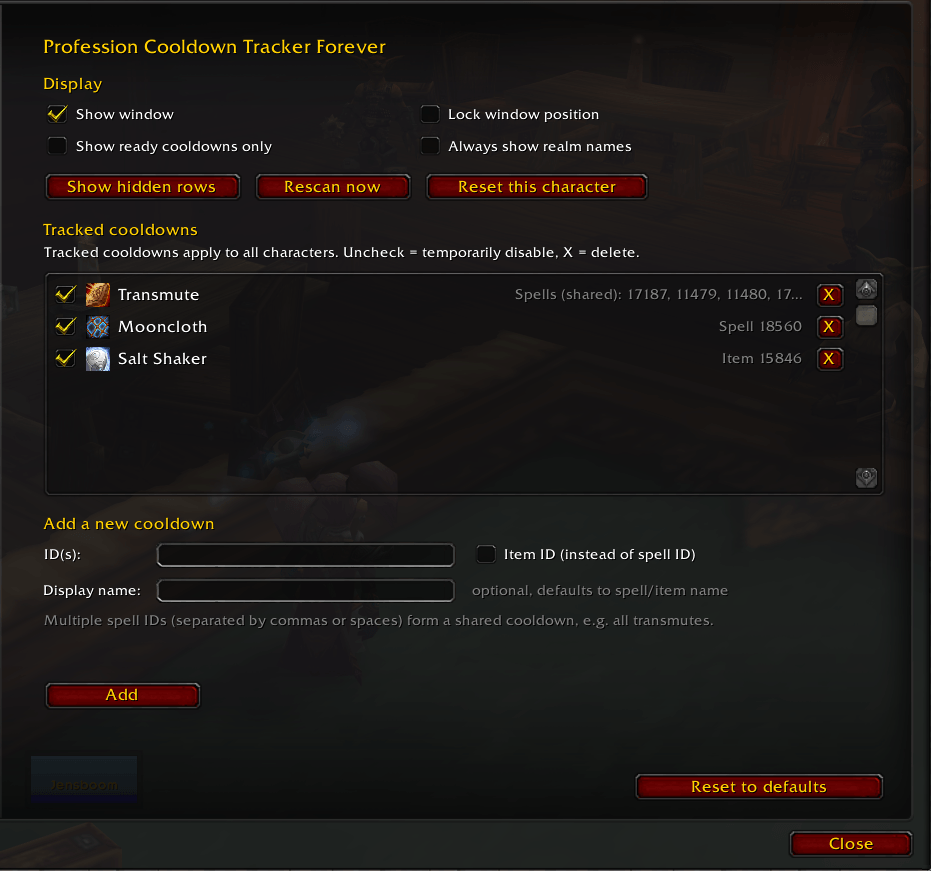
Open it with /pctf config or via Esc → Options → AddOns → Profession Cooldown Tracker Forever.
Display – the same settings as the slash commands, just a click away:
- Show window – show or hide the cooldown window
- Lock window position – prevent the window from being moved
- Show ready cooldowns only – hide everything that is still on cooldown
- Always show realm names – show realm names even with only one realm
- Show hidden rows – bring back all rows you hid with Ctrl + right-click
- Rescan now – read the current character's cooldowns again
- Reset this character – delete the saved data of the current character and rescan (asks for confirmation)
Tracked cooldowns – the list applies to all characters on your account.
- Checkbox: temporarily disable an entry. Its saved timers are kept.
- X button: delete an entry from the list.
- Add a new cooldown:
- ID(s): enter a spell ID. To track a shared cooldown, enter several spell IDs separated by commas or spaces. They will be shown as one row.
- Item ID: tick this box to track an item cooldown instead (for example the Salt Shaker, item 15846). Only one item ID per entry.
- Display name: optional. If you leave it empty, the spell or item name is used.
- A live preview with icon and name shows what you are about to add. Unknown IDs and duplicates are rejected.
- Reset to defaults: restores the default list after a confirmation. Saved timers of your characters are kept.
Slash commands
| Command | Description |
|---|---|
/pctf |
Show or hide the window |
/pctf config |
Open the options menu |
/pctf lock |
Lock or unlock the window position |
/pctf ready |
Toggle: show only cooldowns that are ready |
/pctf realm |
Toggle: always show realm names |
/pctf unhide |
Show all hidden rows again |
/pctf scan |
Rescan the current character's cooldowns now |
/pctf reset |
Delete the saved data of the current character and rescan |
/pctf del Name [Realm] |
Remove a character from the list (current realm if no realm is given) |
Good to know
- A character's cooldowns are recorded once you log in with that character. Log in each crafter once after installing.
- Each character only updates its own data. Other characters are changed only by
/pctf del. - Item cooldowns are only read while the item is in your bags.
Profession Cooldown Tracker Forever Team