Repair Armor
- By
Repair Armor displays your overall equipped durability at a glance, with customizable thresholds and a clear warning whenever an item breaks.
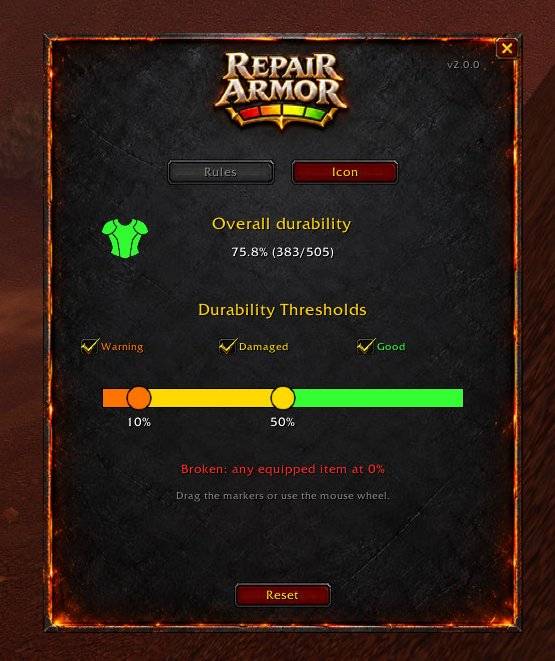
WoWScrnShot_102226_224226.jpg
Description
Repair Armor
Keep an eye on your equipment’s durability with a movable, color-coded armor indicator.
Repair Armor displays your overall equipped durability at a glance, with customizable thresholds and a clear warning whenever an item breaks.
Features
- Color-coded indicator: Green for Good, yellow for Damaged, orange for Warning, and red for Broken.
- Customizable thresholds: Adjust the Warning and Damaged limits using a colored bar with two draggable markers.
- Visibility by state: Choose whether to display the indicator during Good, Damaged, or Warning states.
- Broken equipment priority: If any equipped item breaks, the indicator turns red and remains visible regardless of your visibility settings.
- Detailed tooltip: View individual equipment durability, overall durability, and the number of broken items.
- Movable and resizable: Drag the indicator wherever you prefer and adjust its size in the settings.
- Saved settings: Your position, size, thresholds, and visibility preferences persist between sessions.
- Forge-themed panel: A custom background with familiar WoW controls.
How overall durability works
Overall durability is calculated by dividing the combined remaining durability of your equipped items by their combined maximum durability. Items without durability are excluded.
Controls
- Click the armor indicator: Open settings.
- Drag the indicator: Change its position.
/raor/repairarmor: Open or close settings, even when the indicator is hidden./ra reset: Restore the indicator’s initial position.
The indicator starts to the left of the default player unit frame.
Designed for WoW Forever / Classic+.
Repair Armor Team