RegrowthLootTool
- By
Regrowth Loot Tool
A customer loot council tool for the Regrowth Alliance guild in Thunderstrike EU anniversary servers.
The data is imported and synched to Loot Council members to provide as much in game information as possible to assist in Loot Council decisions during raiding.
Player Tooltips
- Player Raid Attendance displayed as a %
- Players Total previous Loot wins
- Date of players last won item.
Loot Tooltips
- Displays list of players who have item on TMB Wishlist (hidden is no players)
- Shows Loot Councils pre-defined Loot Bias
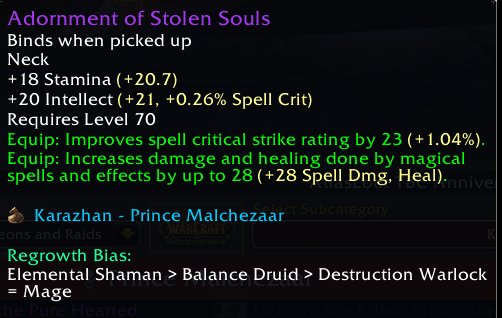
- Wishlist not displayed
Config Options
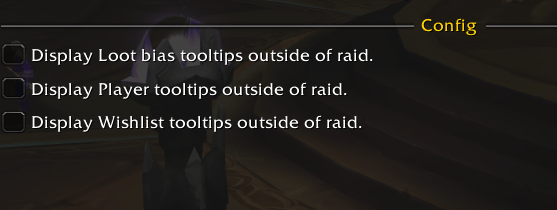
- All Tooltips can be toggled to display only within raids, or outside of raids also.
Optional Modules
Two companion addons extend Regrowth Loot Tool. Both require the core addon to be installed and will not work standalone — install alongside it if you want the extra functionality, or skip them if you just want the core sync/tooltip features.
RG History (Optional)
A dedicated browser window for everything Regrowth Loot Tool has tracked:
- Overview — a sortable table of every player, their attendance %, total loot, and a per-phase breakdown
- Player Loot — pick a player, see everything they've won with dates and phases
- Loot Data — search any item across a phase (or all phases) and see who's won it and when
Command: /rg history or /rg h
RG Bias (Optional)
A searchable reference for the guild's loot council item priorities/bias, organized by raid and boss, in raid-progression order with phase colour-coding. Type to search for an item directly rather than digging through a raid's full loot table.
Command: /rg bias or /rg b
Installation
All-in-one: download RegrowthLootSuite.zip and extract it directly into your World of Warcraft/_classic_/Interface/AddOns/ folder — it contains all three addon folders together and installs everything in one step.
Core only: download RegrowthLootTool.zip
Either way, enable all three on the character-select AddOns screen — the two optional modules are clearly labelled "(Optional)" there so it's obvious which are extensions and which is the core.
RegrowthLootTool Team