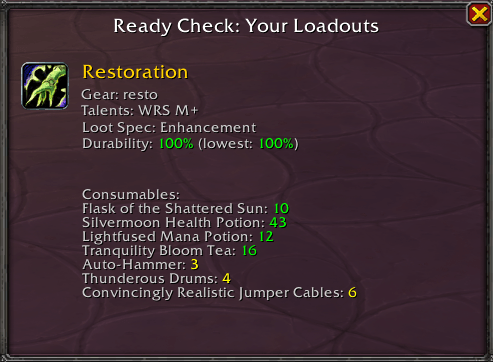
Ready Check Window.png
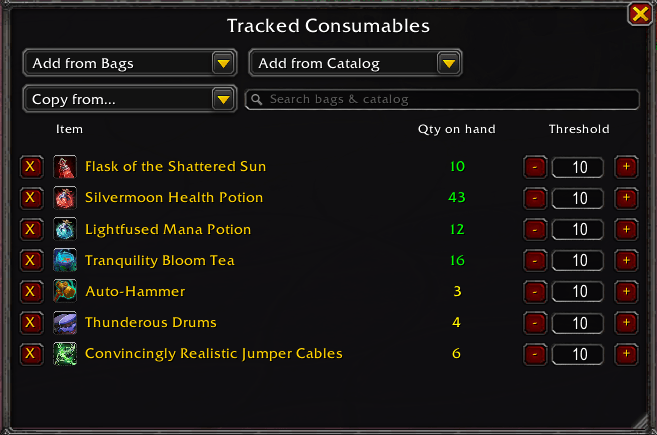
RCL Consumables.png
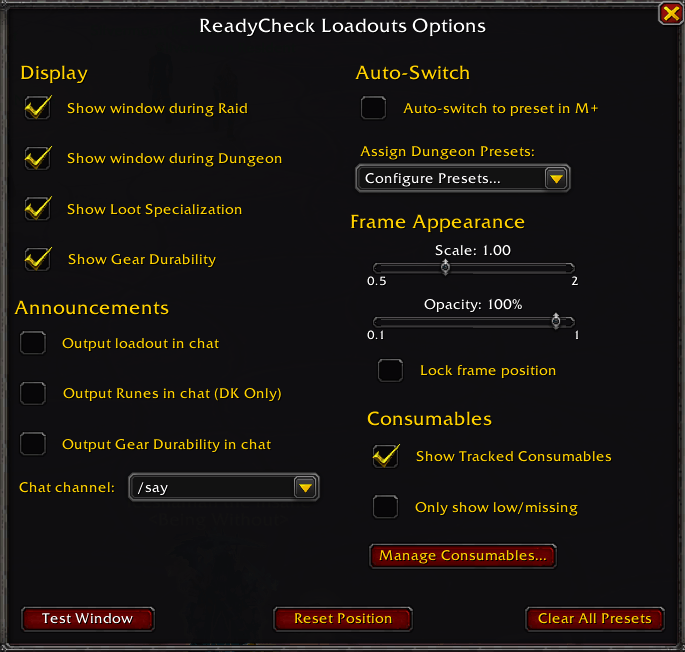
RCL Options.png
Description
# Ready Check Loadouts
**Never start a pull with the wrong talents, low durability, or no flask again.**
Ready Check Loadouts shows your specialization, gear set, talent loadout, gear durability, and consumable stock the moment a ready check fires, giving your raid or dungeon group instant visibility into your setup with zero extra chatter.
## Features
### Loadout display
When a ready check fires, a draggable window shows:
- Active specialization (with icon)
- Equipped gear set name (or "No Set")
- Active talent loadout name (or "Unsaved / Starter Build")
- Loot specialization
- Gear durability, updated live
- **Death Knights:** both weapon runeforges, flagged "Missing!" if a slot is unenchanted
### Consumable tracking
- Track flasks, potions, food, runes, oils, drums, and more, with quality-tier-aware counts that fold both crafted tiers into a single total
- A consumables manager (open it via `/rcl` or the options panel) to add or remove items and set a per-item low-supply threshold
- Tracked consumables appear on the ready-check window with low/missing highlighting
- A quick-add search bar that pulls items from your bags or the catalog in one box
- Account-wide profiles: build your list on one character and copy it to another with "Copy from", then adjust per character
### Mythic+ talent auto-switching
Assign a talent preset to each Mythic+ dungeon. When a ready check fires there, the addon can switch you to the correct preset automatically, and warns you if you're in the wrong loadout.
### Chat announcements
- Optionally announce your talent loadout name to a chat channel of your choosing
- Death Knights can announce their runeforge setup the same way
### Customization
- Independent on/off toggles for raids and dungeons
- Adjustable frame scale and opacity, plus a lock option
- Selectable output channel for announcements
- Per-dungeon preset dropdowns and an auto-switch toggle for Mythic+
- Test the window anytime without triggering a real ready check
## Slash commands
- `/rcl` — open the options menu and consumables manager
- `/rcldebug` — print debug info (instance ID, difficulty, preset status, tracked consumables, and more)
## Notes
- Consumable lists are account-wide; other settings are saved per character
- The window closes automatically when you enter combat
- Supports the current Mythic+ season dungeons
- No dependencies required
## Links
- [CurseForge](https://www.curseforge.com/wow/addons/readycheck-loadouts)
## License
MIT
Ready Check Loadouts Team