AutoSummon
- By
Automatically accept summons after a configurable delay, with smart cancel-on-combat and cancel-on-death safeguards.
AS Options.png
Description
AutoSummon
Stop alt-tabbing back to a missed summon. AutoSummon automatically accepts summons after a short, configurable delay — so when your group summons you to the raid, dungeon, or world boss, you get there without lifting a finger. And if the timing's wrong, it backs off on its own.
Why use it?
You're tabbed out between pulls, sorting your bags, or AFK for a second when the summon lands. By the time you notice, it's expired and someone has to recast. AutoSummon handles the click for you, with a countdown you can cancel anytime, and smart safeguards so it never pulls you somewhere you didn't want to go.
Features
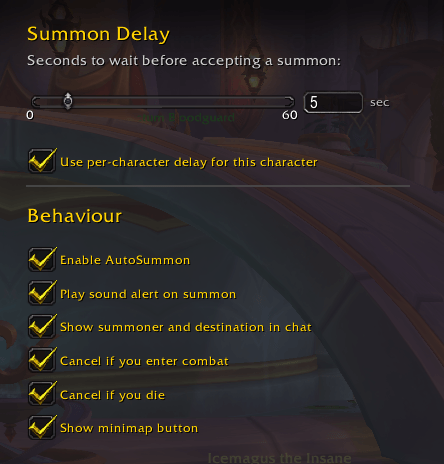
- Configurable delay — set how many seconds to wait before accepting (0–60). Use a longer delay as a safety window, or set it to 0 to accept instantly.
- Slider and text input — set your delay however you like, in a clean options panel.
- Cancel on combat — if you enter combat before the countdown finishes, the accept is automatically aborted. No more getting yanked out of a fight.
- Cancel on death — won't accept a summon while you're dead.
- Summoner and destination info — shows who's summoning you and to which zone, so you can confirm it's intentional before it fires.
- Sound alert — plays a chime the moment a summon is detected, even if you're looking away.
- Per-character delay override — different delay on your main vs. your alts.
- Minimap button — quick access, draggable, and hideable if you keep a tidy minimap.
- Full options integration — settings live in the standard Options → AddOns panel, with tooltips on every setting.
How to use
Install, log in, done. AutoSummon works out of the box with a 5-second default delay. To change anything, click the minimap button or type /as.
Slash commands:
/as— open settings/as delay <number>— set the delay in seconds/as cancel— cancel a pending acceptance/as status— show your current settings/as enable//as disable— toggle the addon
Notes
Built for The War Within / Midnight (12.0.5). AutoSummon is lightweight, self-contained (no library dependencies), and saves your settings between sessions.
Found a bug or have a feature idea? Drop it in the comments or open an issue on GitHub.
AutoSummon Team