Ready Check Consumables
- By
A World of Warcraft addon that displays consumable and buff status during ready checks. Designed for raid leaders and raiders who want a quick overview of group preparedness.
Screenshot 2026-08-19 203542.png
Screenshot 2026-08-19 203448.png
Screenshot 2026-05-23 183623.png
Screenshot 2026-06-15 213552.png
Description
Ready Check Consumables
Ready Check Consumables (RCC) helps you and your group prepare for the next pull in World of Warcraft Retail. Keep consumables close at hand, see what needs refreshing, check your group's readiness, and maintain consumable macros as your inventory changes.
Open settings with /rcc s or Options > AddOns > Ready Check Consumables.
Each display and automatic chat reporting has its own Enabled checkbox,
so you can use only the features you want. Settings and saved positions are
controlled by the Active Profile selector on the main RCC settings page.
Preferred consumables are character-specific by default; see
Settings Profiles to change how your setup is shared.
Personal Consumables
Choose a temporary preparation frame, a permanent Action Bar, or both. Their buttons are configured separately, while preferred item choices are shared.
Consumables Frame
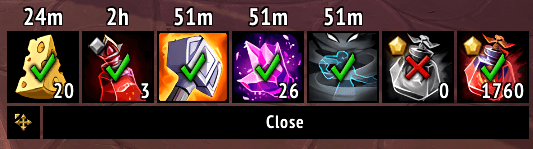
A temporary, clickable bar brings food, flasks, augment runes, vantus runes, weapon enchants, raid buffs, and other essentials together during ready checks. Remaining buff durations, item counts, cooldowns, and reminder glows help you see what needs attention. Hover an icon to see details and available alternatives.
Drag Blizzard's ready-check dialog by its background outside combat; attached consumable buttons move with it. Allow Dragging, under Ready Check Frame on the main settings page, is on by default and saves the position in your profile. Turning it off forgets that saved position.
On the Consumables Frame settings page:
- Choose buttons: Use Buttons by Open Event. Each row's Enabled checkbox controls that button overall; the event columns choose when it appears.
- Choose when it opens: Ready checks are supported by default. Under Automatic Open Events, enable instance entry, cauldron pickups, or BigWigs/DBM break timers. For instance entry, select the instance types you want; delves use Scenarios.
- Adjust the size: Change Scale for the whole frame or Icon Width to make buttons narrower, from 50% to 100%, without stretching their images.
- Keep it visible longer: Enable Keep Open After Ready Response and adjust Ready Check Duration. Instance-entry opens have a separate auto-hide toggle and delay.
Consumables Action Bar
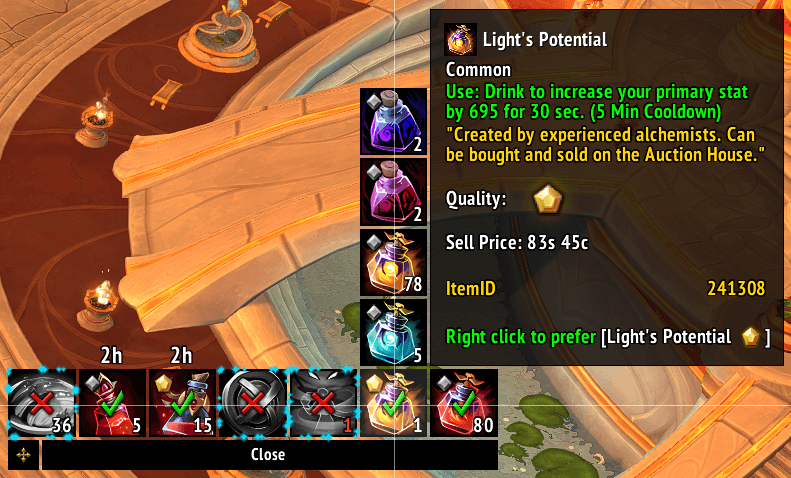
Keep selected consumables on a permanent bar that stays usable in combat. Use flyouts before combat to choose preferred items, then use the primary buttons during the fight. Buttons keep a consistent order, making it suitable for everyday use as well as preparation before a pull.
On the Consumables Action Bar settings page:
- Turn it on: Check Enabled; the permanent bar is off by default. Choose individual icons under Buttons. If you only want the permanent bar, turn off Enabled on the separate Consumables Frame page.
- Arrange it: Set Icons Per Row, button width and height, and horizontal and vertical gaps. Non-square icons are cropped rather than stretched.
- Choose the information shown: Adjust text size, duration-text side, and flyout direction. Under Button Information, toggle counts, durations, status marks, and profession-quality marks.
- Move it: Use EllesmereUI Unlock Mode when available, or Blizzard Edit Mode otherwise. The settings page also offers anchor and X/Y position controls.
The permanent bar uses hover highlights rather than persistent reminder glows. Buff information and item cooldowns continue updating during combat when WoW makes that information available.
Additional Buttons
- Rogue poisons have separate lethal and non-lethal buttons, independent of weapon enchants. With Dragon-Tempered Blades, split icons show both active poisons; apply the selected pair with one click per poison.
- Repair prefers a ready reusable device such as Jeeves before a consumable such as Auto-Hammer. It shows cooldowns rather than ready/missing marks.
- Inky Black Potion shows the item or active buff without ready/missing marks.
- Recuperate adds a dedicated button for the recovery spell also used by the healing-potion macro.
- Consumable Stasis offers items that pause consumable buff durations during breaks. Its temporary-frame button appears for break timers by default.
Repair, Inky Black Potion, and Recuperate are off by default. Enable the ones you want on each display's settings page.
Group Readiness
The Raid Status Frame and Chat Reports work independently of the personal displays and of each other.
Raid Status Frame
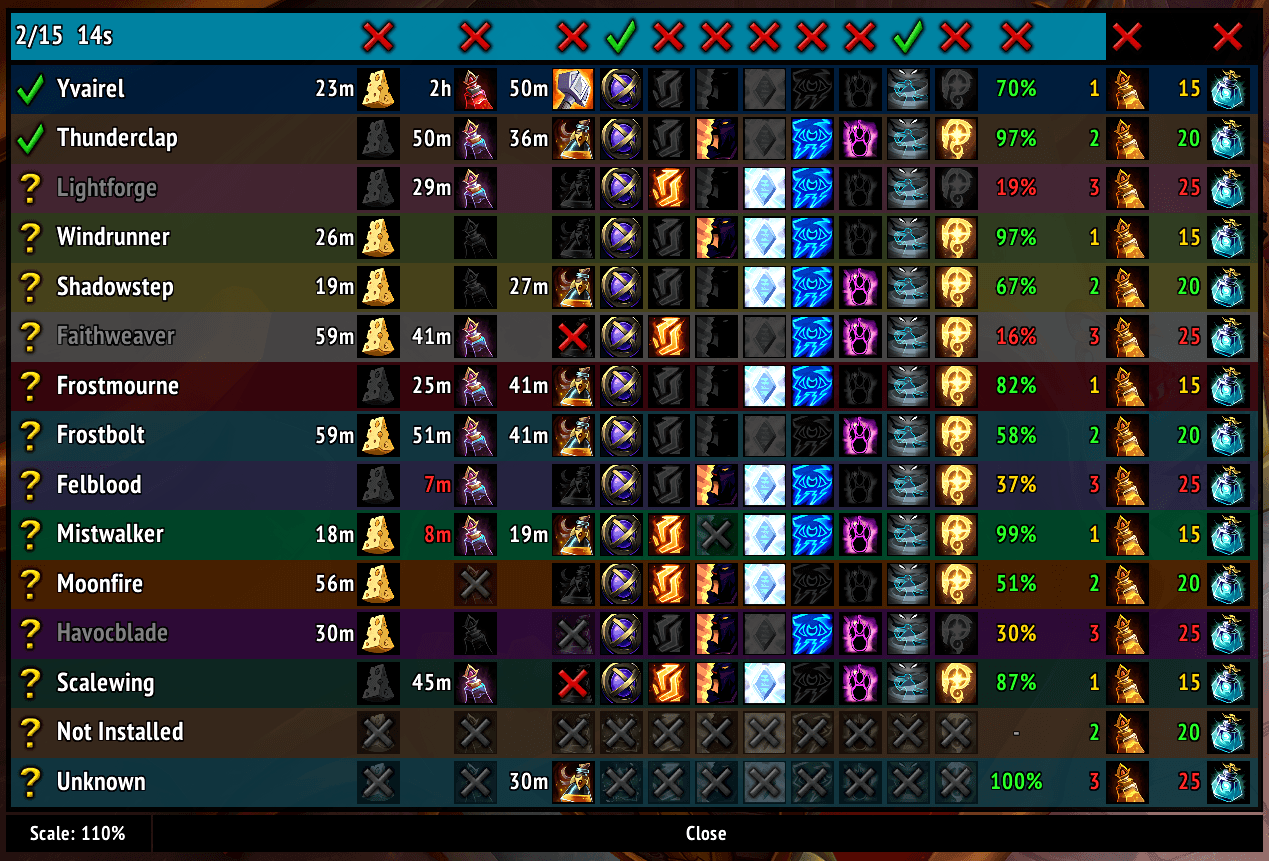
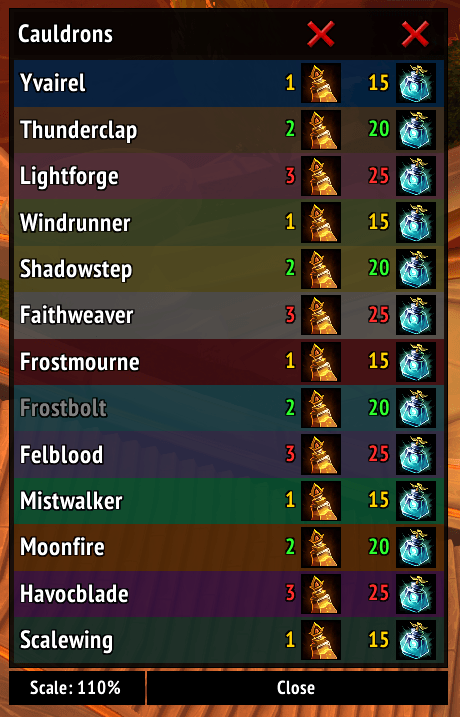
See your party or raid's food, flasks, runes, temporary weapon enchants, raid buffs, and durability alongside their ready-check responses in one table. Buff icons and remaining durations help identify what needs refreshing. Feast and cauldron tracking also shows available provisions and members' flask or potion pickup counts.
On the Raid Frame settings page:
- Display: Turn the frame on or off with Enabled, and adjust Scale. You can also drag the frame to move it and use its bottom scale control.
- Ready-check timing: Use Keep Open After Finished and Keep Open Duration to leave the results visible briefly.
- Feasts and cauldrons: Enable Track Feasts and Cauldrons. Turn on Show Outside Ready Checks if you also want those columns to appear when provisions are detected between ready checks.
Chat Reports
Automatically share missing or expiring consumables, missing raid buffs, low durability, and offline players in group chat during ready checks. RCC coordinates with other RCC users and Method Raid Tools to avoid duplicate automatic reports.
On the Chat Report settings page:
- Enabled turns your automatic reporting on or off.
- Who Can Report selects raid leader, leader/assist, or any raid member. This role restriction applies only in raids.
- Raid Instances and Dungeon Instances select the difficulties where automatic reports are allowed.
By default, automatic reporting is enabled for Heroic and Mythic raids and limited to raid leaders or assistants. Dungeon reporting is off by default.
When a raid has benched members, RCC can also announce when every active member has answered Ready, without waiting for the bench. This follows Chat Report settings and works even with the Raid Status Frame closed or disabled.
Managed Macros
Create macros for food, flasks, augment runes, vantus runes, potions, healthstones, raid buffs, and weapon enchants. RCC keeps them updated as your bags, equipment, known spells, zone, and preferred items change.
Item macros, except Augment Rune, include one eligible backup from your bags, so the macro can still work if the primary runs out during combat. Augment Rune macros use one item only. Inside the Brawler's Guild, its potion takes priority when carried, with your normal healing potion as backup.
To create one:
- Open the Macros settings page.
- Find the consumable you want and click Shared for an account-wide macro, or Character for a character-specific macro.
- Place the created macro on your normal WoW action bar.
You can also include automatically updated potion or healthstone lines in your own custom macros. See custom macro markers below for the syntax.
Settings Profiles
Use Active Profile on the main settings page to choose how settings and saved positions are shared:
- Global keeps one setup across your characters and is selected by default. Your existing settings are preserved here when upgrading to profiles.
- Character keeps an individual setup for the current character.
- Specialization switches automatically with your spec and shares that spec's setup across characters.
- Class, Realm, Faction, and named custom profiles are also available.
Preferred consumables remain character-specific by default, shared by your personal displays and macros. Enable Use profile-specific consumable preferences in the same section if you want choices tied to your selected profile instead. See profile management for copying, resetting, and preference storage details.
Preview and Open Frames
/rcc copens the enabled Consumables Frame outside combat./rcc tpreviews the temporary personal and raid frames with sample data; it does not start a real group ready check./rcc hcloses temporary RCC frames and previews without hiding the permanent Action Bar.
Advanced Reference
Profile management
The Profiles section on the main settings page includes:
- New Profile: Create and select a named profile with RCC's defaults.
- Copy Into Active: Replace the selected profile's settings and saved profile preferences with another profile's, after confirmation. To start a character or spec profile from your current setup, select it first, then copy from Global or whichever profile holds that setup.
- Reset Active: Restore defaults and clear that profile's preferences.
- Rename Profile and Delete Profile: Manage custom profiles. The active profile cannot be deleted; built-in profiles cannot be renamed or deleted.
Unused profiles start with addon defaults, not inherited Global settings. Changes affect every character using the same profile. Profile changes are blocked during combat and while Edit Mode or Unlock Mode is open.
When upgrading from account-wide preferences, each character receives a copy of the old choices once, on their first login. Use profile-specific consumable preferences applies only to your character and stays set across profile changes. Switching it does not copy or delete choices: turning it off restores your character's preferences, while turning it on uses only the selected profile's. A profile with no preferences uses automatic selection. Copying or resetting profiles never changes your character's saved choices or this checkbox.
Choosing consumables
Left-click usable buttons to consume an item or cast a spell. Where supported, right-click an item outside combat to save it as your preferred choice. Right-click the preferred item again to clear that choice and return to automatic selection, including any applicable overrides. Preferences are shared by the personal displays and managed macros. They are stored for your character unless you opt into profile-specific preferences. Item counts use your bags, not your bank.
Some buttons have different purposes on the two displays:
| Button | Consumables Frame | Consumables Action Bar |
|---|---|---|
| Food, flasks, runes, and weapon enchants | Use or apply the selected item/spell | Use or apply the selected item/spell |
| Combat and healing potions | Right-click to choose a preferred item | Left-click to use; right-click to prefer |
| Healthstones | Display available supply | Left-click to use |
| Raid buffs and rogue poisons | Apply the selected buff or poison | Apply the selected buff or poison |
Your preference keeps the exact item and rank you chose. If it runs out, the button keeps showing that item with a zero count; macros can select an available alternative without changing your choice. Carried fleeting flasks and potions from the same family take priority over your regular choice, even if that rank is out of stock. Fleeting items cannot be saved as preferences.
Unlimited augment runes, combat and healing potions, repair devices, and consumable-pausing items show cooldowns on their buttons and flyout choices.
Augment runes
Prefer Unlimited Augment Runes is a shared setting on both the Consumables Frame and Action Bar settings pages, and also applies to macros. It puts carried unlimited runes ahead of consumable runes when choosing automatically, even across expansions, and is on by default. An explicit item preference takes priority; clearing it restores automatic selection. Cooldowns never change the selected rune.
Augment Rune macros always contain just one item-use line, with no backup: if the selected unlimited rune is on cooldown, it simply cannot be used yet. You can still left-click a consumable rune in the flyout or prefer it for your primary button and macro.
Weapon enchants
The button's item icon shows what you will apply next; its buff duration and status mark describe the enchant currently on your weapon. When no class-spell override or explicit item preference wins, RCC tries the most recently applied oil you still carry before normal item selection. Remembered applications stay with your character even when preferences are stored in a profile.
Healthstones and healing potions
Healthstones are selected automatically: a carried Demonic Healthstone takes priority over a normal one. The icon and charge count describe the selected stone; there is no saved preference.
Inside Bizmo's Brawlpub or Brawl'gar Arena, both displays automatically show the Brawler's Guild healing potion when you carry one. Your normal potion preference is kept for when you leave or run out of the Guild potion; normal potions remain available in the flyout.
Rogue poisons
Single- and double-poison modes keep separate preferences. With Dragon-Tempered Blades, prefer up to two poisons of each type; choosing another replaces the oldest preference. Other choices come from recently applied poisons.
Combat and button visibility
Enabled Action Bar buttons normally remain visible even when unavailable. The off-hand enchant button hides when that slot cannot be enchanted, and Raid Buff hides on classes without a raid-buff spell. Poison buttons only appear when you know a poison of that type. The bar closes gaps left by hidden buttons; equipment or spell changes during combat update the layout afterward.
The temporary Consumables Frame and Raid Status Frame hide in combat. Action Bar flyouts close when combat starts and cannot open during combat. The bar's primary buttons keep using the items or spells selected beforehand. Item choices refresh after combat. Readable buff durations and status marks continue updating; glows stay hidden. Managed macro updates also wait until combat ends.
Settings requested in combat open afterward. Manual Consumables Frame and Feast/Cauldron Frame opens are blocked during combat, not queued.
Reading group status
The Raid Status Frame covers active party or raid members, excluding bench groups outside the instance size.
- Column headers: Confirmed failures show a red X. Unknown and no-response states are neutral, so they do not block a green check for known-good members.
- Food: Eating is still in progress until a sufficiently long Well Fed buff appears.
- Weapons: A missing temporary weapon enchant or having no enchantable main-hand weapon equipped is a failure.
- Grey question mark: RCC is present, but the information could not be confirmed. The tooltip explains why the result is unknown.
- Grey X: No addon response arrived. The player may not have RCC installed or may have been unable to reply.
Readable buffs still show when another buff is restricted; buffs that cannot be confirmed remain unknown. Raid buffs that WoW never hides can still be identified as missing even with an unrelated secret aura present. When WoW prevents a reliable check of the active group's buffs, RCC omits the affected buff-based chat-report sections instead of reporting false missing buffs. RCC also reads Method Raid Tools durability data.
Closing the ready-check display also closes its feast/cauldron display.
/rcc ca reopens provision tracking while it remains active. Combat hides the
frame and resets feast/cauldron tracking.
Custom macro markers
RCC-owned macros use #RCC:<key> markers. Inline #RCCI:<key> markers update
a small group of item-use lines inside your own macro without changing the rest.
| Macro type | Key and aliases | Inline marker |
|---|---|---|
| Food | food |
Not supported |
| Flask | flask |
Not supported |
| Augment rune | augment, aug |
Not supported |
| Vantus rune | vantus |
Not supported |
| Combat potion | combatpot, combatpotion, cp |
#RCCI:cp |
| Healing potion | healpot, healingpotion, hp |
#RCCI:hp |
| Healthstone | healthstone, hs |
#RCCI:hs |
| Raid buff | raidbuff |
Not supported |
| Main-hand enchant | mhenchant, mhen |
Not supported |
| Off-hand enchant | ohenchant, ohen |
Not supported |
Put an inline marker on its own line. Optional macro conditions can follow it, for example:
#RCCI:cp [combat]The complete Healing Potion macro casts Recuperate out of combat and uses a
potion in combat. Its inline marker adds only the potion choices, not Recuperate
or a combat restriction unless you include [combat] yourself.
Item macros choose from available automatic overrides first, then your available preferred item, then the category's fallbacks. Augment Rune macros use only the first choice; other item macros include one eligible backup. These choices never change your saved preference. Inside the Brawler's Guild, the Guild potion is used first when carried, with your normal potion as backup. Otherwise, normal primary and backup selection applies. Spell-based macros remain single casts.
Entering or leaving a venue refreshes the macro outside combat. Choices stay
fixed during combat, with pending changes applied afterward;
RCC does not rewrite the macro when you use the last item mid-fight. The backup
is already included as a second /use command. WoW applies its normal item-use
restrictions and cooldowns to each command.
Inline choices all inherit the marker's conditions. Extra generated lines end
with #RCCI+; keep them immediately below the first marked line so RCC can
replace them together. To remove an inline marker, remove its generated lines
too. If an update would exceed WoW's 255-character macro limit, RCC prints a
message and leaves the macro unchanged so you can shorten it.
Command reference
Use /rcc for in-game help.
Everyday commands
| Short | Long | Description |
|---|---|---|
/rcc s |
/rcc settings |
Open settings |
/rcc c |
/rcc consume |
Open the Consumables Frame |
/rcc h |
/rcc hide |
Hide temporary frames; leave the Action Bar visible |
/rcc ca |
/rcc cauldron |
Reopen active feast/cauldron tracking |
/rcc r |
/rcc report |
Print a report locally |
/rcc rc |
/rcc report chat |
Send a report to group chat |
With no group channel available, reports stay local.
Previews
These commands use sample data, not a real group ready check.
| Short | Long | Description |
|---|---|---|
/rcc t |
/rcc test |
Timed combined frame preview |
/rcc tp |
/rcc test permanent |
Combined preview that stays open |
/rcc rt |
/rcc ready check test |
Timed ready-check-only preview |
/rcc rtp |
/rcc ready check test permanent |
Ready-check-only preview that stays open |
/rcc ct |
/rcc cauldron test |
Cauldron-only preview |
Ready Check Consumables Team