Range_Pro
- By
A customizable spell-range indicator for WoW Forever 1.60.1. Red for hostile targets in range, green for friendly targets in range, and gray when out of range. Includes a movable bar, in-game settings, center guides, and 11 languages.
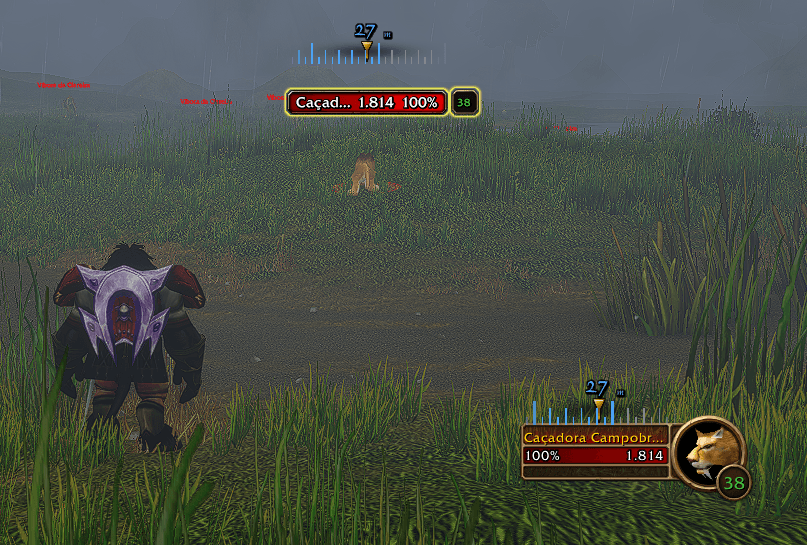
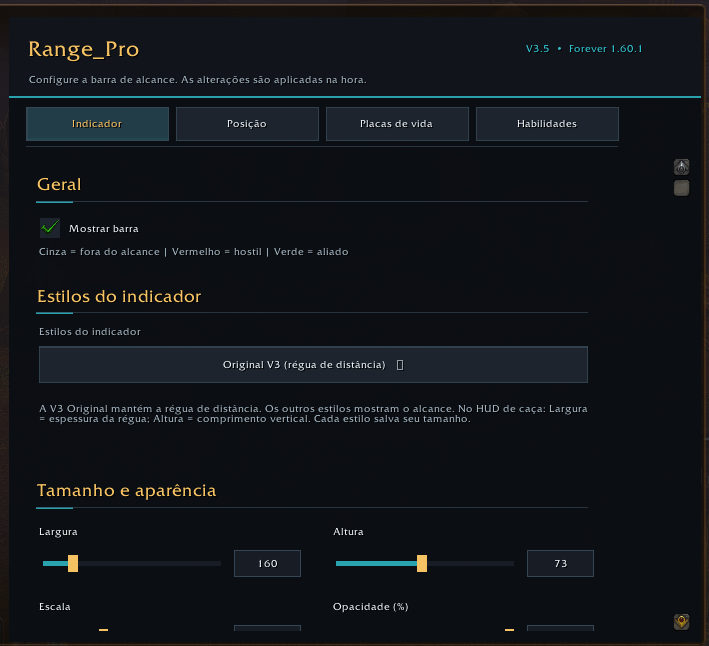
Imagem do ChatGPT 22 de nov. de 2026, 20_52_03.png
Description
Range_Pro — Simple, Accurate Range Feedback
Range_Pro is a lightweight spell-range indicator made for World of Warcraft Forever 1.60.1.
It tells you whether your current target is in range of the selected spell, without cluttering your interface.
🎯 How It Works
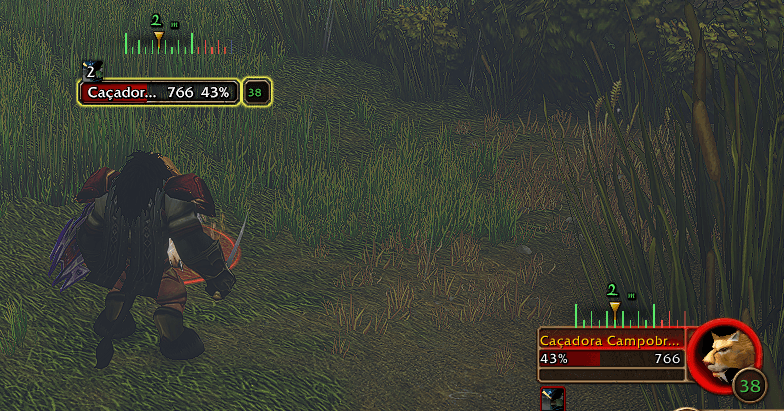
Range_Pro displays a clean, customizable status bar that automatically changes its appearance based on your target.
-
🔴 RED — IN RANGE: A hostile target is within range of your selected offensive spell.
-
🟢 GREEN — IN RANGE: A friendly target is within range of your selected healing or support spell.
-
⚪ GRAY — OUT OF RANGE: Your target is outside the selected spell's range.
If the game cannot determine the target's range, Range_Pro displays an appropriate status message.
The bar displays only the centered range status, keeping your interface clean and distraction-free.
⚙️ Features
Smart Range Detection
-
Automatically detects your character's class.
-
Recognizes supported spells from your spellbook.
-
Supports offensive and friendly spell-range checks.
-
Allows manual selection of the monitored spell.
-
Uses the game's native spell-range APIs.
Supported Classes
Includes predefined spell selections for:
-
Hunter
-
Mage
-
Warlock
-
Priest
-
Shaman
-
Druid
-
Paladin
Optional ranged attacks are also included for Warrior and Rogue.
Fully Customizable Bar
Configure everything directly through the in-game AddOns menu:
-
Bar width and height
-
UI scale
-
Opacity
-
Text size
-
Horizontal and vertical positioning
-
Show/hide options
-
Lock/unlock controls
-
Spell selection
Sliders and numeric input fields allow precise adjustments.
Easy Positioning
Range_Pro includes a convenient positioning system.
When the bar is unlocked, horizontal and vertical alignment guides appear at the center of your screen.
Drag the bar near these guides to automatically snap it into alignment.
Locking the bar hides the guides and saves its position.
🌍 Full Multilingual Support
Range_Pro supports 11 game locales:
-
English (enUS)
-
Brazilian Portuguese (ptBR)
-
German (deDE)
-
French (frFR)
-
Spanish — Spain (esES)
-
Spanish — Latin America (esMX)
-
Italian (itIT)
-
Russian (ruRU)
-
Korean (koKR)
-
Simplified Chinese (zhCN)
-
Traditional Chinese (zhTW)
All interface elements, configuration options, status messages, and addon chat messages are localized.
The language is automatically detected from your WoW client.
Character-Specific Settings
Each character maintains independent settings, allowing different bar positions, sizes, and spell preferences.
🛠️ Installation
-
Download the latest Range_Pro ZIP file.
-
Extract the
Range_Profolder. -
Place it inside
World of Warcraft/Interface/AddOns/. -
Launch World of Warcraft Forever.
-
Enable Range_Pro from the AddOns list if necessary.
🎮 Configuration
Open:
ESC → Options → AddOns → Range_Pro
Alternatively, type:
/rp
Available Commands
-
/rp— Open configuration. -
/rp unlock— Unlock the bar. -
/rp lock— Lock the bar. -
/rp show— Show the bar. -
/rp hide— Hide the bar. -
/rp next— Select the next available spell. -
/rp prev— Select the previous spell. -
/rp list— List detected spells. -
/rp spell <ID>— Select an offensive spell. -
/rp heal <ID>— Select a friendly spell. -
/rp auto— Restore automatic spell selection.
📌 Important Information
Range_Pro checks the selected target using World of Warcraft's spell-range APIs.
An in-range result does not guarantee line of sight, sufficient resources, cooldown availability, or successful casting.
The addon does not calculate exact distances in yards.
✅ Compatibility
Game: World of Warcraft Forever
Client Version: 1.60.1
Interface: 16001
Addon Version: 1.2.1
Designed specifically for the WoW Forever client.
Author: PitbullManso
Range_Pro is an independent community addon and is not affiliated with Blizzard Entertainment.
Range_Pro Team