MikScrollingBattleText_Forever
- By
MikScrollingBattleText adapted for WoW Forever. Displays animated damage numbers, ability icons, critical hits, combat notifications, AoE hit tracking, and customizable scrolling text with PT-BR support.
Description
⚔️ MikScrollingBattleText_Forever
MikScrollingBattleText_Forever is a customized adaptation of the popular Mik's Scrolling Battle Text (MSBT), specially developed for World of Warcraft: Forever.
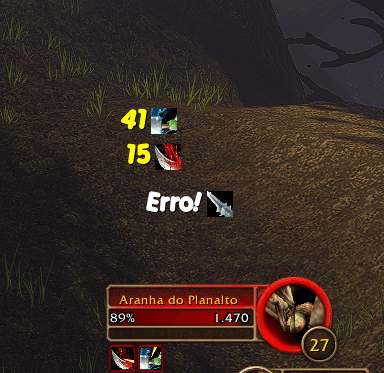
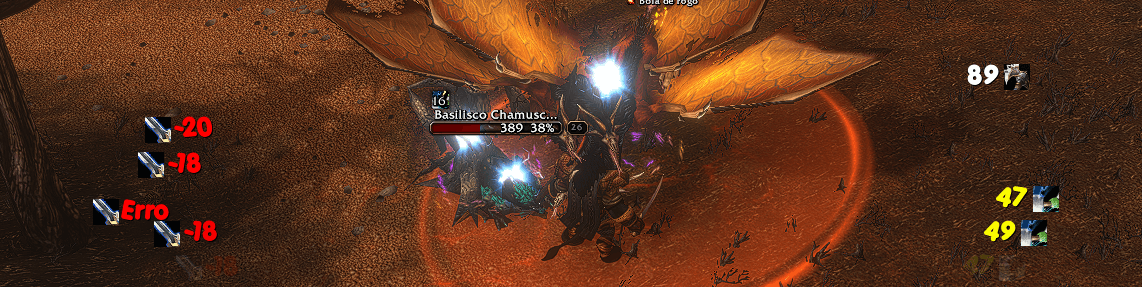
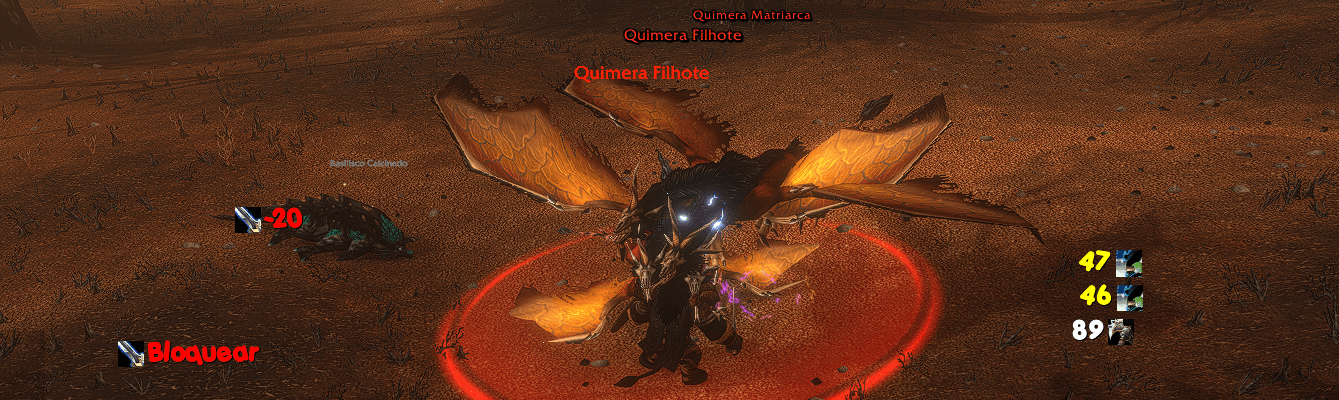
Bring your combat experience to life with animated damage numbers, ability icons, critical hits, healing notifications, and fully customizable scrolling combat text.
Designed to work with the Forever client's updated combat API, this adaptation brings the classic MSBT experience to a new generation of WoW players.
✨ Features
⚔️ Advanced Combat Text
-
Displays outgoing and incoming damage.
-
Shows ability icons alongside damage numbers.
-
Displays the equipped main-hand weapon icon for auto-attacks.
-
Supports physical and magical damage.
-
Displays critical hits with customizable animations.
-
Tracks damage-over-time (DoT) effects.
-
Displays healing and absorption events.
-
Supports combat notifications and special effects.
💥 Multi-Hit & AoE Tracking
-
Detects multiple hits from the same ability.
-
Supports multi-target combat events.
-
Optional hit grouping with counters such as Hit 2, Hit 3, Hit 4, and more.
-
Supports physical and magical AoE damage.
-
Improved detection of rapid consecutive attacks.
-
Adjustable hit-grouping behavior.
Note: Multi-hit detection and damage aggregation depend on the combat information available from the Forever client.
🛡️ Combat Notifications
Stay informed about important combat events:
-
Dodge — Avoided attacks.
-
Parry — Parried attacks.
-
Block — Blocked damage.
-
Miss — Missed attacks.
-
Resist — Resisted spells.
-
Absorb — Absorbed damage.
-
Critical Hits — Powerful critical strikes.
Combat notifications can display alongside their corresponding ability icons and use the same scrolling areas as regular damage.
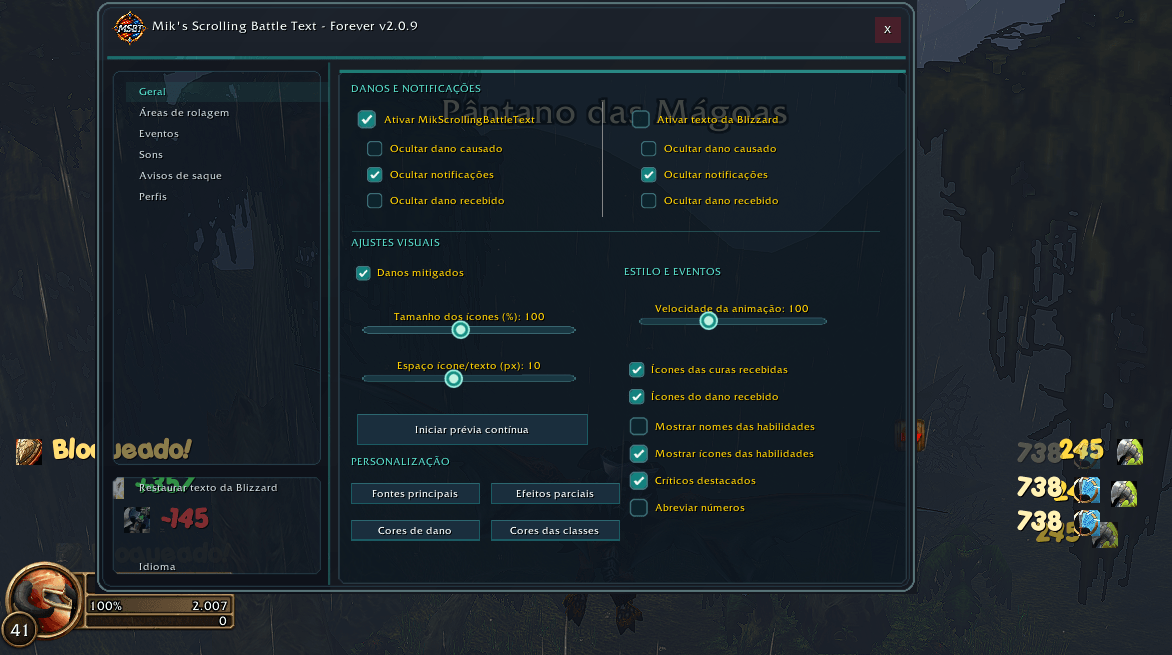
🎨 Fully Customizable Interface
Personalize your combat text exactly the way you want.
-
Customizable scrolling areas.
-
Separate Incoming and Outgoing combat text.
-
Combined player and pet combat text areas.
-
Adjustable horizontal and vertical positions.
-
Customizable fonts, sizes, and colors.
-
Multiple scrolling animation styles.
-
Adjustable animation direction and speed.
-
Ability icon positioning.
-
Customizable critical hit effects.
-
Real-time scrolling area previews.
-
Customizable combat event filters.
-
Profile management.
Choose between classic curved scrolling animations, vertical movement, and other available effects.
🐺 Player & Pet Integration
Player and pet combat events can share the same scrolling areas.
-
Outgoing damage uses the main Outgoing area.
-
Incoming damage uses the main Incoming area.
-
Pet combat events are integrated into these areas.
-
Individual combat event settings remain customizable.
⚡ Optimized for WoW Forever
Adapted for the Forever client's updated combat system.
Includes improvements for:
-
Combat event detection.
-
Ability identification.
-
Protected damage value rendering.
-
Rapid attack processing.
-
Ability icon matching.
-
Multi-target hit tracking.
-
Scrolling text positioning.
-
Combat notifications.
Designed to preserve the familiar MSBT experience while adapting to the Forever client's API restrictions.
🌍 Multilingual Support — 11 Languages
MikScrollingBattleText_Forever automatically detects your game client's language.
Supported languages:
| Language | Locale |
|---|---|
| 🇺🇸 English | enUS |
| 🇧🇷 Portuguese (Brazil) | ptBR |
| 🇪🇸 Spanish (Spain) | esES |
| 🇲🇽 Spanish (Latin America) | esMX |
| 🇩🇪 German | deDE |
| 🇫🇷 French | frFR |
| 🇮🇹 Italian | itIT |
| 🇷🇺 Russian | ruRU |
| 🇰🇷 Korean | koKR |
| 🇨🇳 Chinese (Simplified) | zhCN |
| 🇹🇼 Chinese (Traditional) | zhTW |
Translations cover combat notifications, configuration menus, scrolling areas, animations, interface settings, and more.
Some untranslated strings may fall back to English.
⚙️ Configuration
Type the following command in-game to open the configuration panel:
/msbt
Customize your scrolling areas, animations, combat notifications, fonts, icons, and other settings.
📦 Installation
-
Download the latest version.
-
Extract the ZIP archive.
-
Copy the
MikScrollingBattleText_Foreverfolder into your WoW ForeverInterface/AddOnsdirectory. -
Restart World of Warcraft.
-
Enable the addon and configure your preferred settings.
Important: Remove older installations before updating to prevent duplicate addon loading.
⚠️ Important Information
World of Warcraft: Forever uses a restricted combat API.
Some combat events and damage values are protected by the game client. As a result, certain features, including exact spell identification and multi-hit damage aggregation, may have limitations.
The addon uses the combat information available through the client and does not intentionally generate artificial damage values.
❤️ Credits
Forever Adaptation, Compatibility & Development: PitbullManso
Original Addon: Mik's Scrolling Battle Text (MSBT)
Original Creator: Mikord
Special thanks to the original MSBT developers and contributors for creating one of World of Warcraft's most recognizable combat text addons.
This is an unofficial community adaptation and is not affiliated with Blizzard Entertainment.
⚔️ Addon Information
Addon: MikScrollingBattleText_Forever
Version: 0.1.1
Game: World of Warcraft: Forever
Interface: 16001
Supported Languages: 11
Adapted & Maintained by: PitbullManso
MikScrollingBattleText_Forever Team