Random Fishing Bobber
- By
Random Fishing Bobber adds a simple way to bring some variety to your fishing adventures in World of Warcraft.
Random Fishing Bobber
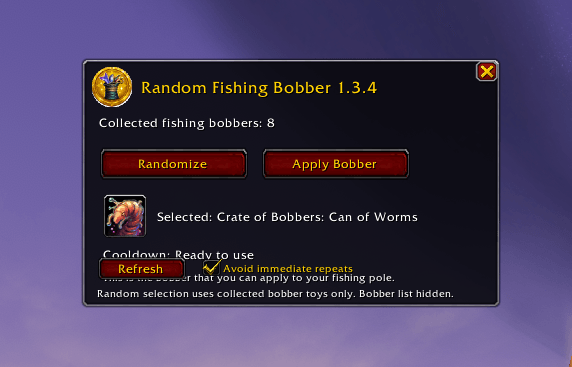
Random Fishing Bobber adds a simple way to bring some variety to your fishing adventures in World of Warcraft.
The addon automatically scans your Toy Box for fishing bobber toys, builds a list of the ones you can use, and lets you randomly choose one whenever you want. No more digging through your Toy Collection trying to find the bobber you want.
Features:
- Automatically discovers your collected fishing bobber toys.
- Supports both current bobber toys and legacy Crate of Bobbers toys.
- Randomly selects a fishing bobber.
- Optional no immediate repeats setting.
- Secure action button that can be placed directly on your action bar.
- Rescan your Toy Box whenever needed.
/rfb debugshows which bobbers the addon detected.- Resizable interface.
- Automatically detects newly added bobber toys without requiring a manually maintained item list.
Slash commands
--------------
/rfb Open the addon window.
/rfb random Choose a random collected bobber.
/rfb refresh Rescan the Toy Box.
/rfb debug List detected collected bobbers and IDs.
/rfb norepeat Toggle immediate-repeat protection.
/rfb minimap Show/hide the minimap button.
/rfb hide Hide the addon window.
Usage
-----
1. Log in normally. The addon scans and retries if Toy Box data is not ready.
2. Click Randomize to select one of your collected fishing bobber toys.
3. The selected bobber is shown below the buttons.
4. Click Apply Bobber to use the selected toy.
DETECTION NOTE
--------------
This version intentionally detects by Toy Box name rather than a
hard-coded list of item IDs. That means newly added bobber toys can
be picked up automatically when their name contains "bobber".
Use /rfb debug after collecting a new bobber to verify that it was
detected.
please if you get LUA error post in the comment plus features we can add later on.
Version 1.3.4
-------------
- Uses PlayerHasToy() so uncollected bobbers are never added to the random pool.
- Keeps the Toy Box scanning/loading retry behavior.
- The main bobber list remains hidden.
- Randomize and Apply Bobber are side-by-side.
- A compact selected-bobber display appears directly below the buttons.
- Apply Bobber is a secure toy action and uses the bobber selected by Randomize.
- Removes the old Drag to Action Bar control from the main window.
- The new gold fishing-bobber icon is shown in the upper-left of the window next to the title.
- Minimap button remains outside the minimap ring and uses the same icon.
- Keeps no-repeat, Refresh, Debug, and minimap slash command
Version 1.3.4 changes:
- Added a functional Randomize button and secure Apply Bobber button.
- Shows the currently selected bobber beneath the buttons.
- Shows a live cooldown timer for the selected bobber using the current Retail C_Item.GetItemCooldown API.
- Shows “Ready to use” when the selected bobber is off cooldown.
- Random selection remains limited to collected/owned bobber toys.
- The full bobber list remains hidden.
- The gold fishing icon remains in the window title and on the minimap button.
Random Fishing Bobber Team