Quick Group
- By
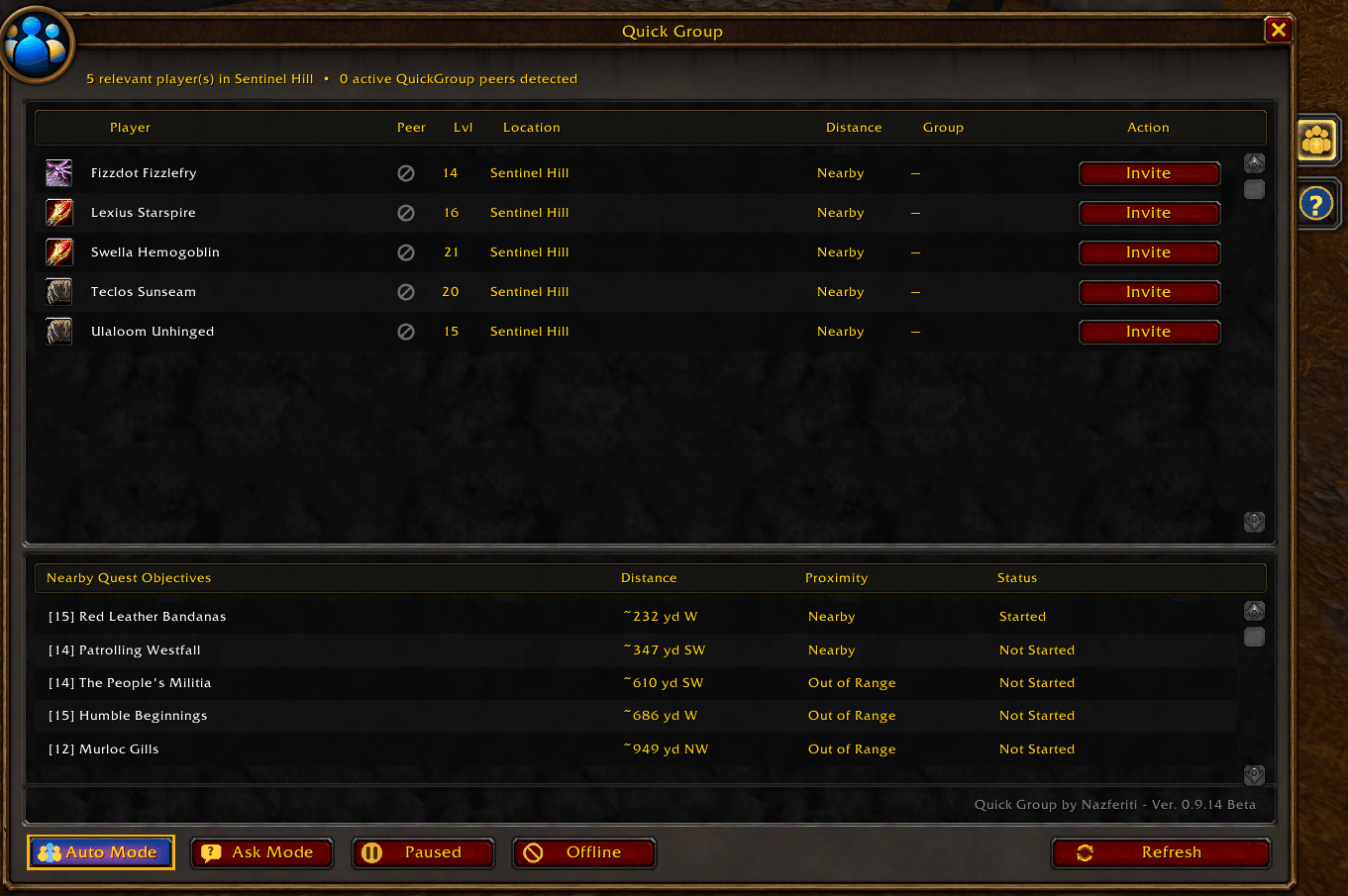
Quick Group’s main window displays nearby players and active Quick Group peers, with their level, location, distance, group status, and grouping actions, along with controls for Auto, Ask, Pause, Offline, and Refresh.
Description
Quick Group
Smart, location-aware quest matchmaking for World of Warcraft: Forever
Quick Group is a lightweight addon that helps players find and form groups while questing in World of Warcraft: Forever.
Ever find yourself fighting through a difficult quest area, knowing other players must be working on the same objectives, but struggling to find anyone to group with?
Forever's phasing makes this even more challenging. Players may be nearby but invisible to one another, working on the same quest in different phases, or already part of a group with room for more.
Quick Group helps bring those players together.
Unlike traditional grouping addons that simply compare quest logs, Quick Group focuses on where you're actually questing.
It looks for compatible players working near the same quest objectives, considers their grouping preferences and party availability, and helps them form groups without unnecessary interruptions.
Go where your quest takes you. Find players doing the same thing. Group up.
Intelligent Quest Matchmaking
Completely rebuilt for version 0.9.0 Beta!
Quick Group's new matchmaking system is designed around one important principle:
Sharing a quest doesn't necessarily mean two players should group together.
Two players standing in Stormwind might have the same unfinished quest in Westfall, but that doesn't mean they're currently interested in completing it.
Quick Group now uses objective-based matchmaking to make better decisions.
When evaluating a potential match, Quick Group considers:
- Shared objectives: Players must have a qualifying unfinished quest in common.
- Objective proximity: Players must be near the relevant quest objective area.
- Player distance: Players must be within their selected matchmaking distances.
- Party availability: Quick Group considers existing parties and available group slots.
- Grouping preferences: Players control whether Quick Group groups automatically, asks first, or remains inactive.
- Quest completion: Quests that are ready for turn-in are excluded from matchmaking.
For a quest to become eligible, you generally need to be within approximately 175 yards of its objective location.
This helps prevent unwanted grouping offers in cities, quest hubs, or other unrelated locations.
The goal isn't simply to find someone with the same quest.
It's to find someone doing the same quest, in the same area, at the same time.
Choose Your Matchmaking Distance
Not everyone wants to group with players several hundred yards away.
Quick Group lets you choose how far it should look for compatible players:
- Small: 100 yards
- Medium: 150 yards
- Large: 250 yards
- Huge: 350 yards
Quick Group respects both players' selected distances when evaluating a match.
These settings control the distance between players. Quest-objective eligibility is evaluated separately.
Whether you're clearing a small cave or working through a larger outdoor quest area, you can choose the distance that works for you.
Smarter Group Formation
Finding a compatible player is only part of the problem. Quick Group also needs to determine how players should group.
The rebuilt matchmaking system is designed to:
- Recognize compatible players who are already in parties.
- Prefer filling suitable existing groups rather than unnecessarily creating new ones.
- Consider available party slots.
- Coordinate grouping between compatible Quick Group users.
- Reduce conflicting invitations and competing group formation.
- Help players discover additional grouping opportunities through other Quick Group users.
This allows Quick Group to focus on building useful questing parties rather than simply sending invitations whenever another player is detected.
Nearby Quest Objectives
Quick Group now includes a dedicated quest objectives panel in its main window.
The panel displays active quests with known objective locations in your current zone, organized by relevance.
Proximity
- In Area: Within 175 yards of the quest objective.
- Nearby: Between 176 and 350 yards.
- Out of Range: More than 350 yards away.
- Ignored: Quest objectives completed and awaiting turn-in.
Quests are sorted by proximity and then by distance, keeping the most relevant objectives at the top.
Quest Progress
The panel also indicates whether a quest is:
- Not Started
- Started
- Incomplete
- Ready for turn-in
When location information is available, Quick Group displays the distance and direction to the objective.
You can also click a quest to open it in your quest log.
This gives you a convenient overview of your current questing opportunities while helping you understand which quests Quick Group considers relevant for matchmaking.
Multiple Ways to Discover Players
Quick Group doesn't depend entirely on seeing another player standing beside you.
It uses available in-game discovery and communication methods to identify potential grouping opportunities.
These can include:
- Nearby players encountered while questing.
- Other players running Quick Group.
- Existing parties and group members.
- Supported guild and group communication.
- Relevant public-chat grouping requests.
When two compatible Quick Group users discover one another, the addons can exchange relevant quest, location, and grouping information using WoW's addon communication system.
The more players using Quick Group, the more effective matchmaking becomes.
Players without the addon can still appear in nearby-player discovery and receive manual invitations. However, full objective-based matchmaking works best when both players have a compatible version installed.
Grouping Modes
Quick Group offers four modes so you can decide how involved it should be in your gameplay.
Auto
Quick Group automatically coordinates compatible grouping opportunities based on your quests, location, and preferences.
Ideal for players who want to spend less time searching for groups and more time questing.
Ask
Quick Group identifies potential grouping opportunities but lets you decide whether to participate.
Ideal for players who want the convenience of matchmaking while retaining control over invitations.
Paused
Temporarily suspends automatic grouping while keeping Quick Group available and allowing nearby group awareness.
Useful when you're taking a break from grouping but don't want to disable the addon.
Offline
Disables Quick Group matchmaking participation for the session without unloading the addon.
Temporary Quest Groups
Open-world quest groups are often temporary.
You might group with someone to defeat a difficult enemy, complete several objectives, and then continue in different directions.
Quick Group can optionally manage parties that it created in Auto mode.
When you leave the relevant quest area, Quick Group can automatically leave the temporary party after a configurable delay:
- 30 seconds
- 60 seconds
- 120 seconds
- Never
You'll receive a warning before leaving, and returning to the quest area cancels the pending departure.
Quick Group does not automatically take control of dungeon groups, raids, manually joined parties, or other groups it did not create and manage.
Manual Invitations and Non-Addon Players
Quick Group is still useful when nearby players don't have the addon installed.
The nearby-player list allows you to identify players encountered in your area and manually invite them.
When appropriate, Quick Group can include a friendly whisper mentioning your nearby eligible quests before sending a party invitation.
For players who also use Quick Group, shared quest information can help make those invitations more relevant.
For players without the addon, Quick Group does not assume they have the same quests.
This helps make grouping more approachable while the Quick Group community continues to grow.
Additional Features
Loot Preferences
Choose between Group Loot and Free For All for eligible Auto-created groups. Quick Group only attempts to apply your preference when it manages the group and you are the party leader.
Party Announcements
Optional announcements let party members know about meaningful grouping activity, such as new invitations, without flooding chat with routine discovery messages.
Minimap Access
Quick Group includes a minimap button for convenient access to its interface and settings.
In-Game Configuration
Adjust matchmaking distance, grouping mode, temporary-party behavior, loot preferences, and discovery settings directly in game.
No External Services
Quick Group doesn't require an account, external website, or separate matchmaking server. It operates using the capabilities available through World of Warcraft: Forever.
Getting Started
-
Install Quick Group and enable the addon.
-
Open the interface using
/quickgroupor the minimap button. -
Select your preferred grouping mode and matchmaking distance.
-
Head out into the world and start questing!
Quick Group will evaluate compatible grouping opportunities as you approach relevant quest objectives.
For the best results, encourage your friends and fellow players to install the latest version.
Designed for World of Warcraft: Forever
Quick Group was created specifically for the unique challenges of open-world questing in World of Warcraft: Forever.
Phasing, player discovery, and the evolving addon environment can make traditional approaches to finding quest groups less reliable.
Quick Group is designed to work within those limitations while making grouping more natural and less disruptive.
Quick Group is not a dungeon finder. Its purpose is to help players form temporary groups for open-world questing, where shared objectives and physical location matter.
Beta Development and Feedback
Quick Group is actively developed and tested for World of Warcraft: Forever.
Version 0.9.0 Beta introduces a complete replacement of the previous quest matchmaking system.
Because Forever and its addon environment are still evolving, some features may behave differently depending on quest data, phasing, or available communication methods.
Quest objective locations depend on information supplied by the game client. Some quests may not have usable coordinates, and completed quests may point toward their turn-in locations instead.
Bug reports and feedback are especially welcome for:
- Quest matching accuracy.
- Group formation and invitation behavior.
- Phasing and player discovery.
- Quest objective locations.
- Compatibility between Quick Group users.
Please report issues through the CurseForge issue tracker.
Quick Group Team