WoWScrnShot_020626_002050.jpg
Description
📖 Quexpert
Quest Efficiency Analyzer for World of Warcraft TBC Classic
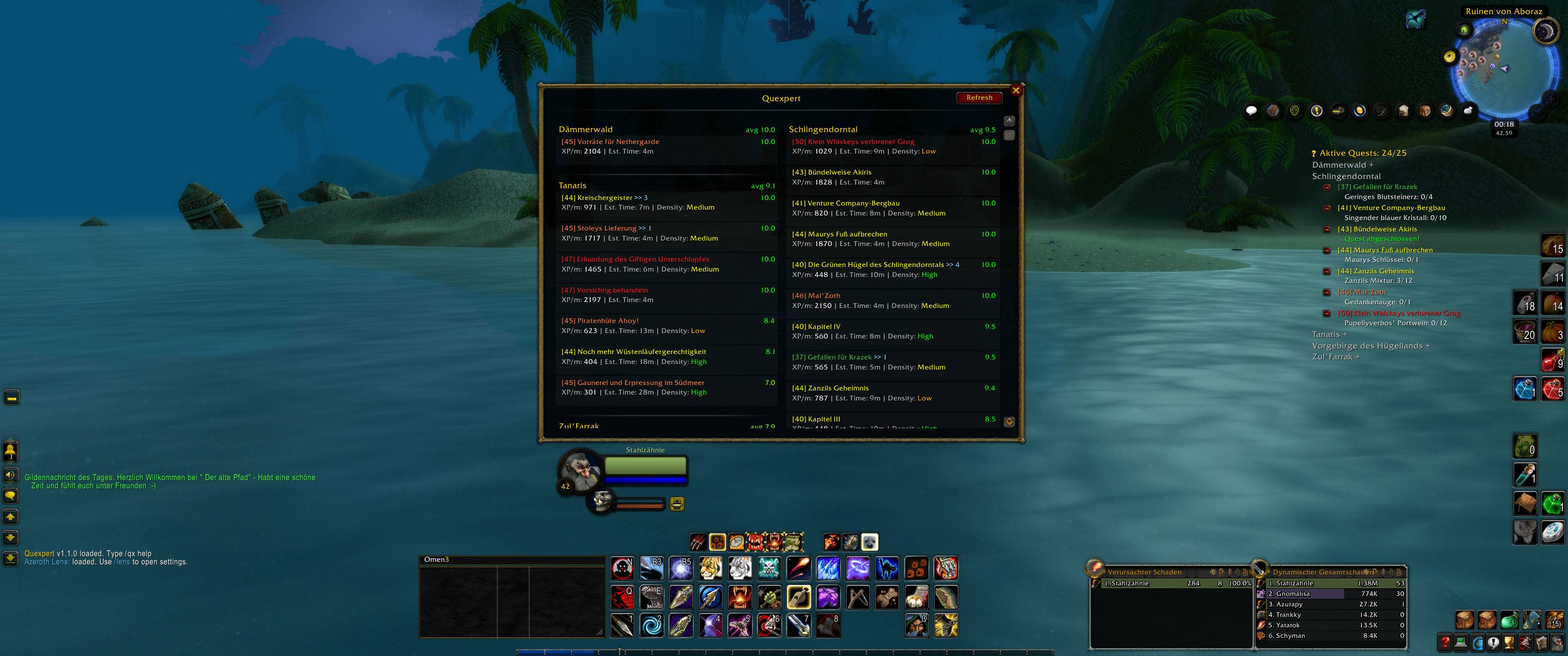
Quexpert automatically analyzes all active quests in your quest log and rates their efficiency based on XP/Minute, estimated time, mob density, and quest chains. This helps you decide which quests are most worthwhile!
🎯 Features
Efficiency Rating
Each quest receives a rating from 1-10 based on:
- XP per minute (primary factor)
- Estimated completion time
- Mob density (High/Medium/Low)
- Quest chains (follow-ups increase value)
Clean UI
- 2-column layout in WoW style
- Sorted by zone and efficiency
- Color-coded difficulty levels for quest names
- Quest tags: [G] for group quests, * for class quests, >> X for follow-ups
Questie Integration
- Automatically detects quest chains via Questie
- Shows follow-up quests
Tooltip Integration
- Shows efficiency analysis directly in quest tooltips
Minimap Button
- Quick access to the UI
- Left-click: Open/close UI
- Right-click: Settings
🚀 Getting Started
- Open UI
- Click the minimap button
- Or type
/qxor/qx show
- View quests
- The UI shows all active quests sorted by zone
- Green numbers = High efficiency (>8.0)
- Yellow numbers = Medium efficiency (5.0-8.0)
- Red numbers = Low efficiency (<5.0)
- Select quest
- Click a quest to open it in the quest log
- Hover with mouse for detailed tooltip info
⌨️ Commands (Chat)
| Command | Description |
|---|---|
/qx or /qx show |
Opens main UI |
/qx hide |
Closes main UI |
/qx toggle |
Toggle UI open/close |
/qx analyze |
Shows analysis in chat |
/qx settings |
Opens settings |
/qx minimap |
Show/hide minimap button |
/qx help |
Shows all commands |
⚙️ Settings
Open: /qx settings or right-click the minimap button
UI Options
- Show quest tooltips: Shows efficiency analysis in quest tooltips
- Mark inefficient quests: Marks inefficient quests (<5.0 rating)
- Show class quests: Shows class-specific quests
- Show minimap button: Show/hide minimap button
- Group quests by zone: Groups quests by zone (always active in UI)
Rating Parameters
- Min efficiency rating (1-10): Minimum rating for inefficient quest warning
- Density weight (0-2): How much mob density affects the rating
- Chain weight (0-2): How much quest chains affect the rating
- Group solo multiplier (1.0-2.0): Time multiplier for group quests when solo
Color Customization
- Use custom efficiency colors: Enable custom color selection
- Color selection: Click color fields for Excellent/Good/Average/Poor/Terrible
📊 What Do The Values Mean?
Efficiency Rating (1-10)
- 10.0 = Perfect! Very high XP/min, quickly completed
- 8.0-9.9 = Very good
- 6.0-7.9 = Good
- 4.0-5.9 = Average
- <4.0 = Inefficient (maybe do it later)
XP/m (XP per Minute)
Estimated experience points per minute. Higher = better!
Est. Time (Estimated Time)
Approximate minutes until completion (based on number of objectives)
Density (Mob Density)
- High (Green): Many mobs, quick to farm
- Medium (Yellow): Normal mob count
- Low (Orange): Few mobs, longer travel times
Tags
- * = Class quest (only for your class)
- [G] = Group quest (difficult solo)
- >> X = Has X follow-up quests (quest chain)
💡 Tips & Tricks
- Prioritize quests with >>X: Quest chains are often more efficient because you stay in the same zone
- Group quests solo? Quests with [G] have a time multiplier when you're solo. Best done in a group!
- Zone batching: Do all high efficiency quests in a zone together before moving on
- Tooltip check: Hover over quests in the quest log for detailed analysis
- Refresh: After accepting/completing quests, click "Refresh" in the UI or
/reload - Chat analysis: Use
/qx analyzefor a quick overview without UI
🔧 Troubleshooting
Problem: No quests are displayed
Solution: Make sure you have active quests in the quest log. Click "Refresh" or /reload
Problem: Quest chains are not detected
Solution: Install Questie for better chain detection
Problem: Efficiency values seem wrong
Solution: The calculation is based on TBC XP tables and estimated times. You can adjust the weighting in settings
Problem: Minimap button is missing
Solution: /qx minimap or enable "Show minimap button" in settings
Problem: UI is outside the screen
Solution: /reload to reset, or close WoW and delete the position from SavedVariables
📝 Changelog
Version 1.1.0 (Current)
- Completely redesigned 2-column UI in WoW style
- Gold color scheme for zone headers
- Improved efficiency calculations (TBC-accurate XP brackets)
- Performance optimizations (caching, localized functions)
- Follow-ups in tooltips and UI
- Language-agnostic objective detection
- Zone-grouped sorting always active
- Color-coded quest names by difficulty
Version 1.0.0
- First release
- Basic efficiency analysis
- Questie integration
- Minimap button
- Tooltip integration
- Settings UI
👨💻 Author
Justin Praßl
Feedback, bug reports, or feature requests are welcome!
📄 License
This addon is free and may be shared. Please credit the author when distributing or modifying.
Have fun questing efficiently! 🎮
(WoW Classic TBC Anniversary Edition)
Quexpert Team