ChatMate - Chat Messenger
- By
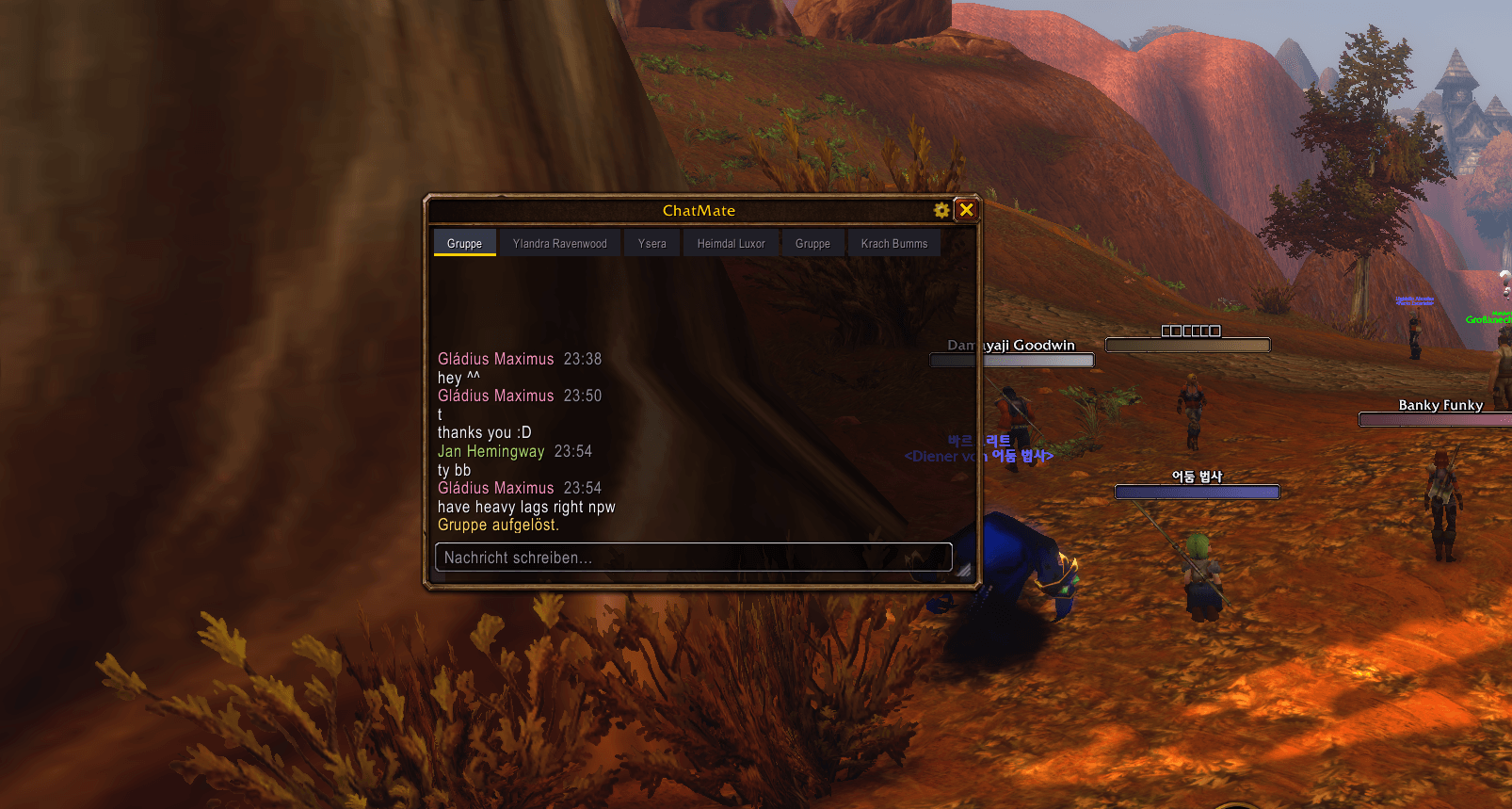
A customizable messenger-style chat addon for WoW Forever with conversation tabs, chat history, and automatic opening without stealing keyboard focus.
Screenshot 2026-10-08 004253.png
Screenshot 2026-10-08 004451.png
Screenshot 2026-10-08 004509.png
Description
If any bugs occure, feel free to tell me!
ChatMate
A messenger-style chat addon for World of Warcraft: Forever.
Keep whispers and group conversations together in one window with conversation tabs, unread indicators and customizable designs. ChatMate opens when a message arrives without taking your keyboard focus or interrupting what you are typing.
English
Features
- Supports character and Battle.net whispers, party, raid, instance, guild and officer chat.
- Automatically opens on incoming messages, including the first message in a new conversation. After closing the window, the next message can open it again.
- Opens passively: incoming messages do not activate the input box or switch an existing conversation selection.
- Separate conversation tabs with unread indicators, pinning and muting.
- Reply directly from ChatMate and optionally keep the Blizzard
/rreply target updated. - Choose how each chat type appears: Move into ChatMate, Mirror in both chat windows, or Off to keep it in Blizzard chat.
- Optional chat history, stored per character, with configurable whisper history limits.
- Class colors, timestamps, message sounds, mention alerts and optional taskbar flashing for whispers.
- Copy messages, conversations and links.
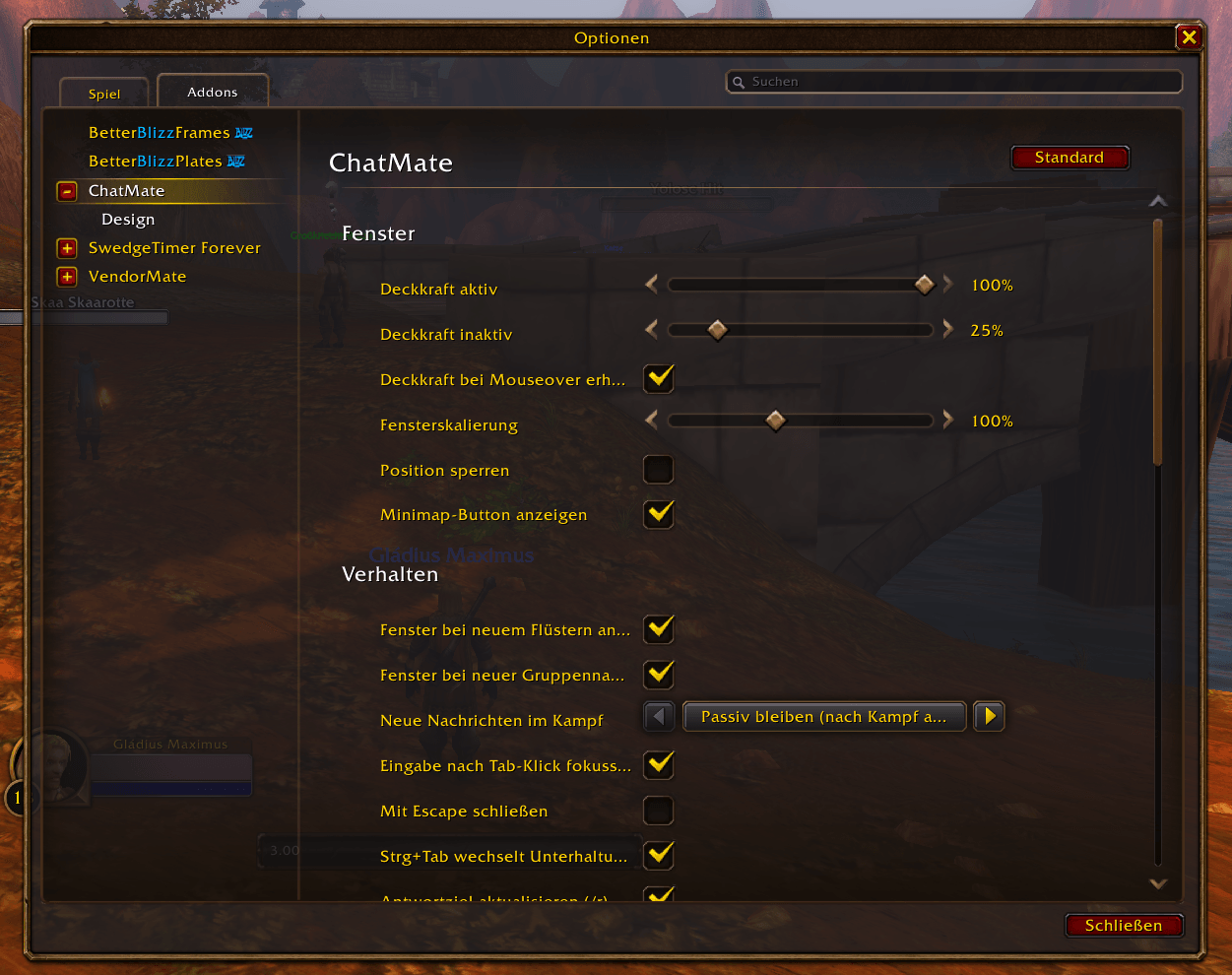
- Movable and resizable window with adjustable scale and active/passive opacity.
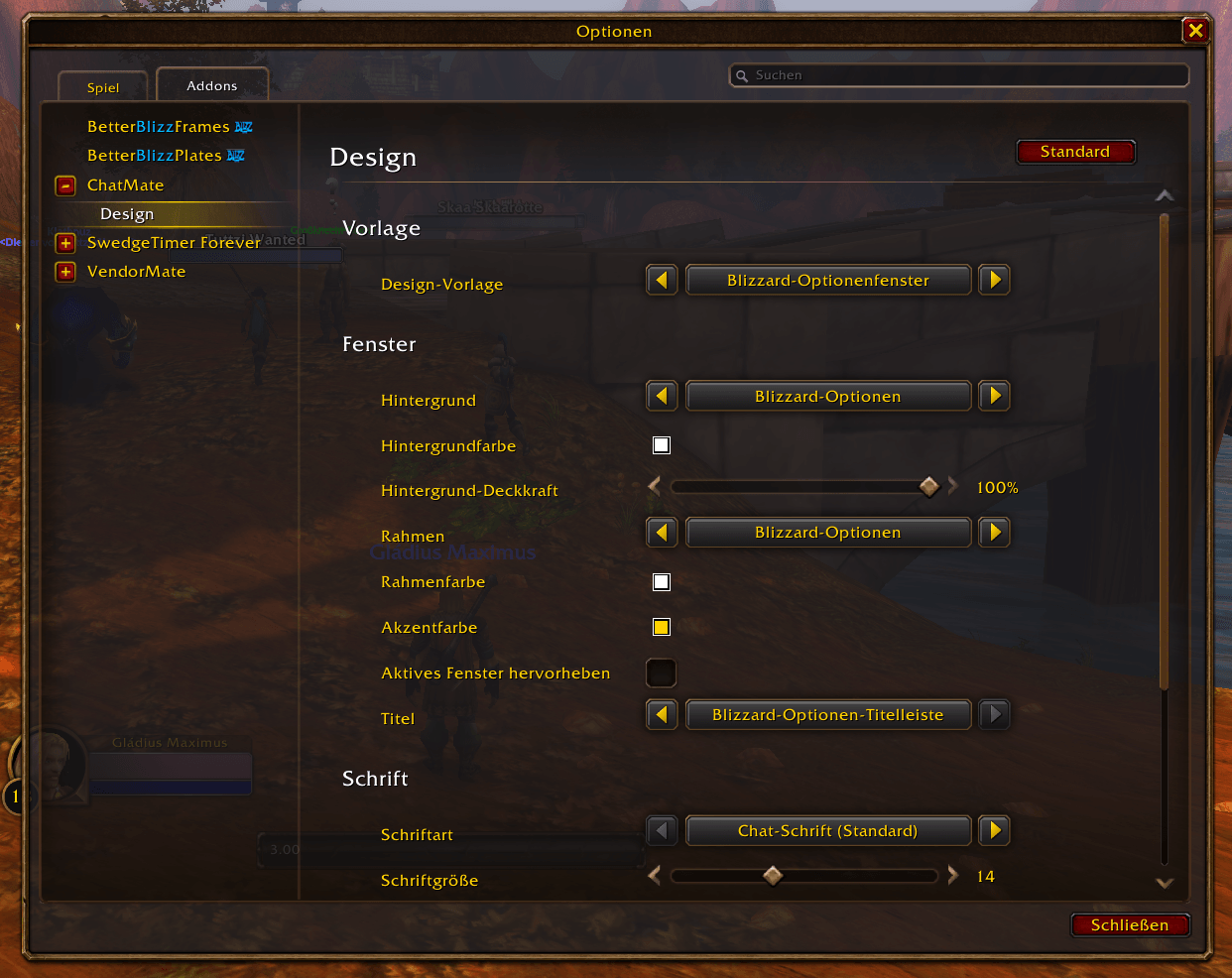
- Blizzard options window is the default design. The original Modern (ChatMate) design, gray and gold Blizzard window designs, and additional presets remain available.
- Customize backgrounds, borders, colors, fonts and message layout. Design settings are saved across reloads and logins.
- Automatically uses German on German clients and English on English clients. Other client languages use English as a fallback.
Getting started
Install ChatMate for your WoW Forever client and enable it in the addon list. For manual installation, place the ChatMate folder in your client's Interface/AddOns folder so that ChatMate.toc is directly inside it, then restart the game or reload the UI.
Use /cm to show or hide the window, and /cm settings to open the options. You can also use the window's settings button, the minimap button or the addon compartment. Supported player context menus offer Open in ChatMate.
Automatic opening is enabled by default for whispers and group chats. Muted conversations, disabled capture and disabled automatic opening do not trigger incoming-message auto-show. By default, messages received during combat open a hidden window after combat ends; you can change this behavior in the settings.
Commands
All commands also work with /chatmate instead of /cm.
| Command | Action |
|---|---|
/cm |
Show or hide the window |
/cm <name> |
Open a whisper conversation |
/cm party or /cm raid |
Open your party or raid conversation |
/cm instance |
Open instance chat |
/cm guild or /cm officer |
Open guild or officer chat |
/cm settings |
Open settings |
/cm history |
Show history statistics |
/cm reset |
Reset window position and size |
/cm help |
Show command help |
/cm errors |
Show recorded addon errors |
/cm debug |
Toggle debug output |
Compatibility and support
ChatMate targets WoW Forever. Compatibility with Retail or other Classic versions is not currently guaranteed. No additional addon is required. If another addon provides LibSharedMedia, ChatMate can offer its registered backgrounds, borders and fonts.
When the client restricts chat access, affected messages remain in Blizzard chat. Client restrictions can also require sending through Blizzard's chat input.
For bug reports, include your client build, the steps to reproduce the issue, the affected chat type and the output of /cm errors. Please remove private messages and personal information from screenshots or logs before sharing them.
Deutsch
Ein Messenger-Chat für World of Warcraft: Forever.
ChatMate bündelt Flüsternachrichten und Gruppenchats in einem Fenster mit eigenen Unterhaltungstabs, Anzeigen für ungelesene Nachrichten und anpassbaren Designs. Neue Nachrichten öffnen das Fenster, ohne dir den Tastaturfokus zu nehmen oder deine Eingabe zu unterbrechen.
Funktionen
- Unterstützt Charakter- und Battle.net-Whispers, Gruppe, Schlachtzug, Instanz, Gilde und Offizierschat.
- Öffnet sich automatisch bei eingehenden Nachrichten – auch bei der ersten Nachricht einer neuen Unterhaltung und erneut nach dem Schließen.
- Eingehende Nachrichten öffnen das Fenster passiv, ohne das Eingabefeld zu aktivieren oder eine bestehende Unterhaltungsauswahl zu wechseln.
- Unterhaltungstabs mit Anzeigen für ungelesene Nachrichten sowie Funktionen zum Anheften und Stummschalten.
- Direkt aus ChatMate antworten und optional das Blizzard-Antwortziel für
/raktualisieren. - Pro Chattyp wählbar: Verschieben nach ChatMate, Spiegeln in beiden Chatfenstern oder Aus für ausschließlich Blizzard-Chat.
- Optional gespeicherte Chatverläufe pro Charakter und ein einstellbares Verlaufslimit für Whispers.
- Klassenfarben, Zeitstempel, Nachrichtentöne, Hinweise bei Erwähnungen und optionales Blinken des Taskleistensymbols bei Whispers.
- Nachrichten, Unterhaltungen und Links kopieren.
- Verschiebbares Fenster mit anpassbarer Größe, Skalierung und aktiver/passiver Deckkraft.
- Blizzard-Optionenfenster als Standardvorlage. Modern (ChatMate), graue und goldene Blizzard-Fenster sowie weitere Vorlagen bleiben auswählbar.
- Hintergründe, Rahmen, Farben, Schriften und Nachrichtenlayout anpassen. Designänderungen bleiben nach Reloads und erneuter Anmeldung gespeichert.
- Deutsche Clients erhalten deutsche Texte, englische Clients englische Texte. Andere Sprachen verwenden Englisch als Fallback.
Installation und Bedienung
Installiere ChatMate für deinen WoW-Forever-Client und aktiviere es in der Addon-Liste. Bei manueller Installation gehört der Ordner ChatMate in Interface/AddOns deines Clients. Die Datei ChatMate.toc muss direkt im Ordner ChatMate liegen. Starte anschließend das Spiel neu oder lade die Oberfläche neu.
Mit /cm öffnest oder schließt du das Fenster. /cm settings öffnet die Einstellungen. Alternativ stehen der Einstellungsbutton im Fenster, der Minimap-Button und das Addon-Menü zur Verfügung. Unterstützte Spieler-Kontextmenüs bieten In ChatMate öffnen an.
Das automatische Öffnen für Whispers und Gruppenchats ist standardmäßig aktiviert. Stummgeschaltete Unterhaltungen, ausgeschaltete Erfassung oder deaktiviertes automatisches Öffnen lösen keine automatische Anzeige eingehender Nachrichten aus. Im Kampf öffnet sich ein verstecktes Fenster standardmäßig erst nach Kampfende; dieses Verhalten lässt sich einstellen.
Befehle
Alle Befehle funktionieren auch mit /chatmate statt /cm.
| Befehl | Funktion |
|---|---|
/cm |
Fenster öffnen oder schließen |
/cm <Name> |
Flüsterunterhaltung öffnen |
/cm party oder /cm raid |
Gruppen- oder Schlachtzugchat öffnen |
/cm instance |
Instanzchat öffnen |
/cm guild oder /cm officer |
Gilden- oder Offizierschat öffnen |
/cm settings |
Einstellungen öffnen |
/cm history |
Verlaufsstatistik anzeigen |
/cm reset |
Fensterposition und Größe zurücksetzen |
/cm help |
Befehlshilfe anzeigen |
/cm errors |
Aufgezeichnete Addon-Fehler anzeigen |
/cm debug |
Debug-Ausgabe umschalten |
Kompatibilität und Fehlermeldungen
ChatMate wird für WoW Forever entwickelt. Die Kompatibilität mit Retail oder anderen Classic-Versionen wird derzeit nicht garantiert. Zusätzliche Addons sind nicht erforderlich. Wird LibSharedMedia durch ein anderes Addon bereitgestellt, stehen dessen registrierte Hintergründe, Rahmen und Schriften zusätzlich zur Auswahl.
Bei Chat-Zugriffsbeschränkungen des Clients bleiben betroffene Nachrichten im Blizzard-Chat. Solche Beschränkungen können außerdem das Senden über das Blizzard-Eingabefeld erforderlich machen.
Für einen Fehlerbericht sind Client-Build, Schritte zum Nachstellen, betroffener Chattyp und die Ausgabe von /cm errors hilfreich. Entferne private Nachrichten und persönliche Informationen aus Screenshots oder Logs, bevor du sie teilst.
ChatMate - Chat Messenger Team