imagen_2026-06-14_112627201.png
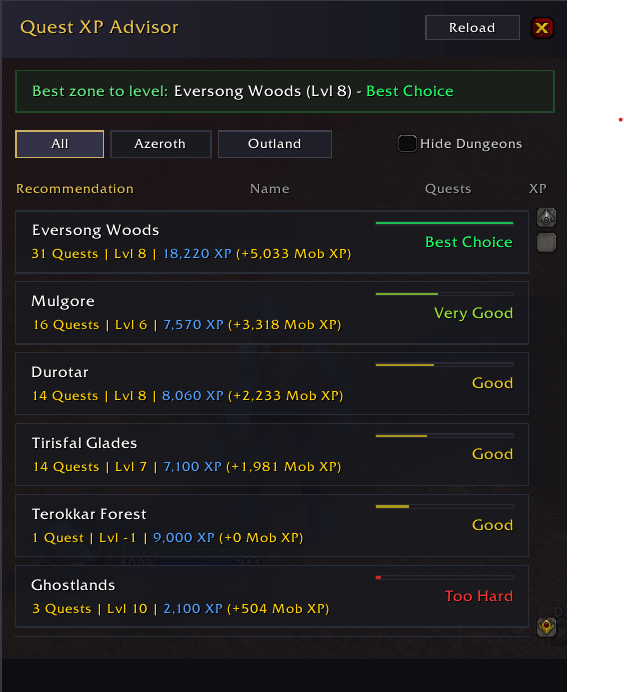
imagen_2026-06-14_112511336.png
Description
# QuestXPAdvisor
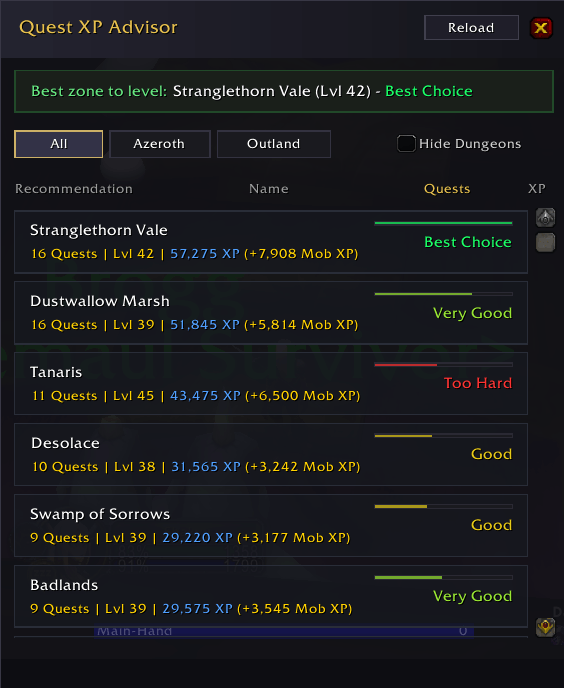
QuestXPAdvisor is a lightweight World of Warcraft Classic & TBC AddOn that acts as your personal leveling counselor. It analyzes your quest status and advises you on which zones are currently the most efficient to quest and level up in.
> [!IMPORTANT]
> Dependency Required: This AddOn requires Questie to function. It uses Questie's database to scan available and active quests.
---
## Features
* Zone Smart-Scoring: Calculates a dynamic convenience score for each physical zone, ranking them from best to worst.
* Mob XP Estimation: Automatically estimates the extra XP you will get from killing mobs for your active quest objectives.
* Background Scanning: Uses coroutines to perform database scans seamlessly in the background without dropping frames or causing lag.
* Auto-Updates: Scans run automatically when you log in, level up, or turn in a quest.
* Fully Featured UI:
* Clean, interactive window with zone cards.
* Filters to show/hide dungeons.
* Sorting options (by name, level, or score).
* Minimap icon for easy access.
---
## How the Scoring Works
The advisor doesn't just look at quest levels; it calculates an advanced score based on:
1. Total Estimated XP: The sum of all quest XP rewards in that zone + estimated mob-kill XP.
2. Level Difference Penalty: Zones that are too high (red/skull) or too low (gray/green) for your level receive score penalties.
3. Sweet Spot Bonus: Zones in the ideal range (+1 to -2 levels of your current level) receive a 1.25x score multiplier.
4. Quest Density: Zones with many quests grouped together receive a density bonus to reward efficiency.
Zones are color-coded in the UI:
* Best Choice: The absolute most efficient zone right now.
* Very Good / Good: Excellent alternatives.
* Average / Low Value: Zones with fewer quests or low XP relative to your level.
* Too Hard: Zones with average levels too high for you.
* Dungeons: Clearly separated, so you can choose whether to group up or quest solo.
---
## Commands & Controls
* Left-Click the Minimap Button (or type /qxp) to toggle the Advisor window.
* /qxp scan - Triggers a manual zone database scan.
* /qxp log - Displays the startup debug/initialization logs.
- 💜Support & Feedback
If you like the addon and want to support its development, feel free to check out the links below:
* **Donate on Paypal**: paypal.me/sk0lu
The QuestXPAdvisor Team