QuestIcons
Questicons brings retail-style (Midnight) quest markers
QuestPlateIcons_mockup.png
QuestPlateIcons_v3_settings_mockup.png
PartyPanel_buttons_mockup.png
Description
Questicons
Retail-style quest icons on enemy nameplates for WoW: Forever.
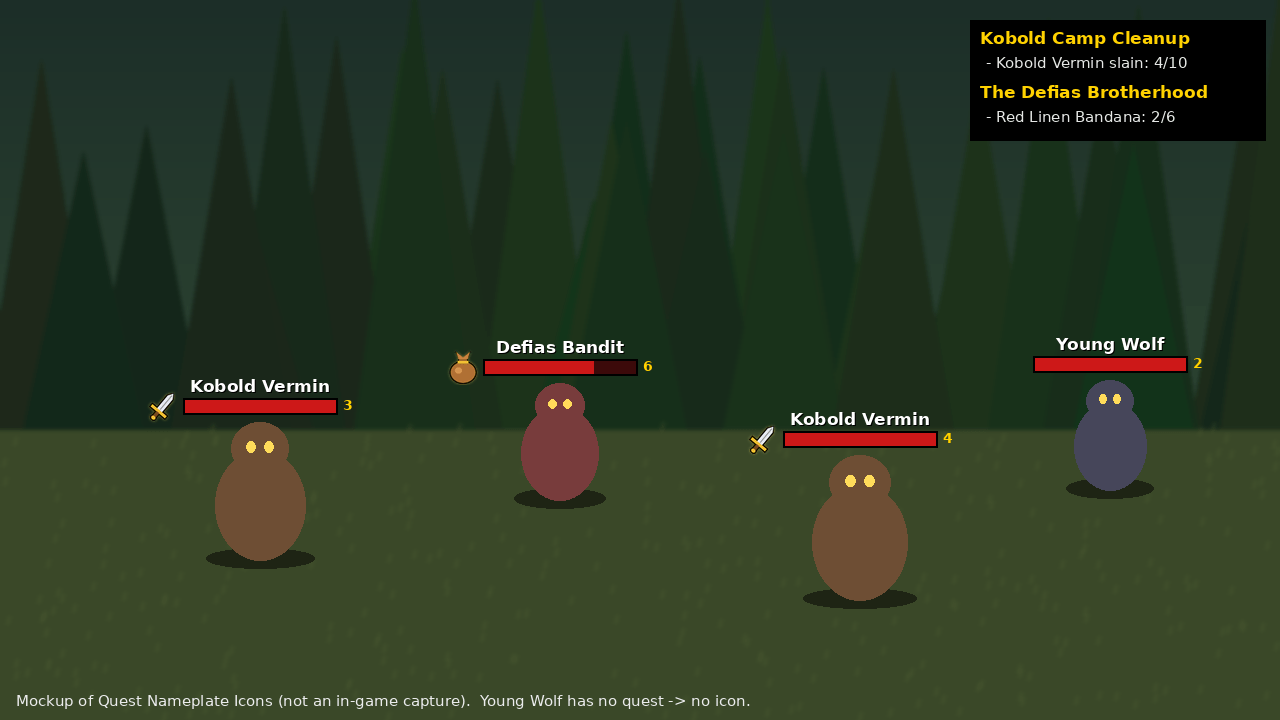
A sword shows on every mob you still need to kill, and a loot bag on every mob that drops an item you still need, with your progress (4/10) right under the icon. Just like Midnight, but on your favourite realm.
It goes further than retail when you group up: party members who use the addon share objectives, progress and learned drops, see each other's quests in a party panel, and get an alert when everyone is ready to turn in.
What the icons mean
- Sword - kill this mob for an unfinished quest
- Loot bag - this mob drops an item you still need
- Gear - use an item on this mob, or interact with it
- Yellow ! - this mob can drop an item that starts a quest
- Silver star - rare mob, even without a quest
- Yellow ? - on your maps: where you picked up a quest that is now complete
- Gold ring - elite or group mob
- Icons in a party member's class colour - that player needs the mob, not you
Features
Nameplates
- Quest icons left of the health bar, right of it, or above the name
- Progress under the icon, like 4/10
- Pulse animation, a glow behind the health bar, and a fade-out when an objective is finished
- Three icon styles: Retail, Classic and Minimal dot
- Optional colour per quest, so mobs for different quests are easy to tell apart
- Sliders for size, scale, opacity and position
- Test mode: a sample icon on every nameplate, so you can set it up without a quest
- Works with Blizzard nameplates, Plater and KuiNameplates
Smart detection
- Kill objectives read straight from your quest log
- Learns quest-item drops: loot a quest item once and that mob type gets the loot bag from then on
- Uses Questie data when it is installed, so loot bags show before the first drop
- Ignore list for single mob types or whole quests
- Works on other game languages, including Chinese and Korean
Party play (with party members who also use the addon)
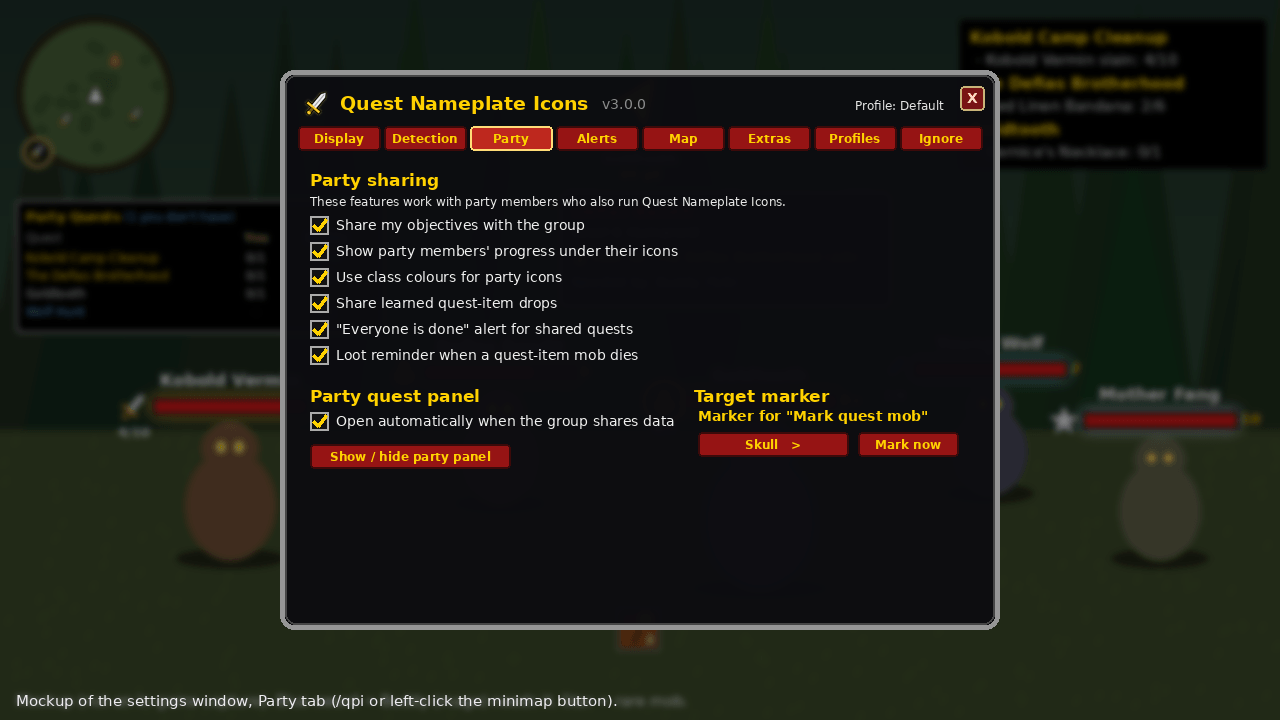
- See what your friends still need, with their progress in their class colour
- Tooltip line: "Needed by: Buddy (5/6), Anna (done)"
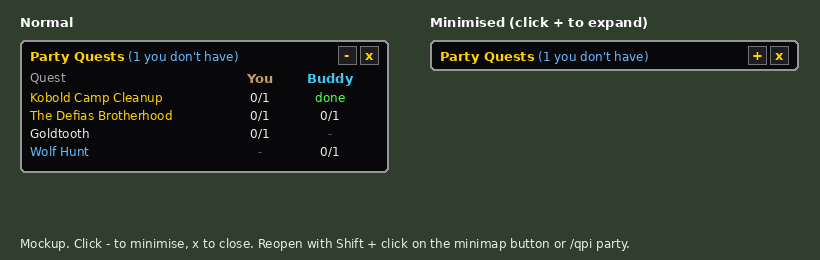
- Party quest panel: everyone's quests side by side. Gold = everyone has it, blue = you are missing it, with who to ask
- Learned quest-item drops are shared with the whole group
- "Everyone is done!" banner when the whole group has finished a shared quest
- Loot reminder when a mob that can drop your quest item dies
- Mark quest mob: puts a raid marker (skull by default) on the nearest quest mob
Maps
- Quest-mob markers on the world map and the minimap
- Turn-in markers for completed quests
- Markers disappear by themselves once they are no longer needed
Alerts
- Retail-style "Objective Complete" and "Quest Complete!" banners
- One sound when a whole quest is complete. No noise on every single kill or loot.
Extras
- Quest item bar: clickable buttons for usable quest items in your bags
- Hide icons in combat or inside dungeons and raids
- Session stats: quests turned in, objectives done, quest mobs killed
- Banners and tooltips in English, German, French, Spanish and Russian
Settings
- Settings window with tabs, opened with /qpi, /questicons or the minimap button
- Minimap button (LibDBIcon) that you can hide
- Profiles: shared across characters or one per character
- Export / import your settings as one line of text to share with friends
- Key bindings for the most used actions
- Built-in debug window (/qpi debug) that makes bug reports easy
Commands
| /qpi or /questicons | Open the settings window |
| /qpi toggle | Turn icons on or off |
| /qpi test | Test mode on or off |
| /qpi party | Show or hide the party quest panel |
| /qpi mark | Mark the nearest quest mob |
| /qpi ignore | Ignore your target's mob type |
| /qpi stats | Show this session's stats |
| /qpi debug | Open the debug window |
| /qpi minimap | Show or hide the minimap button |
Minimap button: left-click = settings, Shift + left-click = party panel, Ctrl + left-click = debug window, right-click = icons on/off, middle-click = test mode.
Good to know
- Party features need your friends to run this addon too (version 3.0 or newer).
- Map markers are approximate: they show where you were standing when the mob appeared.
- The ? turn-in marker is where you picked up the quest. Some quests are turned in somewhere else.
- Quest item buttons work by mouse click and update right after combat.
- The settings window is in English.
Found a bug?
Type /qpi debug, click Run self-test, then Select all, copy with Ctrl+C and paste it in a comment. That report tells me exactly what went wrong.
QuestIcons Team