


QLens
- By
1.png
2.png
3.png
4.png
Description
English Description
QLens — quests, recipes, and item information at a glance
QLens is an addon for World of Warcraft: Forever 1.60.1. It helps you see why an item matters, find its related quests and recipes, and keep relevant quests in view while you play.
QLens does not require Questie and does not download data during gameplay. The complete guide is supplied in two addon folders: QLens and QLens_Guide.
Item tooltips and quest links
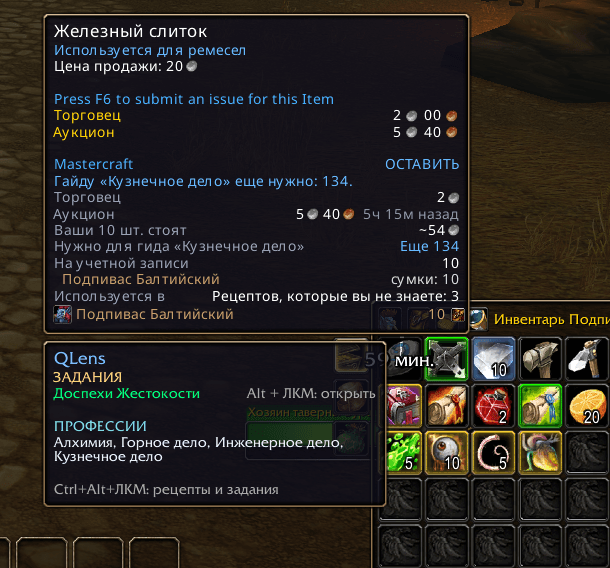
Hover over an item to see related quests and the professions that use it in recipes. If an item is used by several professions, QLens lists each of them.
- Alt + left-click a bag item to open a related active quest. If several quests match, you can choose one.
- Ctrl + Alt + left-click to open the item in the QLens guide.
- The active-quest shortcut can be changed to Alt + Shift + left-click or disabled.
The QLens guide
The offline guide contains information on 4,244 quests and 2,506 recipes. Its Quests and Recipes tabs show how many entries are related to the selected item.
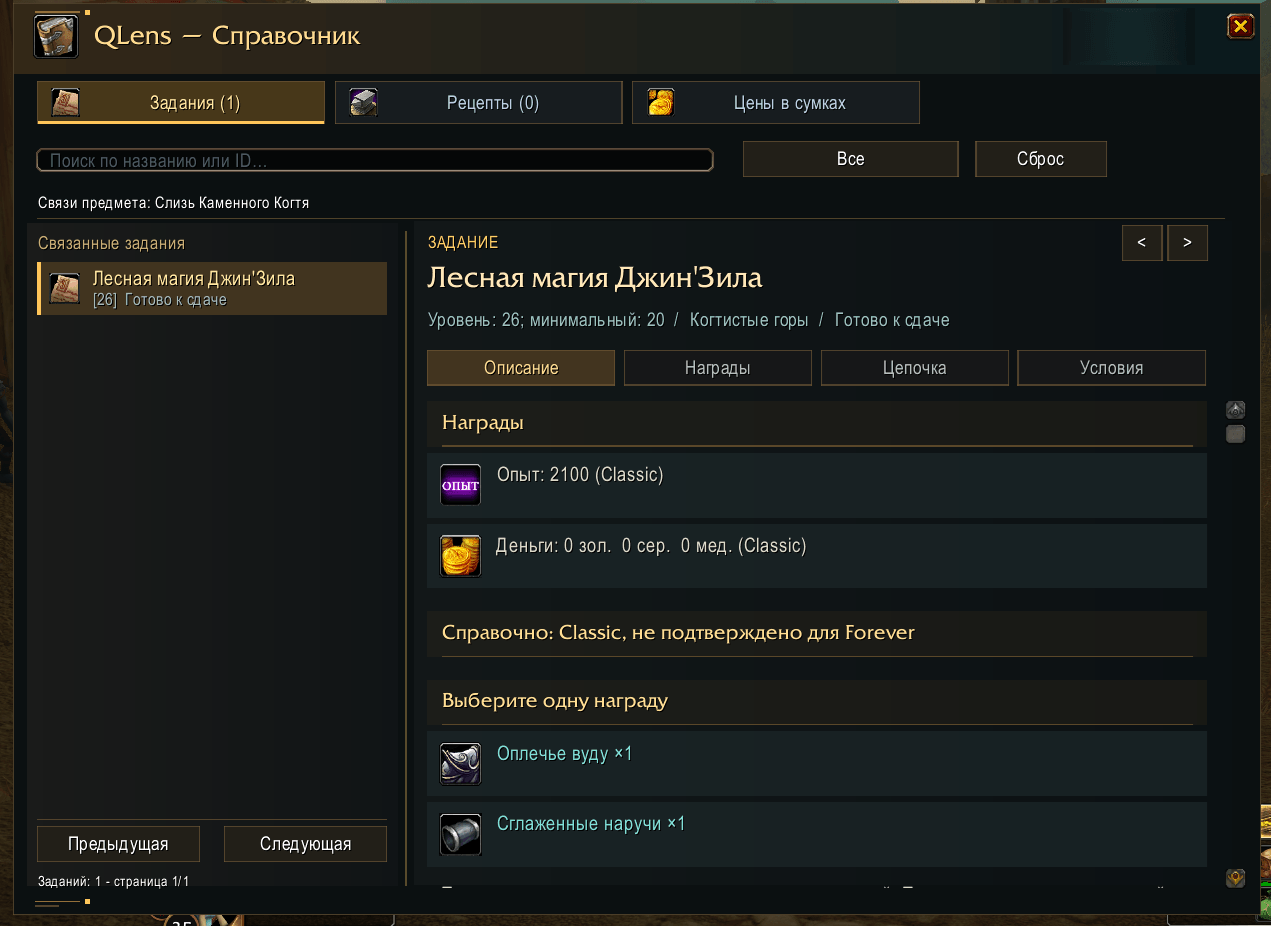
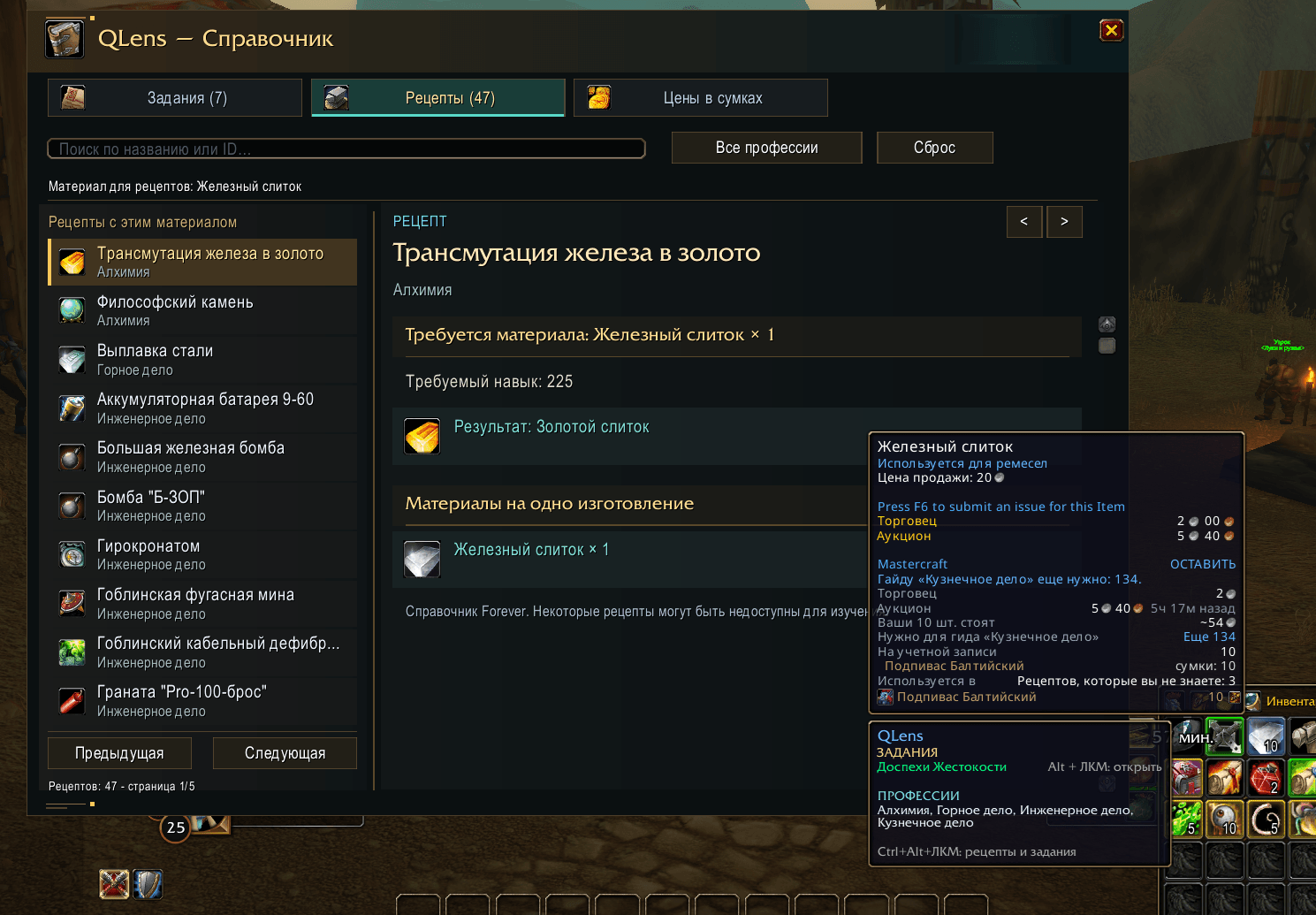
Quest pages include objectives, starting and turn-in points, related items, chains, requirements, coordinates, and reward information. Recipe pages show the profession, crafted result, materials, and quantities needed for one craft. You can search by name or ID.
Guide data is a reference snapshot. Some listed recipes may not be learnable, and Classic reference requirements or rewards may differ on Forever. When the game client provides exact rewards for an active quest, those values take priority.
Quest priority while playing
When QLens recognizes a creature needed for an unfinished objective, it moves the corresponding quest to the top of the regular objective tracker. The quest stays there after combat. If you engage a creature for another quest, that quest takes first place and the previous one moves down.
QLens does not promote a quest again when the relevant kill or item objective is already complete. Known quest objects and ground pickups can also trigger prioritization when detected. Detection depends on the available quest data and the live objective state.
Low-value stack highlighting
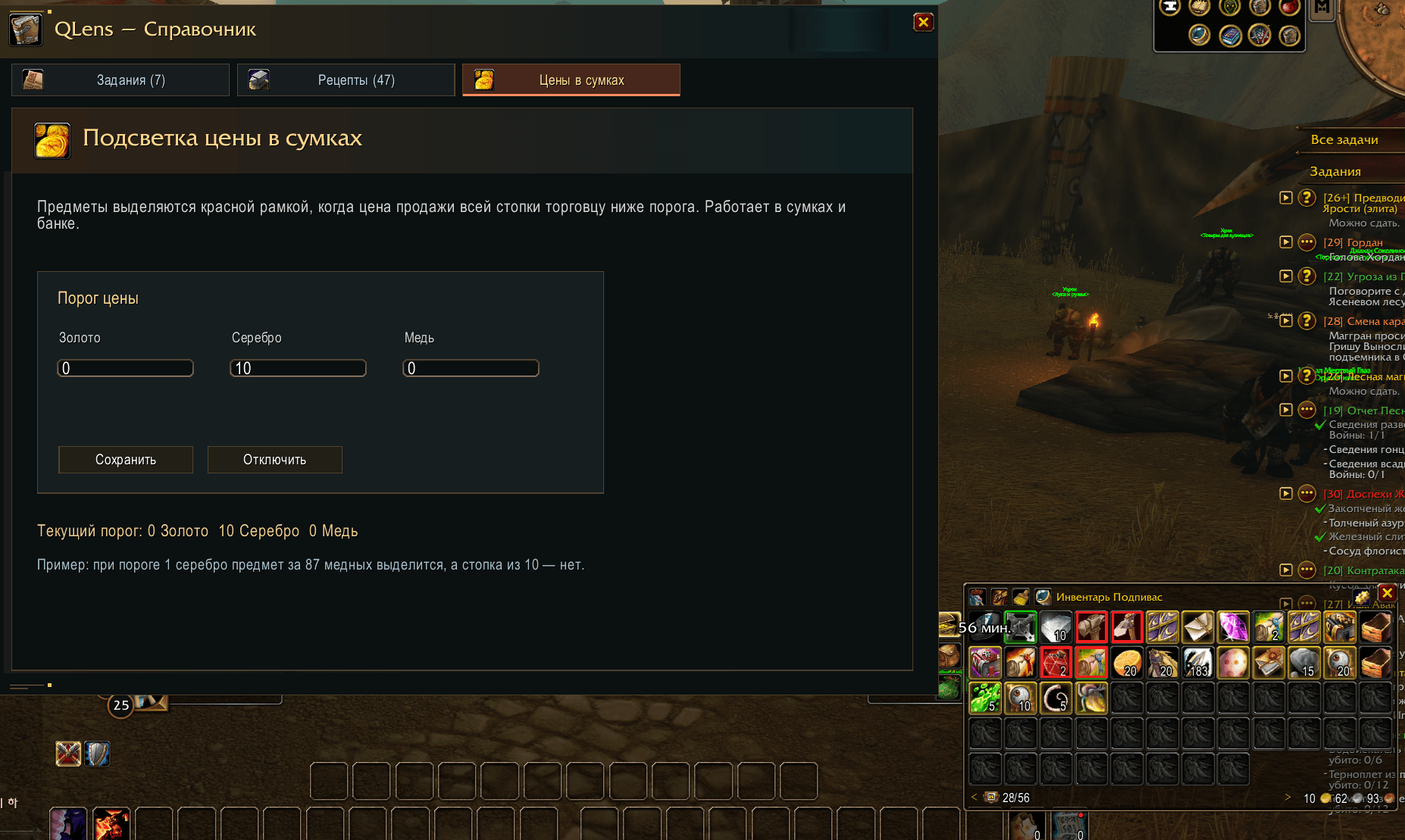
Set a gold, silver, and copper threshold in the Bag Prices tab. QLens outlines an item in red when the total vendor sell value of its entire stack is below that threshold. For example, with a 1-silver threshold, one item worth 87 copper is highlighted, while a stack of ten is not.
Highlighting supports standard bags, bank slots, and compatible bag interfaces including Bagnon. Items without a known vendor price are left unmarked. Set the threshold to zero to disable highlighting. Auction-house prices are not used.
Controls
- Left-click the minimap icon to open the guide.
- Right-click the icon to open Bag Prices directly.
/qlens— open the guide./qlens price— open the separate price settings window./qlens quest IDand/qlens item ID— open an entry by ID./qlens key alt,/qlens key altshift,/qlens key off— configure the shortcut.- The legacy
/qiqcommand remains available.
Русское описание
QLens — задания, рецепты и полезные предметы под рукой
QLens — аддон для World of Warcraft: Forever 1.60.1, который помогает понять, зачем нужен предмет, найти связанные с ним задания и рецепты, а также быстрее ориентироваться в списке заданий во время игры.
Аддон работает без Questie и не загружает данные из сети во время игры. Для полного справочника в комплект входят две папки: QLens и QLens_Guide.
Предметы и задания
Наведите курсор на предмет, чтобы увидеть связанные задания и профессии, в рецептах которых он используется. Если предмет относится к нескольким профессиям, QLens покажет их все.
- Alt + ЛКМ по предмету в сумке открывает связанное активное задание. Если заданий несколько, появится выбор.
- Ctrl + Alt + ЛКМ открывает страницу предмета в справочнике.
- Сочетание для открытия активного задания можно изменить на Alt + Shift + ЛКМ или отключить.
Справочник QLens
Справочник содержит данные о 4 244 заданиях и 2 506 рецептах. Вкладки «Задания» и «Рецепты» показывают количество связей с выбранным предметом.
В карточках заданий доступны цели, места получения и сдачи, связанные предметы, цепочки, условия, координаты и сведения о наградах. Вкладка рецептов показывает профессию, результат изготовления, необходимые материалы и их количество на одно изготовление. Поиск помогает находить записи по названию и ID.
Справочник использует офлайн-данные. Некоторые рецепты могут быть недоступны для изучения, а справочные требования и награды Classic не всегда совпадают с правилами Forever. Если для активного задания клиент предоставляет точные сведения о награде, они имеют приоритет.
Приоритет заданий во время игры
Когда QLens распознаёт нужного для незавершённой цели противника, соответствующее задание поднимается наверх обычного списка заданий справа и остаётся там после боя. Если затем вы займётесь другим заданием, оно займёт первую позицию, а прежнее сместится ниже.
QLens не поднимает задание повторно, если нужное количество убийств или предметов для этой цели уже получено. Для известных квестовых объектов функция также может сработать при взаимодействии и сборе предметов с земли. Распознавание зависит от имеющихся в базе связей и данных текущего задания.
Подсветка недорогих стопок
Во вкладке «Цены в сумках» задайте порог в золоте, серебре и меди. QLens выделит красной рамкой предметы, общая цена продажи всей стопки торговцу которых ниже порога. Например, при пороге 1 серебро предмет стоимостью 87 медных выделится в количестве одной штуки, а стопка из десяти — нет.
Подсветка работает в обычных сумках, банке и совместимых интерфейсах сумок, включая Bagnon. Предметы без известной цены продажи не выделяются. Нулевой порог отключает функцию. Аукционные цены не используются.
Управление
- ЛКМ по иконке у миникарты — открыть справочник.
- ПКМ по иконке — сразу открыть раздел «Цены в сумках».
/qlens— открыть справочник./qlens price— открыть отдельное окно настройки цены./qlens quest IDи/qlens item ID— открыть запись по ID./qlens key alt,/qlens key altshift,/qlens key off— настроить сочетание клавиш.- Старый псевдоним
/qiqтакже поддерживается.
QLens Team
