Addon-Manager
- By
Manage your WoW addons with class rules, custom categories, search and Mythic+, Raid, PvP or Global load modes. Includes modular combat, chat and quality-of-life tools, configurable map reminders and support for English, Simplified and Traditional Chinese.
f24fa4e0-e3b3-46c0-aa33-8f94b947963e.png
Description
Addon Steward
Your addons, load modes and everyday tools in one place.
Addon Steward combines an in-game addon manager with a modular collection of combat, chat and quality-of-life tools for World of Warcraft Retail.
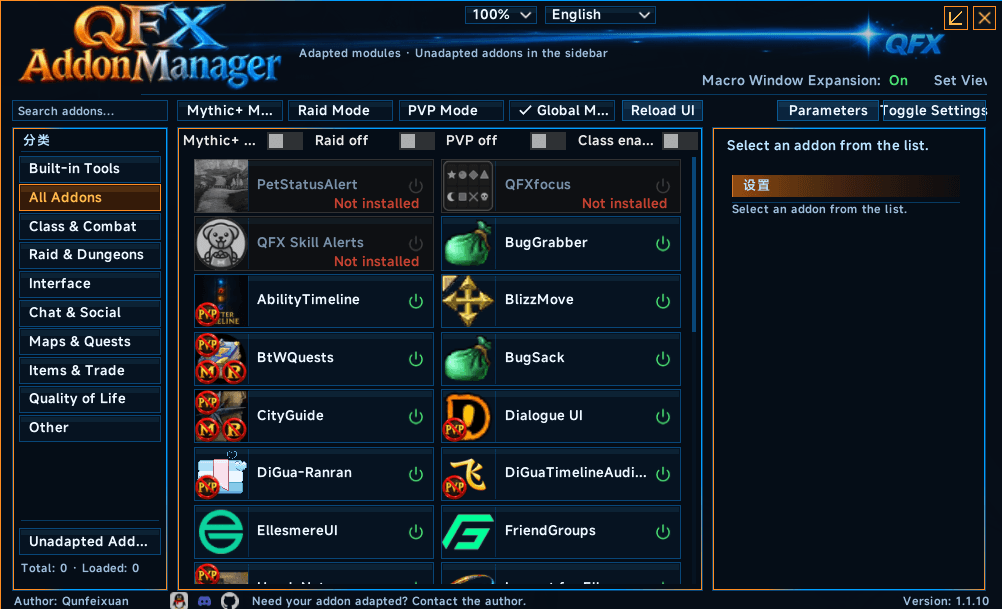
Find the addon you need, choose what should run for your character, and prepare different addon selections for Mythic+, raids, PvP and everyday play.
Addon Management
- Browse addons by category and search names, descriptions or your own keywords.
- Assign custom categories to keep your addon list organized.
- Open the original settings pages of supported addons.
- Set class availability rules for any combination of the 13 classes.
- View related child addons together and adjust their individual switches.
- Keep main-addon power changes separate from child-addon switches. Four Load Modes
Choose Mythic+, Raid, PvP or Global, each with its own addon exclusion list.
Double-click a mode button to apply its selection and reload the interface. Temporary changes made in Mythic+, Raid or PvP mode remain separate from your Global manual choices.
Optional map reminders ask whether you want to switch modes when entering a configured map. Choosing Later dismisses the reminder for that instance visit, including floor changes and wipe recovery. Reloading or logging in starts a new reminder session.
Built-in Tools
Enable and configure the tools you want:
- Combat: GCD history, target distance, cast-target alerts, raid markers, player statistics and a character position marker with a GCD ring.
- Mythic+: party keystone lists, dungeon teleport shortcuts and dungeon helpers.
- Chat: a configurable shortcut bar and whisper history.
- Everyday convenience: fast loot, merchant helpers, equipment-set display, macro interface enhancements and configurable dialogue handling.
- Game settings: CVar presets, combat numbers, latency tolerance and map entrance options. Interface and Languages
Supports English, Simplified Chinese and Traditional Chinese, automatic or manual language selection, and interface scaling from 70% to 150%. Settings and feature packages load on demand.
Getting Started
Install the complete download, then click the minimap button or type /qfxam or /qfxaddons.
Select an addon to view its details and available settings. Use its power button to change its enabled state, then reload when prompted. Individual tools can be enabled from the Built-in Tools section.
Use the CurseForge app to install and update addons; Addon Steward handles their settings and load choices in game. Third-party integrations require the corresponding addons to be installed separately.
Support
Please include your game version, addon version, interface language, Lua error message and reproduction steps when reporting an issue.
Addon-Manager Team