Inspect for EllesmereUI
- By
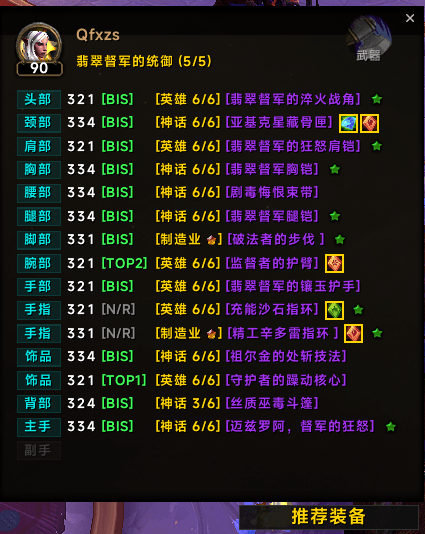
A compact gear inspection interface with deep EllesmereUI integration, displaying item levels, gems, enchants, and durability and specialization-based recommendations for Mythic+ and raids.
A7BED6F21EE343229D97D169DEAFC4F0.png
Description
Inspect for EllesmereUI
Inspect for EllesmereUI is a compact equipment inspection addon for World of Warcraft Retail, featuring deep EllesmereUI integration. View item levels, gems, enchants, and durability in a clean equipment overview. Fonts, borders, and icons are designed to fit EllesmereUI, keeping your character and inspection panels visually consistent. Equipment at a Glance Review your own equipment or inspect another player through compact, aligned equipment lists.
- Clearly displayed item levels and equipment slots.
- Gem icons placed directly beside item names.
- Enchant indicators kept close to the equipment they describe.
- Equipment durability information.
- Upgrade-track information and crafted-quality indicators.
- Equipment set summaries and optional inspection statistics. Display options can be adjusted in the addon settings. Gear Recommendations Browse specialization-based recommendations for Mythic+ and raids, including equipment, gems, enchants, embellishments, and consumables where data is available. Equipment badges make comparison quick:
- BIS — Equipment marked as best in slot by the included dataset.
- TOP1–TOP3 — Equipment appearing in the recommended rankings.
- N/R — Equipment outside the included rankings. Recommendations use the database bundled with the addon and depend on the available specialization, season, and content data. Enchant Status Color-coded stars help you check your enchants:
- Green: The equipped enchant matches the recommendation.
- Red: The recommended enchant is missing or a different enchant is equipped.
- Yellow: The enchant status cannot be determined. Hover over an enchant indicator to view the available details. EllesmereUI Integration Designed to complement EllesmereUI with matching typography, borders, and icon styling. The compact layout keeps equipment information together, with gems and enchant indicators positioned beside item names to reduce wasted space. Localization Addon text supports English, Simplified Chinese, and Traditional Chinese. Russian settings include partial translations, while other languages use English fallback. Equipment names are retrieved from your game client, so item names follow your client language.
Inspect for EllesmereUI Team