Vendetta - PvP
- By
Rate, tag and note players, and get alerts when anyone on your Kill-on-Sight list or blacklist turns up.
Vendetta
Vendetta remembers the people you play with and against. You can rate players, tag them, write notes, and keep a Kill-on-Sight list and a blacklist. When someone on those lists turns up, you'll know. A small movable list also shows the enemy players around you and who has you targeted.
Everything stays on your computer. Nothing is shared with other players or uploaded anywhere.
Adding players
- Right-click a player's portrait, their name in chat, or a raid/party frame and choose Add to Vendetta…
- Use the Quick mark submenu to set KOS, blacklist or a star rating without opening the editor.
- Type
/vd add <name>, or use the button in the main window.
Each entry holds:
- A 1–5 star rating
- Tags (Tank, Healer, Ninja Looter, Ganker and others; add your own)
- A free-text note
- KOS and blacklist flags
- Class, race, level, guild and where you last saw them
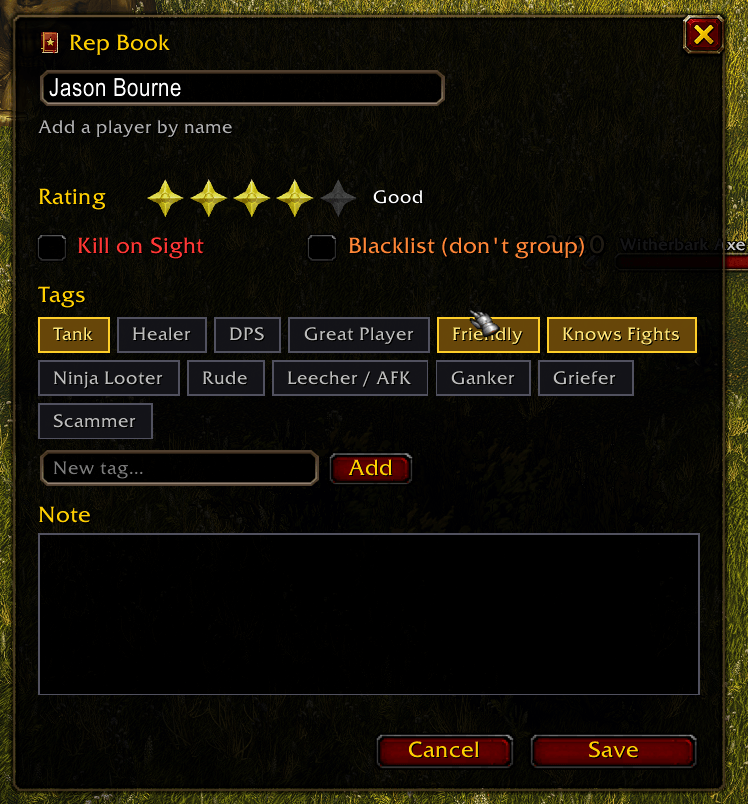
KOS is only offered for players of the opposite faction.
Nearby enemies
A compact list of the enemy players around you. Drag it wherever you like on screen.
- Class-coloured names, level and health
- ON YOU and a red edge when a player has you targeted, plus a count in the header
- (KOS) and (BL) next to anyone on your lists
- Gold border on your current target
Left-click a name to target that player. Right-click to open their entry. Rows 1–5 can also be bound to keys.
Players are picked up from enemy nameplates, so keep enemy nameplates and Always show nameplates turned on. /vd nameplates turns both on for you. Due to Blizzard's restrictions, clicks can't be re-pointed during combat. Players who appear mid-fight are listed as "locked" until combat ends.
Alerts
Kill on Sight: when a KOS player shows up on nameplates, as your target or under your mouse, you get:
- A popup with their level, guild, zone, your kill/death record against them and your note
- A sound (four to choose from)
- An optional taskbar flash if the game is in the background
To target them, click the red bar at the top of the popup or press the keybind. If the alert comes in mid-fight, the bar switches on once combat ends.

Groups: when someone on your blacklist or KOS list joins your group, you get a warning on screen. Players you've already logged get a short line in chat with their rating and history.
At a glance
- Tooltips show the rating, tags, note and your history with the player.
- Nameplates get a small icon: skull for KOS, cross for blacklist, star for 4–5 stars.
PvP and group tracking
For each player, Vendetta counts:
- How many times you've killed them, or your group has
- How many times they've killed you
- How many times you've grouped with them
The main window
Open it with /vd, the minimap button or a keybind. You can search by name, note or tag, and filter by Recent, PvP, KOS, Blacklist, 4–5 stars or 1–2 stars.
Minimap button:
- Left-click: open the main window
- Right-click: recent players
- Shift-click: edit your target
- Middle-click: options
Options
Settings are in Options → AddOns → Vendetta, or type /vd options. The nearby enemies list has its own page underneath. You can:
- Turn tooltips, nameplate icons and the minimap button on or off
- Set group warnings
- Turn PvP tracking and its chat messages on or off
- Choose the alert sound, popup duration and repeat cooldown
- Set up the nearby list: rows, size, lock, sort order, hide when empty
- Manage tags
Commands
| Command | What it does |
|---|---|
/vd |
Open or close the main window |
/vd options |
Open the options page |
/vd add [name] |
Add a player by name |
/vd target / /vd mouseover |
Edit your target or mouseover |
/vd kos <name> |
Toggle Kill on Sight |
/vd bl <name> |
Toggle blacklist |
/vd recent |
Show recently seen players |
/vd nearby |
Show or hide the nearby enemies list |
/vd nearby test |
Show sample players so you can position the list |
/vd nameplates |
Turn on enemy nameplates and set them to always show |
/vd testkos |
Preview the KOS popup and sound |
/vd resetpopup |
Move the KOS popup back to its default spot |
/vd help |
Full command list |
Keybinds
Under Key Bindings → AddOns → Vendetta you can bind keys to:
- Open the main window
- Edit your target
- Edit your mouseover (works on nameplates)
- Target the player from the last KOS alert
- Target nearby enemy 1–5
Vendetta - PvP Team