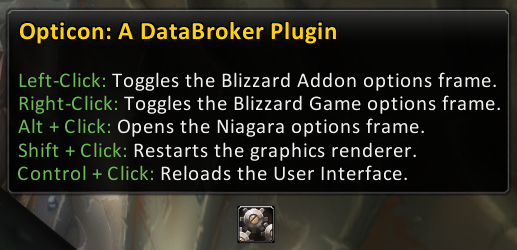
A screenshot, huzzah!
Description
Opticon: A DataBroker Plugin
Opticon provides an icon that gives the user easy access to the Blizzard Options frame, both for the Game and Addon options tabs.
Left clicking on the icon opens and closes the Addons options tab.
Right clicking on the icon opens and closes the Game options tab.
Alt clicking on the icon opens the Niagara menu (if you have Niagara).
Shift clicking on the icon restarts the graphics renderer.
Control clicking on the icon reloads the user interface.
These two are exclusive of each other, if you left click to open the Addon options then you can't right click to close it as right click opens the Game options tab. However, using left click you can toggle the Addon options open/closed.
As a bonus, if you have the Niagara menu system installed (the premiere menu for mods based on the Ace2 framework), Opticon offer the option to open that too via Alt + Click (either mouse button).
What is DataBroker?
DataBroker is part of a system that's similar to FuBar and its plugins, what you have here is a plugin but you'll also need something to display the output of the plugin. You have many options for this, and I've listed a number of them below for your perusal, just pick the one that interests you the most.
- Fortress: http://www.wowinterface.com/downloads/info10401-Fortress.html
- ButtonBin: http://www.wowinterface.com/downloads/info10474-ButtonBin.html
- StatBlockCore: http://www.wowinterface.com/downloads/info9221-StatBlockCore.html
- MakeRocketGoNow: http://www.wowinterface.com/downloads/info9771-MakeRocketGoNow.html
- Carousel: http://www.wowinterface.com/downloads/info10295-Carousel.html
- Titan: http://www.wowinterface.com/downloads/info8092-TitanPanel.html
The Opticon Team