



Grudge Alert
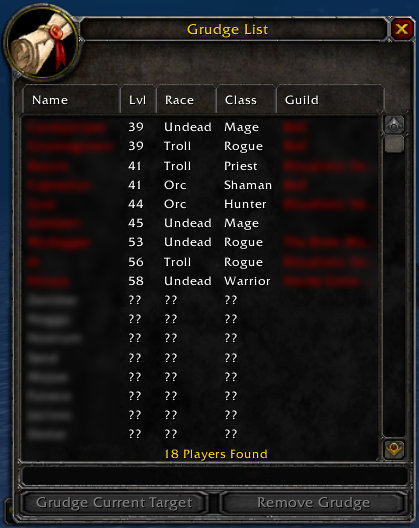
Grudge List
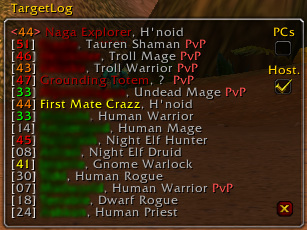
Target Log
Description
Keeps track of the last 16 things you have mouseovered in a moveable, resizeable window, so you have an easier time tracking possible targets rather than trying to remember all the names/etc. that show up in the tooltip at the bottom right corner of the screen.
Features:
* Movable, hideable, and resizeable (sort of) window listing the history of mobs/players/etc. mouseovered and targeted.
* Options to only log PC's and/or only log hostiles.
* You can click on an entry in the history list to try to target it. Note that due to the way TargetByName() works, you may not necessarily get the target you want, eg. if the player is out of range, or there are multiple mobs with the exact same name.
* Grudge list which lets you keep track of player names, and will warn you if you encounter them again.
Installation:
Unzip this into your World of Warcraft/Interface/Addons/ directory, making sure you preserve the directory structure.
After installing, in-game go to the Key Bindings options and bind keys to hide/show the TargetLog window and the GrudgeList window.
Target Log command-line options:
* /tlog lock or unlock to lock (or unlock) the TargetLog window. Good to prevent oneself from accidentally moving it
* /tlog # where # is between 1 and 16, to set the number of lines of history to display in the TargetLog window. (Sorry, drag & resize was just a bit too complicated for me to figure out right now).
* /tlog alpha # where # is between 0.0 and 1.0. Sets the alpha value for the transparent backdrop.
* /tlog help - will list all available options (there are a few otheres which duplicate some of the option buttons).
Managing the Grudge List
You can use the Grudge List window to manage the grudge list.
* To add a name, just type it into the text box.
* To remove a name, select it and click 'Remove Grudge'
* To add your current target to the list, click 'Grudge Current Target' when you have a player targeted.
* The option 'Share adds with guild' (sorry, no new screenshot yet) lets you set whether you want to share new additions to the grudge list with/from other guildmembers.
You can also use the /grudge or /kos (you can use either) commands to quickly list, add or remove names.
* /kos - prints out your grudge list in your chat window.
* /kos [name] - adds the name to your grudge list. No error checking is done to see if that's a real player or not, since there's no way to do so.
* /kos ![name] - removes the name from your grudge list. Use if you accidentally added someone who you had targeted.
* /kos add - adds current target to your grudge list.
Names in the list are colourized depending on if they are enemy faction, friendly faction, or unknown. If you add a player to the list by just typing in the name, without having targeted them (eg. guildmate told you to add the name), it will be considered unknown until you actually run into them so the information can be updated.
Similarly, the player level and guild recorded are actually the last known levels. Again, the data will be updated the next time that player is encountered.
Screenshots:
PCs checkbox - add player characters only to the list.
Host. checkbox - add hostile characters only to the list.
(note these will only affect new entries, old ones will stay on the log)
X button - clears the window.
Current target is highlighted in white.
Players which are on the grudge list are highlighted in red.
On encountering a player on the grudge list, if you mouseover or target them, a warning will pop up and a sound will be played to let you know that they are there : Check the "Grudge Alert" screenshot up here.
Also, that particular entry in the TargetLog window will be highlighted in red.
Bugs/To-do:
* Watch emote and combat message events for grudge presence.
* Use /who information for same-faction grudges.
* Targeting via the 'Target Nearest Enemy' key (by default tab) seems to not generate the proper event, so the list doesn't get updated. Have to wait for Blizzard to fix that one. Also, deselecting target doesn't generate an event (or at least I don't know what event).
TargetLog+GrudgeList Team
