


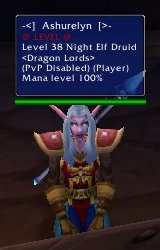
Player character details
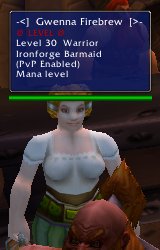
Npc details
Description
Mod that lets you specify what, exactly, is displayed in your tooltip, as well as lets you colorize it statically, or depending on something (level, hostile, etc)
This is a tooltip mod that modifies the tooltips that display when you mouse over NPCS and PCs. It lets you customize nearly all parts of it, such as: What displayed, color displayed in, and background color.
Want to just see their name and guild, on two seperate lines? Then you set the string to "%n\n%G". Simple huh? You can further customize it with color and adding more information (level, class, etc)
Commands: There are two commands for the mod, currently:
/ctt [on|off] - turns the mod on and off
/tooltip <format_string> - sets the format string to display, < and > not included
Displaying Info
You display variable information (eg: names) using the following codes:
%n - Player name
%g - guild, raw name
%G - guild (formatted, <MyGuild>)
%l - level
%r - race
%c - class
%p - similar to %c, but only give the class if its a PC
%t - title (eg, for NPC merchants)
%C - City (eg, for NPC merchants)
%m - mana percent for the target. includes the %. If they don't have a mana bar (ie: guards), it returns nil
%f - if they are fightable, and PvP is enabled
%h - if they are a "hero", and are a PC char
%e - "(Elite)" if they're elite
%T - "Tapped" if they are tapped by you, not sure how it works in a group
Coloring stuff
There are 5 types of coloring:
Text line static (r,g,b|Text): The same color all the time
text line dynamic (-1,code,0|Text): The color based on a code
background static (r,g,b|bg): The same bg color all the time.
Background dynamic and textline default (-2,code,0|Text): Color the background based on code, color the textline the default color,
background dynamic and textline dynamic (-2,code,code|Text): Color the background based on code, color the textline based on another code
Example:
Player name in blue, with the background representing their reaction (hostile, friend, neutral, etc): "0,0,1|Name %n\n-2,n,0|"
Player name colored by level, with the bg representing reaction: "-1,l,0|Name %n\n-2,n,0|"
Don't worry about the blank line. It won't display it, but it will process it.
Valid codes:
n - gives a color based on their reaction. Blue for friendly and pet, Red for hostile, Yellow for neutral, Teal for party, green for guild.
l - gives color based on their level. Grey if less 10, yellow if between 10 and 3 lower, yellow if between 3 lower and 4 higher, red if 5+ higher.
g - gives color based on guild. green if they're your guild, white otherwise. TODO: add kos and allied guild colors
c - gives color based on class. Always returns white right now.
The current colors are hard coded in. %n will color the text/bg blue if they're a friend, red if they're an enemy, etc etc. Not all codes have dynamic colors for them and will default to white.
To color the textline statically:
r,g,b|My Name is %n
Adding your own codes and extending it
The mod processes codes using string.gsub and a callback function. The callback function looks in the registered codes array to decide what to do. If the code exists, then it'll execute its corresponding function and return the text.
So, lets say you wanted to display (Elite) if the mob is elite, and you want the code color to be black. You want to use the code %e to do this. Here is what you do:
First, register the code, you don't include the %:
CustomTooltip_AddCode("e", ProcessEliteCode);
Then create your ProcessEliteCode function:
[code]
function ProcessEliteCode()
local level = nil;
if(UnitIsPlusMob("mouseover") or UnitClassification("mouseover") == "elite" or UnitClassification("mouseover") == "worldboss") then
level = "(Elite)";
end
return level;
end
/code
Now you're done with the displaying it part. Whenver they put %e into the format string, it'll change it to (Elite) or a blank string, depending on if its an elite mob.
Next, we want to make it give us the color black if they use e in the color formats, so here's what we do:
CustomTooltip_AddCodeColor("e", ProcessEliteCodeColor);
Next, we create the function to give us black:
function ProcessEliteCodeColor
return 0,0,0; -- r,g,b values for black
end
And we're done. Now when they specify "e" in the color format, it'll give us black.
If you look in the OnLoad function of the source, you can see that this is exactly what i do. Register the code, create the function.
Current Bugs: None known.
CustomTooltip Team
