
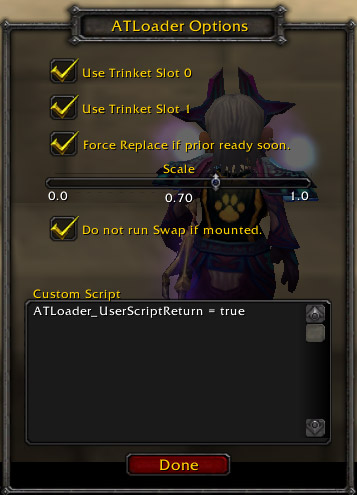
option window
Description
This mod is a concept implementation. you can see how this addon work bellow. http://files.filefront.com/howtoworkATLavi/;5117279;;/fileinfo.html
There are lots of equip management addons, but I didn't see anything like these functionality easily.
First idea, we have lots of trinket with powerful effect and cooldown, we have only 2 slot for trinket, we can not switch them in combat, So, I want to manage trinkets and switch them for utilization.
I also add "1 key trincket + DD" functionallity and "1 step" quick changer interface, too.
From patch 2.0, several functionallity was dropped.
- features
*  trinket management, and auto switch ( you can choice the switch timing manually)
* GUI(ATL Edit Queue mode).
* GUI(ATL Queue mode).
* "1 key trinket +" macro support (hope blizzard do not fix this method).
* key bindings (TODO: key bind to trinket 0/1.)
- trinket management, and auto switch
manage several trinket's cooldown, and swap them automatically. These trinket managed by priority list.
- GUI
there are 2 mode on GUI, ATL edit queue mode and * ATL queue mode. these user interface have different operability. describe bellow.
- ATL Edit Queue mode).
This mode allow you make trinket priority list. You can drag and drop from inventory or bag, to icon box under ATL queue window. you can config the entry and add the trinket to priority list. also, if you select the icon of the ATL queue window, you can config the trinket. To change priority order, you can drag&drop the entry on ATL queue window.
- GUI(ATL Queue mode).
you can change the mode from context menu that popup by right click title bar. In this mode, you can use trinket by click the icon of the ATL queue window, if you click left/right button on the panel of queue entry, you will equip the trinket to slot 0/1. If you are in combat, the trinket will remember to the "stack". that will equip when you are out of combat.
- "1 key trinket +" macro support (changed from patch 2.0)
type /macro, select <char> specific Macros, you will see "ATL_GenMacro".
this macro has made by ATL. Please change icon to spell/skill you want to use.
To configurate generated macro contents, open ATL config window, you will see
"Macro" edit box. (before, custom script. that no longer work). edit this edit box as you like.
Put the ATL_GenMacro to where you like. you can use this macro for 1 key trinket + macro.
If you want to make more than 2 macro, push + button of the drop down, enter macro name.
Note: If you wont to use macro, set clear the edit box. ATL no longer create macro.
If you no longer use the macro, push - button for delete selected macro entry.
(ATL_GenMacro is the default, so that is not deleted, just cleared.)
ATL does not delete the existing macro entry, so you need delete it from /macro window.
ATL generate macro with following.
- If you define #... for the first line of your macro, move it to the first line of generated macro.
- Hide UIErrorsFrame and Error Speech sound option turn off since avoid error message
- use 13 or 14, or both with correct sequence. if trinket set as "vs friend", [help] option will add.
- restore your error speech option.
- run your macro.
- restore UIErrorsFrame.
- if you check off the "run" checkbox on the left of title bar, the auto-swap
functionallity is suspended.
- you can configuration several setting by config window. this can access from
context menu.
- Key bindings
Toggle Queue Window::
toggle the ATL Queue window. this is same as /atl.
Toggle auto swap::
check on/off the ATL queue run checkbox. this allow you start/stop auto trinket swap function.
Swap Trinket::
allow you execute auto trinket swap function even if you check off the run checkbox.
- Trinket setting (since UseTrinket functionallity dropped, type attribute has no longer used.).
* passive: check if the trinket is passive. do not need click to activate. this will check automatically.
* disable: if checked, does not select this entry while swapping.
* duration: keep the trinket on the slot till the duration expires.
* type: this works for activate trinket with ATLoader_UseTrinket()
 * manual: function does not use the trinket automatically. you need to click the trinket to activate.
 * vs friend: /use [help] option will add. trinket will be used if your target is friendly.
 * vs enemy: /use [harm] option will add. trinket will be used if your target is not friendly.
 * no check: no option will add. trinket will be used if you click the macro.
 * custom: No longer used.
- slash command
* /atl - toggle window
* /atl config - toggle config window
* /atl add [item link] - add trinket to queue ( note: do not link which not a trinket. not check yet ).
* /atl delete <index> - delete trinket. index from 1 to 16
* /atl edit <index> disable - toggle disable property of active queue index.
* /atl addset <set name> - add queue set.
* /atl delset <set name> - delete queue set. you cannot delete "default" queue.
* /atl set <set name> - set specified set to active queue. if you do not specify set, list the defined set name.
* /atl verbose - toggle verbose mode. this mode show when/how to update and use trinket by macro.
The AutoTrinketLoader Team
