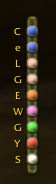
Vertical Bar
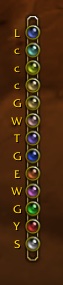
Alternate Art
Description
ChatBar - Button Bar for openning chat messages of each type.
A little acsii art for demonstration: [oooooooo]
o - Buttons, colored the color of a chat type, left click to open editbox of that type, right click for type specific options. Initial letter of the type on or above the button
[ ] - Ends of the bar, left click to drag, right click for options
Button / ChatType Options:
Leave (Channel)
Print Channel User List - List prints to the default chat frame. Same as "/list #"
Hide This Button - Hide the button for that chat type or channel by name.
Reply (Whisper) - Open whisper to the last person that whispered you.
Retell (Whisper) - Open whisper to the last person you whispered.
Sticky - http://www.wowwiki.com/Chat#Advanced_Chat_Terminology.2FDetails Note: Channels are all or none, other types can be stickied individually.
ChatBar Options:
Vertical Orienation - Toggles vertical/horrizontal bar via sliding.
Reverse Button Orienation - Toggles button order reversal via sliding
Text On Buttons - Toggles chattype abrev on/next to the buttons
Show Button Text - Toggles chattype abrev visibility
Use Channel ID On Buttons - Toggles using the channel index or the first letter of the channel name
Button Message Flashing - Toggles button flashing when you receive a message of that type
Show Bar Border - Toggles show/hide the bar border/background. Note: You can still click on the ends of the bar when it's hidden
Hide Addon Channels - Hide GuildMap, Sky, CTRA and CTA channel buttons
Hidden Buttons - Submenu for showing manually hidden buttons
Reset Position - Attaches the ChatBarFrame to above the ChatFrame1 tab
Reorder Channels - General, Trade, LocalDefense, LookingForGroup, WorldDefense, GuildRecruitment, others...
ChatBar Team