WhoTip
- By
Shift-clicking on a user name in chat shows a tooltip with their whois information.
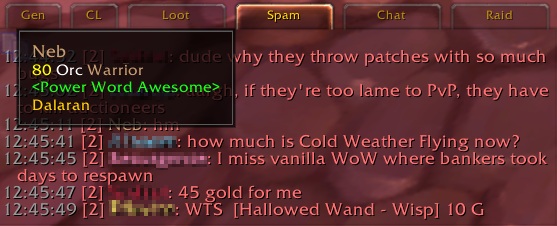
WhoTip anchored to the cursor
Description
Shift-clicking on a user name in chat shows a tooltip with their information.
I like to have a separate frame for General/LFG, Trade, Whispers and everything else. The basic idea of WhoTip is that you don't have to switch over to ChatFrame1 ("General" by default) to look at the /who information when you Shift-Click a name in another tab. It's useful for forming and looking for groups because you can just shift-click anyone who whispers you or that you see in a channel.
You can use /whotip to toggle the tooltip anchor between your cursor and the default (bottom-right corner).
WhoTip Team

Owner