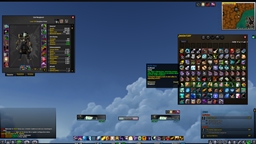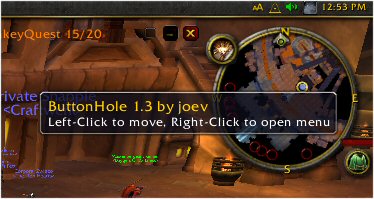
With tooltip...
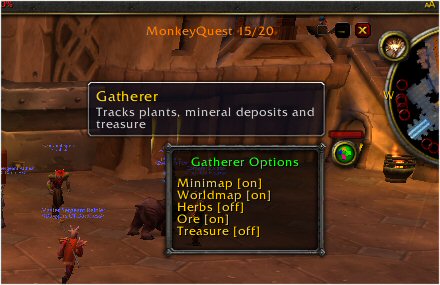
with gatherer
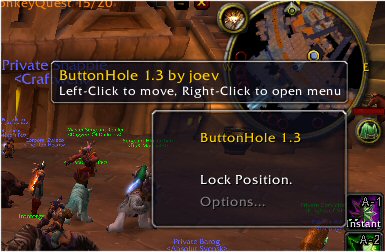
With tooltip and right-click menu
Description
Sick of 20 buttons clogging up your minimap? Then you need ButtonHole!
This mod "swallows" minimap buttons into one easily manageable place where they can be selected by simply scrolling through them using the mouse-wheel.
Supporting Mods:
----------------
CleanMinimap 2.6 and higher.
Ultimate Book of the Dead v2.31 and higher
Predefined Mods:
----------------
The following mods have "predefined" support for ButtonHole - That is, I have provided the necessary hooks until the mods themselves support ButtonHole. Therefore they can be used at present without modification.
* Accountant
* Atlas
* Opium
* MonkeyBuddy
* Parchment
* TrinketMenu
* Wardrobe
* CT RaidAssist
* CT Mod
* FlagRSP and Friendlist
* DepositBox
* Paladin Assistant
* Minigames Pack
* Call To Arms
* MyMusic
* GypsyMod
* EnchantingSell
* QuestAssist
* TrainerSkills
* QuickCalc
* Gatherer
* ImprovedErrorFrame
* Cosmos
* Ultimate UI
(Special Thanks to barryj, Leachim, Grym and Hunterman for the additional pre-defined entries)
Feel free to mail me some predefined entries (you can look for them in the PredefinedMods.lua file in the Interface\Addons\ButtonHole directory of your WoW folder.)
You should assume latest version of all of the above, I can't guarantee that older versions will work.
For Developers:
---------------
To include ButtonHole support in your mod is easy.
Simply add ButtonHole to your mods' .toc file as an optional dependency and add the following to your mod's 'OnLoad' event handler and your minimap button should automatically be 'swallowed' by the ButtonHole.
if ButtonHole then
ButtonHole.application.RegisterMod({id="SOMEIDENTIFIER", name="Your Mods Name",tooltip="Some Tooltip text", buttonFrame="YourMinimapButtonFrame", updateFunction="YourMinimap_UpdatePosition_Function"});
end
The fields are as follows:
id = Some string that will uniquely identify your mod in the buttonhole queue. Your mods name + some gobbledygook should ensure uniqueness :)
name = er... well.. the name of your mod silly. :)
tooltip = again self explanatory.. if the tooltip is nil, then ButtonHole will not attempt to show it.
buttonFrame = The name of the frame that represents your mod. BH will strip this off the minimap border and "swallow" it.
updateFunction = The name of the function that updates your mimimap buttons position.I need to disable this (for obvious reasons) while your mod is "swallowed".
Future Enhancements
-------------------
These initial releases are deliberately coarse. There are two reasons for this.
1. Experience with CleanMinimap has taught me that other people come up with many good ideas that I haven't even thought of yet.
2. I want to get early versions out so that mod authors can begin adding support if they have 'minimap' buttons for their mods.
I do have ideas for where BH will go in the future, for example:
* Options Gui
* Key bindings to move up and down the list
* A 'modifier' key to scroll to a particular mod, click it, then have the ButtonHole scroll back to the previously shown button.
* Ability to enable/disable swallowing of buttons 'on the fly'.
* Much nicer ButtonHole icon/frame.
* Changing the order of buttons in the ButtonHole
* 'Slide out' drawer style functionality
* Titan Panel support (put your ButtonHole into your Titan Panel... Sweet!
Those are just some ideas I have for the future.
Hope you enjoy ButtonHole!
ButtonHole Team