Description

A "chrome" focused UI for WoW Classic Era and WoW: Forever.
Frosted glass, twelve skins, and a HUD that is connected in a lattice.
What is Lattice?
A replacement "chrome" (the parts of the UI that you always see and interact with) for WoW Classic Era and WoW: Forever. One addon — no modules to install, no profile to import. A short tour sets you up the first time you log in.
Coming from AetherUI? It's the same addon, renamed. Remove the old AetherUI folder; Lattice starts with fresh settings, and the tour sets you up again in about a minute. If both are installed, Lattice offers to switch the old one off.
The HUD
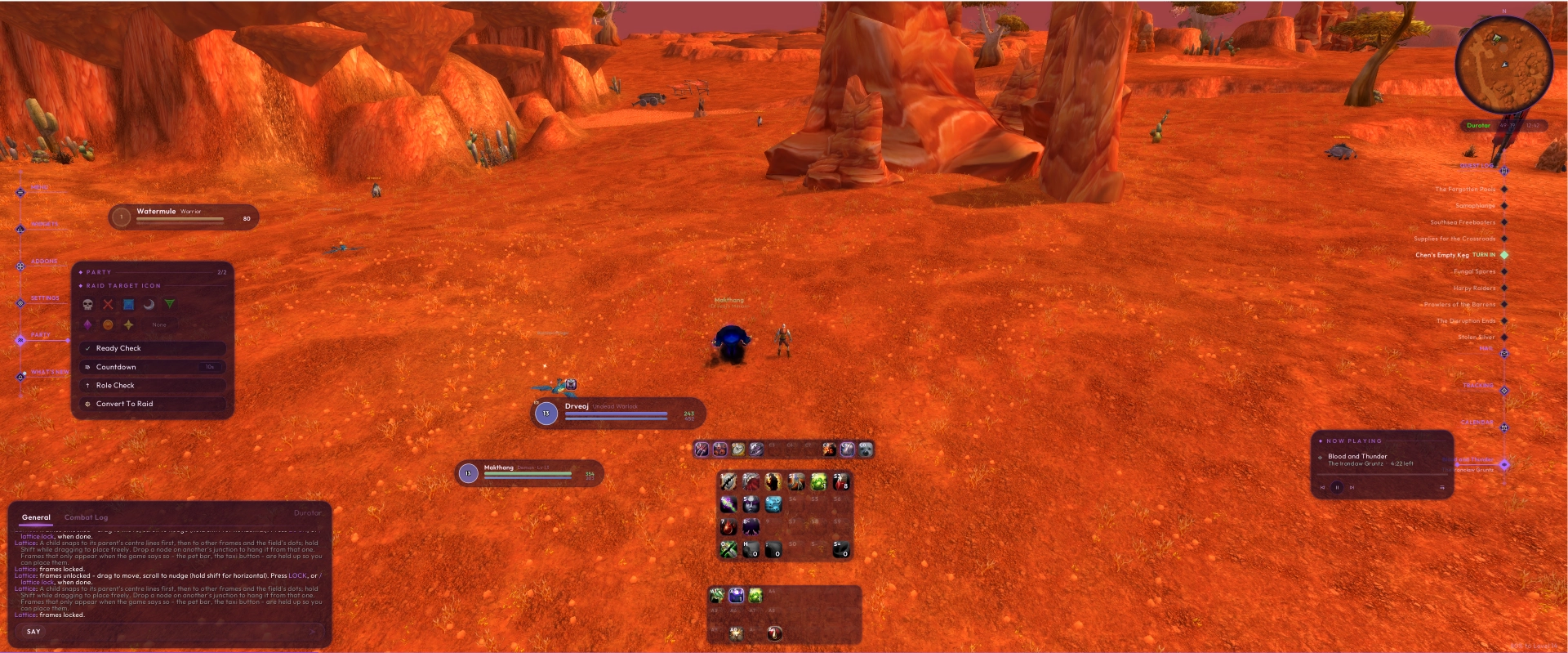
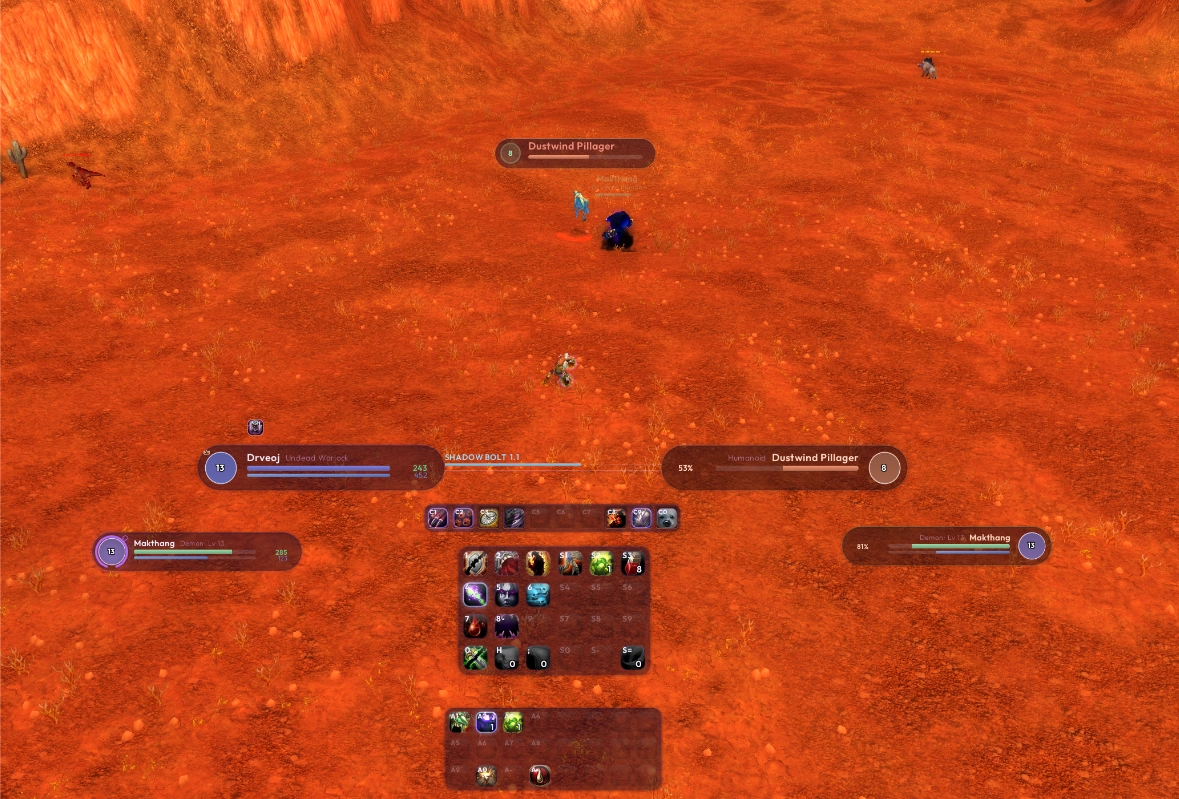
- Unit frames — you, your target, its target and your pet, as glass capsules with a class-coloured level orb. Buffs above, debuffs below.
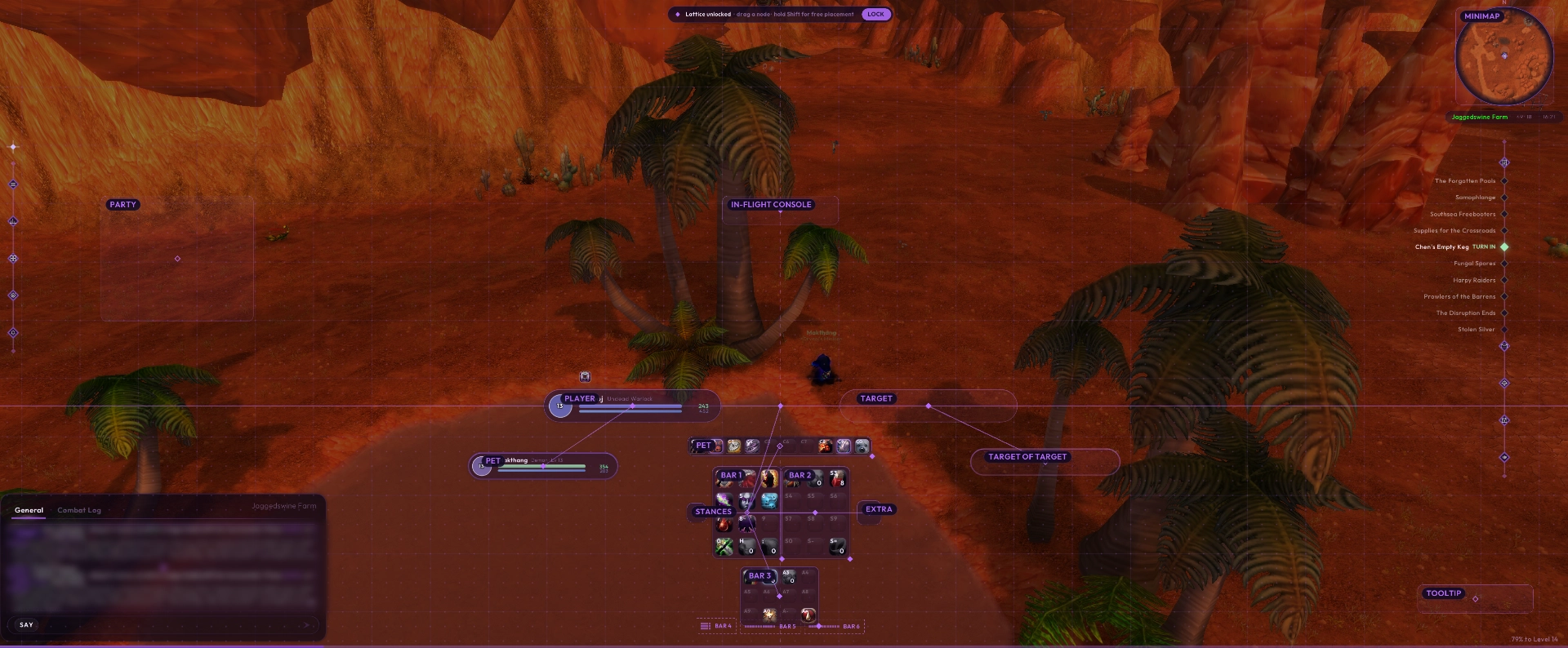
- The spine — the player and target sit level on one line. Your casts and enemy casts run along it, and your bars hang from its middle.
- Threat — a ring on your own frame that fills as threat climbs: gold while you are rising, red when it is on you. What counts as trouble flips with your role, so a tank is warned about the opposite thing to everyone else.
- Party frames — four capsules in fixed slots that move as one block.
- Nameplates — one capsule carrying level, name and health, tinted by reaction.
- XP bar — a 4px sliver along the very bottom of the screen.
Action bars
- Six independent bars (nine on WoW: Forever), plus stance, pet and extra bars.
- Cooldowns, charges and range drawn on the icons.
- Reshape any bar from its corner: rows, columns, uneven shapes. Drag one bar's edge against another's to join them into a block.
- Each bar can rest dimmer out of a fight, show only on hover, and show its keybinds.
/lattice bind— hover a button, press a key.
The two trunks
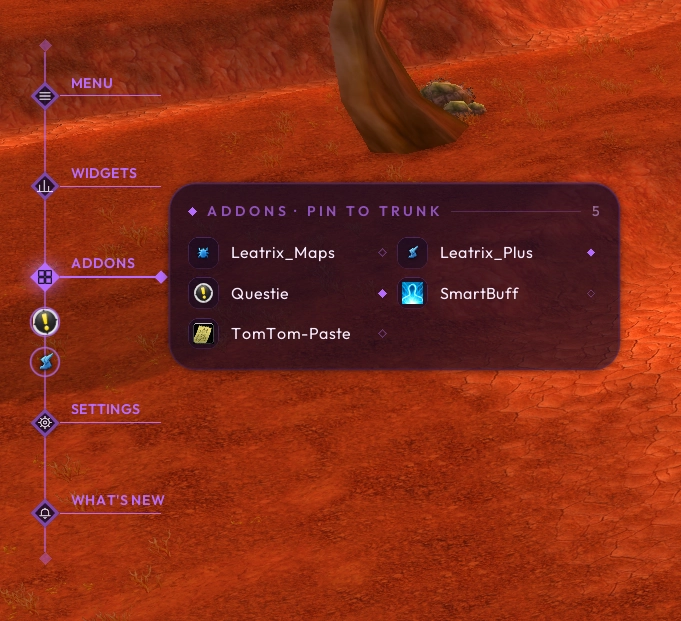
The Toolbox — a trunk down the left of your screen. Everything you'd otherwise hunt for branches off it: a menu of the game's windows, widgets, your addon buttons, quick settings, what's new, and Party while you're in a group (raid marks, ready check, role check and a countdown).
Addon buttons are collected automatically — LibDataBroker launchers and minimap buttons alike, deduplicated, whichever shape they arrived in. Pin one and it sits on the trunk.
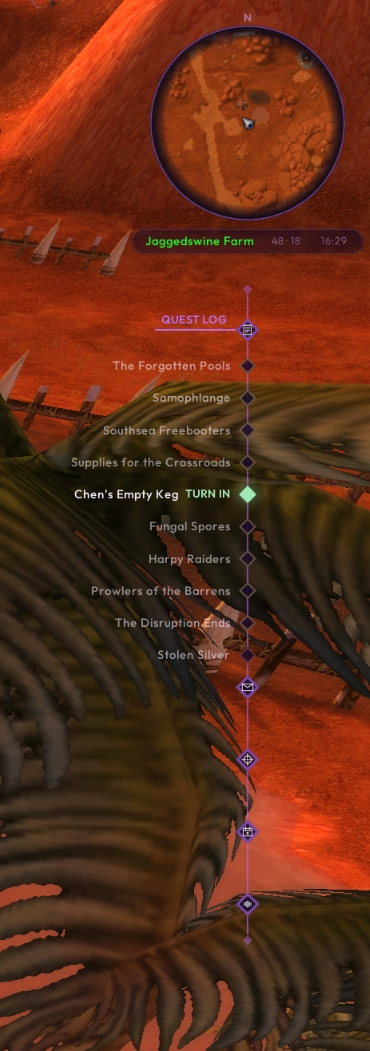
The World trunk — hangs from the minimap. Your tracked quests sit on it with their item buttons, alongside Mail, Tracking, the Calendar and the music player. In a fight it draws up out of the way and leaves your active quest showing.
Quests
- Your quests live on the World trunk, as above.
- Quest log rebuilt as a dual-pane window rather than a reskin of Blizzard's.
Bags
- All your bags in one categorised panel, and a second one for the bank.
- Equipped bags in a drawer at the edge; money and free slots in the footer.
- Junk sale and auto-repair, both off by default — an addon that quietly empties your pocket is not a convenience. Every repair prints what it cost.
Zen mode
Stand still and the interface fades out entirely, leaving a slow breath, your health, the zone and the clock. Your character sits down and the camera pulls back for the view. Move and it is back. The delay is yours to set, or off.
I.F.E.C. — the In-Flight Entertainment Console
Music, stories and thoroughly disreputable gossip rags for the length of a flight, timed to your flight path and stopping when you land unless you say otherwise. It works on Classic Era and WoW: Forever, each with its own flight times. Needs a content pack.
It plays on the ground too, from its node on the World trunk, where it is called N.I.F.E.C. for reasons I stand behind. The "N" stands for "Not".
Note: the content comes from a companion addon, Lattice Packs, which provides the music and stories for the I.F.E.C.
Skinned to match
Chat, minimap, tooltips and right-click menus are dressed to match Lattice, and the game's own fonts/lettering are set to match. Breath, fatigue and feign death run as lanes out from your own frame. All optional, individually.
Blizzard's windows — character, spellbook, talents and the rest — keep their own look. We focus on the "chrome".
Twelve skins
Midnight, Dawn, Noon and Dusk; Amethyst, Sapphire, Emerald and Ruby; Winter, Spring, Summer and Autumn. Pick one under Theme or in the tour, and the whole interface recolours at once.
Making it yours
- The tour — eight stops, about a minute, and every choice applies live on the real interface rather than in a preview: your pet and target-of-target frames, three starting shapes for your bars, and your skin. On an alt it offers you the setup you already picked.
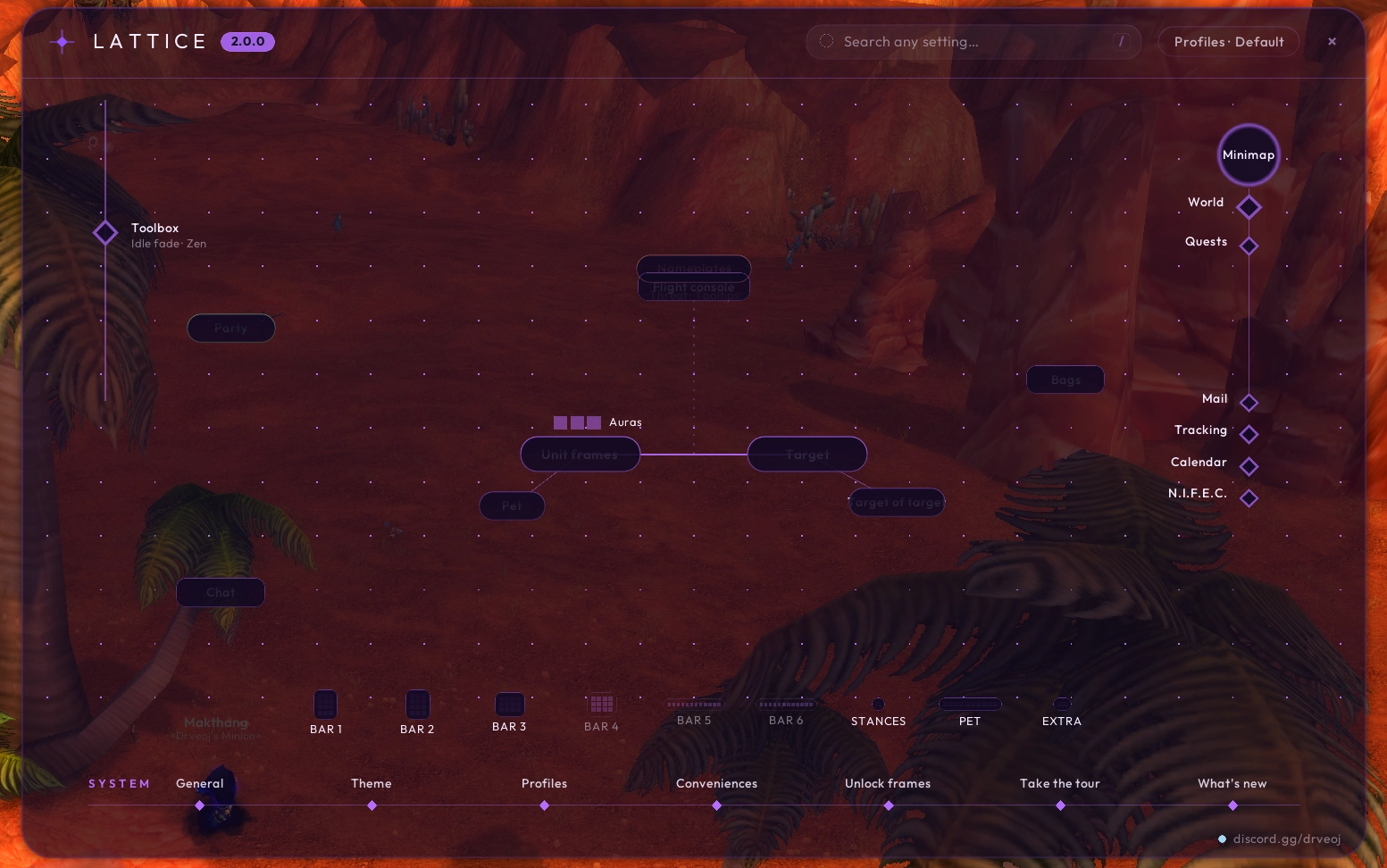
- The settings map — the settings open on a map of your own screen. Click any part to change it; search finds any setting.
- Unlock and drag. The spine snaps to the middle of your screen. Ctrl-drag to stretch it, scroll to nudge a frame up or down (Shift-scroll for sideways), and hold Shift while dragging to place it freely.
- Share your layout —
/lattice layoutgives you a string to paste to a friend, or takes theirs. - One scale control sizes the whole interface together, fitted to your screen the first time.
- Full profile support, per character.
Works with other addons
Questie + TomTom — "Navigate with TomTom". Right-click a quest on the World trunk and Lattice asks Questie where that quest actually wants you, then hands the coordinates to TomTom as a waypoint. It creates and owns its own waypoint rather than borrowing Questie's, so clearing yours never clears theirs and clearing theirs never clears yours. The menu item appears only when both addons are present and Questie's database has finished loading, and when Questie has no location for a quest it says so plainly instead of offering a dead button.
Anything with a minimap button or an LDB launcher is collected into the Toolbox automatically — Leatrix, SmartBuff, Auctionator, Pawn and the rest.
Lattice replaces some of Blizzard's interface rather than skinning it, so it may argue with other addons that do the same thing to the same frames. It gets along fine with the ones that don't. Questie, TomTom, Leatrix and SmartBuff are known to be compatible.
Chat commands
/lattice                       open the settings
/lattice tour                  run the tour again
/lattice skin <name>           midnight, dawn, noon, dusk, amethyst ...
/lattice scale 0.6-1.6         size everything, together (or "fit")
/lattice unlock                drag frames into place
/lattice bind                  keybind mode
/lattice layout                share or import a layout string
/lattice zen off               stop the interface fading
/lattice errors                collect anything that went wrong, copyable
/lattice status                which parts are running
/lattice help                  everything else
/aether still works for this release.
Something wrong?
/lattice errors collects anything that has gone wrong into a box you can copy out of. Paste that into a bug report and I will have what I need.
Contact
Discord: https://discord.gg/drveoj
Lattice Team