Profession Helper: 1-300 Leveling Guide & Shopping List for WoW Forever
- By
All-in-one 1-300 profession helper for WoW: Forever. Step-by-step guide, what you have and what's missing across all characters, Auctionator shopping lists, specializations, and 10 languages.
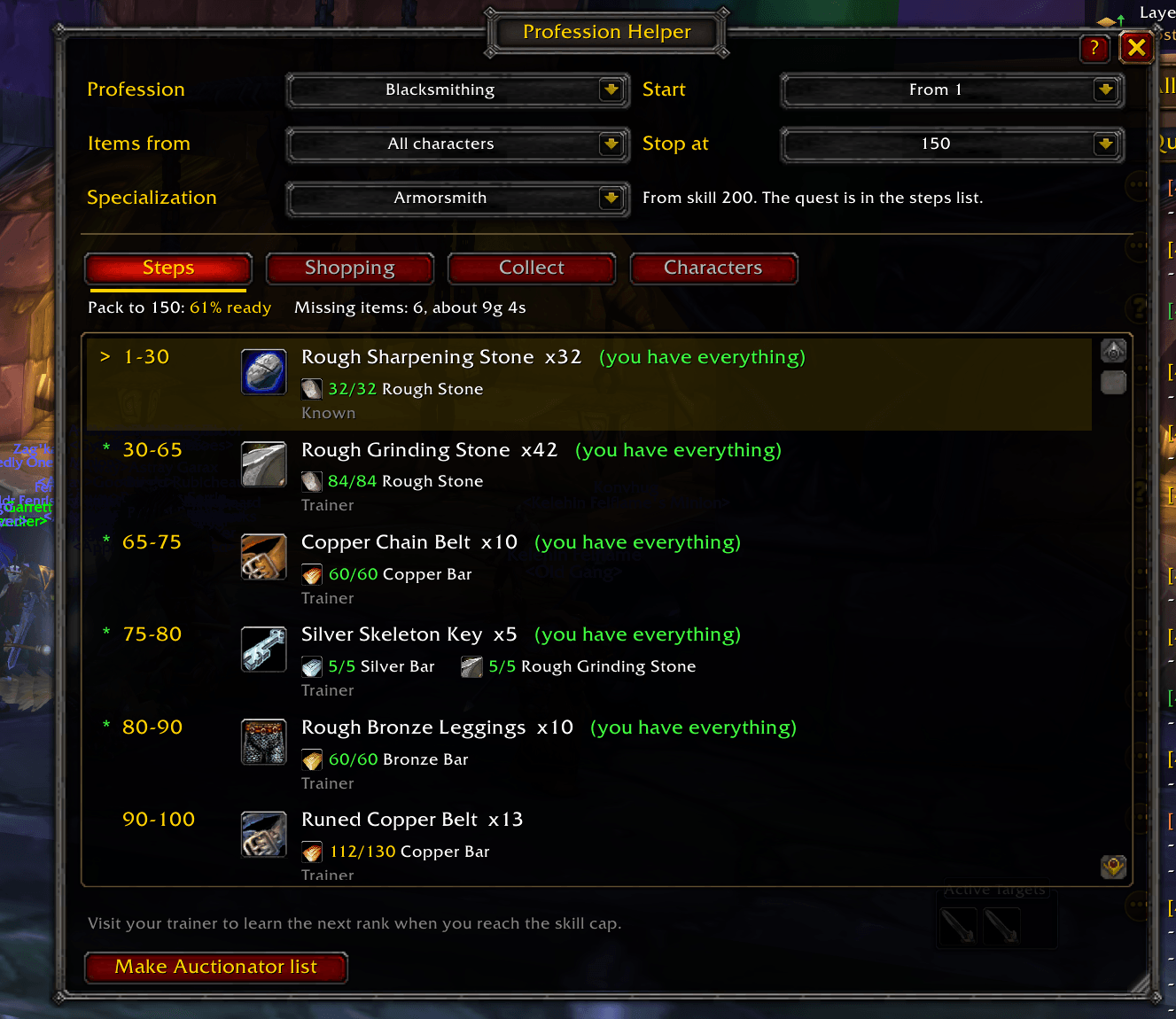
Screenshot 2026-11-20 114941.png

Screenshot 2026-11-20 115417.png
Description
Profession Helper Forever
Everything you need to take a profession from 1 to 300 in WoW: Forever, in one window. Type /ph or click the minimap button.
Steps
- A step-by-step 1-300 guide for Alchemy, Blacksmithing, Cooking, Enchanting, Engineering, Leatherworking and Tailoring.
- Reads your real skill and highlights the step you're on. Finished steps are greyed out.
- Every step shows what to craft, how many, and each material with its icon as have / need in green, yellow or red.
- Shows where each recipe comes from: your trainer, or which vendor sells the pattern.
- Stop at 150, 225 or 300, and start from your current skill or from 1.
- Specializations: Gnomish or Goblin Engineering, Armorsmith or Weaponsmith (and the Master Axe-, Sword- and Hammersmith paths), and Dragonscale, Elemental or Tribal Leatherworking. Pick one and its quest shows up in the steps at the right skill. If your character already has one, it's found for you.
Shopping
- Counts what you already own in the bags, bank and mailbox of this character, or of all your characters.
- Shows what's still missing and what it will cost with Auctionator prices.
- Things you can make yourself (bolts of cloth, leather, grinding stones, blasting powder and more) can be broken down into the raw materials they're made from.
- Vendor items (thread, vials, dyes, flux, salt, spices) are marked with their vendor price. Leave them out of the Auctionator list or tick a box to add them anyway.
- Make Auctionator list: one click, on the Steps or Shopping tab, creates an Auctionator shopping list with exactly the missing amounts.
- Click any item to search for it at the auction house. Shift-click to link it in chat.
- Copy to spreadsheet: paste your list straight into Google Sheets or Excel.
Collect and Characters
- Collect tells you which of your other characters has what you need, and what to take out of your bank or mailbox.
- Characters shows all your characters with their full WoW Forever names and their profession skills.
Window
- Drag the bottom edge to make the window taller. Drag the corner, or use Ctrl + mouse wheel, to make the whole window bigger or smaller.
- Window scale is also under Options, AddOns, Profession Helper.
- A short tutorial shows you around the first time you open it.
Languages
English, Deutsch, Français, Español, Português, Italiano, Русский, 한국어, 简体中文 and 繁體中文. The addon follows your game language.
Getting started
- Log in and type /ph.
- Open your bank and a mailbox once on each character, so their items are counted.
- Pick a profession and follow the steps.
Commands
- /ph: open or close the window
- /ph shop: make an Auctionator shopping list of what's missing
- /ph scale 50-150: make the window bigger or smaller
- /ph reset: put the window back to normal size, in the middle
- /ph tour: show the tutorial again
- /ph minimap: hide or show the minimap button
Good to know
- Auctionator is optional. Without it you still get the guide, the counts and the spreadsheet copy.
- The routes and amounts follow Wowhead's WoW Forever profession guides. Craft counts are averages, so you may need a few more or a few less.
Profession Helper: 1-300 Leveling Guide & Shopping List for WoW Forever Team