Prestige
- By
A virtual prestige leveling system for max-level characters in WoW TBC Classic (2.5.5).
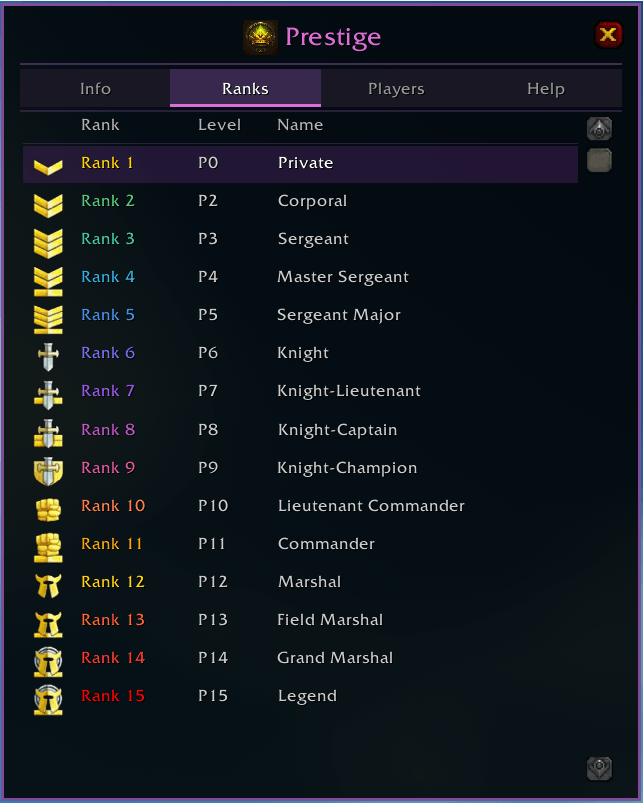
Progress through 15 faction-specific PvP ranks — from Private all the way to Legend. The Ranks tab displays every tier with its icon, prestige level requirement, and name. Your current rank is highlighted.
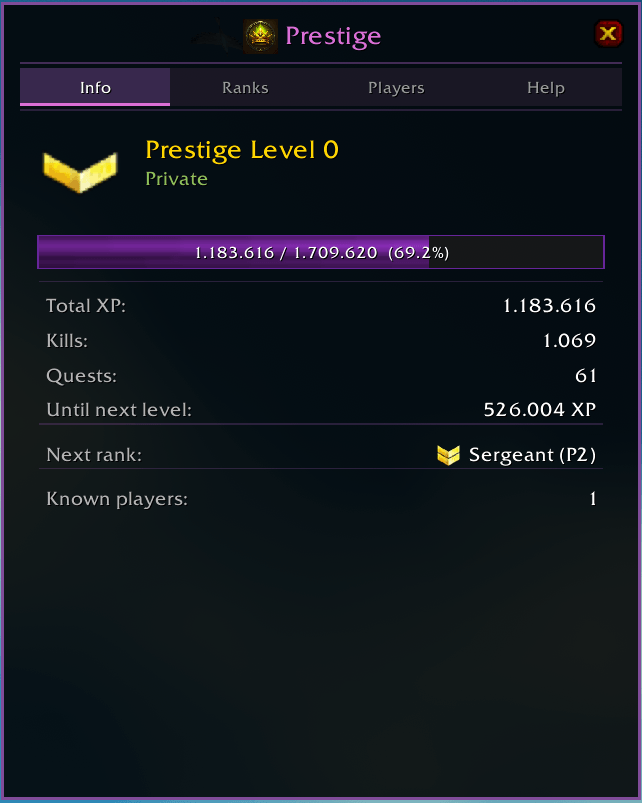
The Info tab gives you a full breakdown of your prestige progress: current level and rank, XP bar with percentage, total XP earned, kill and quest counts, next rank preview, and known addon users on your realm.

Prestige medal icons appear next to player names in all chat channels, showing your rank at a glance.
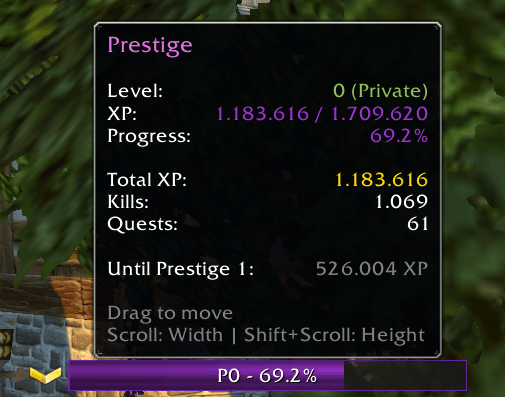
A compact, draggable XP bar tracks your prestige progress on screen. Hover over it for detailed stats including level, XP, kills, quests, and remaining XP to the next prestige level. Resize with scroll wheel.
Description
# Prestige
A virtual prestige leveling system for max-level characters in WoW TBC Classic (2.5.5).
## What It Does
At level 70, character progression stops. Prestige gives you a reason to keep going: every mob kill and quest turn-in earns virtual XP towards **Prestige Levels**. Track your progress, earn medal tiers, and see other addon users' prestige in chat and tooltips.
## Features
### Virtual XP System
- **Mob kills** are detected via the combat log and award XP based on the actual TBC XP formula (mob level, level difference, elite multiplier, group size penalty)
- **Quest completions** award XP based on the quest's reward value
- XP is only tracked at level 70 - the addon stays completely inactive below max level
### Realm-Wide Prestige (Shared Progress)
- Prestige progress is **shared across all characters on the same realm**
- XP earned on any character contributes to the same prestige level
- Log in on an alt and see the same rank immediately
- Different realms maintain separate prestige progress
### Prestige Leveling
- Each prestige level requires **1,709,620 XP** (110% of the 69-to-70 requirement)
- Every prestige level costs the same amount - no exponential scaling
- Progress persists across sessions via SavedVariables
### Prestige Bar
- Custom XP bar showing your current progress (percentage and prestige level)
- Draggable - position it anywhere on your screen
- Resizable via mouse wheel (Shift+scroll for height)
- Medal icon displayed next to the bar
- Click the bar to open the menu window
- Hover for a detailed tooltip with stats (total XP, kills, quests, XP remaining)
### Menu Window
- **Info tab**: Overview with medal, XP bar, stats, and next rank preview
- **Ranks tab**: All 15 ranks with icons, level requirements, and current rank highlighted
- **Players tab**: Scrollable list of known addon users sorted by prestige level
- **Help tab**: Commands and controls reference
### Rank System (15 Ranks)
Uses the classic PvP rank icons with faction-specific names:
| Prestige | Alliance | Horde |
|:-:|---|---|
| 1 | Private | Scout |
| 2 | Corporal | Grunt |
| 3 | Sergeant | Sergeant |
| 4 | Master Sergeant | Senior Sergeant |
| 5 | Sergeant Major | First Sergeant |
| 6 | Knight | Stone Guard |
| 7 | Knight-Lieutenant | Blood Guard |
| 8 | Knight-Captain | Legionnaire |
| 9 | Knight-Champion | Centurion |
| 10 | Lieutenant Commander | Champion |
| 11 | Commander | Lieutenant General |
| 12 | Marshal | General |
| 13 | Field Marshal | Warlord |
| 14 | Grand Marshal | High Warlord |
| 15+ | Legend | Legend |
### Multiplayer Integration
- **Guild & Party/Raid**: Prestige data is automatically broadcast to guild members and group members on login
- **Player Tooltips**: Hovering over a player with the addon shows their prestige level in the tooltip
- **Chat Medals**: Medal icons are displayed next to player names in all chat channels (say, yell, party, raid, guild, whisper, custom channels)
- Communication uses `SendAddonMessage` - completely invisible and does not clutter chat
## Slash Commands
| Command | Description |
|---|---|
| `/prestige` | Show current status (level, XP, kills, quests, known players) |
| `/prestige menu` | Open the prestige menu window |
| `/prestige size <w> [h]` | Resize the prestige bar (width 100-600, height 10-40) |
| `/prestige reset` | Reset all progress (requires confirmation) |
## Installation
1. Download or clone the `Prestige` folder
2. Place it in your `\World of Warcraft\_anniversary_\Interface\AddOns` directory
3. Restart WoW or type `/reload`
4. The addon activates automatically once your character reaches level 70
## File Structure
```
Prestige/
Prestige.toc - Addon metadata
Data.lua - Constants, medal definitions, XP formula, hash functions
Core.lua - Initialization, SavedVariables, realm-wide data, slash commands
XPEngine.lua - Kill/quest tracking, mob level cache, rate limiter
Communication.lua - Addon messaging protocol (guild/party/raid broadcast)
UI.lua - Prestige bar, tooltip hooks, chat medals, nameplate icons
Menu.lua - Menu window with Info, Ranks, Players, Help tabs
```
## How XP Is Calculated
### Mob Kills
The addon uses the official TBC XP formula:
- **Base XP** = 45 + (5 x mob level)
- **Same level or higher**: Up to +25% bonus (capped at +5 levels above player)
- **Lower level**: XP scales down linearly toward the gray level threshold
- **Gray mobs** (more than 9 levels below at level 70): 0 XP
- **Elite multiplier**: Elite (2x), Rare-Elite (2.5x), Rare (1.5x), World Boss (3x)
- **Group penalty**: XP is divided by group size with a small multiplier bonus
Mob levels and classifications are cached when you target or mouseover enemies. If the level is unknown (e.g. you never targeted the mob), a fallback of level 68 is used.
### Quest Completions
- Quest XP is captured from `GetRewardXP()` when the quest completion dialog appears
- If the API returns 0 at max level, a fallback of 12,650 XP (average level 70 quest) is used
## Requirements
- WoW TBC Classic 2.5.5 (Interface 20505)
- Character must be level 70 for the addon to activate
## Version History
### 1.1.0
- **Realm-wide shared progress**: Prestige XP, level, kills, and quests are now shared across all characters on the same realm
- Automatic migration of existing data from v1.0.0
- Login message now displays the realm name to confirm shared progress
### 1.0.0
- Initial release
- Virtual XP from mob kills and quest completions
- 15-rank medal system with PvP rank icons
- Prestige bar with drag-to-move and scroll-to-resize
- Menu window with Info, Ranks, Players, and Help tabs
- Guild/Party/Raid addon communication
- Chat medal icons and player tooltip integration
- Nameplate prestige badges for group members
## Author
J4gg3d
## Special Thanks
- **Scura** - for testing and feedback
- **Scura**, **m4es7ro**, **Nexusexe** - for the idea behind Prestige
Prestige Team