


Prepped: Raid Readiness
- By
Know you're ready before raid night
Prepped turns everything you bring to a raid (gear, enchants and consumables) into one readiness score, then tells you exactly what to do next to raise it, biggest gain first.
Built for World of Warcraft: Forever, on top of SimGear Forever's gear scores and item data.
Features
One score, one to-do list
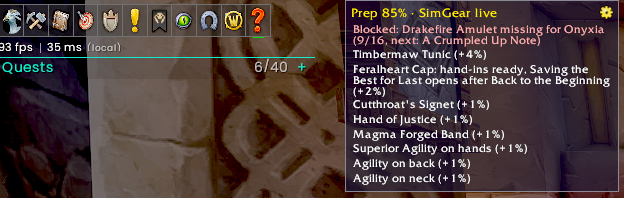
- Prep % in the tracker: your gear, enchants and consumables against Pre-raid best-in-slot for your spec.
- Raid now % inside a raid: the same score, counting the buffs you actually have up.
- A to-do list sorted by gain: each upgrade, enchant and missing consumable shows how much readiness it adds (+3%). A slot's enchant always comes after the item it goes on.
Pre-raid best-in-slot, your way
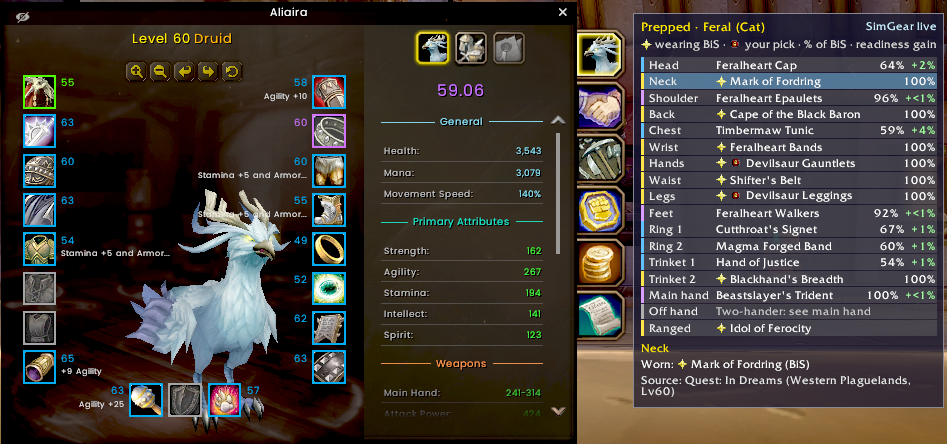
- BiS per slot, picked with SimGear's simmed scoring, including set bonuses and Forever's server-only tier 0.5 sets.
- Your picks: right-click a slot to target something else (a cheaper BoE, say). The score and to-dos follow your choice.
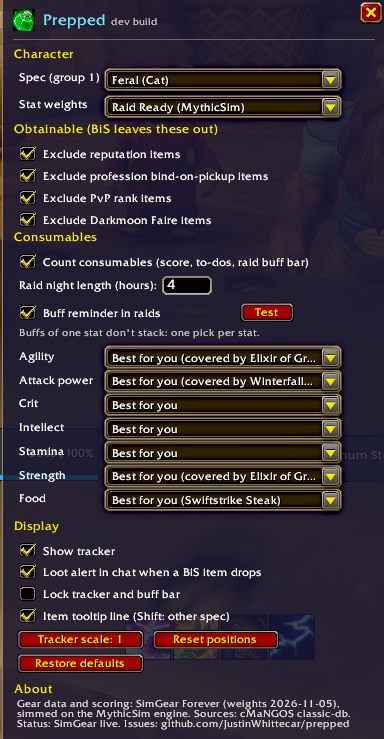
- Filters for reputation, profession-only, PvP rank and Darkmoon Faire items. Raid loot and items Forever doesn't have are never picked.
- A slot panel beside your character sheet: worn vs BiS for every slot, with where to get each item.
Tier 0.5, every class
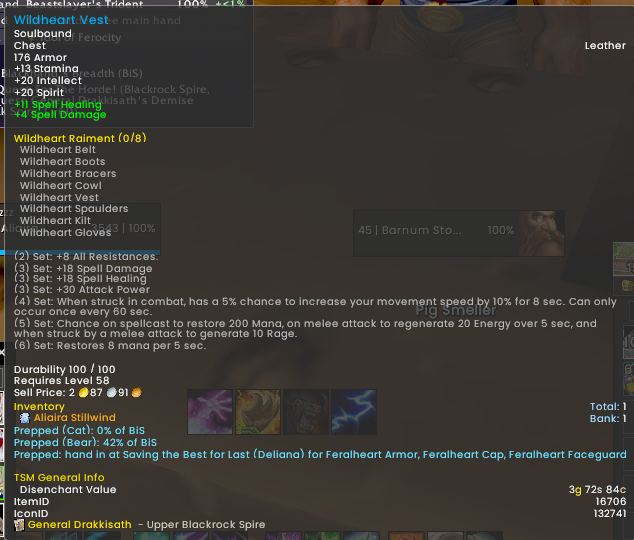
- Each tier 0.5 piece names the quest that gives it and the dungeon set pieces you still need to hand in.
- Hand-in items get a tooltip line, so a Wildheart Kilt never gets vendored, and the loot alert speaks up when one drops.
Consumables and raid buffs
- A consumable plan sized to your raid night length. Buffs of the same stat don't stack on Forever, so you pick one per stat.
- A buff reminder bar in raids: click a button to use what's missing. Hidden in combat.
- Don't bother with consumables? Switch them off and the score is gear and enchants only.
And also
- Tooltips: % of BiS and the readiness an item would add, for your spec (hold Shift for your other one).
- Loot alert in chat when a BiS item or tier 0.5 hand-in drops or comes up for roll.
- Onyxia attunement: a blocker line with your progress through the chain.
- Stat weights: SimGear's simmed weights, a preset, or your own.
Getting started
- Install SimGear Forever and Prepped.
- Log in on a level 60 character. The tracker appears; /prep shows or hides it.
- Open the options with /prep options or the gear icon on the tracker.
Prepped ships with a snapshot of SimGear's data, so it keeps working if SimGear's class data is missing or changes shape.
Commands
| Command | What it does |
|---|---|
/prep |
Show or hide the tracker |
/prep options |
Open the options |
/prep spec <name> or auto |
Choose the spec for this talent group, or detect it |
/prep pick <slot> <item link> or auto |
Set your own target for a slot, or go back to Prepped's BiS |
/prep weights |
Show or set stat weights |
/prep buffs test |
Preview the raid buff bar |
/prep reset |
Put the tracker and buff bar back where they started |
/prep debug |
Show what Prepped sees, for bug reports |
Status and feedback
Beta, English only. The content target is Pre-raid; raid loot targets will follow once their loot data exists.
Found a bug or a wrong BiS pick? Open an issue on GitHub and include the output of /prep debug.
Credits
Gear data and scoring: SimGear Forever by Flavius and contributors, simmed with MythicSim. Quest, reputation and attunement data: cMaNGOS classic-db. Prepped is free software under the GNU GPL v3 or later; source on GitHub.
Prepped: Raid Readiness Team
