Portal Pro
- By
Portal Pro is the single most advanced addon for mages to sell portals and track their income. Massive customization, ledgers, market analysis, reagent cost and count tracking and more! Actively being developed and improved.
full.png
leads_2.png
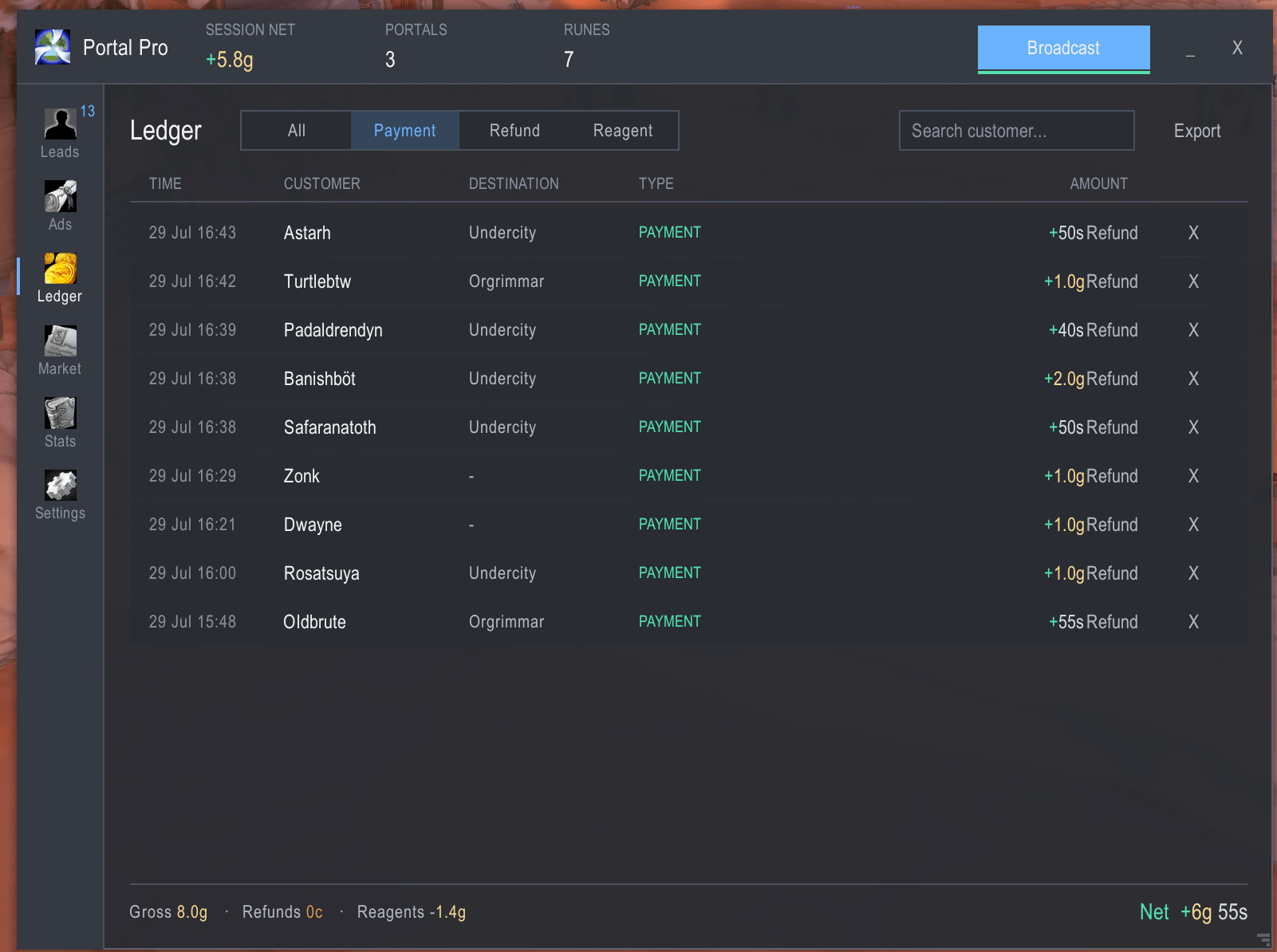
ledger_2.png
Description

Run your portal business properly. Find the customers, answer them in one click, and know to the copper what you actually made — net of refunds and runes, not the flattering gross number.
Built for WoW Classic Era & Hardcore (1.15.9). No dependencies. No Blizzard panel chrome — a custom interface that scales cleanly and gets out of your way.
Read this first: the honest bit about Trade chat
No addon can post your advert to Trade chat while you're AFK. Since patch 8.2.5 /
Classic 1.13.3, Blizzard protects SendChatMessage for Say, Yell and Channel — those
require a genuine click or keypress. Anything claiming otherwise is broken or lying.
Portal Pro doesn't pretend. It composes and stages the ad, then releases it from real input:
- Broadcast button — one click, ad goes out.
- Keybind — bind it and never move your mouse.
- Arm mode (opt-in) — stages the ad and releases it on your next keypress while you play normally, so you don't have to aim for a button.
A cooldown bar shows when the next ad is due, so you keep a rhythm instead of guessing.
Whispers, party, raid and guild are not restricted — so auto-replying to someone who asked for a portal, and announcing "portal's up" to your party, genuinely do happen on their own.
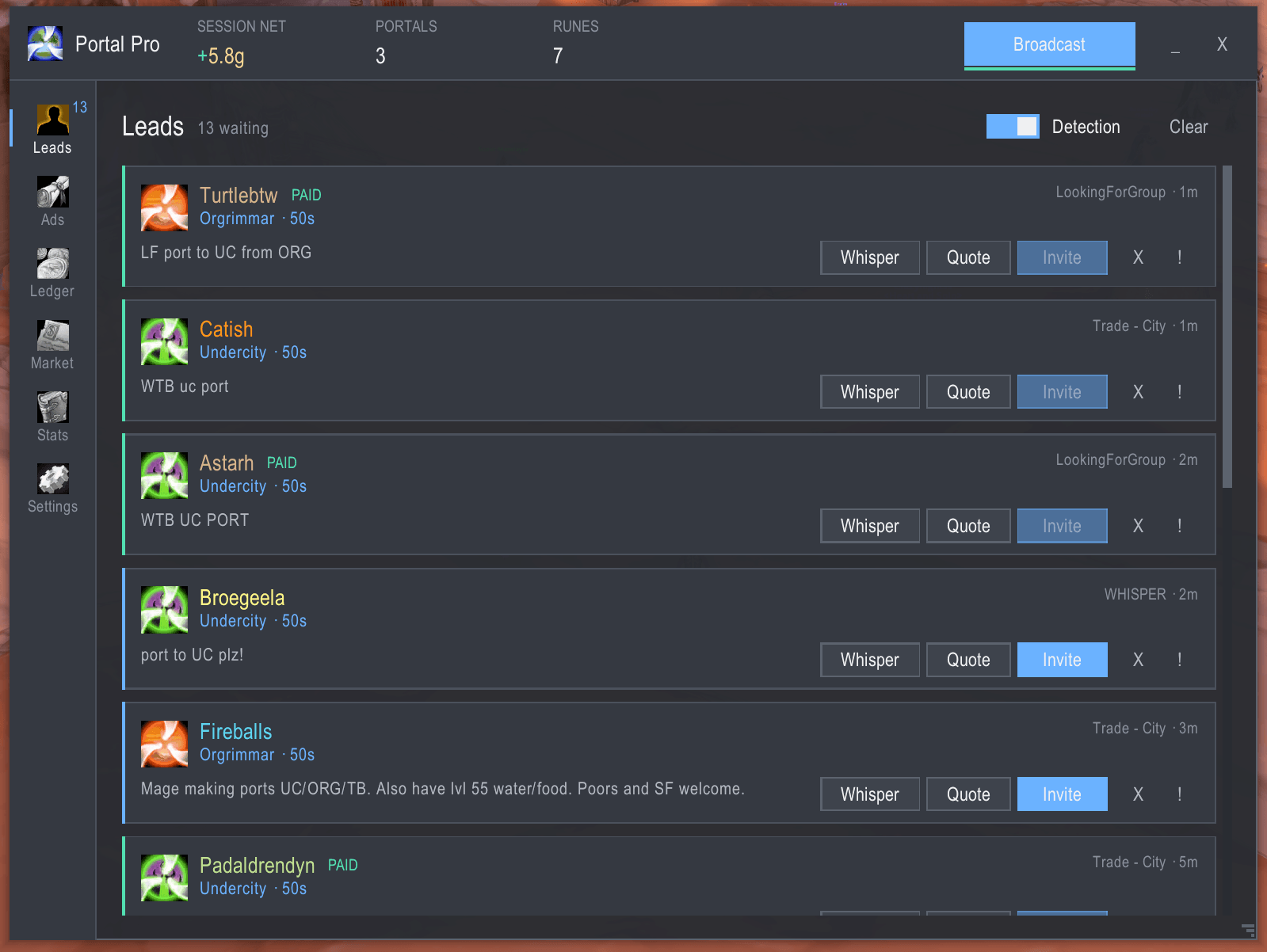
Leads — stop reading Trade chat
Scans Say, Yell, General, Trade, LookingForGroup, Guild, Party and Whispers (each one toggleable).
Intent is scored against a weighted rule set, not matched with a naive search for "port". That matters more than it sounds:
selling ports to SW 10gis a competitor — filtered out, so you stop whispering your own competition.meet me in the portal roomis not a customer — filtered out.lf port sw will tipscores high and lands at the top of your queue.
Destination parsing understands how people actually type: sw, if, og, uc, tb,
darn, iron forge, thunder bluff, and common misspellings. Abbreviations are matched as
whole words, so if only counts as Ironforge when it's standing alone — never inside
ordinary English.
It also reads position, not just presence. wtb port to UC from Org names two cities;
Portal Pro knows the one after "to" is where they want to go and the one after "from" is
where they already are. Quote the wrong city and you cast the wrong portal.
Every lead card shows the name (class-coloured), the destination and your price for it, the verbatim message, which channel it came from, and how long ago. Hover it and the tooltip tells you exactly which rules fired and why it matched — so a false positive is something you can diagnose, not just shrug at.
One click per action: Whisper · Quote · Invite · Dismiss · Blacklist.
- VIPs and regulars jump the queue and get longer to be answered.
- Returning customers are flagged, with their history on hover.
- Blacklist anyone who wastes your time; they never generate a lead again.
- Per-player cooldown so one person spamming Trade doesn't fill your screen.
- Paid customers drop off the queue by themselves. Their cooldown clears on the way out, so if they come back for another portal five minutes later they still reach you.
- Hardcore rescue zones — a lead from a dangerous zone is highlighted so you can price accordingly. Only shown on Say/Yell, because those are zone-local and actually prove the customer is near you.
Auto-whisper and auto-invite exist and are off by default. Conservative on purpose: aggressive auto-messaging gets you squelched by the server spam filter. One click to turn on if you want it.
Popups that respect combat
The lead alert never appears while you're fighting. Leads that arrive mid-fight are held and replayed the moment you drop out of combat — newest first, with a count of any others still waiting. If combat starts while an alert is up, it's pulled off screen and the lead is kept, not lost. Leads that expired during a long fight are quietly discarded rather than shown stale.
The alert sound still fires immediately, because that part is useful while you're swinging.
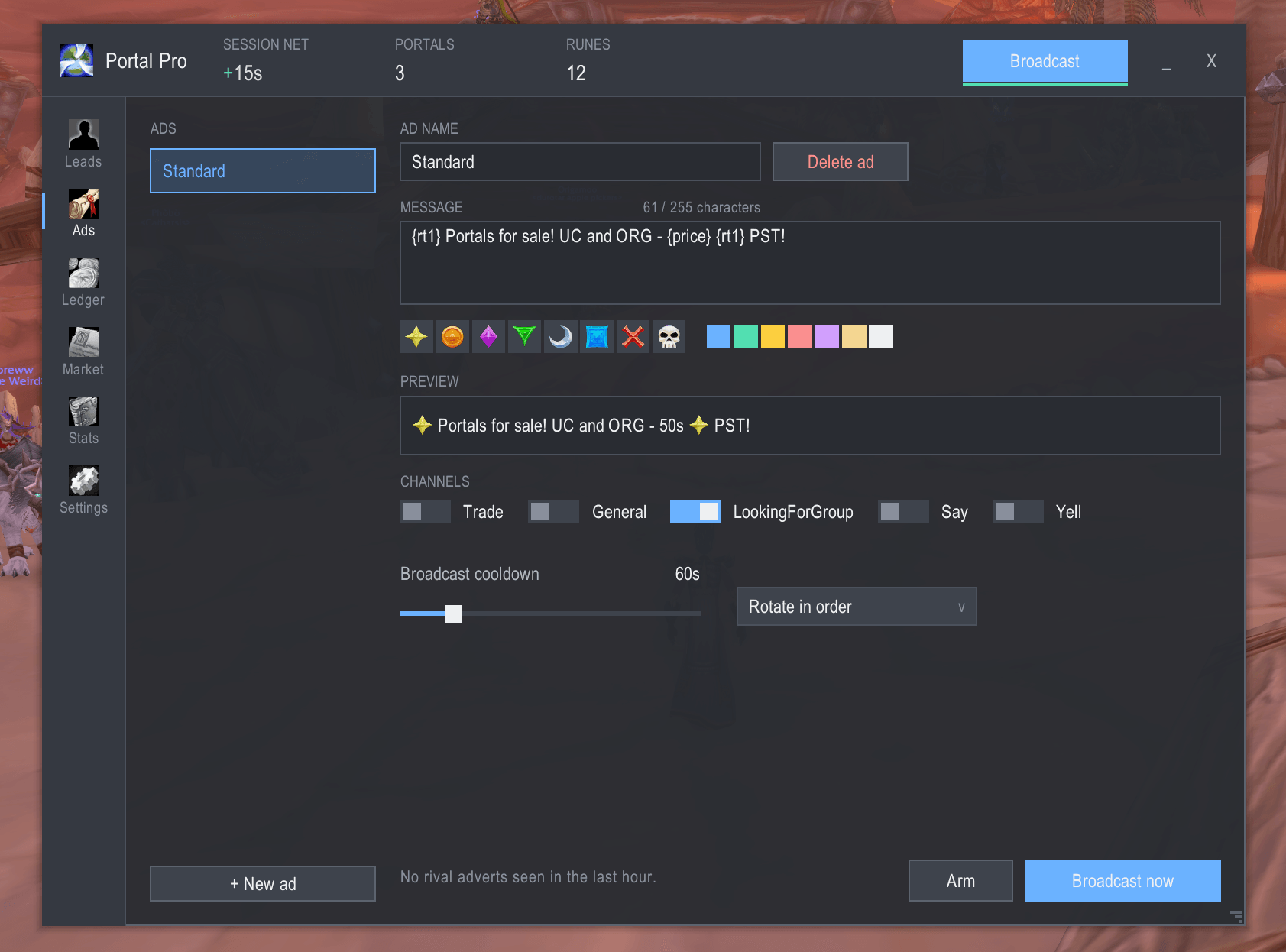
Ads — write them properly
- Multiple templates with sequential or random rotation, so you don't read like a bot.
- Variables:
{price}{dest}{city}{me}{count}— filled in at send time. - Raid icon picker inserts
{rt1}–{rt8}. It deliberately does not offer{star}: the word forms are localised and silently fail to render on non-English clients. - Colour picker for
|cffcodes. - Live preview renders icons and colours exactly as chat will show them, so you find out here rather than after posting.
- 255-character counter that warns before you waste a send.
- Per-ad channel targeting — Trade, General, LFG, Say, Yell.
- Tells you if you're not actually in the channel you're aiming at.
Know what to charge
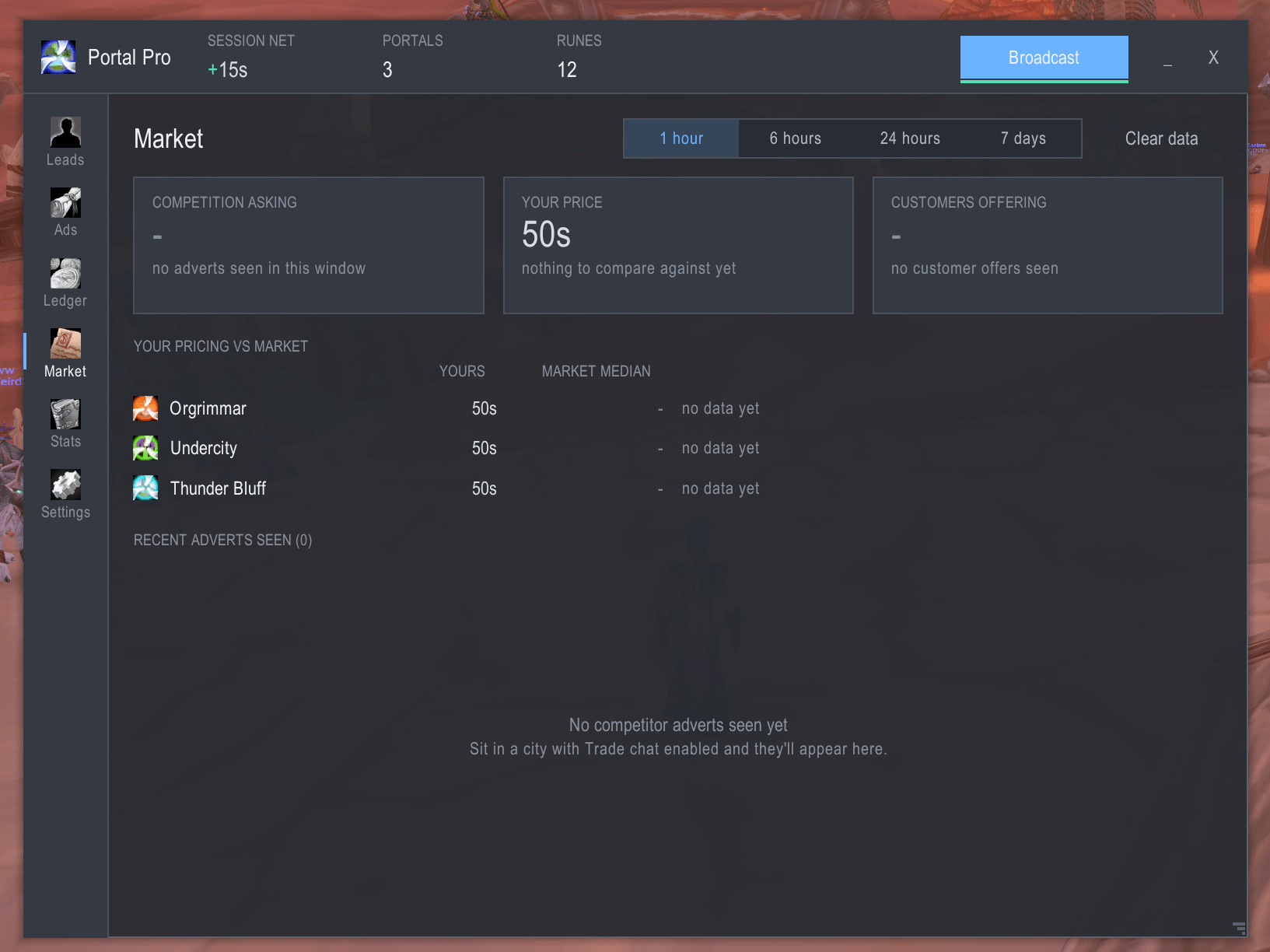
Pricing in Classic is guesswork. Portal Pro turns it into data — using information it was already throwing away.
The scanner reads every rival advert in Trade in order to reject it as a customer. Those adverts contain prices. Portal Pro keeps them.
Trade median 10g from 4 mages · you're undercutting by 2g
That line sits on the Ads tab while you're writing the advert, which is exactly when you decide what to charge. The Market tab gives the full picture:
- What the competition is asking — median, range, and how many mages are advertising
- What customers are offering — bids are tracked separately from asks, because "what rivals charge" and "what buyers will pay" are different questions
- Your price vs the market, per destination — undercutting, at market, or above it
- A live feed of every advert seen, with prices parsed out
The median counts one price per mage, not one per message. That detail matters: without it, whoever spams Trade hardest would define the "market rate".
Understands 10g, 1g50s, 75 silver, 12 gold, and multi-price adverts. Traders' shop
listings are filtered out — item links, multi-item price lists and prices sitting nowhere
near the word "portal" are all rejected — and when something slips through anyway, one click
drops it or ignores that advertiser for good. Hover any advert to read the full message.
Data is per-realm, because prices don't transfer.
No extra setup, no data collection service, nothing sent anywhere. Just what your own client already heard.
Whispers — seven templates, one click each
Greeting · Quote · Location · Invited · Portal up · Thanks · Busy
All support variables. Quick-reply buttons sit on every lead card. Throttled per-person so a misclick can't spam anyone.
Portal announcements to party fire automatically the instant the cast lands — party chat isn't protected, so this one needs no button.
The ledger — where the money actually goes
Append-only. Refunds are linked negative entries that never edit the original sale, so your history stays auditable.
Payments captured automatically
Gold from trades and mail, booked to the right customer without you touching anything.
This is harder than it looks and most attempts get it wrong. TRADE_CLOSED fires on
cancelled trades too and carries no result — treat it as "paid" and every abandoned trade
becomes phantom income. Portal Pro watches the actual change in your gold, claimed by
whichever source is expecting it, through a single arbiter. Cancelled trades book nothing.
Trade gold and mail gold can never be double-counted.
Refunds, first-class
- Gold traded or mailed back to a known customer is recognised as a refund automatically.
- Manual Refund button on any payment, including partial amounts.
- Refunds are subtracted from every net figure and shown as their own row type.
Real profit, not gross
Rune consumption is recorded as cost basis — Rune of Portals and Rune of Teleportation, at a unit price you set. So Net means net.
Tips are detected by comparing what you were paid against your asking price, and noted on the transaction. Shortfalls too.
Filter by type, search by customer, delete any row (arm-then-confirm — a stray click can't erase a payment), and export the whole thing as CSV from a copyable box.
When you need to correct it by hand
Automatic capture is good, not infallible. Nothing is ever stuck:
/pp paid Shekza 10g ucRecords a payment as though it had been captured from a real trade — the customer's lead
clears from the queue, their history updates, the stats move. Name and amount are required;
the city is optional and understands the same abbreviations as everything else. Amounts
accept 10g, 5g50s or 250s.
/pp oops— untracks the portal you just cast and removes its rune cost, for the moment you realise it shouldn't have been billed.- Refund on any payment row, including partial amounts.
- Delete on any row, for something that was never business at all.
/pp export— the whole ledger as CSV, ready for a spreadsheet.
It accounts for portals that aren't sales
The problem: you open a portal for your dungeon group, and the addon charges the rune against your business margin. Your ledger now lies to you.
Your own teleports don't count either. Teleport relocates only the caster, so it can never be a sale — it isn't billed against your margin, and it never triggers the party "portal's up" announcement. (A switch exists if you'd rather log travel to your selling spot as a cost.)
For portals cast for reasons other than business, Portal Pro handles this three ways:
- Dungeon and raid casts aren't logged at all — on by default. Nothing to remember.
- Per-destination exclusion — never track a given city.
- Free-cast mode (
/pp free) suspends logging entirely, for when you're porting guildmates around for nothing.
Plus /pp oops, which retroactively untracks the portal you just cast and removes its
rune cost — for when you realise a second too late.
Whenever logging is suspended for any reason, the header says NOT LOGGING in plain sight. Free-cast mode is deliberately session-only and clears on logout: a forgotten flag that survived a relog would quietly stop recording your income, and you'd only find out from a ledger that doesn't add up.
Untracked casts are counted separately rather than discarded, so the runes are still accounted for — they just don't pollute your margin. And auto-uninvite never fires on an untracked cast, so it can't kick your dungeon party twenty seconds after opening their portal.
Stats — decide, don't just record
Switch between Session / Today / This week / All time.
- Net, with gross and refunds broken out
- Gold per hour on a session clock that pauses when you go idle — so it reflects time actually spent working, not time parked in Orgrimmar with the addon loaded
- Portals and teleports cast
- Conversion funnel — leads → whispered → invited → paid
- 7-day chart, with losing days drawn in red
- Breakdown by destination
- Top customers
Everything else
- Rune counter in the header with a low-stock warning before you run dry mid-sale
- Tells you why a portal failed — out of runes, wrong faction
- Group handling — invite tracking, join/leave detection, optional auto-clear after each portal (leader-checked)
- Per-destination pricing plus a default. Understands
12g,5g50s,250s - Money is shown in full —
12g34s56c, never rounded to a flattering12.3g. Rounding is fine for a chart axis and wrong for a balance - Compact bar — a slim always-on strip with leads, net, portals, runes and Broadcast. This is what most people run day to day, so it's a first-class screen, not a shrunken window
- Minimap button — drag it anywhere round the ring, left-click to open, right-click for the compact bar, with a pip when leads are waiting
- Resizable and scalable window, 60–150%, position and size remembered, lockable
- Font picker — bundled Inter and Noto Sans (both OFL), or point it at your own. Each candidate is probe-tested, so an unusable file shows as "not installed" instead of silently blanking your interface
- Per-character profiles
- Full slash command surface:
/pp - Escape closes it, like every other window in the game
A test harness, because gold accounting deserves one
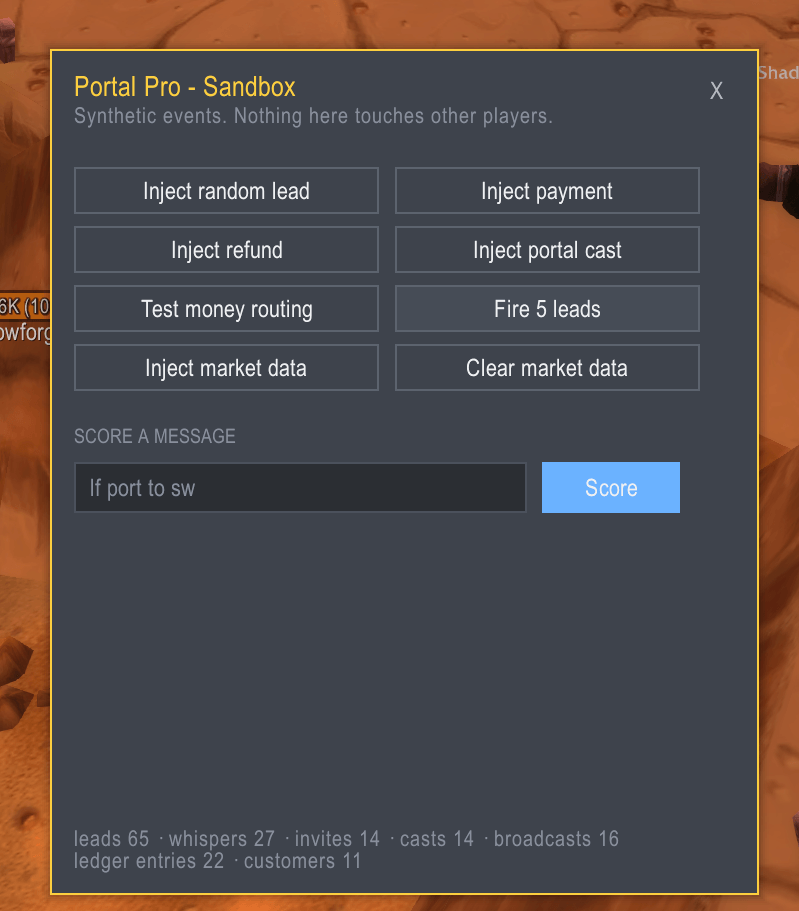
/pp sandbox opens a panel that fabricates the situations you'd otherwise have to wait
for:
- Inject a lead — or five at once, to see the queue under load
- Inject a payment — pays whoever is at the top of your queue, through the real payment event, so it genuinely exercises the ledger and the "clear the lead once they've paid" path
- Inject a refund and inject a portal cast
- Inject market data — sample rival adverts pushed through the actual classifier
- Score any message — paste a chat line and see precisely which rules fired, with their weights, and whether it would have become a lead
Nothing in it touches other players. The alternative is debugging your ledger in Orgrimmar at 2am with a real customer waiting.
/pp test lf port to sw does the scoring part from chat, without opening the panel.
Commands
Everyday
| Command | Does |
|---|---|
/pp |
Open / close the window |
/pp compact |
Toggle the slim always-on bar |
/pp on · /pp off |
Enable / disable chat detection |
/pp leads |
List the current queue |
/pp clear |
Clear the lead queue |
/pp help |
List every command |
Pricing and market
| Command | Does |
|---|---|
/pp price sw 12g |
Set a destination price |
/pp prices |
Show current pricing |
/pp market |
What the competition is charging, last hour |
/pp market 360 |
Same, over any number of minutes |
Money
| Command | Does |
|---|---|
/pp paid <name> <amount> [city] |
Record a payment by hand, e.g. /pp paid Shekza 10g uc |
/pp oops |
Untrack the portal you just cast and remove its rune cost |
/pp free |
Toggle free-cast mode — stop logging portals entirely |
/pp stats |
Session summary: net, gold/hour, casts, funnel |
/pp export |
Dump the ledger as CSV |
Diagnostics
| Command | Does |
|---|---|
/pp sandbox |
Open the test harness |
/pp test <message> |
Score a message against the lead rules |
/pp debug |
Toggle verbose logging |
/pp version |
Show the version |
/portalpro works anywhere /pp does.
Keybinds
Under Key Bindings → Portal Pro:
- Broadcast current ad — the keypress itself satisfies Blizzard's hardware-event rule, so this posts to Trade without you touching the mouse
- Toggle Portal Pro window
- Whisper + invite top lead — answer the customer at the front of the queue outright
A note on conduct
Answering someone who asked for a portal is normal and welcome. Blanket-whispering people who didn't, or hammering Trade chat, gets you squelched and risks your account. Portal Pro ships with conservative defaults — matched requests only, per-player cooldowns, broadcast throttling. The aggressive settings are available and clearly labelled. What you do with them is on you.
Portal Pro is MIT licensed. Bundled fonts remain under the SIL Open Font License.
The Portal Pro Team