PleebUI
- By
PleebUI is a complete UI overhaul made by me for me and some friends. It has modules for Cooldown Manager, custom cooldown tracking Personal Resource Display, all unit frames, action bars, damage meter and several other modules.
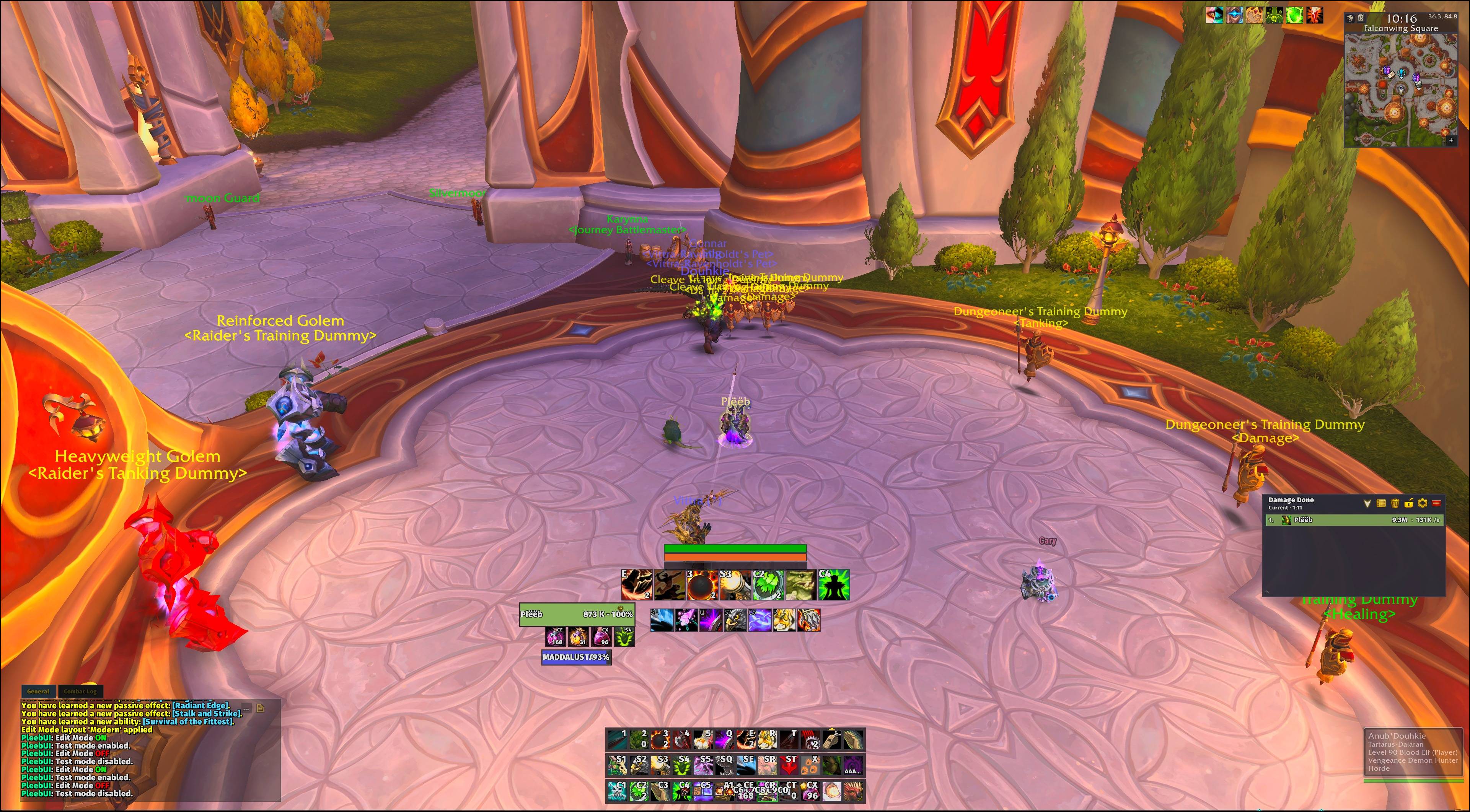
Full UI with default settings
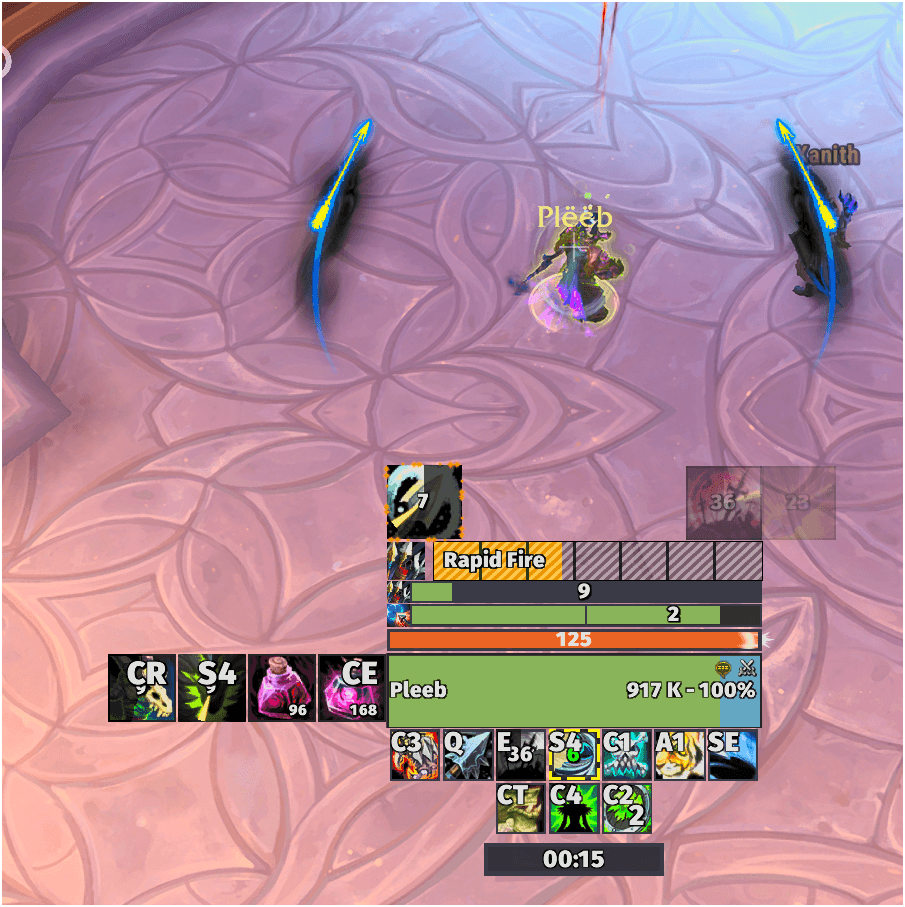
UI with some custom trackers (Icons and CD / Charges)
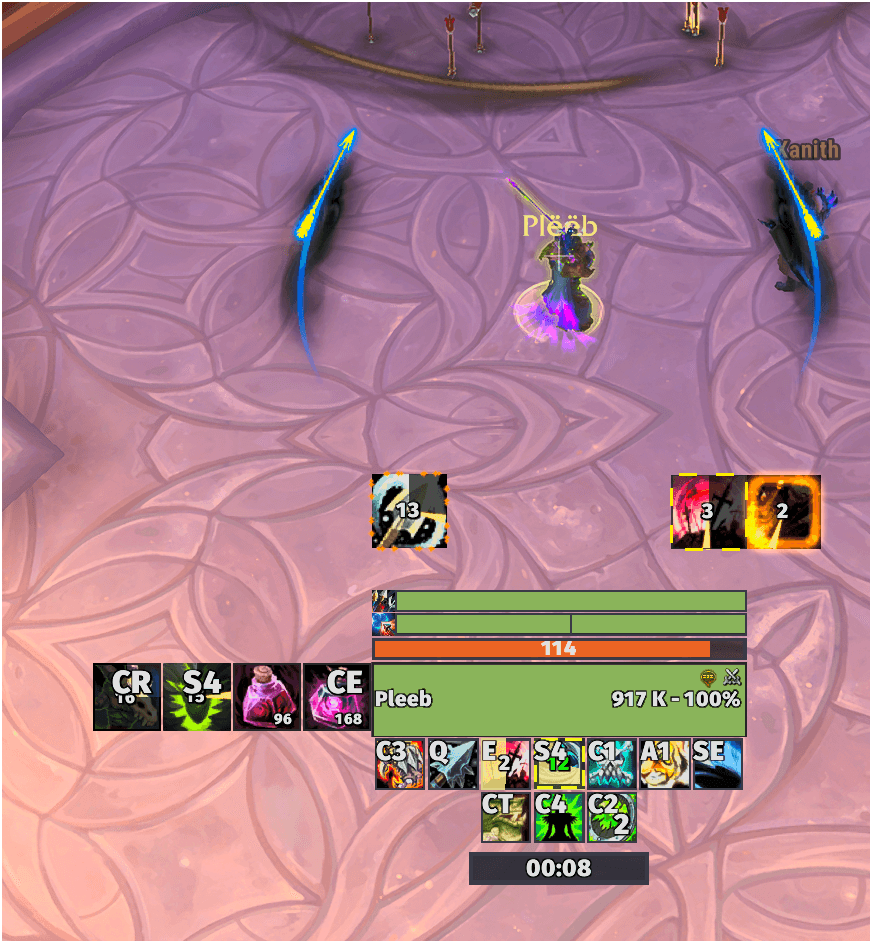
UI with some custom trackers (Icons and CD / Charges) - active
Description
PleebUI
I developed PleebUI as an all-in-one UI addon for World of Warcraft Retail, built around the changes introduced with Midnight.
I wanted to have as much control over my interface as possible without having to install and configure a dozen different addons to get everything looking and working the way I wanted.
PleebUI has grown quite a bit since I started working on it. It now covers most of the interface I normally use, from Unit Frames and Action Bars to cooldown tracking, class resources, Damage Meters, Chat, and a bunch of smaller features.
Almost everything can be customized, and I've tried to make the configuration itself as straightforward as possible. Most visual changes are applied directly, and you can preview frames and other elements without having to enter combat or find a group.
I'm still actively developing it, fixing things I come across and adding features as I go.
Accessibility
With version 1.6, I've put a lot of work into making PleebUI more accessible.
I've been using WCAG 2.1 and the W3C's WCAG2ICT guidance for non-web software as references when developing the configuration interface and its controls.
The goal is to make the addon usable for people who might have trouble reading smaller text, distinguishing certain colors, using a mouse precisely, or navigating complicated interfaces.
Some of the accessibility features I've implemented include:
- Keyboard navigation: Navigate the options interface using Tab, Shift+Tab, arrow keys, Enter, and Space. This also covers supported dropdowns, dialogs, and other interactive controls.
- Keyboard Edit Mode: Move and position frames using the keyboard instead of dragging everything with the mouse. I've also added a guide where you can practice the controls.
- Color vision presets: Built-in presets for protanopia, deuteranopia, and tritanopia, along with two high-contrast themes.
- Contrast previews: Preview color presets before applying them, including the calculated contrast ratio between text and background colors.
- Text and font settings: Adjust fonts, text sizes, outlines, and scaling globally or for individual parts of the UI.
- Larger pointer targets: Increase the size and spacing of smaller controls to make them easier to interact with.
- Reduced motion: Disable animations in the configuration interface.
- Combat Readability preset: Apply larger health and resource text, stronger outlines, clearer backgrounds, and larger aura icons across supported combat elements. The changes can also be undone.
- Keyboard focus indicators: Make it easier to see which control is currently selected when navigating without a mouse.
I've also included accessibility settings directly in the installation wizard, so you don't have to finish setting everything up before you can adjust the interface to something comfortable.
WCAG compliance
I don't consider PleebUI fully WCAG compliant yet.
My current estimate is approximately 75% alignment with the applicable WCAG 2.1 criteria, using the W3C's WCAG2ICT guidance for non-web software.
This is my own estimate, not the result of an independent accessibility audit or an official certification. Some limitations also come from World of Warcraft itself and what addons are allowed to control.
I'm continuing to improve this, and I'd particularly appreciate feedback from anyone using the accessibility features.
What's included in PleebUI?
Unit Frames
- Customizable Unit Frames for Player, Target, Focus, Pet, Boss, Party, and Raid. You can change all the usual settings, and some unusual ones too. Respects accessibility settings and toggles in the options menu. I tried to make sane defaults for everyday use.
Party and Raid frames have their own configuration options, including aura displays, dispel indicators, healing and absorb prediction, and layout settings.
I've also added previews and Test Mode so you can configure frames without needing an actual group.
Action Bars
- Customization for Action Bars 1–12, along with Pet and Stance bars. I added more action bars to allow the user to more easily move around binds, buttons and whatnot and spread them out as they wish. Respects accessibility settings and toggles in the options menu.
You can configure button sizes, spacing, layout, keybind text, visibility conditions, mouseover fading, backgrounds, and more.
There are also previews and a keybinding mode.
Cooldown Manager and custom trackers
- Expanded on Blizzard's Cooldown Manager rather than trying to replace all of its underlying functionality.
PleebUI supports customization of the Essential, Utility, Buff Icon, and Buff Bar viewers, including individual icon settings, layouts, glows, colors, text, and positioning.
You can also create your own cooldown icons, duration bars, charge bars, and aura stack bars. I have put a lot of focus on having the ability to use bars instead of icons to track all sorts of cooldowns, durations, stacks and whatnot, and I pre-built the most commonly (to my knowledge) used custom bars, at least when I look back at the old class weakaura packs and what my friends want to track when I ask them. You can of course disable all these.
I've included a guided tracker setup, live previews, custom groups, and plenty of individual display settings.
Consumable Tracker
A configurable tracker for supported combat consumables and items, including potions, Healthstones, combat resurrection items, equipped trinkets, and racial abilities.
You can configure the icons, cooldown displays, counts, glows, and visibility.
Personal Resource Display
- Customizable Personal Resource Display for health, power, class resources, and supported tracked effects.
Resources have their own settings for sizing, colors, text, layout, and positioning.
The available resource options depend on your class and specialization, rather than showing settings for resources your character doesn't use.
Damage Meters
PleebUI includes its own Damage Meters. I made it because it was fun. Doesnt do much that the default one does but I wanted to try to make one and not just skin the regular one. There are 100% better ones out there, but I liked having my own.
Each window can show different supported combat statistics and segments. I've also included player breakdowns, recent encounters, saved boss kills, and completed Mythic+ Overall sessions.
Chat and Minimap
Customizable Chat features, including styling, font settings, timestamps, clickable links, message copying, and chat history. Chat is mostly handled more easily allow for accessibility settings such as custom fonts, colors and contrast settings.
The Minimap can be customized, with options for its appearance, addon buttons, coordinates, clock, zone text, and other details.
Edit Mode
Separate Edit Mode for PleebUI, accessible using /pe.
You can move supported frames and bars around, adjust their positions, and use Smart Snap to align things or move connected elements together.
I've added keyboard movement, Undo/Redo, alignment guides, quick settings, and a searchable list of movable elements.
Supported Unit Frames can also have different saved positions depending on whether you're playing Solo, in a Party, or in a Raid.
Commands
/pui— Open PleebUI settings/pui install— Run the installation wizard/pe— Open PleebUI Edit Mode/pek— Open Edit Mode with keyboard movement/kb— Open Action Bar keybinding mode/cd— Open Blizzard Cooldown Manager settings/dmgor/dps— Control the Damage Meters
For addon developers
I've also added a public API for addon developers who want to integrate with PleebUI.
Other addons can register their own configuration pages and Edit Mode movers while keeping ownership of their own frames and settings.
The API is documented in the GitHub repo.
Feedback and development
PleebUI is being developed, and there's always something I'm working on or trying to improve.
If you find a bug, run into a Lua error, or notice something that doesn't work properly, please let me know. Include as much information as possible.
Suggestions are welcome too. I can't promise to implement everything, but I do read the feedback.
GitHub: https://github.com/grimboso/PleebUI
Discord: https://discord.gg/ZESUvEUwV
Bug reports and feature requests: https://github.com/grimboso/PleebUI/issues
If you like what I do please feel free to donate to those who needs help more than I do
https://help.unicef.org/en/donate-unicef-0
Thanks for trying out PleebUI.
PleebUI Team