Description
🕊️ Pigeon 1.0
Your messages, carried with care.
A modern chat replacement. A better way to whisper. A little more personality for Azeroth.
Pigeon replaces World of Warcraft's default chat with a clean, customizable interface while completely reimagining how you interact with whispers.
Instead of losing conversations in a wall of chat messages, Pigeon gives every person you're talking to their own animated Whisper Tile, a dedicated conversation window, and a centralized messaging hub.
Inspired by modern messaging apps and designed to complement Island, Pigeon brings a more organized, polished, and personal approach to chatting in World of Warcraft.
Your conversations deserve more than a chat log.
✨ What's New in Pigeon 1.0?
A fresh look. Smoother interactions. Better conversations.
Pigeon 1.0 introduces a redesigned interface across the entire addon, with improved animations, unified styling, and deeper integration with Island.
A Completely Refreshed Interface
- Redesigned Chat & Whispers — Softer message bubbles, improved spacing, cleaner buttons, and more consistent layouts.
- Island-Inspired Styling — Refreshed settings, rounded controls, switches, sliders, and menus.
- Dynamic Island Theme — Automatically follows Island's accent color and opacity when available.
- Spring Animations — Smooth transitions for Whisper Tiles, conversation windows, and contextual menus.
- Improved Unread Indicators — Rounded, readable notification counters across tabs and conversations.
- Refined Class Icons — Updated class symbols and colors, including a redesigned Priest symbol.
- New Pigeon Branding — A little-bird identity across settings, the Whisper Hub, minimap, and addon icon.
More Ways to Customize
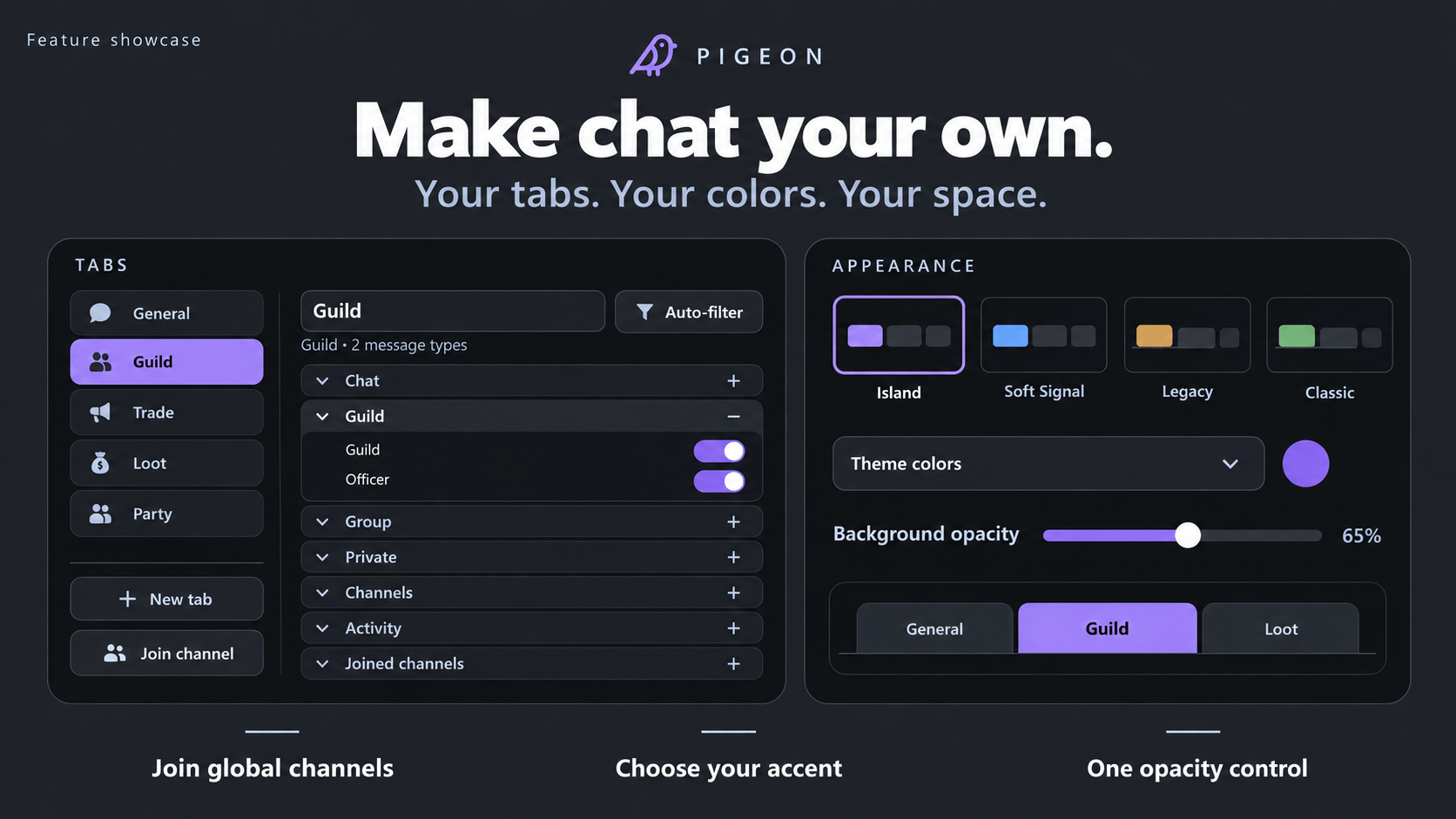
- Redesigned settings with a dedicated Tabs section.
- Collapsible message filter groups.
- Join global chat channels directly from settings.
- Create dedicated filtered tabs for joined channels.
- Unified background opacity across chat and whisper windows.
- Improved typography, selectors, and layout controls.
Better Everyday Chat
- Searchable emote drawer with Twitch Emotes integration.
- Dedicated crafting and tradeskills message filters.
- Improved timestamp handling.
- Refined conversation menus and draggable hub header.
- Numerous interaction, layout, and usability fixes.
💬 Whisper Tiles — Conversations at Your Fingertips
Meet the feature that makes Pigeon different.
Whisper Tiles transform your private messages into individual, accessible conversations.
Traditional WoW chat treats whispers like any other message. They scroll by, get buried under other activity, and quickly become difficult to follow.
Pigeon takes a different approach.
Every person you whisper gets their own conversation tile.
Think of them as miniature messaging shortcuts that keep your friends, guildmates, and conversations just one click away.
Personalized Conversation Tiles
- One Tile Per Conversation — Each person gets their own dedicated tile.
- Class Identity — Tiles display class symbols and player initials.
- Animated Interactions — Smooth spring animations bring tiles and their menus to life.
- Unread Counters — Rounded indicators make missed messages easy to spot.
- One-Click Access — Click a tile to open that person's conversation.
- Multiple Conversations — Switch between people without digging through chat.
- Battle.net Support — Works with regular character whispers and Battle.net friends.
Whether you're organizing a dungeon, chatting with guildmates, or catching up with friends, every conversation has its own place.
Floating Conversation Windows
Click a Whisper Tile to open a dedicated conversation window.
From there, you can:
- Read previous messages.
- Reply directly.
- Invite the player to your group.
- Move the conversation into the Whisper Hub.
Conversation windows feature softer message bubbles, consistent controls, and smooth opening animations.
Manage Your Tiles
Keep multiple conversations available without cluttering your screen.
Right-click conversation tiles to access contextual actions through animated menus.
Double right-click the tile stack button to close all open tiles.
Your saved conversations remain accessible through the Whisper Hub.
🗂️ The Whisper Hub
All your whispers. One beautiful home.
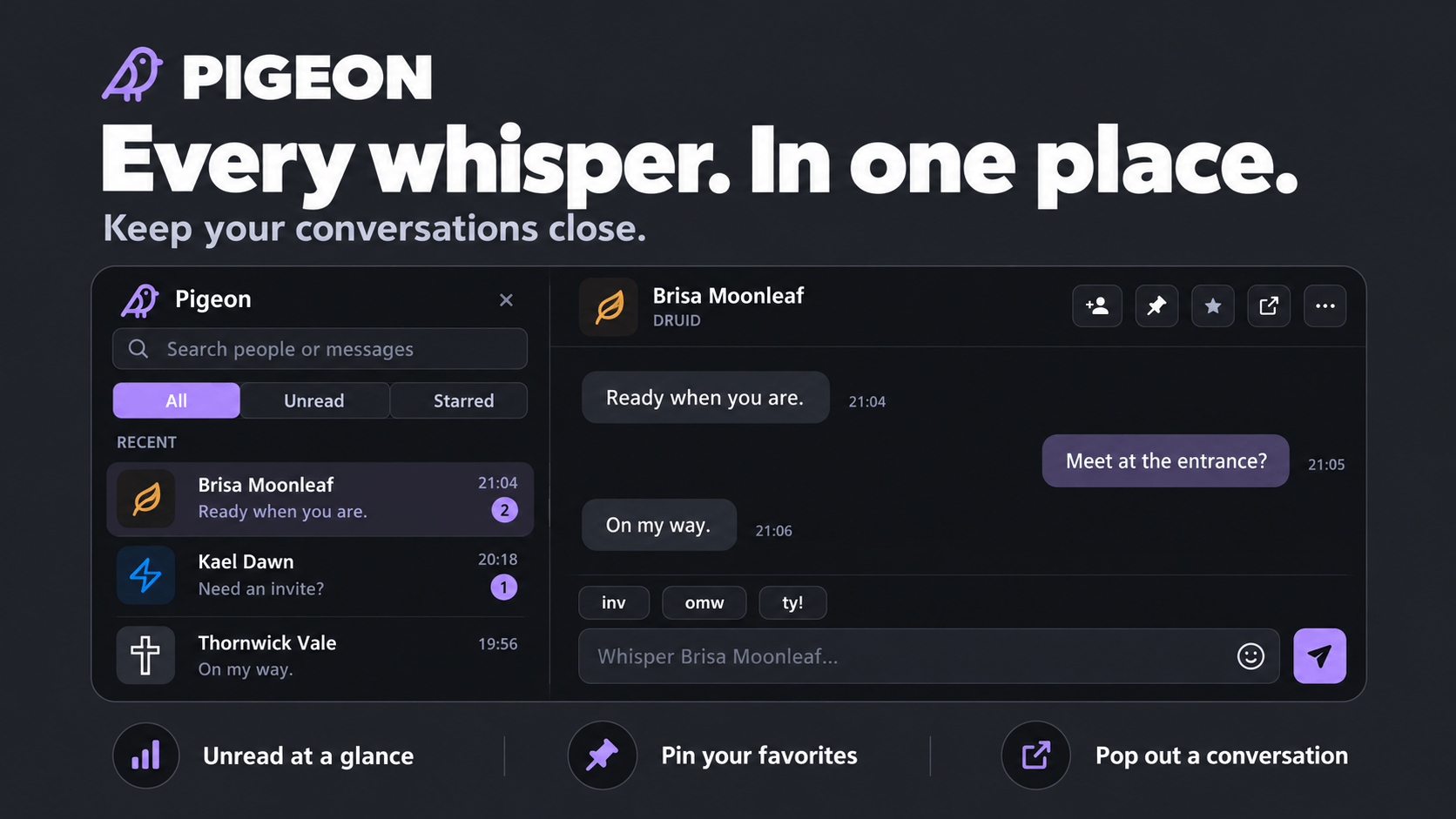
Whisper Tiles make conversations accessible. The Whisper Hub brings everything together.
A dedicated messaging interface keeps your private conversations organized separately from general chat.
Your Personal Messaging Center
- Conversation History — Browse your saved private conversations.
- Search — Find the conversation you're looking for.
- Unread Filter — Focus on messages you haven't caught up with.
- Starred Conversations — Mark important conversations.
- Pinned Conversations — Keep frequent contacts within reach.
- Conversation Management — Organize and access individual conversations.
Switch between:
All · Unread · Starred
Five Conversation Styles
Make your whisper experience your own.
| Style | Appearance |
|---|---|
| Rails | Structured conversation layout |
| Bubbles | Modern messaging bubbles |
| Threads | Thread-focused conversations |
| Classic | Traditional chat-inspired presentation |
| Minimal | Clean, understated design |
Redesigned for 1.0
The Whisper Hub features:
- Softer message bubbles and improved spacing.
- Consistent rounded buttons and menus.
- Accent-colored contextual controls.
- Smooth spring animations.
- A draggable conversation header.
- Separate interaction areas for toolbar buttons.
Your History Stays With You
Conversations are saved per character, surviving logouts and UI reloads.
Your conversations don't need to disappear every time you leave Azeroth.
✉️ Smarter Whispering
Quick Replies
Convenient reply options appear above the message input, helping you respond faster.
Automatic Away Messages
Configure an away message and let Pigeon respond when you're unavailable.
Whisper Notifications
Stay informed without constant interruptions.
- Soft notification sounds.
- Incoming whisper preview toasts.
- Optional notification suppression during combat.
- Unread indicators on conversation tiles.
Combat-Friendly Whispering
Need to reply during combat?
Pigeon transfers your message into Blizzard's chat input, ready to send, while respecting the game's combat restrictions.
🗨️ A Better Chat Box
Pigeon doesn't stop at whispers.
It replaces the default chat box with a modern interface designed to make everyday communication cleaner and easier to manage.
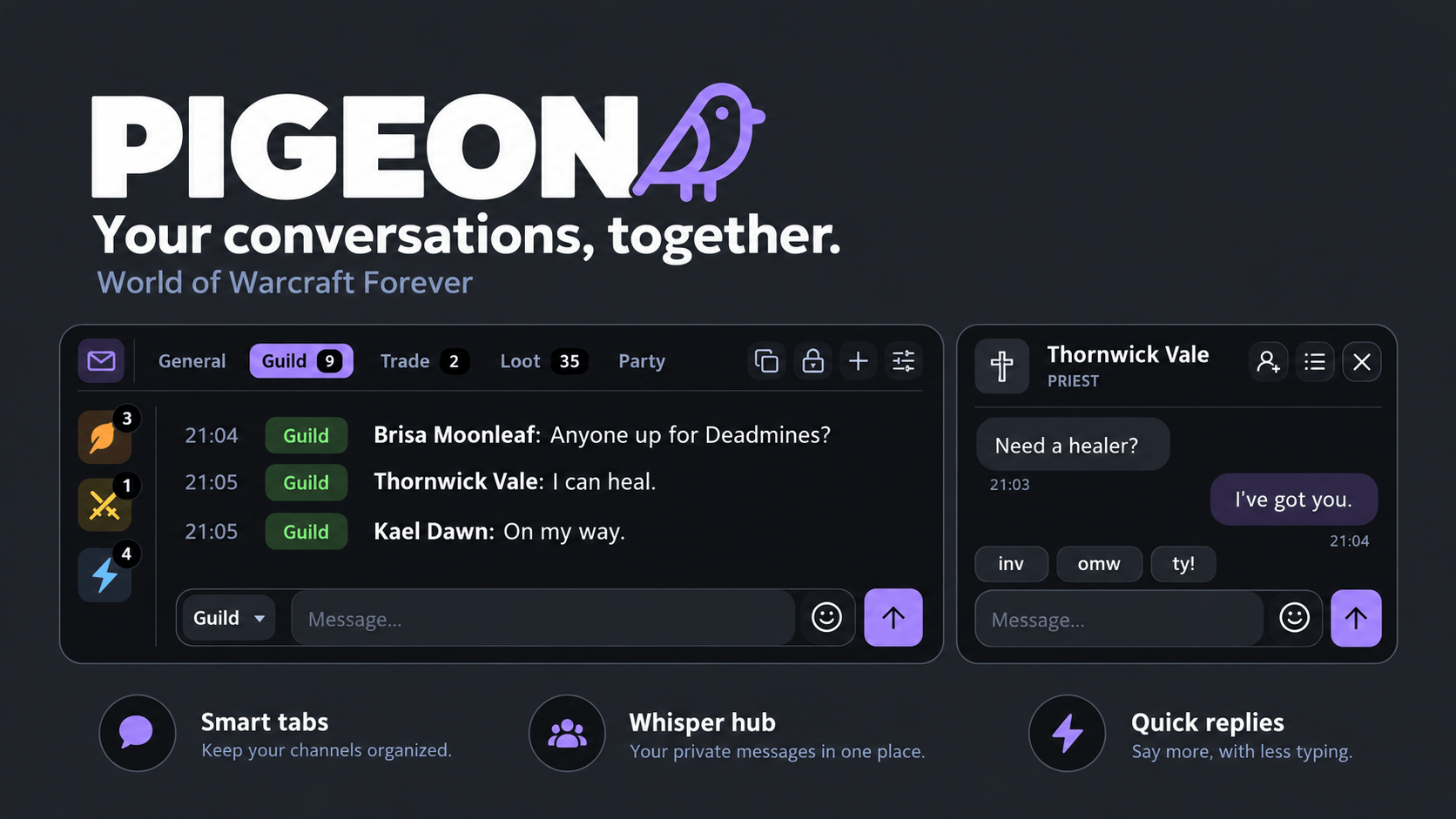
Smart Chat Tabs
Create tabs for the messages you care about.
Pigeon recognizes common tab names and automatically applies appropriate filters.
- Guild — Guild conversations.
- Trade — Trade chat.
- Loot — Loot-related messages.
- Party — Group conversations.
- Whispers — Private messages.
- Combat Log — Blizzard's combat log with its filtering options.
Right-click any tab to fine-tune which messages appear.
Custom Channel Tabs
Pigeon 1.0 makes managing global channels easier.
- Join global chat channels directly from settings.
- Create filtered tabs for those channels.
- Include channels you've already joined.
- Customize individual tab message categories.
Better Tab Navigation
- Unread message counters.
- A jump-to-latest button when you've scrolled up.
- Automatically shortened tab names when space is limited.
- Scrollable tabs when you have many open.
- Accent-colored selected tabs.
Channel & Language Selector
A small channel chip inside the message composer shows exactly where you're speaking.
For example:
Say · Orcish
Click it to switch channels or languages without entering additional commands.
😀 Twitch Emotes Integration
Express yourself.
Pigeon 1.0 adds a convenient emote picker when Twitch Emotes is installed.
- Searchable Emote Drawer — Quickly find the emote you want.
- Paginated Browsing — Navigate large emote collections.
- Direct Insertion — Selected emotes are inserted into the chat input that opened the drawer.
The emote picker works alongside Pigeon's redesigned chat composer.
Twitch Emotes is optional. Pigeon works normally without it.
📋 Copy, Select & Share
Interacting with chat text should be effortless.
- Select Text — Drag across messages to highlight text.
- Copy Messages — Press Ctrl+C to copy selected text.
- Copy Entire Tabs — Copy a full tab's contents with one button.
- Clickable URLs — Open a convenient copy box for web links.
- Profession Links — Open crafting and profession links on click instead of hover.
Improved Timestamps
Pigeon's configured timestamp format takes priority over Blizzard's timestamps.
This includes setting timestamps to Off, allowing a completely timestamp-free chat appearance.
🧠 Smart Chat Features
Keyword Alerts
Never miss a message that matters.
Pigeon can highlight:
- Your character's name.
- Custom words and phrases you choose.
Enable an optional sound when a keyword is detected.
Spam Filtering
Keep unnecessary messages out of your chat.
- Repeated message filtering.
- Gold-selling advertisement filtering.
- Boosting advertisement filtering.
Smarter Group Finding
Pigeon recognizes common LFG and LFM messages and adds useful interaction shortcuts.
- Identifies group recruitment messages.
- Highlights role information.
- Provides quick whisper and invite actions.
Available actions:
[w] — Whisper the player
[inv] — Invite the player
Crafting & Tradeskills
Pigeon 1.0 introduces a dedicated Crafting & Tradeskills message filter.
- Separate crafting-related notifications from regular chat.
- Configure crafting notices inside Combat Log tabs.
- Prevent nearby crafting and pet-feeding notices from being treated as ordinary loot messages.
Keep your loot notifications focused on actual loot.
🎨 A Fresh Look for 1.0
Designed to Feel Like Island
Pigeon's new default theme is Island, bringing the two addons together visually.
When Island is installed, Pigeon can follow its configured:
- Accent Color
- Background Opacity
This creates a more cohesive interface without manually matching settings between addons.
Prefer class colors? Class-based accents remain available as an option.
Island is optional. Pigeon works independently.
Redesigned Controls
Pigeon 1.0 refreshes the entire settings and interaction experience with:
- Rounded pill selectors.
- Modern switches and sliders.
- Updated typography.
- Consistent accent highlights.
- Cleaner navigation.
- Smooth contextual menu animations.
Custom Appearance
Personalize your interface with:
- Fonts and text sizes.
- Accent or class coloring.
- Flat or glass-style panel appearance.
- Rounded or square corners.
- Adjustable background opacity.
- Idle fading and message fading.
- Optional timestamp column.
- Chat lock, move, and resize controls.
- Blizzard profanity filter controls.
Unified Opacity
One background opacity setting controls the appearance of:
- Main chat box
- Whisper windows
- Whisper Hub
Keep your entire messaging interface visually consistent.
Native Blizzard Styling
Prefer an appearance closer to the original game?
Pigeon can use Blizzard's own window frames for a native World of Warcraft look.
🛡️ Class Icons & Identity
Pigeon includes its own custom class symbols for Whisper Tiles and messaging UI.
Version 1.0 refines the appearance of several classes, including:
- A stylized Priest cross.
- Corrected Warrior colors.
- Corrected Paladin colors.
- Corrected Shaman colors.
Choose Your Icon Style
Select from:
- Pigeon's custom class icons.
- Blizzard's default class icons.
- Compatible icons shared by other addons.
⚙️ Settings & Customization
Pigeon 1.0 introduces redesigned settings inspired by Island's clean interface.
Easier Navigation
Settings use a sidebar layout with updated controls and organized option groups.
Dedicated Tabs Settings
Tabs now have their own settings section, including:
- Collapsible message category groups.
- Separate appearance options.
- Channel management.
- Custom filtering.
- Global channel joining.
Layout Controls
Fine-tune the position and appearance of your chat interface.
Move and resize the chat window through its corner controls, then lock it when you're satisfied with the layout.
👤 Profiles & Sharing
Create the perfect layout and take it with you.
- Save multiple profiles.
- Assign character-specific settings.
- Share configurations between characters.
- Export and import profiles.
Share Your Setup
Export an entire configuration as a single line of text.
Send it to a friend so they can import your setup without recreating every setting manually.
🔗 Addon Compatibility
Pigeon works independently while offering optional integrations.
| Addon | Integration |
|---|---|
| Island | Shared accent colors, opacity, and coordinated visual styling |
| Twitch Emotes | Searchable, paginated emote picker |
| ElvUI | Font, color, and panel placement compatibility |
| EllesmereUI | Font, color, and panel placement compatibility |
No additional addons are required.
Pigeon's default Island theme works even when the Island addon isn't installed.
⌨️ Commands & Keybinds
Slash Commands
| Command | Description |
|---|---|
/pigeon |
Open Pigeon settings |
/ws |
Open settings (shortcut) |
/pigeon clear |
Delete saved whisper history |
/pigeon chatdebug |
Enable debugging for chat-related issues |
Keybindings
Navigate to:
Options → Keybindings → Pigeon
Available actions:
- Reply to Latest Whisper — Quickly return to your most recent conversation.
- Open Whisper Hub — Access your saved conversations.
Mouse Shortcuts
- Right-click a chat tab — Open its configuration.
- Right-click a conversation tile — Access conversation actions.
- Double right-click the tile stack button — Close all conversation tiles.
🐛 Feedback & Bug Reports
Found something that isn't working? Have an idea for a new feature?
Leave a comment on CurseForge!
When reporting an issue, please include:
-
What you were doing when the problem happened.
-
What you expected to happen.
-
What actually happened.
-
A screenshot if the issue is visual.
-
The complete Lua error from BugSack or BugGrabber, if available.
Chat Debugging
Having trouble with player names, whispers, or invitations?
Use:
/pigeon chatdebug
Reproduce the problem and include the additional debugging output in your report.
❤️ Credits & Development
Whisper Notification Sound: Free-use audio.
Artwork & Branding: Pigeon's logo, little-bird branding, and custom class icons were created for the addon.
Pigeon is an independent, fan-made World of Warcraft addon and is not affiliated with or endorsed by Blizzard Entertainment.
🕊️ Your Conversations Deserve Better
World of Warcraft has always been about more than quests, raids, and loot.
It's about your guildmates, your friends, the strangers you meet in dungeons, and the conversations that happen along the way.
Pigeon gives those conversations a place of their own.
With personalized Whisper Tiles, animated conversation windows, a centralized messaging hub, and a completely refreshed interface, staying connected has never felt more natural.
Pigeon 1.0 — Your messages, carried with care.
Pigeon Team