Island
- By
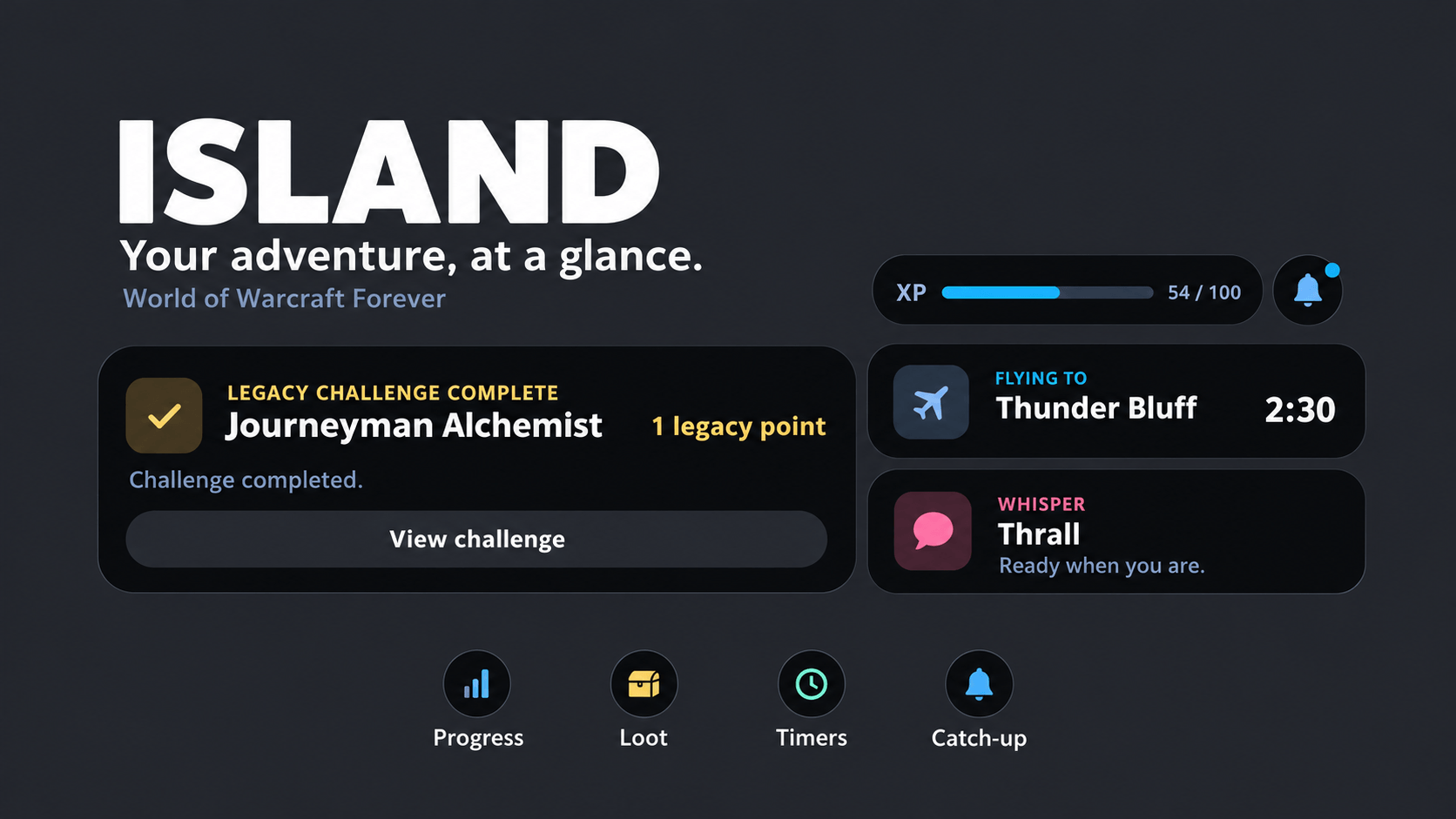
Your XP bar, loot rolls, invites, alerts and dungeon runs in one clean black pill at the top of the screen, inspired by the iPhone's Dynamic Island.
ChatGPT Image Oct 13, 2026, 10_13_20 PM.png
ChatGPT Image Oct 13, 2026, 10_13_28 PM.png
Description
Island 3.0
Less UI. More Warcraft.
Now supporting World of Warcraft: Retail and World of Warcraft: Forever!
Island reimagines your World of Warcraft interface with a compact, animated notification hub inspired by Apple's Dynamic Island.
Experience gains, loot rolls, interactive prompts, dungeon activities, progression updates, timers, and notifications all come together in one sleek interface.
Instead of scattered popups and overlapping UI elements, Island delivers the information you need through smooth animations, interactive cards, and small activity bubbles.
One Island. Two Worlds. A Cleaner Warcraft Experience.
✨ Features at a Glance
- Retail & Forever Support — Client-aware features and settings designed for both versions of WoW.
- Dynamic XP & Reputation — Animated experience gains, detailed statistics, and level-up celebrations.
- Smart Loot & Gear Upgrades — Integrated loot rolls with Lootified and Pawn equipment evaluations.
- Interactive Prompts — Handle invitations, ready checks, summons, resurrections, and confirmations.
- Live Activity Bubbles — Track flights, cooldowns, navigation, queues, and other ongoing activities.
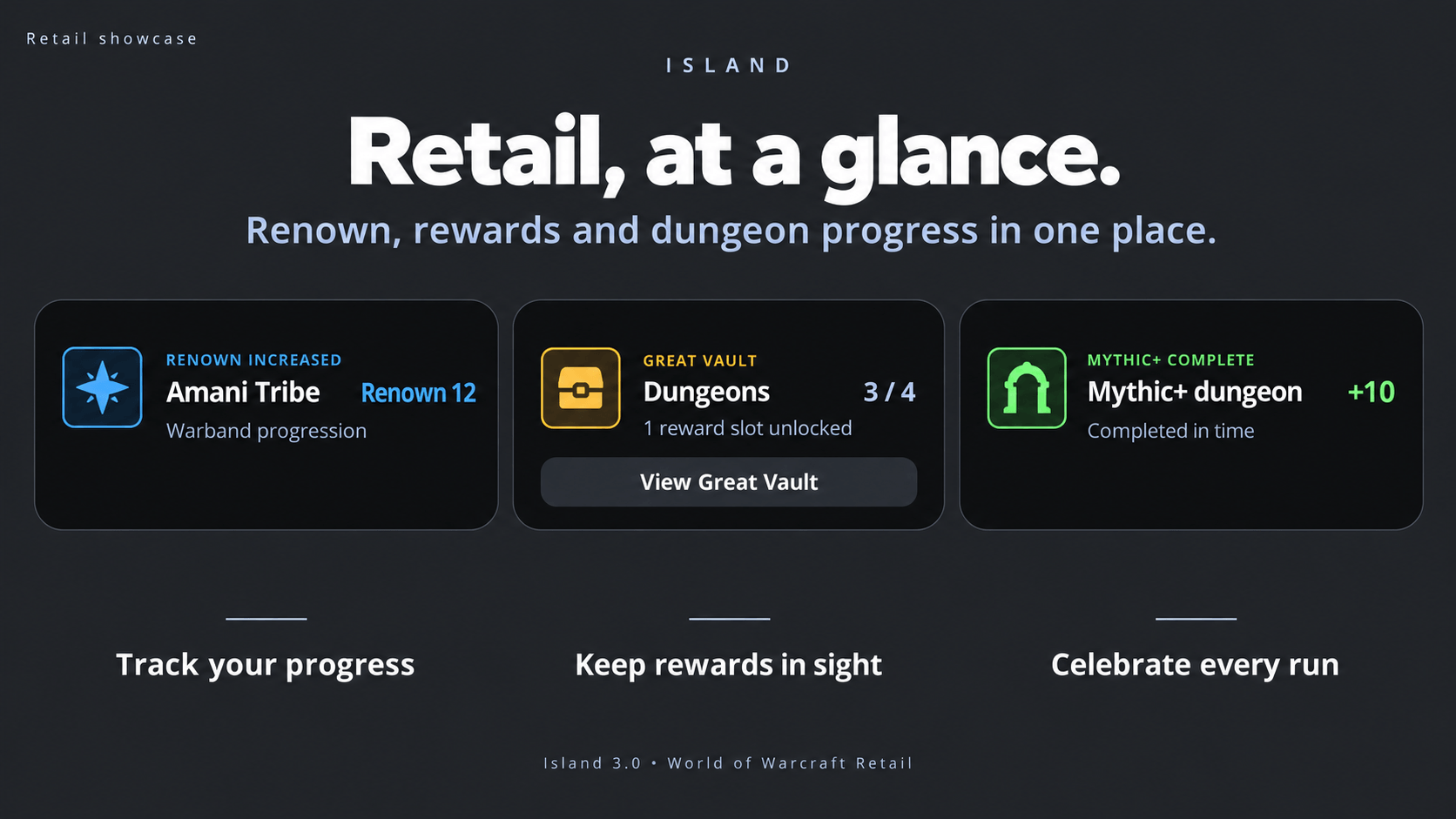
- Retail Progression — Renown, Great Vault, Mythic+, Delves, professions, and collection unlocks.
- Voiceover & Dialogue Integration — Spoken voiceovers and Retail Talking Head cards.
- Dungeon & Raid Tracking — Monitor instance runs, rewards, and performance.
- AFK Catch-Up — Return to an organized summary of important events you missed.
-
Fully Customizable — Choose your layout, colors, animations, sounds, and notification styles.
🌍 World of Warcraft: Retail & Forever
One Interface. Two Different Experiences.
Island 3.0 introduces dedicated Retail support alongside its existing Forever support.
Island automatically recognizes which game client you're using and adjusts its available features and settings accordingly.
- Client-Aware Features — Only relevant gameplay systems are available.
- Adaptive Settings — Retail-specific settings stay hidden in Forever, and vice versa.
- Consistent Design — The same Island visual language across both clients.
- Dedicated Integrations — Features tailored to each version of World of Warcraft.
No irrelevant options. No unnecessary clutter. Just the features that belong in your game.
🏆 Retail Progression & Rewards
Modern Progression, Made Simple.
Island 3.0 brings Retail's progression systems directly into its notification experience.
Keep track of your accomplishments without constantly opening additional interface windows.
Renown & Weekly Rewards
- Renown Tracking — Follow your Renown progression through Island.
- Great Vault Reminders — Stay informed about your Vault rewards.
- Vault Activity Bubble — Keep Vault-related information accessible beside the island.
Mythic+ & Delves
- Mythic+ Summaries — Dedicated cards for Mythic+ activities.
- Delve Summaries — Review your Delve adventures through Island.
- Boss Loot Summaries — Organized item displays with tooltips and paging.
Professions & Collections
- Profession Notifications — Stay informed about relevant profession activity.
- Profession Knowledge Bubble — Track Knowledge-related information through a compact activity bubble.
- Collection Unlocks — Celebrate newly unlocked collectibles with animated notifications.
Your accomplishments deserve recognition, without taking over your screen.
🎭 Retail Talking Head Integration
Let Azeroth Tell Its Story.
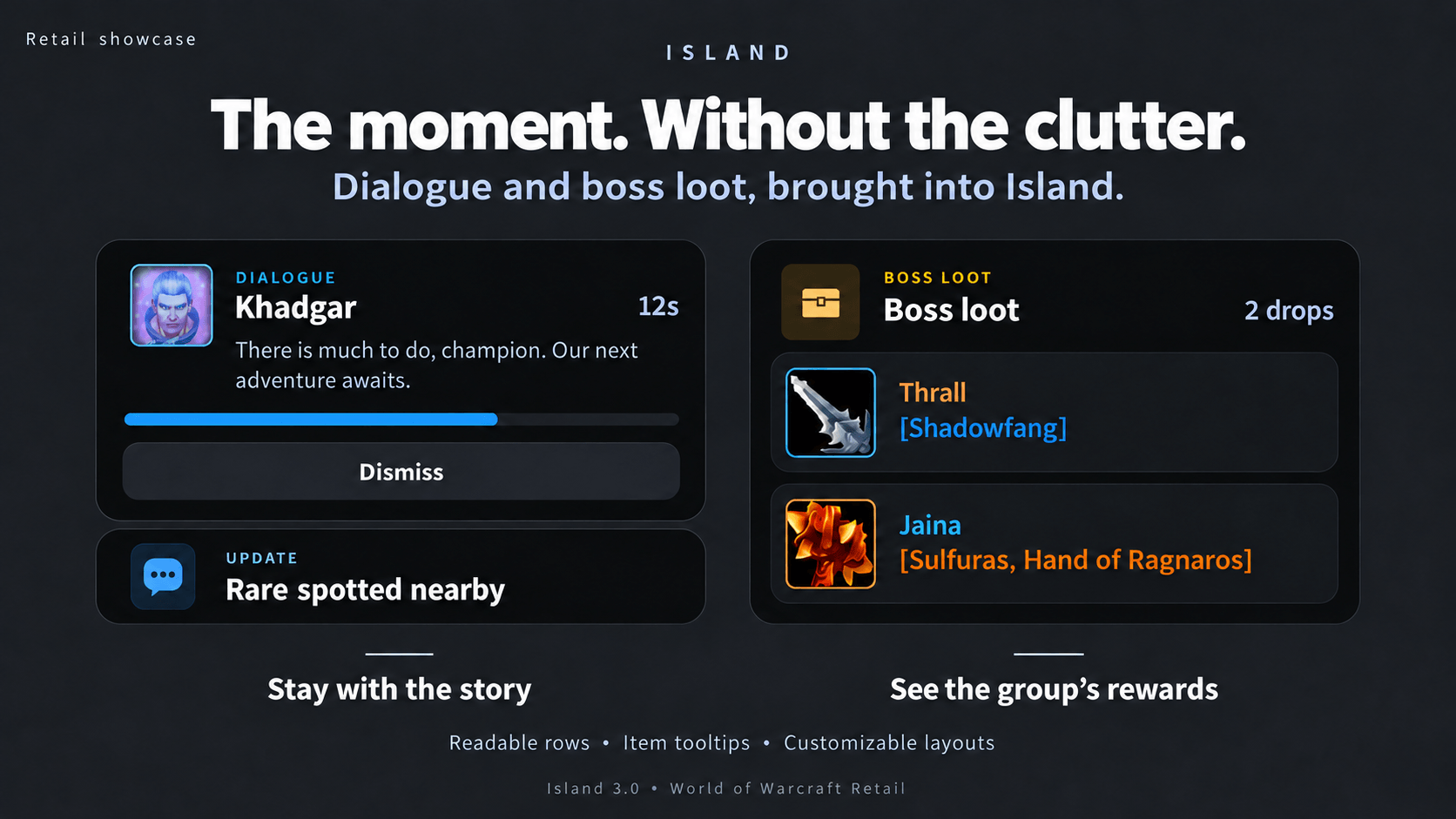
Island 3.0 integrates Retail's Talking Head dialogue into its animated notification system.
Instead of a separate dialogue window competing for screen space, character dialogue appears in a dedicated Island card.
Immersive Dialogue Cards
- Character Portraits — See who's speaking.
- Original Game Audio — Hear the dialogue as intended.
- Dialogue Countdowns — Follow the remaining dialogue time.
- Integrated Presentation — Dialogue becomes part of Island's interface.
Notifications During Dialogue
Important moments shouldn't make you miss everything else happening around you.
While a Talking Head card is active, smaller notifications can appear in a compact area underneath it.
Enjoy the story. Island handles the rest.
⚔️ Retail Dungeon Finder
Your Next Adventure, One Click Away.
Island brings Dungeon Finder interactions into its card system.
- Interactive Dungeon Finder Cards — Handle Dungeon Finder prompts directly through Island.
- Enter & Leave Controls — Respond without searching for the original game window.
- Live Group Readiness — See readiness information update as players respond.
- Dungeon Finder Bubble — Keep activity visible beside the main island.
Less time managing popups. More time getting into your next dungeon.
🎁 Boss Loot Summaries
More Loot. Less Clutter.
Island introduces dedicated boss loot summary cards designed to make rewards easier to inspect.
- Separate Item Rows — Each item gets its own padded row.
- Larger Item Icons — Recognize rewards at a glance.
- Hover Tooltips — Inspect individual items.
- Paged Summaries — Browse larger loot lists without overcrowding the card.
- Custom Styling — Configure boss loot appearances through the Card Builder.
Clean, readable loot summaries that fit naturally into your interface.
📊 Experience, Reputation & Leveling
Your XP Bar, Reimagined.
Island transforms the traditional experience bar into an animated progression display.
- Dynamic XP Bar — Shows your level, experience percentage, and rested XP.
- Animated XP Gains — Kills, quests, and exploration expand the island to show earned experience.
- Level-Up Celebrations — Displays your new level, health, mana, and available talent points.
- Reputation Tracking — Supports reputation display when experience progression is complete.
Detailed Leveling Statistics
Hover over Island to view:
- Experience earned per hour
- Estimated time until your next level
- Estimated kills remaining
- Session experience, kills, and gold earned
Smarter Kills-to-Level Estimates
Island calculates kill estimates using your recent confirmed kills.
- Uses a rolling average of recent kills.
- Excludes quest and exploration experience.
- Accounts for rested experience.
- Handles grouped kills more accurately.
- Displays estimates after enough kill data has been collected.
- Uses
~to indicate approximate values.
🌟 Forever Legacy Progression
Your Legacy. Your Achievements.
Island integrates with World of Warcraft: Forever's Legacy progression system, bringing challenge updates directly into your notification experience.
Legacy Challenge Cards
- Challenge Completions — Animated notifications for completed Legacy challenges.
- Objective Progress — Optional updates for incremental challenge progress.
- Profession Progress — Track relevant profession-related objectives.
- Challenge Tiers — Recognizes sequential progression through challenge tiers.
- Quiet Loading — Avoids unnecessary notifications during login and loading transitions.
Unspent Legacy Points
Have Legacy points ready to spend?
Island displays a reminder card with a shortcut to open the Legacy talent tree.
Reminders can be enabled or disabled independently.
Talent Point Reminders
Island can also remind you about unspent talent points after logging in or changing zones.
Click the notification to open your talent window.
🎲 Loot Rolls & Smart Gear Upgrades
Integrated Loot Rolls
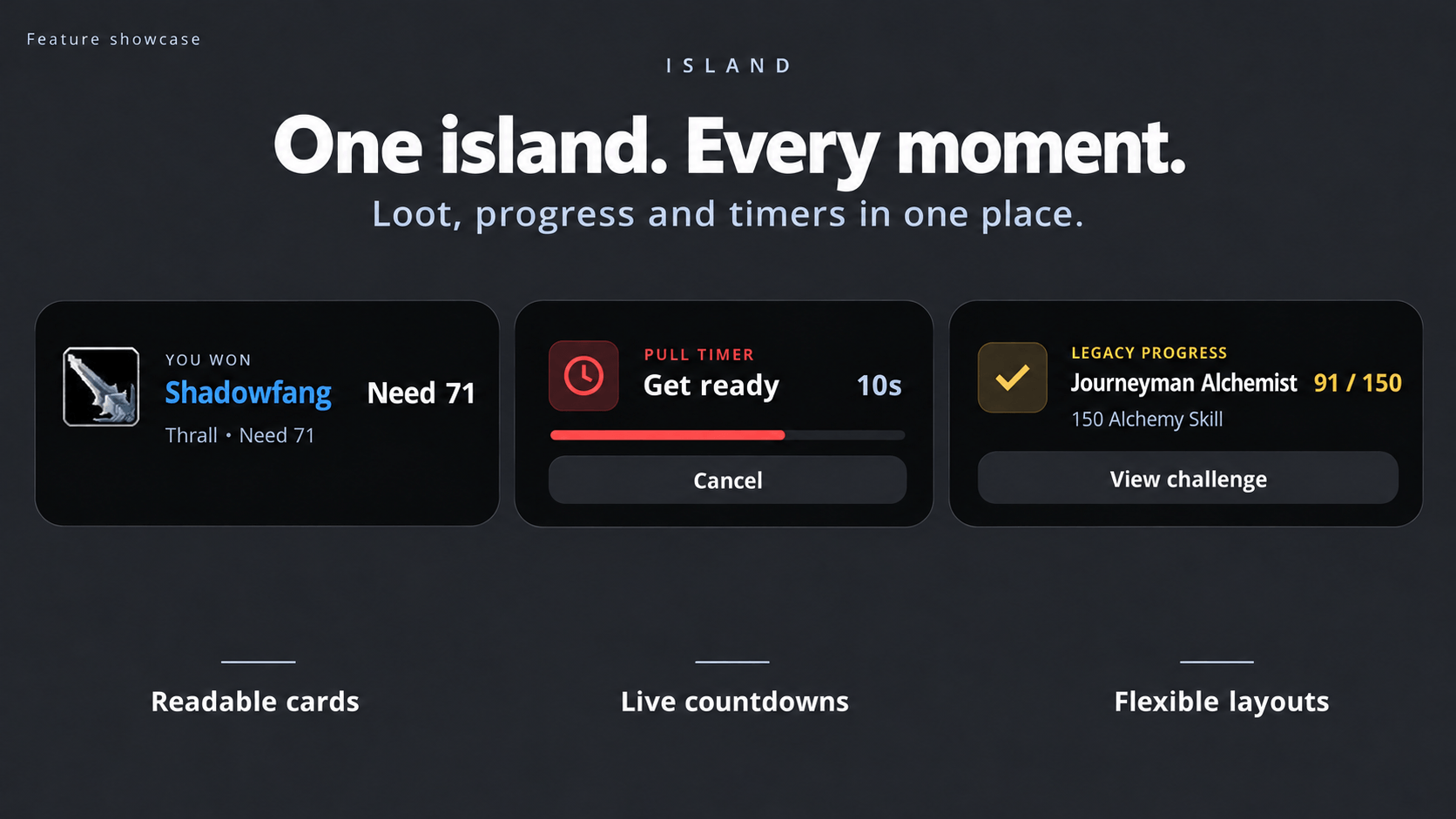
Handle group loot directly from Island without relying on Blizzard's traditional loot roll windows.
- Need, Greed, Disenchant & Pass — Make your selection directly on the island.
- Item Tooltips — Inspect equipment before rolling.
- Live Roll Tracking — See what other group members choose.
- Animated Results — A spinning roll number announces the winner.
- Clean Interface — Default loot roll windows are hidden while Island handles them.
Smarter Gear Upgrades — Lootified & Pawn
Not every higher-item-level piece is an upgrade. Island knows the difference.
Island integrates with Lootified and Pawn to display stat-based equipment evaluations.
Depending on the available evaluator, Island can use:
- Stat-Based Comparisons — Evaluate equipment using supported stat calculations.
- Saved Simulation Results — Use available simulation data.
- Custom Stat Weights — Respect configured stat priorities.
- Character Compatibility — Avoid upgrade notifications for equipment your character cannot use.
For Forever, item-level-only upgrade detection has been removed.
Upgrade notifications require a supported, enabled evaluator. Without one, Island disables upgrade cards rather than making unreliable item-level guesses.
See Upgrades Before You Roll
Loot roll cards can display equipment evaluation information directly alongside the item.
When available, this includes:
- Upgrade Gain — The calculated improvement.
- Evaluator — Which addon provided the evaluation.
- Replacement Item — The equipment being compared.
Upgrade details on loot rolls have their own toggle.
General reward cards and upgrade cards can also be controlled separately.
🤝 Interactive Prompts & Confirmations
Important Decisions, Right Where You Need Them.
Island replaces supported popup interactions with clean, interactive cards.
Group & Social Prompts
- Party invitations, including role selection
- Guild invitations
- Duel requests
- Summons and resurrections
- Ready checks with live readiness counts
- Battleground invitations with countdowns
- Death and resurrection options
Supported Blizzard popup windows stay hidden while their Island cards are active and return when appropriate if a card expires.
Confirmation Cards
Island also supports confirmation prompts for:
- Binding equipment
- Applying or replacing enchantments
- Applying gems
- Trading items
- Selling tradeable items
- Resetting instances
- Unlearning professions or specializations
Important Blizzard warning text and original confirmation behavior are preserved where applicable.
🎮 Keyboard & Controller Support (Beta)
Respond Without Reaching for Your Mouse.
Island supports configurable keyboard controls for interactive cards.
Keyboard Actions
Bind keys to:
- First, second, third, and fourth card buttons
- Last button on the active card
- Close the current card
- Show or hide Island's details
These bindings support common interactions including loot rolls, invitations, ready checks, summons, and more.
Keyboard actions work during combat.
Optional key labels appear beside card buttons.
Controller Support
- D-Pad — Select a card button.
- A — Activate the selected action.
- B — Choose the negative response, such as Decline, Not Ready, or Pass.
- Guide Button — Show or hide Island's details.
Controller card interaction works out of combat only, preserving normal combat controls.
Controller Rumble
Optional vibration feedback for:
- Ready checks
- Invitations
- Summons and resurrections
- Battleground queues
- Pull timers
Configure these options in Controls (Beta).
🔔 Smart Notifications & Alerts
Loot, Rewards & Activity
Stay informed through compact animated notifications.
- Looted items and equipment upgrades
- Quest rewards
- Money and currency gains
- Reputation changes
- Auction House sales, wins, outbids, and expirations
Choose a minimum item quality for loot notifications.
Intelligent Alerts
| Alert | Behavior |
|---|---|
| Low Durability | Persistent red armor indicator until repaired |
| Nearly Full Bags | Warns when inventory space is low |
| Low Ammunition | Class- and weapon-aware warnings |
| Low Reagents | Warns when required supplies are running low |
| Expiring Buffs | Alerts before important buffs expire |
| Unspent Talents | Reminds you about available talent points |
| New Mail | Displays incoming mail notifications |
| Calendar Invitations | Alerts you to calendar events |
Friends, Guild & Group Activity
Receive notifications when:
- Friends and guild members come online or go offline.
- Party or raid members join or leave.
- Players disconnect.
- Group leadership changes.
Multiple simultaneous group updates can be combined into one notification to reduce clutter.
🌍 Exploration & World Events
Zone Announcements
Entering a new zone displays an animated location card with the area's name and territory classification where applicable.
Quest Progress & Discoveries
- Quest objective updates
- Objective completion cards
- Skill increases
- Exploration discoveries
- Rare enemy sightings
- RareScanner discoveries
Example:
Kobold Vermin slain: 3/8
Whisper Notifications
Incoming whispers appear as interactive cards.
With Pigeon installed, supported cards can open their associated conversations directly.
🗣️ Spoken Voiceover Integration
Your Quest Dialogue, Brought to Life.
Island integrates with Spoken to display quest, zone, and book voiceovers directly on the island.
Animated Voiceover Cards
- Quest or location name
- Current speaker
- Voiceover countdown
- Smoothly scrolling dialogue
- Words highlighted as they're spoken
Playback Controls
- Pause / Play
- Skip when additional lines are available
- Stop
Spoken restarts the current line when playback resumes because it cannot resume partway through a line.
Spoken's original voiceover window and subtitles step aside while Island displays the voiceover.
Notifications During Voiceovers
Small updates can continue through a thin notification strip beneath the voiceover.
More important information, such as whispers, rare sightings, and equipment warnings, can briefly appear as full cards.
Interactive prompts and loot rolls retain priority.
⏱️ Live Activity Bubbles
Keep Important Timers Within Reach.
Island displays ongoing activities through small secondary bubbles beside the main interface.
Choose how many temporary bubbles can appear simultaneously, from 1 to 4, with more urgent activities taking priority.
Travel & Movement
- Flight path timers
- Hearthstone cooldown
- Breath and fatigue timers
- Feign Death duration
- Resting indicator
Flight Controls
Flight cards and bubbles support Request Stop.
Optionally hide Blizzard's original Request Stop button while flying.
Group & Raid Timers
- Pull timers initiated through DBM or BigWigs
- Break timers and completion notifications
- Ready check countdowns
- Battleground queues
- Instance run timers
- Raid lockout countdowns
- Server shutdown and restart warnings
DBM and BigWigs pull or break timers can be recognized from group activity without requiring you to install either addon yourself.
Fishing & Professions
- Fishing lure durations and expiration notices
- Tracked profession cooldowns
- Ready profession cooldown indicator
Hover over supported profession cooldown bubbles to see what's ready and what's coming next.
Active Tracking
Dedicated tracking icons for supported tracking types, including herbs, minerals, treasure, fish, beasts, and humanoids.
Retail Activity Bubbles
Retail adds dedicated activity bubbles for:
- Great Vault
- Profession Knowledge
- Dungeon Finder
🧭 Navigation & Waypoints
Your Destination, Always in Sight.
Island includes a compact navigation bubble that points toward your current waypoint.
- Directional Arrow — Shows where to travel.
- Distance Tracking — Displays remaining distance.
- Waypoint Details — Hover to view the name, zone, and coordinates.
- Arrival Notification — Displays a card when you reach your destination.
- One-Click Clear — Click the navigation bubble to clear the waypoint.
TomTom Integration
Island can follow waypoints created by TomTom, including waypoints originating from quest addons, RareScanner, or other compatible sources.
Optionally hide TomTom's floating arrow while Island displays navigation.
Built-In Waypoints
TomTom is not required for Island's own navigation functionality.
Click supported rare discovery cards to create waypoints, or use:
/island way 45.2 33.1 Name
Clear your active waypoint:
/island way clear
🏹 Ammunition & Buff Tracking
Ammunition Bubble
A dedicated bubble shows your available ammunition when applicable.
- Quiver — Arrows
- Pouch — Bullets
- Shuriken — Consumable thrown weapons
The indicator turns orange when low and red when empty.
Hover to view the ammunition's name.
Buff Pills
Island supports buffs tracked through the game's Cooldown Manager.
- Displays tracked buffs.
- Shows remaining durations.
- Displays stack counts.
- Updates during combat.
Paladin Seal Support
Paladins receive additional seal tracking, including an active seal indicator and a warning when fighting without one.
Pinned Bubbles
Keep selected information permanently visible beside Island.
Supported pinned activities include:
- Ammunition count
- Active tracking
- Resting moon
Pinned bubbles don't count toward the temporary bubble limit and can remain visible when temporary bubbles are restricted.
⚔️ Dungeon & Raid Tracking
Every Run Has a Story.
Island tracks supported instance sessions and provides a summary of your adventure.
Run Statistics
- Time spent inside
- Gold earned
- Enemies defeated
- Experience gained
Persistent Run Tracking
Instance sessions are associated with the instance itself.
- Corpse runs preserve the active session.
- Temporary vendor trips don't automatically end the run.
- UI reloads retain run information.
- Resetting the dungeon begins a fresh session.
When you leave, Island displays a summary of your run.
Review current and previous runs with:
/island runs
Retail additionally includes dedicated Mythic+ and Delve summaries.
💤 AFK Catch-Up
Step Away. Island Keeps You in the Loop.
Taking a break shouldn't mean losing track of everything that happened while you were gone.
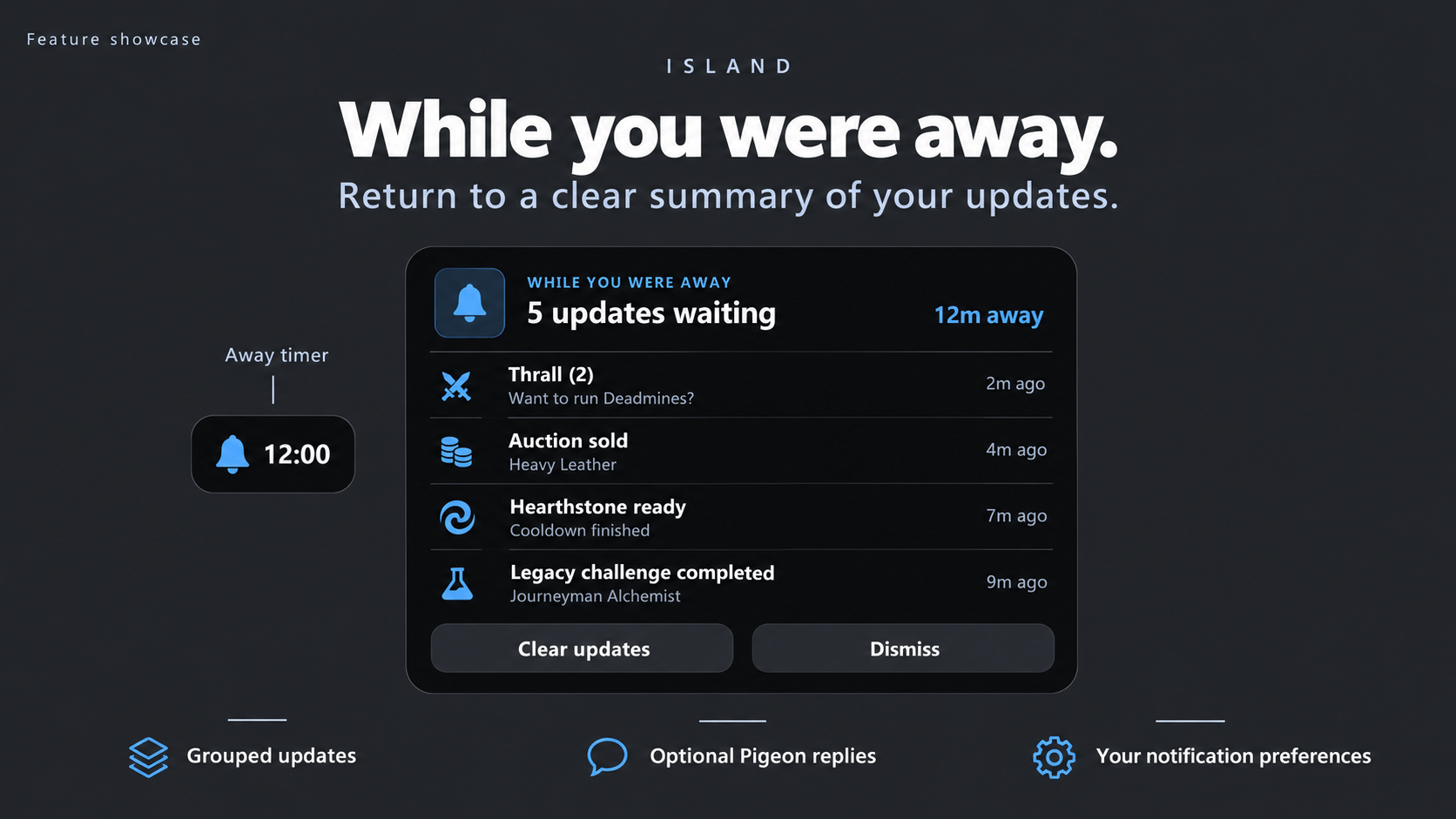
AFK Catch-Up collects important events while you're away and presents them in one organized summary when you return.
Away Timer Bubble
A small bubble appears beside Island while you're AFK.
- Displays how long you've been away.
- Uses a bell indicator.
- Follows your configured rested XP color.
- Can be enabled or disabled.
What Did You Miss?
Your Catch-Up summary can include:
- Whispers — Private messages received while away.
- Auction House — Sales, wins, outbids, and expirations.
- Mail — New mail notifications.
- Cooldowns — Tracked cooldown completions.
- Legacy Challenges — Completed challenges on Forever.
- Group & Queue Notices — Important group and queue activity.
Repeated whispers and auction events are intelligently grouped to reduce clutter.
Interactive Catch-Up
With Pigeon installed, supported whisper entries let you jump directly into conversations and reply.
Dismiss or Clear
- Dismiss — Hide the summary while keeping updates available for later.
- Clear — Remove collected updates.
- Automatic Expiration — Old updates expire according to your settings.
Catch-Up history is limited to your current play session.
Configurable Behavior
Choose which event categories are included, how long you must be away before Catch-Up activates, whether the timer bubble appears, and how long updates are retained.
Commands:
/island catchup — Reopen your summary
/island catchup test — Preview AFK Catch-Up
Take a break without missing a thing.
🛠️ Quality-of-Life Features
Automatic Repairs & Junk Selling
Island can handle routine vendor tasks automatically.
- Sell grey-quality items.
- Repair equipped gear.
- Configure each feature independently.
- Receive a summary of the completed transactions.
Example:
Sold 14 junk +2g 10s 4c · Repaired -1g 35s 50c
Hold Shift while opening a vendor to skip automation for that visit.
Cleaner Error Messages
Messages like "Out of range" and "Not enough rage" appear in a small red pill beneath Island instead of the center of your screen.
Repeated errors increase a counter rather than stacking.
Blizzard's spoken error messages remain enabled.
Clickable Notification Cards
Many Island notifications include contextual interactions.
| Notification | Action |
|---|---|
| Friend Online | Whisper the player |
| Looted Item | Link it in chat |
| Rare Discovery | Create a waypoint |
| Low Durability | Open character equipment |
| Full Bags | Open inventory |
| Zone Announcement | Open world map |
| Unspent Talents | Open talent window |
Hover over a supported card to discover its available action.
🌙 Do Not Disturb & History
Stay Focused When It Matters.
Do Not Disturb holds back nonessential notifications while allowing important prompts and errors to continue displaying.
Activate it through:
- The bell icon in Island's hover panel
- Alt + Click on Island
- A configurable keybind
/island dnd
Held notifications are saved to history rather than immediately discarded.
Scroll your mouse wheel over Island to browse previous cards.
Island can also hold eligible notifications during combat and replay them afterward.
🎨 Appearance & Customization
Make Island Yours.
Customize nearly every part of Island to match your interface.
Island Styles
Choose from several visual layouts:
- Level and % — Traditional progression information
- Percent — Compact experience percentage
- Bar Only — Minimal experience bar
- Dot — Tiny pill with a miniature XP bar
- Hidden — Minimal visibility with an accessible hover area
Colors & Typography
- Adjustable background opacity
- Custom text size
- Class-colored or custom XP bar
- Custom accent colors
- Optional accent coloring for activity bubbles
Placement
Place Island:
- At the top of the screen
- Near the bottom, above your action bars
- Anywhere through manual positioning
Cards open upward when Island is positioned near the bottom.
Activity bubbles can be positioned on either side or underneath.
Combat Behavior
Choose whether the resting island remains visible, dims, or hides during combat.
Important interactive prompts continue to display.
🃏 Card Builder
Your Notifications. Your Style.
Customize how individual card categories appear.
Card Categories
- Zone changes
- Loot and money
- Quests and skills
- Whispers
- Friends and groups
- Rare discoveries
- Alerts
- Supported Retail notification categories
- Boss loot summaries
Layout Options
- Icon beside text
- Icon with centered text
- Centered text without an icon
Additional options include:
- Show or hide category labels
- Customize label colors
- Normal or large titles
- Optional secondary text
Live Preview
Changes are previewed directly on Island.
Reset individual categories to their defaults whenever you want.
Island 3.0 adds expanded Retail categories and improved previews designed to fit their respective panels.
🎞️ Animations, Sounds & Timing
Animation Styles
Choose how Island feels:
- Snappy — Fast and responsive
- Smooth — Balanced transitions
- Calm — Relaxed animations
Notification Duration
Configure Short, Normal, or Long display times independently for supported categories.
Sounds
- Enable or disable sounds per category.
- Choose sounds for whispers.
- Choose sounds for interactive prompts.
- Customize incoming loot roll sounds.
🧹 A Quieter Default UI
Island hides many of the Blizzard interface elements it replaces.
Depending on the client and enabled features, this can include:
- Traditional experience bar
- Zone announcement text
- Loot roll windows and banners
- Level-up banners
- Battle.net friend notifications
- Durability indicator
- Quest objective text
- Discovery announcements
- Red error messages
- Breath, fatigue, and Feign Death bars
Your chat remains untouched.
The goal isn't to replace everything. It's to make the information you regularly interact with cleaner, more consistent, and easier to manage.
⚙️ Settings & Profiles
Island includes a dedicated settings interface with organized sections and smooth scrolling.
Configuration areas include:
- Look — Appearance, colors, size, opacity, and positioning
- Cards — Animations, timing, and sounds
- Card Builder — Individual notification layouts
- Prompts — Interactive card behavior
- Loot & World — Loot, money, and exploration settings
- Alerts — Warning thresholds and notification controls
- Bubbles — Activity tracking and bubble placement
- Controls (Beta) — Keyboard and controller functionality
- Extras — Additional features
- General — Profiles and general configuration
- Try It — Preview supported notifications
Client-specific options are displayed only when relevant to your version of World of Warcraft.
Character Profiles
Choose between character-specific settings or shared configurations.
Open settings: Right-click Island or type /island.
🔗 Addon Integrations & Compatibility
Island works independently and integrates with several optional addons to expand its functionality.
| Addon | Integration |
|---|---|
| Lootified (no longer exists) :( | Stat-based equipment evaluations and supported simulation results |
|
Pawn |
Equipment evaluations using configured stat weights |
|
ItemTree |
Another addon that offers a baseline for item improvements. |
| Pigeon | Interactive whisper cards and AFK Catch-Up replies |
| Spoken | Quest, zone, and book voiceovers |
| TomTom | Waypoint navigation and directional tracking |
| RareScanner | Rare discovery notification cards |
| DBM / BigWigs | Group pull and break timers |
| Island Quest Log | Matching quest tracker and quest log |
| Island Combat Text | Matching scrolling combat text |
| ElvUI | Compatible unit-frame-related positioning |
| EllesmereUI | Compatible unit-frame-related positioning |
| Shadowed Unit Frames | Compatible unit-frame-related positioning |
All integrations are optional.
Island's core functionality works without additional addons. Features that depend on an external addon, such as Lootified/Pawn upgrade evaluations, require their corresponding integration.
Individual integrations and functionality may vary by game client.
💻 Slash Commands
| Command | Description |
|---|---|
/island |
Open settings |
/island test |
Preview XP gains and level-up |
/island roll |
Preview a loot roll |
/island toasts |
Preview toast notifications |
/island alerts |
Preview alert cards |
/island zone |
Preview zone announcements |
/island runs |
View current and previous instance runs |
/island runs reset |
Reset the current run |
/island dnd |
Toggle Do Not Disturb |
/island catchup |
Reopen AFK Catch-Up |
/island catchup test |
Preview AFK Catch-Up |
/island way 45.2 33.1 Name |
Create a custom waypoint |
/island way clear |
Clear the active waypoint |
/island seal debug |
Display seal tracking diagnostics |
/island unlock |
Unlock Island positioning |
/island lock |
Lock Island positioning |
/island reset |
Reset Island positioning |
Some commands are client- or feature-specific.
Additional keybindings are available under:
Key Bindings → AddOns → Island
💬 Feedback & Bug Reports
Found a bug? Have an idea for a new feature?
Leave a comment on CurseForge!
When reporting an issue, please include:
- Whether you're playing Retail or Forever
- What you were doing when the issue occurred
- What you expected to happen
- What actually happened
- A screenshot, if the issue is visual
- The full Lua error from BugSack or BugGrabber, if available
Feedback, suggestions, and feature requests are always appreciated.
❤️ Credits & Development
Font: Open Sans by Steve Matteson (SIL Open Font License / Apache License 2.0).
Design Inspiration: Apple's Dynamic Island.
Island is an independent, fan-made World of Warcraft addon and is not affiliated with, endorsed by, or sponsored by Apple Inc. or Blizzard Entertainment.
About the Project
Island is developed through AI-assisted coding using Claude.
Yes, it's 100% vibe-coded.
The goal is simple: create something useful, visually appealing, and enjoyable to use.
🌟 Island 3.0
One Island. Two Worlds.
Whether you're progressing through Retail's modern systems or adventuring through Forever, Island keeps the important information close and the unnecessary clutter out of your way.
Less UI. More Warcraft.
Island Team