PIAS: Gear Macro Updater
- By
Tired of editing 15 macros every time you get a new sword? PIAS (Please Insert Another Sword) is your personal macro caddy. Drag your new gear into a box and every single one of your gear-swapping macros is updated instantly. Stop the macro madness.
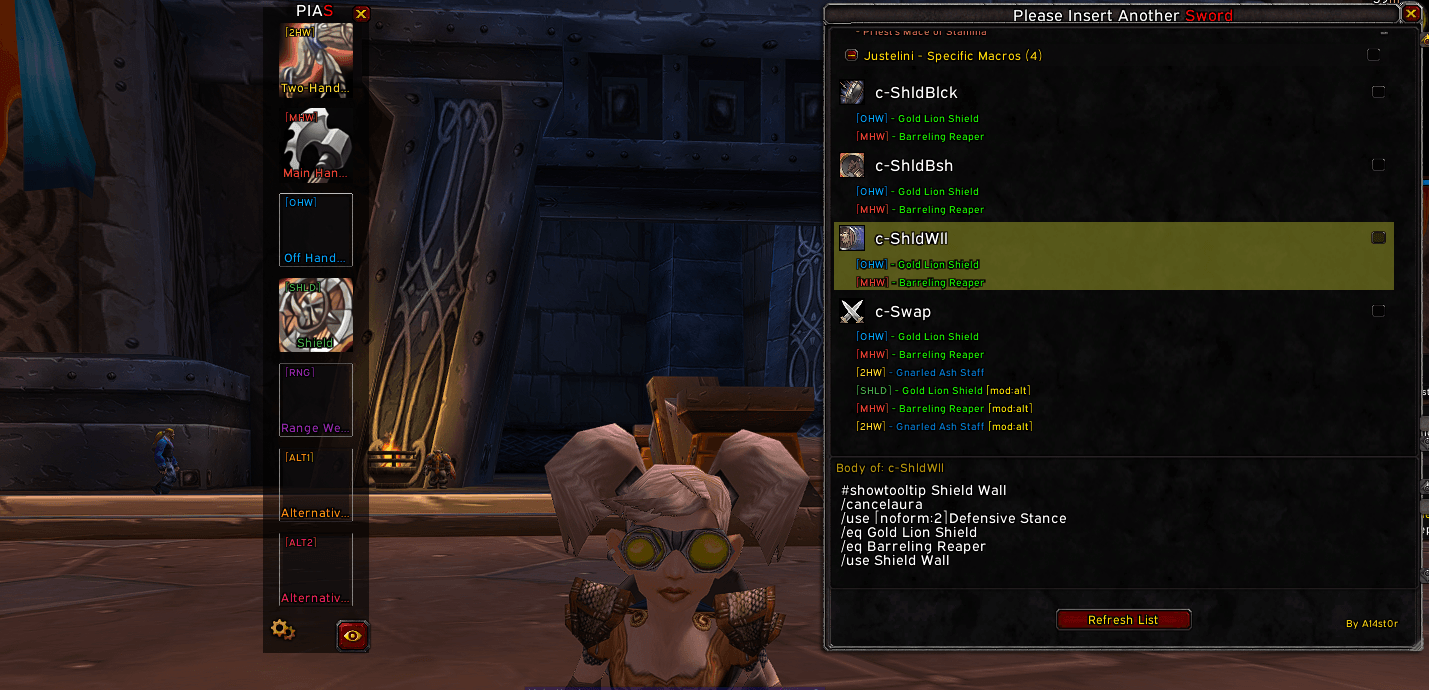
The macro list displaying your gear swap macros with their items. You just teach PIAS once what kind of item is in each macro (e.g. main hand weapon, helmet) and when ever you drop an item on the corresponding box PIAS will update your macro for you!
Description
Please Insert Another Sword (PIAS)
The Ultimate Gear Macro Updater.
You've finally done it. You've won the roll for [Ashkandi, Greatsword of the Brotherhood]. The raid cheers. The meter-padders tremble.
…and then it hits you. That familiar, soul-crushing dread.
Now you have to manually edit your Battle Stance macro, your Berserker Stance macro, your PvP macro, your farm set macro… changing your old weapon out for the new one, line by tedious line.
What if you could update every single one of them… in one second?
Welcome to PIAS.
PIAS is a smart, lightweight utility that fundamentally changes how you manage gear. Instead of caring about what your old item was, PIAS learns where your gear slots live inside your macros.
You teach it once. It works forever.
How It Works: The Smart Way
PIAS's philosophy is simple: you're not assigning an item, you're assigning a location.
The One-Time Setup: Teach PIAS Your Macros (20 seconds)
- Open the PIAS Macro Viewer (
/pias list). It automatically finds all your gear-swapping macros. - Find an item in a macro you want to manage, like
[Lionheart Helm]. - Right-click
[Lionheart Helm]inside the viewer. - From the dropdown, assign it to the appropriate PIAS Box (e.g., "ALT1" for your main helm).
That's it. You've just taught PIAS that "this specific spot in this macro belongs to my 'ALT1' box."
The Payoff: One-Click Updates, Forever
Now, when you get a new helmet:
- Drag your new
[Helm of Wrath]onto the "ALT1" box in the PIAS Panel (/pias). - Done.
PIAS instantly goes to that exact location you assigned in every relevant macro and replaces whatever was there with [Helm of Wrath]. It doesn't matter what the old item was. It only cares about the assigned slot.
✨ Core Features
- Location-Based Logic: This is the core of PIAS. It's not a dumb text replacer. It updates the specific item slot you assign within a macro, making it incredibly robust and immune to desync errors.
- The PIAS Box Panel: A sleek, draggable panel (
/pias) with 7 customizable boxes for your most common gear swaps. Rename them, give them custom tags, and make them your own. - Intelligent Macro Viewer: Automatically finds every macro used for gear swapping and shows you which items are assigned to which PIAS box with clear, colored tags.
- Combat-Proof: All updates are safely queued if you make changes in combat and applied the second you're safe.
- Lightweight & Efficient: No fluff, no CPU cycles wasted. PIAS does one job, and it does it perfectly.
- Minimap Icon & Power-User Shortcuts: Quick access to all panels and reset functions with simple
ShiftandCtrlclick modifiers.
⚙️ Slash Commands
| Command | Description |
|---|---|
/pias |
Toggles the main PIAS Box Panel. |
/pias list |
Toggles the Macro Viewer window. |
/pias reset |
Resets the Macro Viewer's position and size. |
/pias resetboxes |
Resets all box names and tags to default. |
/pias clearassignments |
Wipes all assignments for a fresh start. |
Stop fighting your UI. Start playing the game. Install PIAS.
PIAS: Gear Macro Updater Team