PeripheralCastBar
- By
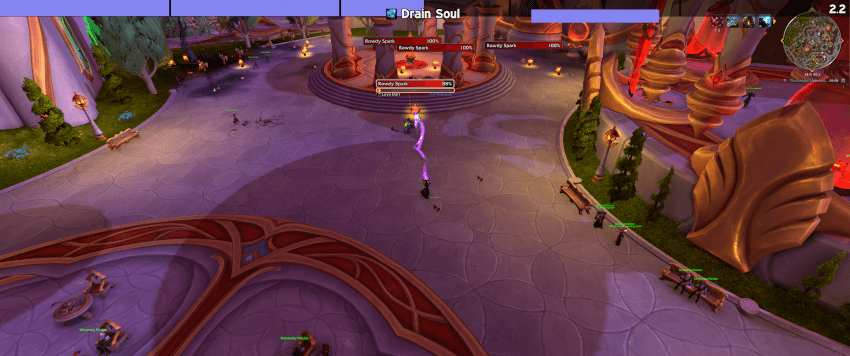
Replaces your cast bar with a highly customizable, edge-to-edge bar readable at a glance through peripheral vision, including channel ticks and evoker empowerments.
A single, fully customizable cast bar that spans the full width of your screen and replaces the default one. Designed for quick, at-a-glance or even peripheral tracking of your casts and channels, rather than hunting for a small bar somewhere in your UI. Supports LibSharedMedia-3.0.
This addon is part of a small family. If you like the idea, these might be worth a look as well:
- PeripheralCooldownBars – the same concept, but for cooldowns: up to 8 edge-to-edge bars that drain while your spells recover, so you know when your interrupt is back without looking at your action bars.
- OldManCursor – a highly customizable crosshair with edge-to-edge lines leading to it, so you never lose your cursor in the heat of battle.
Features
Casts fill the bar from left to right, channels drain it from right to left (or the other way around, if you prefer), and interrupted or failed casts flash in their own color before fading out. On top of the bar sit the spell's icon, its name and the remaining time, each of which can be styled on its own:
- Spell name and remaining time: font, size, outline, color, alignment and offsets, always with a drop shadow to keep them readable. The time can read
1.4,1.4sor1.4 / 2.5. - Spell icon: on the bar, next to it, or attached directly to the spell name, sized freely or matching the bar's height.
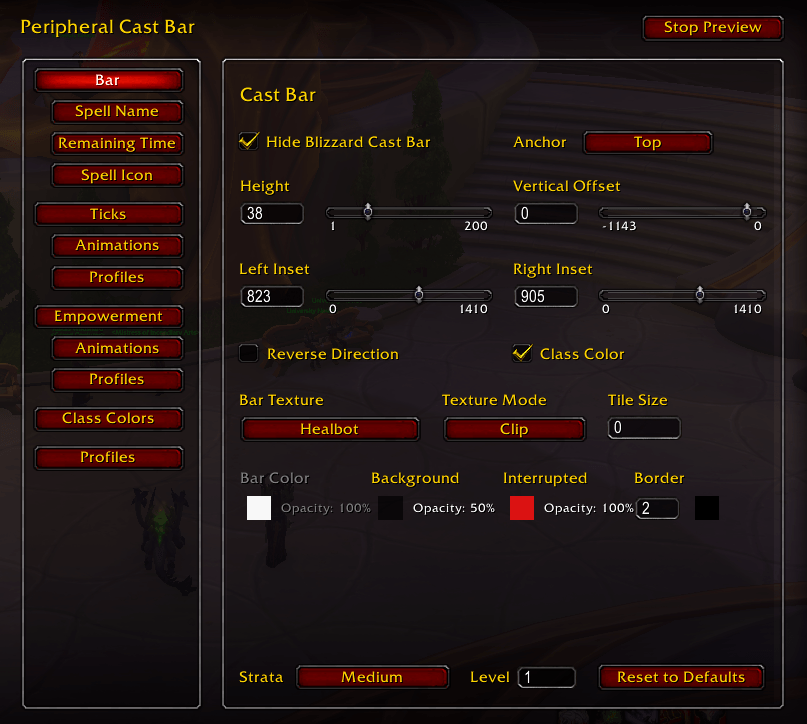
- The bar itself: height, vertical position (anchored to the top, center or bottom of the screen, or simply dragged into place), insets from either side, texture, colors and an optional class color, with the class colors themselves adjustable as well.

Channel ticks and empowered spells
Channeled spells can show their ticks as lines on the bar, in a color and width of your choosing. Evoker empower spells show their stages while you hold them: the number of stages comes straight from the game, and each segment, including the hold at max, can have its own color.
A channel with the emptied bar segments animated

A channel with the tick lines animated

A channel with both the bar segments and the tick lines animated

The same works for empowered spells

Animations
Every part of the bar a tick empties, and every segment an empowered spell fills, can play an animation, and so can the tick or stage line itself. The part and its line each get their own animation, so they can play the same one, two different ones, or only one of them. An animation can flash, travel in a direction of your choice, shrink or grow, blur, change color and fade out. It can also play in reverse, so the piece flies in and lands just as its tick passes or its stage fills.
Ticks and empowered spells each have their own set of animations. Two come included in each (the empower ones play in reverse), and you can create, duplicate, rename and delete as many of your own as you like, or reset the included ones to their defaults.
Good to know
- Due to changes in what addons can see in Midnight, ticks can't be detected automatically. Channel a spell once and it shows up in the Ticks tab, where you enter how many times it ticks. Haste is accounted for, so this is a one-time setup per spell.
- The bar is designed to span the screen, so its options reflect that: it can be moved up and down and shortened from either end, but it can't be freely resized or repositioned.
Settings
Various elements also feature tooltips to explain their meaning and functionality where I deemed it necessary. A preview mode shows the bar running sample casts while you change it. Settings are stored in profiles that each character can choose on its own, while class colors, tick counts and animations are shared across all characters.
The slash command /pcast can be used to open the settings quickly. Alternatively the settings can be found in the Options > Addons tab.
Background
Like my other addons, this one started as a WeakAura: a big cast bar spanning my screen that I had gotten so used to reading through peripheral vision that I didn't want to play without it anymore. With WeakAuras no longer fully supported, I got by with various UnitFrames addons that allowed detaching the castbar, resizing it as much as possible, etc. However once I stopped using that particular addon, it would become another hassle and search once again. So I rebuilt it as a standalone addon—and expanded the functionality along the way, making it more flexible and customizable for other users.
I'm open to adding features or making changes, as long as they align with the overall vision of the addon. I've done extensive testing, but if you spot any bugs I may have missed, please let me know. This is still an early version of the addon.
AI Disclaimer: The code for this addon was written entirely by Claude. Should someone else release a hand-crafted addon with similar, better or even additional features, I will gladly remove this addon immediately and switch myself.
PeripheralCastBar Team