Screenshot 2026-10-22 175915.png
Screenshot 2026-10-22 180135.png
Screenshot 2026-10-22 180230.png
Description
PatchTools
Quality-of-life tools for World of Warcraft: Forever and Classic Era, with built-in English and German language support. No external libraries required.
Made by Patch & Zen.
Supports Classic Era and Forever in one package. World refresh warnings are Forever-only and are hidden in Era. The extra profession bag option is also Forever-only; Era bank bags are never included in automatic sales. The separate PatchToolsMaps addon supports both versions.
Featured: warnings before possible phase changes
Avoid being surprised by an announced world refresh. PatchTools can warn you when a possible phase change is announced and again before its countdown ends. Choose the advance warning time, sound, on-screen duration and chat output. Countdowns use minutes and seconds.
Observed during the Forever Beta and stress test. Availability in the final game is not yet confirmed. If the release client keeps the same announcements, PatchTools can use them without a separate feature update. Unannounced changes cannot be predicted.
Features
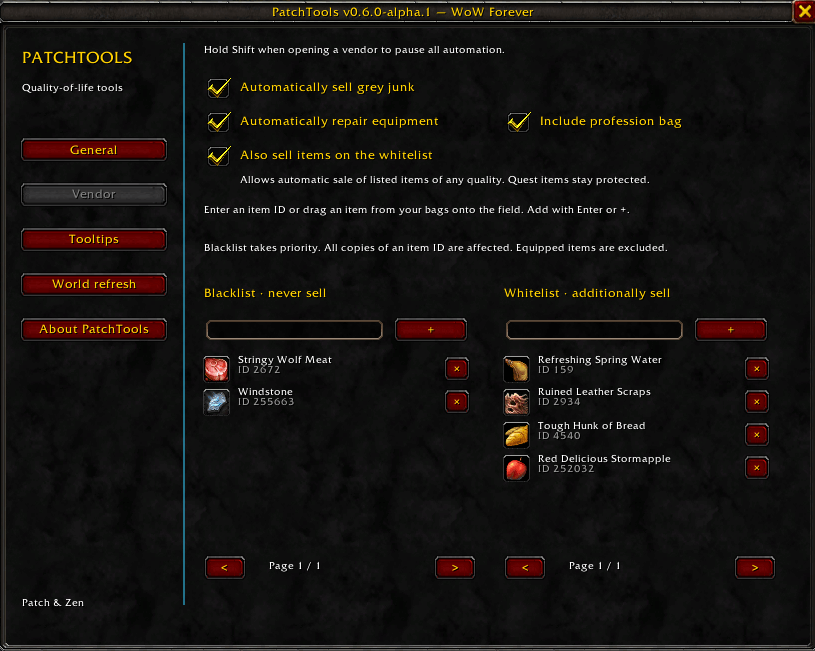
- Automatic junk selling: sell grey items when you visit a vendor. Quest items are protected.
- Custom selling lists: protect items with a blacklist or add items to a selling whitelist. Enter an item ID or drag an item from your bags. The blacklist always wins.
- Profession bag control: choose whether automatic selling includes the extra profession bag.
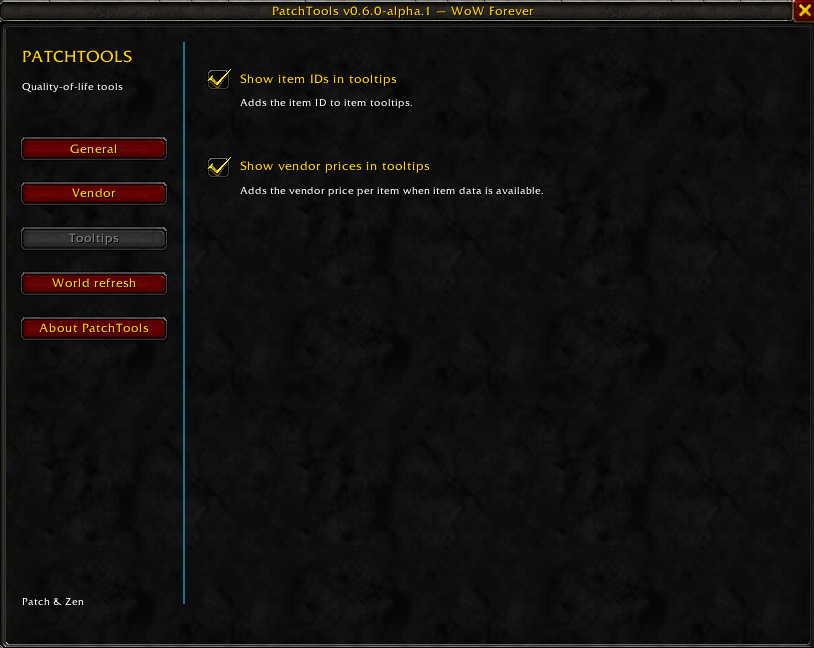
- Item tooltips: optionally show item IDs and vendor prices per item.
- Automatic repairs: repair your equipment using your own money when you can afford it.
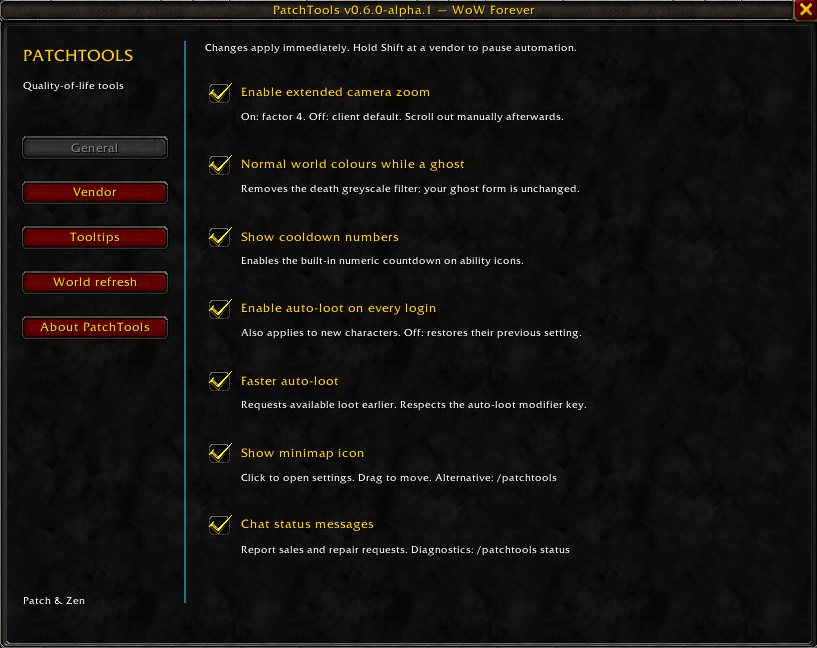
- More camera distance: zoom out further for a wider view.
- Normal colours as a ghost: keep the world in colour while you are dead.
- Cooldown numbers: see how long your abilities need to recharge.
- Auto-loot on login: keep automatic looting enabled for your characters.
- Simpler item deletion: optionally replace typing DELETE with a Yes/No confirmation outside combat. The item name and quest warning remain visible. Disabled by default.
- Faster looting: collect available loot sooner when auto-loot is active.
- World refresh warnings: get a warning when a phase change is announced, and another before it may happen. Choose the warning time, sound, message duration and chat output.
- Optional map tools: find PatchToolsMaps in the Map section. Install it separately for moving, resizing and reveal options. Map zoom, movement and resizing are available outside combat.
- Minimap button: open your settings with a click, move the button or hide it.
Settings are grouped into General, Vendor, Tooltips, Map and About PatchTools, with World Refresh on Forever. Without PatchToolsMaps, the Map section explains its features and links to the separate download.
Choose the features you want in the settings. Junk selling, whitelist selling, automatic repairs and extended camera zoom start turned on for new settings. The whitelist starts empty. Tooltip additions and world refresh warnings start turned off. Your settings are kept when you update.
On Forever, the extra profession bag is included when selling is enabled, unless you turn it off. Selling rules apply to every bag item with the same item ID. Quest items stay protected.
World refresh warnings work only when the game announces a change.
Installation
- Close World of Warcraft.
- Download the PatchTools ZIP from CurseForge.
- Extract the PatchTools folder into your game's Interface\AddOns folder.
- Start the game and enable PatchTools in the AddOns menu.
Example: World of Warcraft\_forever_\Interface\AddOns\PatchTools
Supported installation folders:
| Game version | AddOns folder |
|---|---|
| WoW: Forever | World of Warcraft\_forever_\Interface\AddOns\ |
| WoW Classic Era | World of Warcraft\_classic_era_\Interface\AddOns\ |
| WoW: Forever Beta | World of Warcraft\_classic_beta_\Interface\AddOns\ |
If you are unsure which folder to use, open the game's options in Battle.net and choose Show in Explorer. Folder names may differ between installations.
Controls and languages
- Optional map tools: find PatchToolsMaps in the Map section. Install it separately for moving, resizing and reveal options. Normal map zoom remains available; the additional zoom step is temporarily disabled.
- Minimap button: click to open settings; drag to move it.
/patchtoolsor/ptools: open settings./patchtools status: show information that can help with a bug report.- Hold Shift when opening a vendor: pause automatic selling and repairs for that visit.
- Language: German game clients use German automatically. Other game languages use English.
Reporting issues
Found a problem or have an idea? Open a GitHub issue. English and German are both welcome.
Please tell us:
- Which WoW version and PatchTools version you use.
- What you did and what happened.
- What you expected instead.
A screenshot or an error message is helpful, if available. You can also copy the output of /patchtools status. Please hide private chat or account details in screenshots.
License
MIT License. You may use, change and share PatchTools. Keep the original copyright and license notice with your copy.
Community project. Not affiliated with or endorsed by Blizzard Entertainment.
Changelog
0.8.0 — 2026-10-23
- Add Classic Era compatibility, version-specific options and bank protection.
- Enable junk selling, repairs, camera zoom and whitelist selling for new settings; preserve existing choices.
0.7.1 — 2026-10-23
- Optional Yes/No item destruction confirmation, using the game's translated text. Enable it under General; typing DELETE remains required during combat.
0.7.0 — 2026-10-23
- World refresh countdowns now use minutes and seconds.
- Added support for the optional PatchToolsMaps addon.
- The Map section appears above About PatchTools and offers installation information when the module is absent.
0.6.0 — 2026-10-22
- First regular release of PatchTools for WoW: Forever.
- Includes the selling lists, profession bag option, item tooltips and revised settings from 0.6.0-alpha.1.
- No feature changes compared with 0.6.0-alpha.1.
0.6.0-alpha.1 — 2026-10-22
- Added blacklist and whitelist selling rules, with item-ID entry and drag-and-drop.
- Added support for the extra profession bag and an option to exclude it.
- Added optional item IDs and vendor prices in tooltips.
- Reorganized settings into five sections.
- Added credits, a GitHub link and an invitation to suggest new features.
- Fixed special characters in the new texts.
0.5.0-alpha.4 — 2026-10-22
- Removed development test files from the download. Features are unchanged.
0.5.0-alpha.3 — 2026-10-22
- Set up automatic CurseForge downloads for future version tags. Features are unchanged.
0.5.0-alpha.2 — 2026-10-22
- Added a choice of how long world refresh warnings stay on screen.
- Added an option to show world refresh warnings in chat.
- Added the MIT license.
0.5.0-alpha.1 — 2026-10-22
- Added world refresh warnings with a choice of warning time and sound.
- Added a button to try the warning.
0.4.0 — 2026-10-21
- Added built-in English and German support.
- Includes junk selling, repairs, camera zoom, ghost colours, cooldown numbers, auto-loot, faster looting and a minimap button.
For contributors: developer information and release instructions.
PatchTools Team