Party Role Icons : display group roles
Puts tank, healer and damage icons back on your party portraits.
Description
Everything below the line is the page body.
Tank, healer and damage icons on your party portraits, the way retail does it.
What it does
Four druids in your dungeon group. Good luck telling which one is tanking, which one is healing, and which two are just here to hit things.
This addon puts the icon back, in that order of preference:
- The assigned role, whenever there is one. Free, instant, always right.
- The specialization, when there is not. Resolved through a throttled inspect and remembered per character.
- The class, for hunters, mages, rogues and warlocks. They have no tank or healer spec, so those four never cost an inspect at all.
And a role worked out from a spec is treated as what it is: a guess. The moment the group assigns roles, a role check before queueing for instance, the icon switches to what the player actually picked. That happens even if the client never sends the event, because a guessed role keeps a slow re-check armed until the real answer turns up.
Setting it up without a group
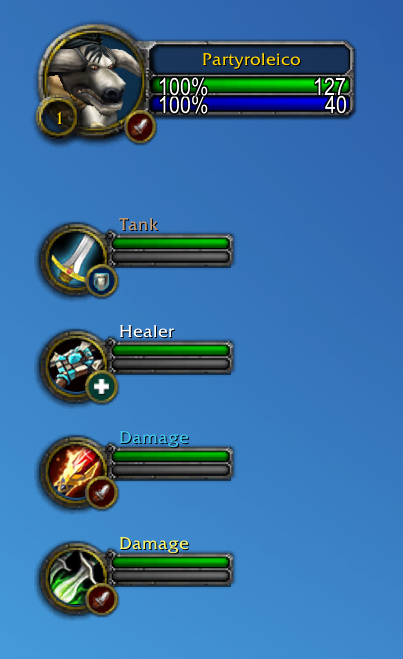
Type /pri, or find Party Role Icons in the game's options, and tick
Simulate a group. The empty party slots fill with a plausible five man, as
above: a warrior tank, a priest healer, a mage and a rogue, class portraits and
role names included. Drag the sliders and the icons move while you watch.
Position is a three by three keypad of the nine anchor points around the
portrait, so you click the corner you want instead of guessing what
BOTTOMRIGHT will look like.
Why other role icon addons come up empty on 5.5
Two client details, both of them silent. If you tried another addon and got a blank party or a strange cropped blob, this is why.
The party frames moved. MoP Classic ships the modern layout: the frames live
in PartyFrame.MemberFrame1 through 4, handed out by a frame pool. The old
PartyMemberFrame1 globals are gone. An addon that only looks those up finds
nothing, attaches nothing, and has nothing to complain about. Your own portrait
keeps working, since PlayerFrame is still a global, which makes the whole thing
look like a half broken addon rather than a missing frame. This one resolves the
frames at runtime and handles the modern layout, the frame pool, and the legacy
globals.
The role artwork has two coordinate spaces. UI-LFG-ICON-ROLES is a 256
pixel sheet, and the helper everyone reaches for, the venerable
GetTexCoordsForRoleSmallCircle, still hands back coordinates from the 64 pixel
era. Feed it those and you slice a corner out of an icon, which is exactly the
little truncated square you may have seen on your own portrait.
Commands
Everything lives in the panel, and everything also has a command.
| Command | Effect |
|---|---|
/pri |
open the options panel |
/pri on · /pri off |
turn the icons on or off |
/pri player |
show or hide the icon on your own portrait |
/pri spec |
use the specialization when no role was assigned |
/pri size 8-40 |
icon size in pixels |
/pri x N · /pri y N |
nudge the icon |
/pri anchor POINT |
which corner of the portrait it hangs on |
/pri blizzard |
hide Blizzard's own role icon |
/pri test |
dress up the empty party frames to set things up solo |
/pri reset |
back to defaults |
/pri debug |
dump everything the addon can see |
/partyroleicons works as a longer alias.
Where it works
| Client | The role comes from |
|---|---|
| MoP Classic | the assigned role, then the specialization |
| Classic Era, Hardcore, Season of Discovery | talent trees, since Era has neither roles nor specializations |
Hardcore and Season of Discovery are realm rulesets on the Era client rather than separate flavours, so one build covers all three. Retail is not a target: it already draws these icons itself.
On Era the role is read from whichever talent tree got the points, matched by tab index rather than by name so it works in any language. Feral Combat is the one tree nothing can settle, bear and cat being the same tree, so a feral druid shows up as damage.
Good to know
- It draws on the default Blizzard unit frames. ElvUI, Z-Perl and friends replace those with their own and have their own role indicator option, so use theirs instead.
- With raid style party frames on, Blizzard already draws role icons there and this addon has nothing to attach to.
- Icons only show while grouped, like retail. That is what the simulation is for.
- Distance only matters for the specialization path. An assigned role is read straight off the roster, so in a dungeon group nobody has to stand next to you. It is only the hand made group with no roles assigned that needs an inspect, and there a member who is out of range stays blank until they come back.
- Something looks off?
/pri debugprints what the addon sees, frame by frame. That output is the ideal thing to paste into a bug report.
My other addons
If this one earns a place in your AddOns folder, you might like the rest.
Timeless Question Autocomplete Senior Historian Evelyna asks you a lore question every day on the Timeless Isle. This answers it, in any game language.
Darkmoon Faire Buff Sayge's buff is four dialogue clicks and one wrong turn away from the buff you actually wanted. Pick yours once, then just talk to him. It can also recommend one from your class, level and talents, and it tracks the cooldown.
Hardcore Congrats Level 60 in Hardcore is a long and perilous road. When someone on your realm finally gets there, this congratulates them for you.
Source and bug reports
Open source under the GPLv3, on
GitHub. Bug reports and ideas are
welcome in the issues, and
/pri debug output makes them far easier to act on.
Party Role Icons : display group roles Team