Parental Control Helper
- By
Addon that helps manage your Parental Control play time better, by displaying a customizable timer with your playtime left.
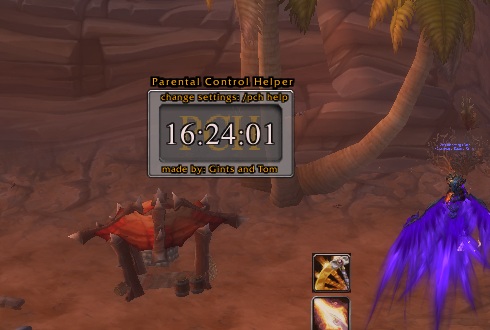
Screenshot of the PCH frame on mouse over, the text isn't displayed if you don't have the frame mouse overed.
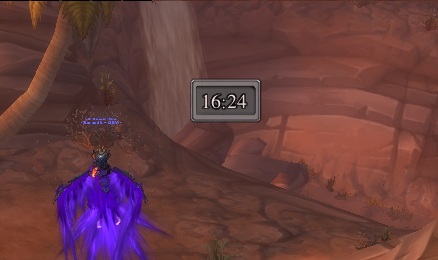
Parental control frame on small size. On this size it doesn't display seconds and the frame is really small and doesn't show no texts or anything.
Description
----
Addon that helps manage your Parental Control play time better, by displaying a customizable timer with your playtime left.
You can use a daily or a weekly limit, and depending on that, the timer will reset at the correct time (each day at 5 A.M. local time for a daily limit, each Sunday at 5 A.M. local time for a weekly limit). Warnings will be displayed when there is a certain amount of play time left, for example 10 minutes, 5 minutes and 1 minute.
-------------------------------------------
/pch help will open an option menu, with the following commands:
-
- PCH - Frame Settings -
-
/pch lock/unlock - Locks/unlocks the PCH frame.
/pch hide/show - Hides/shows the PCH frame.
Double click the PCH frame to change its size.
-
- PCH - Timer Settings -
-
/pch weekly/daily - Change PCH to use a weekly or a daily limit. Default: weekly.
/pch maxtime - type: #hours (eg. /pch maxhours 21) - Set the amount of hours you are allowed to play. Default: 40.
/pch reset - Manually reset the time to the max amount of hours you are allowed to play.
/pch timeleft - type: #hours #minutes (eg. /pch timeleft 3 17) - Manually change your time left.
-------------------------------------------
All feedback is appreciated!
-------------------------------------------
Short F.A.Q.
Q: Help! After I alt-tabbed back in WoW the timer went very fast for a few seconds!
A: You are playing in full screen mode, after alt tabbing back in the timer needs a short time to update. No worries, your time will still be 100% accurate!
-------------------------------------------
The Parental Control Helper Team