image (63).png
Description
Overcraft UI
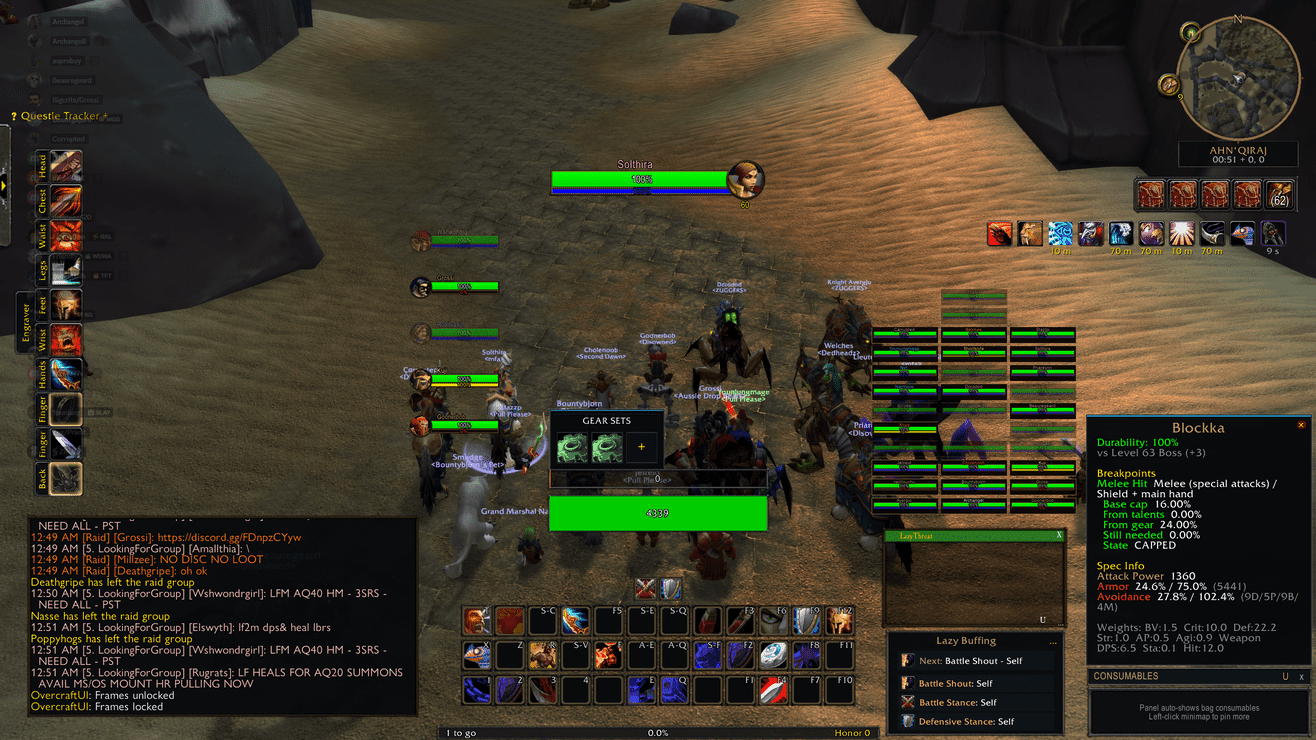
A complete UI overhaul for Classic WoW — unit frames, action bars, minimap, XP bar, and chat, all unified under one addon.
OvercraftUI merges the best features of WarUnitFrames, WarChat, SmoothResourceBars, and Dominos-style action bars into a single, cohesive interface. Every element is customizable, movable, and themed to match your preferred playstyle.
OvercraftUI replaces the default Blizzard UI elements with a fully custom-designed alternative. It's built on a modular framework where each component (unit frames, action bars, chat, minimap, XP bar, cast bars, auras, resource bars) can be independently configured, locked, or reset. The result is a polished, pixel-perfect interface that works across every supported WoW client.
✨ At a Glance
- Modular architecture — every UI component is a separate module that can be enabled or disabled independently.
- WarUnitFrames merge — party, raid, arena, target, and focus frames with configurable scale, spacing, sorting, and visibility modes.
- Dominos-style action bars — full paging support with configurable column and row layouts.
- ElvUI-style chat — WarChat visual frame with reliable slash command routing, tab system, URL detection, and Blizzard chat suppression.
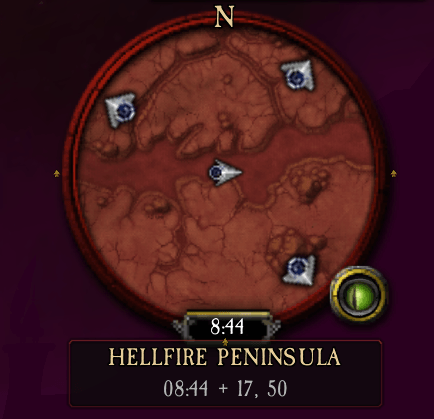
- Minimap overhaul — zone and coordinate display with a custom-styled minimap ring.
- XP bar — bottom-of-screen XP bar with hue shifting, level display, and percentage tracking.
- SmoothResourceBars — integrated resource bars for health, mana, rage, and energy with smooth animations.
- Pixel-perfect rendering — resolution-aware scaling and 1px border precision regardless of UI scale.
- Mover system — lock/unlock all frames for repositioning, with saved positions persisting between sessions.
- Profile system — shared, spec, and character profile support for switching configurations.
- Open with
/ouior/overcraftto access the options panel.
🎮 One Project, Every Supported WoW Version
OvercraftUI is a single CurseForge project with releases built for the current Retail and Classic clients. Download the file matching your game client — do not install a Retail package in a Classic client, or vice versa.
| Game client | Download the matching release | Highlights |
|---|---|---|
| Retail | Retail |
Modern unit frames, action bars, minimap, and chat with Retail-specific features |
| Mists of Pandaria Classic | MoP-Classic |
MoP-era unit frame styles and classic minimap overlays |
| Burning Crusade Classic | TBC-Classic |
TBC-era frame styling and classic action bar layouts |
| Classic Era / Season of Discovery / Hardcore | Classic-Era |
Vanilla-era UI elements and classic styling |
Important: Features and available styling adapt to the selected game client. Older clients only show controls and options that make sense for that era.
⚔️ Core Features
Unit Frames
OvercraftUI provides fully customizable unit frames for every important target: player, target, focus, party (4 members), and raid (40 members). Each frame includes health bars, power bars, name text, and integrated cast bars.
- Party and raid frames support bracket scaling (10/25/40 man), group-based sorting, healer mode detection, and range-based alpha fading.
- Party pet frames are supported with toggle options for visibility, scale, and position.
- Click-casting is enabled on all unit frames using the WarFrames-style secure click-casting system.
- Arena frames include friendly vs. enemy detection using a Cell-style approach.
- All frames support the mover system for drag-and-drop repositioning.
Action Bars
Dominos-style action bars with full paging support. Configure the number of columns and rows, page actions, and customize button appearance. The action bar module integrates with the OvercraftUI options panel for easy configuration.
Minimap Overhaul
Replace the default minimap with a custom-styled overlay featuring zone name display and player coordinates. The minimap integration module handles all rendering and positioning.
XP Bar
A bottom-of-screen XP bar with:
- Hue shifting — the bar color transitions as you approach the next level.
- XP missing displayed on the left, level on the right, and percentage in the middle.
- Rested experience support.
Chat System
WarChat integration provides a complete alternative to the default Blizzard chat:
- ElvUI hook pattern for reliable slash command routing without binding conflicts.
- Multi-tab system with per-tab message filtering and color swatches.
- URL detection with clickable link copy popup.
- Command history (Up/Down arrows in editbox).
- Timestamp toggle, resizable frame, and lock/unlock position.
- Class-colored messages per message type.
- Scroll buttons and mouse wheel scrolling.
/wcslash command suite for all chat controls.
Cast Bars
Standalone cast bars for player, target, and focus with:
- Spell icon, name text, and timer countdown.
- Non-interruptible shield icon.
- Interrupt detection and channel support.
- Mover registration for repositioning.
- Integrated cast bars attached below unit frames.
Resource Bars
SmoothResourceBars merged into the player unit frame, providing smooth animated resource bars for mana, rage, energy, and runic power with configurable colors and styling.
Auras and Indicators
- Buff/debuff display with configurable styling.
- HoT and absorb indicators on unit frames.
- Click-casting support on all aura elements.
Fonts and Styling
Nine font families from DynamicTooltips are available throughout the interface, giving you complete control over the visual appearance of every text element.
🚀 Getting Started
- Download the release whose filename matches your WoW client.
- Extract it into your WoW
Interface\AddOnsfolder so the final path isInterface\AddOns\OvercraftUI. - Start or reload WoW. All modules initialize automatically.
- Open the options panel by typing
/ouior/overcraft. - Toggle modules, adjust settings, and use
/oui moversto unlock frames for repositioning.
Available Commands
/oui— Open options / show help/oui movers— Toggle mover mode (unlock frames for repositioning)/oui lock— Lock all frames/oui reset— Reset all positions/oui preview party/raid/arena— Toggle preview frames/oui profiles— Show profile management/oui debug— Toggle debug mode/wc— Show WarChat frame/wc hide/lock/unlock— Control WarChat visibility and position/oui /warui— War Unit Frames options
Configuration
Settings are saved per-character and persist between play sessions. Use the options panel to configure:
- Unit Frames — visibility, scale, spacing, sorting, visibility mode, click bindings, font sizes, health text mode, raid style mode.
- Action Bars — page configuration, column/row layout, button styling.
- Chat — font size, opacity, timestamps, tab configuration, Blizzard chat suppression.
- Minimap — zone display, coordinates, ring styling.
- XP Bar — position, colors, display mode.
- Profiles — shared, spec, and character profile management.
👥 Built For Every Kind of Player
- Casual players: Use the default configuration for a clean, modern interface without any setup.
- Raiders: Configure raid frames with healer mode, proper scaling, and group sorting.
- PvP players: Adjust arena frames and action bars for fast-paced combat.
- Collectors/roleplayers: Use the minimap zone display and customize chat tabs for roleplay channels.
- Min-maxers: Fine-tune every element with the options panel, profiles, and debug mode.
📝 Notes
- Settings, positions, and profiles persist between play sessions.
- The addon does not add Retail-only features to Classic clients.
- All modules are initialized automatically on addon load.
- The mover system allows repositioning of every frame when unlocked.
- The addon has optional dependencies on LibSharedMedia-3.0 and Masque for font and skin integration.
🔧 Module Reference
| Module | Description |
|---|---|
Core.lua |
Main addon framework and module registry |
Defaults.lua |
Default configuration values |
Fonts.lua |
Nine font families from DynamicTooltips |
Mover.lua |
Frame positioning system with lock/unlock |
Options.lua |
Blizzard-native options panel |
Profiles.lua |
Shared/spec/character profile system |
ClickCast.lua |
Secure click-casting system |
Modules/UnitFrames.lua |
Player, target, focus, party, raid, arena frames |
Modules/ActionBars.lua |
Dominos-style action bars with paging |
Modules/Minimap.lua |
Custom minimap with zone and coordinates |
Modules/XPBar.lua |
Bottom XP bar with hue shifting |
Modules/ResourceBar.lua |
Smooth resource bars for player unit frame |
Modules/CastBars.lua |
Standalone cast bars for player, target, focus |
Modules/Chat.lua |
WarChat with ElvUI hook pattern |
Modules/Auras.lua |
Buff/debuff display |
Modules/Indicators.lua |
HoT/absorb indicators |
Modules/Tags.lua |
Text tag system |
Modules/XPBar.lua |
Experience bar module |
🐛 Support
Found an issue or have an idea? Please open an issue or leave a comment on CurseForge. When reporting a bug, include your game version, addon version, and the full error message if one appears. Appreciate any patreons to help as this is costing me time and money to maintain: https://www.patreon.com/c/LazyLoafs504
Made for players who want their interface to work as hard as they do.
Overcraft UI Team