Over and Out
- By
A World of Warcraft addon that automatically joins your group's voice chat when you queue into Raid Finder, Dungeon Finder or a battleground - and puts you back where you were when the group ends. No more forgetting to click the headphones.
v1-0-0_001.png
v1-0-0_002.png
v1-0-0_005.png
v1-0-0_006.png
Description
Over and Out
A World of Warcraft addon that automatically joins your group's voice chat when you queue into Raid Finder, Dungeon Finder or a battleground - and puts you back where you were when the group ends. No more forgetting to click the headphones.

Features
- Joins Instance voice automatically when you land in Raid Finder, Dungeon Finder, a battleground or other queued content - each one its own on/off toggle
- Joins party/raid voice when you form or join a group anywhere, open world included (follower dungeons skipped)
- Puts your previous voice channel back when the group ends
- Optional guards keep you in guild or community voice instead of switching, or skip auto-join while you're on open mic
- Auto-join voice on login (optional): hop into your guild's or a community's voice when you log in
- Picks up where you left off after a /reload or relog, rejoining the channel you were in if it still applies
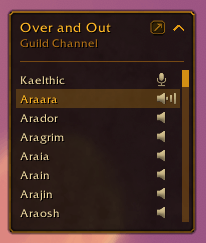
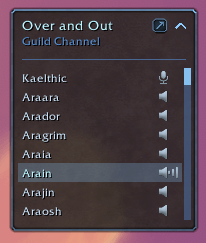
- Always-on mini voice roster: who's in voice with you, with (talking), (muted) and (deafened) markers, per-person mute, and a one-click channel switcher
- Lists guild, officer and community voice too, outside the dungeons/raids/battlegrounds where Blizzard hides that
- Optional "joined voice" emote in Raid Finder and Dungeon Finder so the group knows you're on
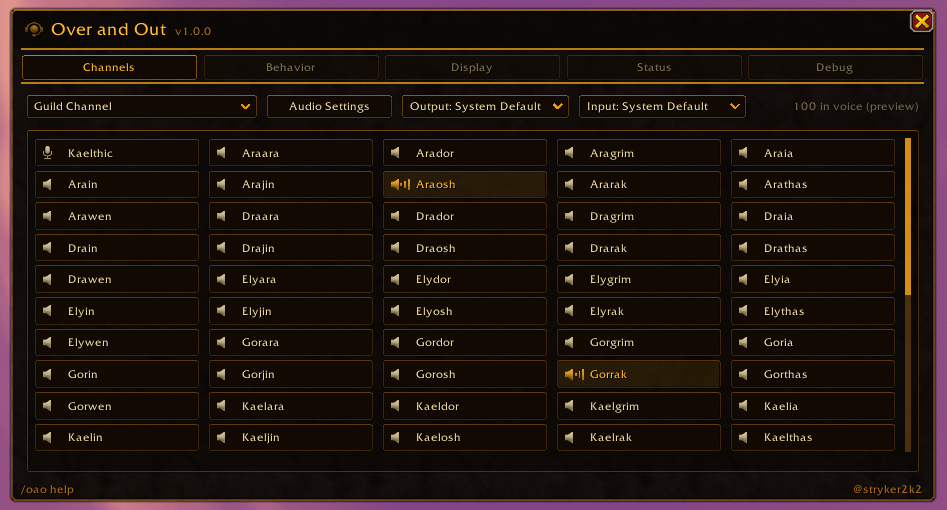
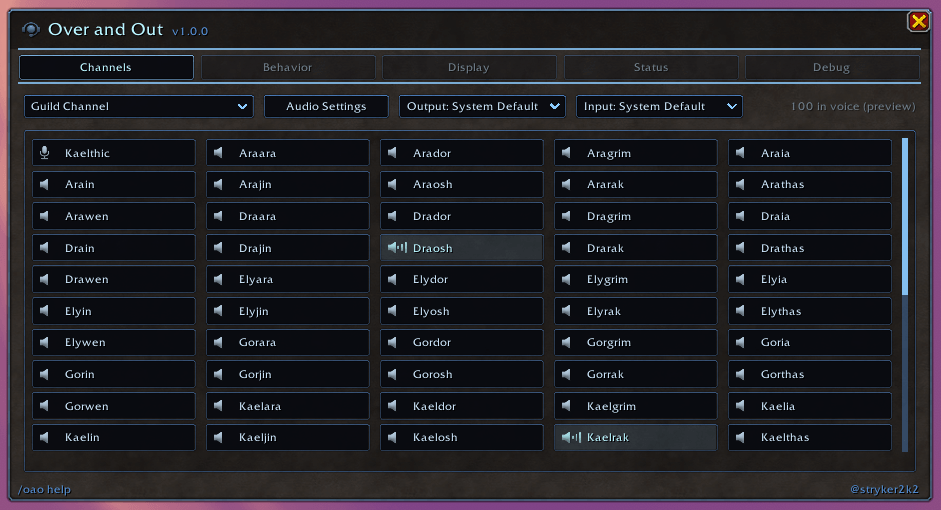
- 14 color themes, pickable background textures, and a full Main Panel for everyone in voice at once (40+ fit)
- Everything - toggles, theme, roster position and size - persists automatically
Usage
| Action | Result |
|---|---|
| Queue into LFR / LFD / BG | Auto-joins Instance voice |
| Click a roster speaker icon | Mute / unmute that person (for you only) |
| Click your own mic icon | Mute / unmute your microphone |
| Click the channel name | Switch to any channel you can join, or leave voice |
| Click the roster corner arrow | Collapse to just the title, or expand again |
| Shift + drag the roster | Reposition it |
| Roster maximize button | Open the Main Panel |
Main Panel
Open with /oao, the roster's gear, the addon compartment, or ESC -> Options -> AddOns. Five tabs:
- Channels - everyone in voice at once as click-to-mute buttons (lit while talking), a channel switcher, Output/Input device pickers, and a jump to WoW's voice settings
- Behavior - the auto-join toggles, the guild/community/open-mic guards, and the login auto-join choice
- Display - voice roster show/hide and opacity, color theme, background texture and strength
- Status - the live voice and group state at a glance
- Debug - reset-all (behind a confirm), debug toggle, and the log viewer
Slash Commands
| Command | Action |
|---|---|
/oao |
Open / close the Main Panel |
/oao join |
Join your group's voice channel now |
/oao leave |
Leave voice chat |
/oao roster |
Show or hide the voice roster |
/oao status |
Print the current voice and group state |
/oao info |
Show addon and client versions |
/oao reset |
Restore all defaults |
/oao debug |
Toggle verbose debug messages |
/oao help |
Show the command list (/overout works too) |
Compatibility
| Client | Interface |
|---|---|
| Retail | 12.1.5 |
| Forever | 1.60.1 |
Author
stryker2k2
Over and Out Team