OpenMap-Skribbl
- By
Draw on OpenMap's world map with your guild and party - live. Plus quick map markers.
OpenMap-Skribbl
Draw on the world map together. Skribbl takes what you draw with OpenMap's quill and shares it with your guild and your party – live, while you draw it. Everything drawn shows on the minimap too.
Requires OpenMap (0.8 or newer, with its Quill). Everyone who should see the drawings needs Skribbl too.
Features
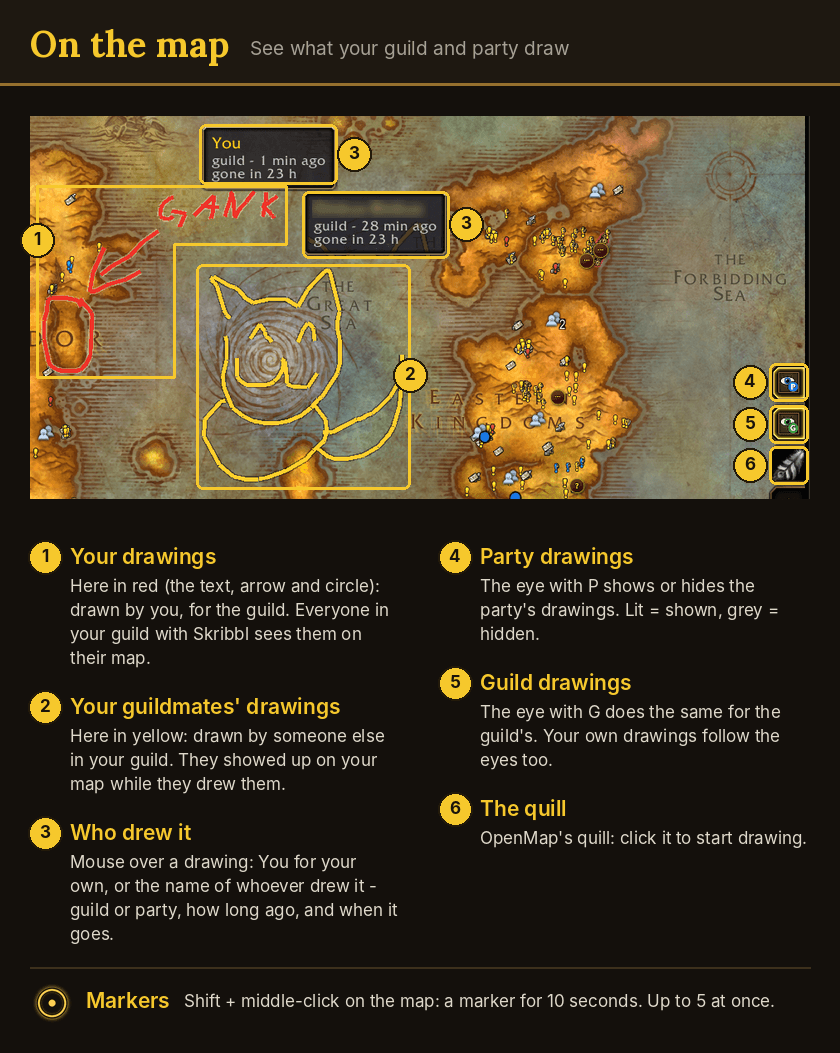
- Live drawing – the others see your stroke grow as you draw it, with your name by the pen.
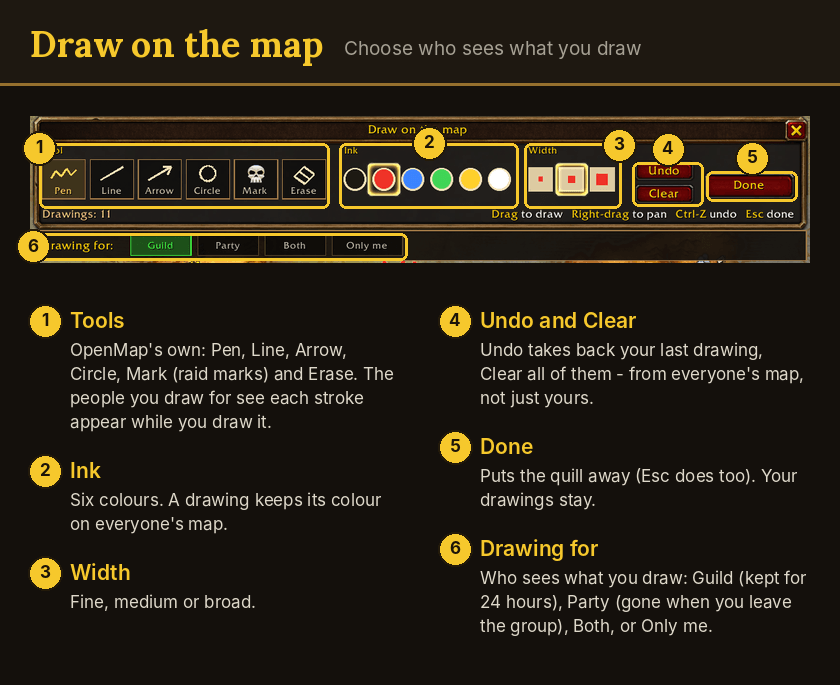
- Guild and party – choose who you draw for: Guild, Party, Both or Only me.
- Two eyes on the map's edge – show or hide the guild's and the party's drawings with one click. Your own drawings follow the eyes too.
- Who drew it? – mouse over a drawing to see who drew it, when, and when it goes.
- On the minimap (new) – drawings and markers also show on the minimap, around where you stand.
- Quick markers – Shift + middle-click on the map puts a marker there for 10 seconds, in your class colour, for the people you draw for. Up to 5 at once, with the minimap's ping sound (new).
- Cleans up after itself – guild and party drawings disappear 24 hours after they were drawn, on everyone's map. Party drawings go from your map when you leave the group.
- Erase, Undo and Clear take your drawings off everyone's map too.
- Catches up – log in later and you get what your guild has drawn while you were away.
- Uses OpenMap's own tools – pen, line, arrow, circle and raid marks, in every ink and width.
Drawing
On the map
On the minimap
Your drawings and your guild's and party's show on the minimap too, centred on where you stand and at the minimap's zoom. They turn with the minimap if it rotates, and stop at its edge, round or square. Markers show there as well, and you hear the minimap's ping sound when one is put down – even with the world map closed.
How to use
- Open the map and click OpenMap's Quill (the feather on the map's edge).
- Under the quill window, choose who you're drawing for: Guild, Party, Both or Only me.
- Draw. The others with Skribbl see it straight away, on their map and minimap.
- Use the eyes (G and P) on the map's edge to show or hide the guild's and the party's drawings.
- Shift + middle-click anywhere on the map for a temporary marker. A plain middle-click is still OpenMap's Find me.
Settings
In OpenMap's menu, under Skribbl:
- Guild drawings and Party drawings – the same as the two eyes.
- Drawings on the minimap
- Ping sound when a marker is put down
- Who drew it, with the mouse over a drawing
All of them are on to start with.
Commands
/skr– help/skr quill guild|party|both|me– open the quill, drawing for them/skr show guild|party on|off– show or hide their drawings/skr minimap on|off– drawings and markers on the minimap/skr sound on|off– ping sound when a marker is put down/skr hover on|off– who drew it, on mouse-over/skr list– who has drawn what/skr hide <name>//skr unhide <name>– hide someone's drawings/skr forget <name|all>– throw away what you've received from someone/skr who– who in your guild and group has Skribbl, and which version/skr test– check that your messages reach the guild and the group
Good to know
- Live is a moment behind: the game lets an addon send about one message a second, so a long stroke appears in steps. The finished stroke always arrives whole.
- Your guild rank needs permission to talk in guild chat, or the server won't pass your drawings to the guild. Skribbl tells you if that's the case, and drawing for Party still works.
- In dungeons and raids the game can block addon messages during combat. Skribbl waits and sends afterwards.
- Drawings don't show on the minimap in instances, where the game doesn't give your position.
- Drawings on a dungeon's own map and on map pins stay private.
Something not working?
Type /skr test – it shows which ways your messages get through. /skr who shows who has Skribbl and how they've set it.
Credits
Built on OpenMap (MIT, OpenMap contributors). OpenMap-Skribbl is released under the MIT License.
OpenMap-Skribbl Team